windows server 2025
24 Topics
CfExecute(TRANSFER_PLACEHOLDERS) returns E_INVALIDARG inside an FSLogix profile container
We develop a Cloud Files sync provider. When the sync root lives in a user profile that FSLogix redirects to a per-user VHDX container, some FETCH_PLACEHOLDERS callbacks cannot be answered: every CfExecute(CF_OPERATION_TYPE_TRANSFER_PLACEHOLDERS) for them fails with E_INVALIDARG (0x80070057), including the error completion. The request stays pending until the platform cancels it after about 60 s, and the application that triggered it (File Explorer, Office and Edge background processes, line-of-business apps) hangs for that time. The callback is raised by a name lookup of a non-existent child (`CreateFileW` / `GetFileAttributesExW` on `<dir>\missing.txt`) inside a placeholder directory with on-demand population enabled, and nobody has had that directory open for about one to two minutes. The same callback raised by a directory enumeration is answered fine every time. A lookup on a directory opened a few seconds earlier is fine too. A standalone PowerShell script (own throwaway sync root, no third-party software) reproduces it on a clean Windows Server 2022 (20348.5761, October 2026 CU) with FSLogix 26.08 (3.26.826.17182) for a user with a profile container. The same script on the same server, ten minutes later, as a local user in the "FSLogix Profile Exclude List": all answers accepted. Also reproduced on Windows Server 2022 20348.3328 and 20348.5622 and on Windows Server 2025 26100.1742 with profile containers; not reproducible on the same builds without FSLogix, with a sync root on a plain VHDX volume or a mount point, or on Windows 11. The OS patch level and the FSLogix release did not make a difference in our tests. Waiting, an attributes-only open of the directory, or omitting the correlation vector, request key and sync status from CF_OPERATION_INFO do not help. If the provider opens the directory with FILE_LIST_DIRECTORY (and may close it again) before answering, or after the rejection and then resends the byte-identical answer, CfExecute returns S_OK. CfUpdatePlaceholder(DISABLE_ON_DEMAND_POPULATION) on the directory has the same effect. We ship the directory open as a workaround. Is this a known issue for a Cloud Files sync root inside an FSLogix-redirected profile? Script and both logs (reproduced / not reproduced, same server): https://gist.github.com/pdupont1/85cc0b4a708a784db03087bdcdbe74c8 Full write-up with the environment matrix and all tested variants on https://learn.microsoft.com/en-us/answers/questions/6039901/cfexecute-transfer-placeholders-returns-e-invalida39Views0likes1CommentWindows Server 2025 – DHCP Failover con dos controladores de dominio: el ámbito no se sincroniza
Hola buenas a todos. Recientemente he configurado una implementación de DHCP Failover entre dos controladores de dominio con Windows Server 2025 (DC1 y DC2), utilizando el modo Hot Standby. La configuración del ámbito se replica correctamente después de la configuración inicial, pero después de realizar cualquier cambio manual en las opciones del ámbito (por ejemplo, modificar la puerta de enlace predeterminada o añadir una nueva reserva), los cambios no se sincronizan automáticamente con el servidor asociado. Cada vez tengo que ejecutar manualmente «Replicar ámbito». Ambos servidores están en la misma subred y pueden comunicarse sin problemas. ¿Se trata de un problema conocido de DHCP Failover en Windows Server 2025, o hay alguna configuración específica que pueda estar pasando por alto para habilitar la replicación automática de los cambios realizados en el ámbito? Gracias.177Views0likes1CommentWindows Server 2025 – DHCP Failover con dos controladores de dominio: el ámbito no se sincroniza
Hola buenas a todos. Recientemente he configurado una implementación de DHCP Failover entre dos controladores de dominio con Windows Server 2025 (DC1 y DC2), utilizando el modo Hot Standby. La configuración del ámbito se replica correctamente después de la configuración inicial, pero después de realizar cualquier cambio manual en las opciones del ámbito (por ejemplo, modificar la puerta de enlace predeterminada o añadir una nueva reserva), los cambios no se sincronizan automáticamente con el servidor asociado. Cada vez tengo que ejecutar manualmente «Replicar ámbito». Ambos servidores están en la misma subred y pueden comunicarse sin problemas. ¿Se trata de un problema conocido de DHCP Failover en Windows Server 2025, o hay alguna configuración específica que pueda estar pasando por alto para habilitar la replicación automática de los cambios realizados en el ámbito? Gracias.101Views0likes0Comments
Windows Server 2025 DC — LSASS handle leak identified via WinDbg — authz!AuthzpDeQueueThreadWorker
Hello All!! Im having a problem, LSASS crashes on a Windows Server 2025 Domain Controller, I identified what appears to be the root cause using WinDbg memory dump analysis. Sharing this hoping someone else has seen it or Microsoft can confirm. The Problem LSASS handle count grows continuously over time and eventually crashes with a 0xC0000005 access violation (Event ID 1015). After a reboot the cycle repeats. The growth rate correlates with authentication load and faster during peak hours, slower overnight. WinDbg Dump Analysis Captured LSASS dump at high handle count and ran !handle 0 f: Token handles: overwhelmingly dominant Everything else: negligible Every leaked token shows: GrantedAccess: 0x8 (TOKEN_QUERY only) PointerCount: overflowed to negative integer Running !findstack authz 2 shows multiple worker threads all sitting in: authz!AuthzpDeQueueThreadWorker What Was Tested And Eliminated Stopped or disabled each individually and measured handle growth rate — zero meaningful difference from any: - Antivirus (all components) - Backup software - Application services - VSS snapshots - Hardware management agents etc.. Environment OS: Windows Server 2025, fully patched with the latest updates including April LSASS update. Role: Domain Controller DNS PAM: Not active. Conclusion Token handles are opened with TOKEN_QUERY access inside authz!AuthzpDeQueueThreadWorker and never released. Reference counter overflows to negative integer. Growth rate scales directly with authentication load. Current workaround: reboots during off hours. Has anyone else seen this pattern on Windows Server 2025? Is there a known fix or Microsoft acknowledgment for this specific authz token handle leak?1.6KViews4likes5CommentsWindows server 2025 SQL patching cluster problem.
Dear Team, I have a problem when I am patching upgrade windows server 2025 with KB5091157. After patching is the clustering is not able to join back; it shows the error with credentials. The log error is "Cannot connect sqlxxxxxxx." you do not have administrative privileges on the cluster. Contact your network administrator to request access. Note: The server is not in a different VLAN network.423Views0likes1Comment
Windows Server 2025 Failover Cluster Live Migration Issue
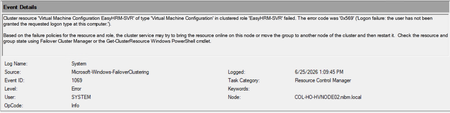
Hi Everyone, I am facing an issue in a Hyper-V Failover Cluster environment where Live Migration intermittently fails due to a service logon-related problem. The environment was previously working normally, but now whenever we attempt to Live Migrate a VM between cluster nodes, the migration fails unless we manually run “gpupdate /force” on the Hyper-V host first. After running gpupdate /force, the migration works temporarily, but the issue returns again during the next migration attempt. This makes it appear that some policy or permission is not being applied consistently on the cluster nodes. During troubleshooting, I attempted to add “NT VIRTUAL MACHINE\Virtual Machines” to the “Log on as a service” policy under Local Security Policy > Local Policies > User Rights Assignment. However, the account does not appear or resolve in the Object Picker when trying to add it manually. At this stage, I am trying to understand whether this is related to a domain GPO overwriting local policy settings, a Failover Cluster permission issue, or something specific to Hyper-V virtual machine accounts. Has anyone encountered a similar issue where Live Migration only works after running gpupdate /force? Also, is there a correct method to add “NT VIRTUAL MACHINE\Virtual Machines” to the “Log on as a service” policy, or should this permission already exist by default on Hyper-V hosts? Any guidance or recommendations would be greatly appreciated.443Views0likes1Comment
SQL Server FCI CSV storage flips multiple times into Online (No Access) state and eventually fails
Dear Team, I'm encountering an issue with our SQL Server multi‑instance failover cluster after applying the OS security patches and restarting the second node. Once the second node comes back online, the Cluster Shared Volume (CSV) briefly flips multiple times into Online (No Access) state and eventually fails.(we can make it online manually, but again flips and failed after sometime). To make the SQL cluster available, we either need to shut down the VM or revert the patch. Before the patching, all cluster roles and SQL instances were moved off the node, and the cluster appeared healthy. The issue only occurs after the reboot of the second node. (first node patched and restarted and everything working fine) OS : Windows Server 2025 Standard Patch tried: KB5075899 (February,2026 ) KB5078740 (March,2026) KB5082063 (April 2026 ) KB5087539 (May 2026) Could you please advise if there are any specific checks or steps we should follow during OS patching to prevent CSV access loss? Is it an issue with the patch or something else? Any insights or recommended actions would be really helpful to perform the security OS patch in the server Thanks you!179Views0likes0Comments
Windows Admin Center Preview - 2511 English [MSI Corrupt]
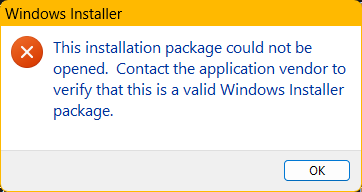
When attempting to launch the WindowsAdminCenterPreview_2511.msi, I received an error message (See Below). In addition, when I test the MSI using 7zip, the archive fails to validate. This occurred downloading the installer package twice over a two-day period. My system info is below.507Views1like2Comments