Recent Discussions

Getting rid of unwanted shares
Hello everyone. On my company computers there is a name listed under "People" and this individual has shared a file with me (by mistake I assume). Through a lot of digging I finally found out he is an attorney and it was paperwork from some case he had worked on. I don't know him and whatever the docs are have nothing to do with me. The secretary I talked to didn't seem to care and said, "I don't believe it's confidential. Just ignore it." I don't want to ignore it! Every time I log on there it is. It's intrusive! And before you all say just hide it, No, There should be a way to not automatically accept unwanted shares.7Views0likes0Comments
Temp Files Flagged As Viruses By Norton - Windows 11
My Norton anti-virus software keeps quarantining temp files from my onedrive setup folder as containing viruses. This happens every few minutes. Any thoughts on what this might be from? All files seem to be synced and I am just doing normal browsing and Word processing.31Views0likes0Comments
Serious Abuse of Microsoft/OneDrive Email Infrastructure for IRS Phishing Scam
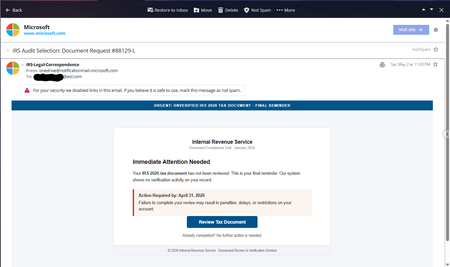
I want to report a very serious phishing/security concern involving what appears to be Microsoft/OneDrive email infrastructure. On Sat, May 2, 2026 at 11:03 PM, I received a phishing/scam email pretending to be an IRS tax notice. Today is May 17, 2026, and I am posting this because this issue is extremely concerning and could easily fool many users. The alarming part is that the email was sent from: email address removed for privacy reasons The email contained fake IRS-related warnings such as: “URGENT: UNVERIFIED IRS 2026 TAX DOCUMENT” “Final Reminder” “Immediate Attention Needed” “Review Tax Document” It attempted to pressure users into clicking a fake “Review Tax Document” button. What is deeply concerning is: The sender appears to come from an official Microsoft domain (notificationmail.microsoft.com) The branding and formatting look legitimate Non-technical users could easily trust and click this AOL itself displayed a security warning and disabled the links My questions to Microsoft are: How is it possible for phishing emails to originate from or appear to originate from notificationmail.microsoft.com? Is Microsoft infrastructure being abused? Were compromised Microsoft/OneDrive accounts used? Why are such emails passing authentication checks strongly enough to appear legitimate? This is not a normal spam message. This directly impacts trust in Microsoft notification systems and can lead to credential theft or malware infections. I hope Microsoft investigates this seriously and explains how such abuse is possible from a Microsoft-associated notification domain. Users should: Never click such links Verify tax notices only through official government portals Carefully inspect email headers and domains Report suspicious Microsoft-branded phishing emails immediately Blair Glennon almmicrosoft Microsoftyan68Views0likes0CommentsMy previous OneDrive post was incorrectly flagged as spam
EN: Hello, My previous post titled “OneDrive no longer syncs new .lnk files since April 16, 2026” was automatically flagged as spam. This is a false positive. Could a moderator please restore it so I can continue the discussion? Thank you. FR : Bonjour, Mon précédent message intitulé « OneDrive no longer syncs new .lnk files since April 16, 2026 » a été automatiquement marqué comme spam. Il s’agit d’un faux positif. Pourriez-vous le restaurer afin que je puisse poursuivre la discussion ? Merci.21Views0likes0Comments
Unable to restore one drive personal vault file
Im trying to restore my onedrive file that I did not even deleted from personal vault I simply renamed it and somehow it got auto deleted now when Im trying to restore the file Im unable to restore it. You can in right panel it is "Waiting" indefinitely Please help I need these files urgently. ASAP.50Views0likes0Comments
Impossible to login
Hi, I was connected with Onedrive with one account A and I could see it in my File Explorer. Now I had to close that account (external email) and I created a new account B (outlook.com). I unsync the account A ... but now I can't connect account B the loading page of "Microsoft OneDrive" icon is not working and ... I can't see my onedrive in the File Explorer... Any idea? And I have not started yet to move all file from onedrive account A to onedrive account B thanks for your help Francesco39Views0likes0CommentsEnabling OneDrive Health Sync
Hello, once again being victimized by Microsoft 😒 Have a series of users reporting constant sync errors. We've reached out to Microsoft technical support and they just successively told us it was garbage and not to use it. Anyway, trying to get the Sync Health Dashboard to work, based off this document: https://learn.microsoft.com/en-us/sharepoint/sync-health?tabs=windows It's one of those Microsoft documents that the community CAN'T edit, so of course - it's out of date and incorrect. From what I can figure, based on research from other sources, most of this process is now arbitrary, and you have to create a 'EnableSyncAdminReport' in some policy location in the registry. Computer\HKEY_LOCAL_MACHINE\SOFTWARE\Microsoft\OneDrive < already exists, but not referenced by documentation Computer\HKEY_LOCAL_MACHINE\SOFTWARE\Policies\Microsoft\OneDrive < key doesn't exist, but is referenced by documentation. but this sorta 'try it and see' methodology really upsets me. Anyone have any insight to this, and why the documentation team fails to update the documentation, or whether this process will work or not?108Views0likes0Comments
Critical Sync Failure on macOS: Local data ignores Sync Engine unless manually opened
Environment: OS: macOS 15.7.4 (Sequoia) OneDrive Version: v.25.224.1116 File Provider: Apple File Provider (CloudStorage) framework The Problem: I am experiencing a persistent failure where OneDrive for Mac refuses to index or upload files moved into the local directory. The sync only triggers if I manually open each file or subdirectory, making bulk data management impossible. Files copied into ~/Library/CloudStorage/OneDrive-Personal remain in a "Pending" or "Online-only" state indefinitely. Standard "User Intent" triggers (opening the file) work, but the background daemon (fileproviderd) does not acknowledge local filesystem changes (FSEvents). Troubleshooting Already Attempted: 1) Standard Resets: Ran ResetOneDriveApp.command and OneDrive.app/Contents/MacOS/OneDrive /reset. 2) CLI Overrides: Attempted open /Applications/OneDrive.app --args -Settings (only opens Finder). 3) Metadata Clearing: Used xattr -rc to strip extended attributes and find . -exec touch {} to force timestamps; neither triggered the sync engine. 4) FileProvider Utility: fileproviderctl materialize is unresponsive or deprecated in this build. 5) Re-mounting: Attempted /unmount and manual cache clearing in Group Containers, but the UI remains "headless"—the Menu bar icon opens a Finder window instead of the Settings menu. Current State: OneDrive is functionally a "Pull-only" service. It downloads changes made on other devices, but will not "Push" local changes unless I recursively open every directory manually. Question: Is there a known method to force a full re-index of the File Provider local database when the standard reset flags fail to re-register the FSEvents observer?59Views0likes0CommentsMicrosoft deliberately blocks Affinity Thumbnails (.af) displaying on your PC
When syncing with OneDrive Microsoft deliberately blocks Affinity Thumbnails (.af) displaying on your PC. After contacting OneDrive support, they admitted “This behaviour is by design” It appears we are paying for a service where Microsoft select which thumbnails are displayed at Microsoft’s discretion. Adobe files AI, PDF, PSB, PSD, Affinity’s main competitor are viewable as thumbnails. Is this a corporate decision? It certainly is not to the benefit of Microsoft’s paying customers.50Views0likes0Comments
Sharepoint Shortcut to OneDrive
Hi, We’ve been using “Add shortcut to OneDrive” from SharePoint instead of the “Sync” option. Recently, however, some users have reported missing files. After investigating, I noticed that the shortcut appears to have been converted into a local copy in the user’s OneDrive. I realized this because the folder no longer shows the shared (people) icon, and I’m able to re-add the shortcut without any errors. Normally, if a shortcut already exists, SharePoint would display an error indicating that the shortcut is already present in OneDrive. Has anyone else experienced this issue? Thanks, Sur112Views1like0Comments
OneDrive Photo Memory email template
Is there a way to provide feedback on the "photo memory" email template for OneDrive? It recently changed in a way that seems like it was not written proper English or for the US locale my account is in. Maybe it was AI-generated and not proofread? Note how it used to have the subject of "Your memories from this day" and indicate dates like "Month DD". Now as of Feb 12 it instead in the subject has a shouty (with the exclamation mark) backwards (to a US user) of "DD Month!", which reads very strangely, and the "Over the years" text after that is an odd fragment. It seems this string was not properly reviewed and should be revisited. The email itself is also really odd and has leading zeroes for single digit day numbers, which is also demonstrative of a lack of attention to detail: The call to action of "Check it out" also is oddly written and would benefit from "Check It Out" as the casing, or a more natural string like "Open in OneDrive" which actually is descriptive of what happens. Also: one thing that has always bugged me about the email template before the recent change was that the email itself does not indicate which year a photo came from. It should not require I jump into the OneDrive app to check what year a photo is from! (I realize this is the OD4B forum but not sure where else to submit this feedback other than directly pinging people I used to work with at Microsoft) Thanks for reading!36Views0likes0Comments
Can't delete file on OneDrive for Android - Kindle Fire HD 10
I created a new Word Document on my Kindle Fire HD 10 tablet using the Office 365 app. It created Document (1). I looked for a "rename file" function but had to settle for "save as".So I have two files. I saw nothing on Office 365 to delete the file. Went to one drive and found it. Tried to delete it there. It tells me that "It will be moved to the recycle bin and removed from all your synced devices." However, it doesn't delete the file and inexplicably doesn't give an error mesaage. This occurs even when the Office 365 app on the Kindle Fire is closed.45Views0likes0Comments
Request to Update Onedrive Mass File Deletion Prompt
Hello, Onedrive ran out of cloud storage space for this person. It then popped up a prompt to delete several thousand files, with zero background information. Are these files simply older versions of files in the Onedrive cloud? Are they local files on the C drive? This is a pretty loaded question to ask a person without providing any background information. This information would ideally be provided in an accurate summary format, IE: "to free up cloud storage space, Onedrive recommends deleting these older version files, all of which will still have a more recent version remaining in the cloud AFTER the deletion." On a related note, it would be really nice if there were a few automated script actions that could be made available in the online web interface to Onedrive to help people clear up space, like "delete all but the most recent X versions of files within directory OnedriveRoot:/this/is/the/path" Thanks, A frustrated IT support dude107Views0likes0CommentsOneDrive wanted me to set up backing up to OneDrive, again
When I logged into my Windows 11 machine here at home, I was presented with a full-window popup from OneDrive. It wanted me to set up backing up my important folders like Documents, Photos, etc. I have been paying for Microsoft 365 Family Edition for at least 10 years, so I've done this already. But I thought I'd go ahead and do it again. But now I'm wondering, might I have accidentally created a second schedule job to back up my Documents, Photos, etc. to OneDrive, duplicating what I've done when I set those things up years ago?48Views0likes0CommentsOneDrive folders no longer have picture previews
ALL folders in OneDrive were just fine until I downloaded all recent Windows 10 updates. Now, the majority of my folders in OneDrive have no picture preview, just a tiny icon instead. The same goes for picture folders outside of OneDrive. Why do so many of my folders look like this? How do I get the previews back?48Views0likes0CommentsOneDrive for Business sync issues.
Hello Please i need your help on this issue. We are having OneDrive for Business sync issues. Our Client rossmachineshop.onmicrosoft.com has been having issues with long onedrive sync issues for some time. We have been working to help them move files to new libraries to reduce quantity of files being synced. Recently it seems that nearly all users are experiencing issues. We would like assistance in troubleshooting what is happening.67Views0likes0CommentsMost recent files are not sync'd/backed-up unless you pause & restart OneDrive
As per the title - most recent files are not sync'd/backed-up unless you pause & restart OneDrive. This means you are always missing recent files from the backup, unless you remember to pause and restart OneDrive before closing Windows. How can this be prevented?62Views0likes0CommentsUrgent: OneDrive Storage Discrepancy – Backend Audit Request
I’m the global admin and sole owner of the Microsoft 365 tenant for mailto:email address removed for privacy reasons. My OneDrive usage has jumped from 276 GB to nearly 1 TB in under 30 days, yet my visible files total only ~66.5 GB on my PC and in my web OneDrive. I’ve: Emptied the recycle bin Deleted version history Verified no shared libraries or backups Confirmed that local and cloud file views match Despite this, the Admin Center shows 0.9 TB used, and I’m unable to open a service request. The Support Assistant bot is the only option available, and it does not escalate to a live agent. I need a backend audit to identify any hidden, orphaned, or misreported data inflating my quota. Please escalate this to a support engineer who can investigate the issue.68Views0likes0Comments“OneDrive Storage Spike – Backend Audit Needed”).
My OneDrive usage has jumped from 276 GB to nearly 1 TB in under 30 days, yet my visible files total only ~66.5 GB on my PC and in my web OneDrive. I’ve: Emptied the recycle bin Deleted version history Verified no shared libraries or backups Confirmed that local and cloud file views match Despite this, the Admin Center shows 0.9 TB used, and I’m unable to open a service request. The Support Assistant bot is the only option available, and it does not escalate to a live agent. I need a backend audit to identify any hidden, orphaned, or misreported data inflating my quota. Please escalate this to a support engineer who can investigate the issue.31Views0likes0CommentsOnedrive on iOS sends some docx files to open in Word
Hello everyone. I have the Onedrive iOS app v16.19.8 installed. Lately, I have been working on three documents, which are modified copies of a fourth document. After Autosaving them, I tried to preview them on the app on my iPhone 15, and where 100% of the time the app would preview the document in an uneditable inherent viewer, these documents, and subsequently some other files, are viewed using the DEFAULT system viewer or it opens in the Word app I have installed. I require your diligent assistance in resolving this issue in the most efficient way possible. I can also attach screenshots if necessary. Many thanks.73Views0likes0Comments





Events
Recent Blogs
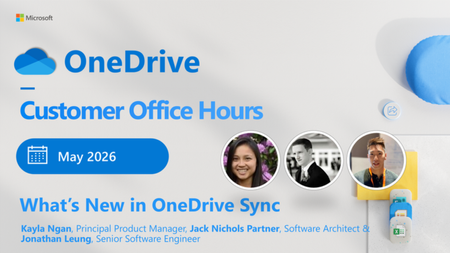
- Get ready for May’s OneDrive Customer Office Hours! This session creates space for open conversation around the latest updates and how they support the way you use your files every day. In this month...May 14, 2026382Views0likes0Comments
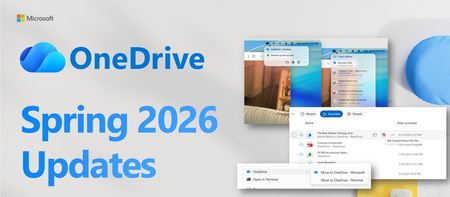
- Last year, we made a promise: your files should work for you, not the other way around. That meant reimagining OneDrive not just as a place to store files, but as an intelligent layer that surfaces w...Apr 21, 20266.3KViews3likes2Comments