Recent Discussions

Tasks sync failure - Outlook web vs mobile Outlook vs desktop Outlook
--- # 📄 **Technical Report: Persistent Outlook Web App Sync Failure Affecting Microsoft To Do / Outlook Tasks Ecosystem** **Issue Duration:** At least 3 months probably more **Platforms Affected:** - Microsoft To Do (Android) - Outlook Tasks (Windows Desktop Outlook) - Outlook Tasks (Outlook Web App) - Exchange Online (backend sync service) --- ## 1. **Executive Summary** I have experience **persistent, intermittent, and platform‑specific synchronization failures** within the Microsoft To Do / Outlook Tasks ecosystem. The critical finding is: ### **The Outlook Web App is often isolated and does not sync with any other platform.** Meanwhile: - **Windows Desktop Outlook ↔ Android To Do sync perfectly in both directions.** - **Outlook Web App ↔ (Desktop / Android)** do not sync. This isolates the issue to the **web app’s sync pipeline**, not the task data, not the account, and not the other apps. The failures present as: - **“Synchronization in progress”** stuck indefinitely - **“Synchronization failed”** when manually attempting sync - Web app showing **stale, outdated, or incomplete task lists** - Web app failing to send or receive updates from Exchange Online The same tasks that fail to sync for hours later sync successfully without any modification, proving the data is not corrupted and the failure is backend‑related. --- ## 1.1 **Cross‑Platform Sync Behavior (Critical Diagnostic Insight)** ### ✔ **Windows Desktop Outlook ↔ Android To Do** - Full two‑way sync - Immediate updates - Reliable and consistent ### ✖ **Outlook Web App ↔ Desktop Outlook** - No sync in either direction ### ✖ **Outlook Web App ↔ Android To Do** - No sync in either direction ### ✖ **Outlook Web App ↔ Exchange Online** - Appears to be failing or stalling This proves the web app is **not participating in the sync ecosystem**. --- ## 2. **Symptoms Observed** ### 2.1 **Outlook Web App** - Sync button stuck on **“Synchronization in progress”** for hours - Manual sync results in **“Synchronization failed”** - Web app shows outdated task lists - Web app does not receive updates from desktop or mobile - Web app does not send updates to desktop or mobile ### 2.2 **Android To Do** - Tasks created on Android do not appear in the web app - Tasks created in the web app do not appear on Android - Edits fail to propagate to the web app - Manual sync does not resolve the issue - Logout/login sometimes helps, inconsistently ### 2.3 **Windows Desktop Outlook** - Syncs perfectly with Android - Does not sync with the web app - Shows correct, up‑to‑date task data ### 2.4 **Platform Sync Matrix** | Action | Desktop Outlook | Android To Do | Outlook Web App | |--------|-----------------|---------------|------------------| | Create/edit task on **Desktop** | ✔ Syncs to Android | ✔ | ✖ No sync to Web | | Create/edit task on **Android** | ✔ Syncs to Desktop | ✔ | ✖ No sync to Web | | Create/edit task on **Web** | ✖ No sync to Desktop | ✖ | ✔ Stays only on Web | **Conclusion:** The Outlook Web App is **fully isolated** from Exchange Online’s task sync pipeline. --- ## 3. **Troubleshooting Steps Already Attempted** ### 3.1 **Web App** - Hard refresh (Ctrl + Shift + R) - Full browser cache clear - Logout → close browser → reopen → login - Switching lists to force metadata reload - Creating tasks to trigger sync events - Deleting tasks to force backend updates ### 3.2 **Android** - Manual sync - Clear cache - Logout/login - Device restart - Network switching - Creating/completing tasks to trigger sync ### 3.3 **Desktop Outlook** - Verified account health - Verified Exchange Online connectivity - Verified task folder integrity ### 3.4 **Account / Backend** - Verified Microsoft Account stability - Verified no multi‑account conflicts - Verified Exchange Online service health None of these steps produce consistent or lasting resolution. --- ## 4. **Frequency and Pattern** - Occurs multiple times per week - Occurs regardless of recent task edits - Occurs across multiple browsers - Occurs across multiple Android versions - Sync resumes randomly after hours - Sync resumes without any data changes - Sync resumes after logout/login, but inconsistently This pattern strongly suggests **backend sync token stalling**. --- ## 5. **Technical Analysis** ### 5.1 **Two‑Way Sync Failure Confined to Web App** Because: - Desktop ↔ Android works - Web ↔ (Desktop / Android) fails The failure is isolated to the **web app’s connection to Exchange Online**. ### 5.2 **Sync Token Stalling (Most Likely Cause)** Symptoms match known sync token stall behavior: - Endless “Synchronization in progress” - Manual sync fails - Sync resumes randomly - Sync resumes after forced metadata refresh - Sync resumes after unrelated actions (e.g., completing a task) ### 5.3 **Not a Corrupted Task Issue** Because the same tasks later sync successfully: - No malformed tasks - No unsupported metadata - No blocked sync queue - No corrupted lists ### 5.4 **Backend Sync Pipeline Instability** The pipeline: **Web App → Microsoft Sync Service → Exchange Online → Desktop / Android** appears to be failing at the **first hop** (web app → sync service). ### 5.5 **Web App Lacks Retry Logic** The web app provides: - No manual retry - No way to cancel a stuck sync - No way to reset sync session - No way to regenerate sync token Thus, when the backend stalls, the web app remains stuck indefinitely. ### 5.6 **Android Background Sync Not the Cause** Android is syncing perfectly with desktop Outlook, proving Android is not the source of the issue. ### 5.7 **Web App Sync Isolation (New Insight)** The web app is the **only** platform failing to communicate with Exchange Online. This is now clearly a **web‑app‑specific sync session failure**, not a multi‑platform issue. --- ## 6. **Impact** - Tasks frequently out of sync - Web app becomes unusable for task management - Daily workflow disrupted - Manual intervention required multiple times per week - Task state inconsistent across platforms - Reduced confidence in Microsoft To Do as a reliable ecosystem --- ## 7. **Requested Assistance** ### 7.1 **Engineering‑Level Investigation** Specifically into: - Outlook Web App sync token behavior - Web app → Exchange Online sync session stability - Backend retry logic - Web app sync error handling - Web app task API connectivity ### 7.2 **Diagnostic Tools** If available: - Sync session logs - Sync token status - Task metadata inspection tools - Backend queue visibility - Error codes beyond “Synchronization failed” ### 7.3 **Known Issues** Requesting documentation on: - Known To Do / Outlook Web sync token stalls - Known Exchange Online sync delays - Known intermittent sync failures - Known web app pipeline instability ### 7.4 **Confirmation Whether This Is a Known Issue** Given the duration and reproducibility, this appears to be a **backend‑level web app sync failure**. ### 7.5 **Request for Web App Sync Session Reset** Specifically: - Manual reset of the web app’s sync session - Forced regeneration of sync token - Flush of stuck sync queues - Verification of web app’s Exchange Online connectivity --- ## 8. **Evidence Available** I can provide: - Screenshots of “Synchronization failed” - Screenshots of “Synchronization in progress” - Timeline of sync failures - Android device logs - Browser console logs --- ## 9. **Conclusion** This is a **persistent, platform‑specific sync failure** affecting only the Outlook Web App. Desktop Outlook and Android To Do sync perfectly, proving the backend and data are healthy. The web app is isolated and failing to communicate with Exchange Online. I am requesting **engineering‑level support** to reset or repair the web app’s sync session and investigate the underlying cause. ---Solved68Views0likes1Comment
error when sharing list
Hi all, MS support was not helpful, so hope you can support me in how to fix. My wife and I we are using private @outlook.com accounts. We are heavy users of todo and we have some shared lists between our accounts. So far all good, all fine. Now if i create a new list, no matter if in browser, ios app, .... i have to switch to another list and to switch back to see the share button. If i click it, there is the error that a problem has occured and link can't get created. Please try again. If i do so, it works and a link is created. If my wife then tries to open such link, she gets the question if she wants to access list XYZ like it should be and it always was. If she does it, there is an error "the list was not found, please contact the person who shared with you. We have the exact behaviour if she tries to share with me. The exisitng, already shared lists, are running well. Any idea or thoughts, how to overcome this issue? Greetings, DennisSolved934Views9likes22Comments
Microsoft To Do no longer allowing me to view or add notes
Hi all, I am stuck. When I am in To Do, I can only add and complete tasks. I no longer have the option to click in and see or add notes or adjust titles. I have tried to dig around in settings, restarted my computer multiple times to no avail.Solved147Views0likes1CommentOpen in Outlook Button Inactive
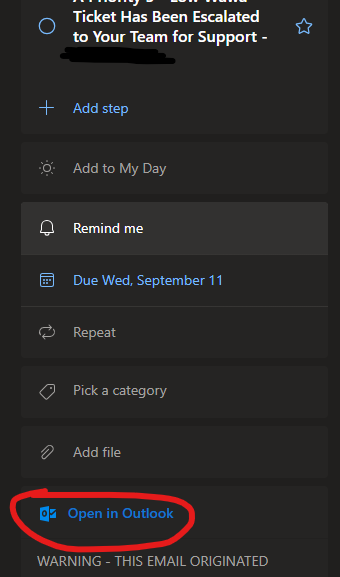
I flag a lot of emails to follow up on in To Do. When I click on one of the tasks, I used to be able to click Open in Outlook on the right hand side pane, and it would open the email that was flagged. I opened Outlook today and the Open in Outlook button is not working. I do not get the finger pointer when hovering over it, and when I click nothing happens. I tried closing / opening Outlook and rebooting.Solved2.3KViews3likes21CommentsHTTP ERROR 500 • to-do.office.com/tasks • Web app down for anyone else?
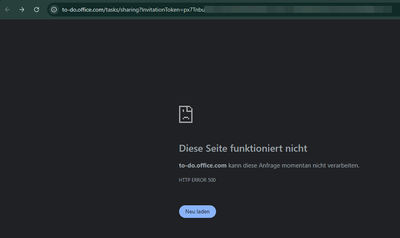
Hi, we just started using to-do and we cannot share lists because the sharing links are not working. When trying to open a sharing link like https://to-do.microsoft.com/sharing?InvitationToken=px7Tnbu/sharing?InvitationToken=px7Tnbu.... which will redirect to https://to-do.office.com/tasks/sharing?InvitationToken=px7Tnbu/tasks/sharing?InvitationToken=px7Tnbu.... we only ever get HTTP ERROR 500. Actually, the base URL https://to-do.office.com/tasks/sharing?InvitationToken=px7Tnbu/tasks/ already does not work, and we can't access to-do web-app. We tried different browsers, devices and Internet access points. We use the free to-do version, and do not have an office365 subscription. Is this related? Windows and Android apps are working fine. Does anyone else have this problem and/or a solution to this? Kind Regards. (none native englisch speaker)Solved2.2KViews0likes8CommentsAndorid widget not available
Hello everyone, Over the past few days, I've been experiencing an issue with tasks list widget on my Android 14 (one ui 6.1) device. Initially, it froze and stopped updating at the beginning of the day in 'my day' view for scheduled tasks. When I attempted to remove the widget and add it back to the desktop, it was no longer available in the widget list. I also enrolled in the beta user program, but that didn't resolve the issue. Client: To Do Android; Version: 2.120.8620.00.betabuild#: 0 Any ideas how to fix this? Thanks, KrzysztofSolved662Views0likes1CommentContext Menus no longer appearing when I right click on tasks
Hello - I commonly used the context menus in the ToDo web app (using on desktop) to move tasks between lists in the way demonstrated here: https://support.microsoft.com/en-gb/office/move-tasks-between-or-within-lists-8360617e-63c6-4bf7-952a-60af4b920b62 Following the update to version 2.119.1 which I believe happened earlier this week I can no longer access any context menus, can't drag and drop tasks and cannot find anyway to move tasks between lists. This was a key feature for my workflow so I really need it back.Solved4.6KViews0likes3Comments
Due dates showing incorrectly
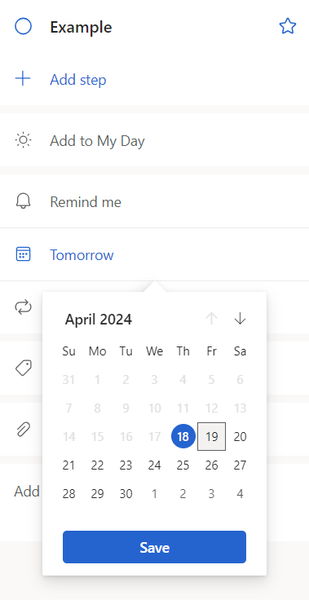
Hello, I'm experiencing an issue that just started yesterday. When I assign due dates for tasks, the date always shows up as the day prior. For example, If I set the due date as April 19th, the due date shows as April 18th. I have included some photos to show what I'm talking about. This happens regardless of using tasks in my browser or in Outlook. Would appreciate any help in fixing this issue. Thank you, TheodoreSolved4.1KViews8likes12CommentsWhere are the Microsoft To Do theme backgrounds stored?
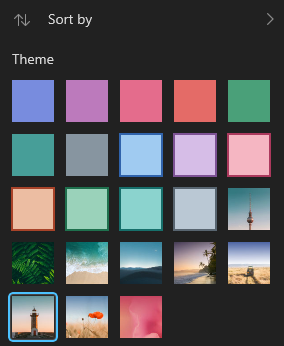
I was wondering where these backgrounds are stored, since a few of them are quite pretty and wanted to use them as my desktop wallpaper too. I was not able to stumble onto them through reverse image searches, thus I was wondering if anyone could help me out. See below for reference:Solved4.5KViews1like2Comments
I hope I can move the order of tasks after setting sort by due date option
Hi, I'm using this app very usefully and I want some improvements. I'm using "sorted by due date" most often, and sadly I can't move the task order even they have same due date. I hope I can move it even between same due date. It's especailly frustrating when I can't move tasks that didn't set the due date(none) during the sorted mode. And also I hope repeated tasks(such as everyday) goes up to the top automatically even without any sorting Thank youSolved1.1KViews0likes1Comment
Show all tasks together
With the former task function in outlook it was possible to see all task together in one list and filter them, also they were in different folders and list. If I have different list or groups in to do, it's not possible to show them all together in an overview/list. Is there any possibility I don't know?Solved6.6KViews2likes2CommentsSort options for "My Day" in Outlook
I know I can sort my lists in the browser for To Do, but I prefer just using it in the sidebar of Outlook. However I don't see the options to sort the list there, I still have to go to the browser and the sorting I do there doesn't sync back to the Outlook sidebar. I'd like to have it sort alphabetically so I can prioritize my list for My Day.Solved1.6KViews0likes3Comments
How to configure flow to grab MS To Do Priorities List items and send list to MS Teams?
Hello, Is there a way to configure a Power Automate flow to grab my To Do Priorities list and send it to MS Teams chat at a certain time of day? Microsoft To Do seems very limited in that regard. Thank you.Solved1.2KViews0likes1CommentWhat is Microsoft To Do suggesting I do, concerning reminders on my Android phone?
Recently I started getting this popup every time I open Microsoft To Do on my Samsung phone: Don't miss a reminder Your Android device settings may impact your To Do reminders. Select Manage to optimize your settings to make sure you never miss a reminder. Then I press the Manage link as suggested. It takes me to a settings in Android to change something. But I've no idea what Microsoft To Do is suggesting I change. I need help with this, please.Solved1.3KViews0likes1Comment
Multiple sort criteria
Enable complex sorting, like in Outlook Desktop. Specifically, enable sorting first by Category, then Date, then Priority, then Alphabetical. The Tasks function in Outlook Desktop is the BEST task management application in existence because it can be structured as a list of all tasks sorted by date, priority, and alpha. One look and I see what I have to do today and this week. I cannot run my business and my life without it. Thank you.Solved1.9KViews4likes2CommentsSearching using # but hiding completed tasks?
Hi, I'm pretty sure this isn't possible but thought I'd ask anyway. I use hashtags in my tasks, these are mostly to remind me to speak to certain colleagues about things, ie: "Update corporate GLs #LP" That way when I do a search for #LP any things I need to discuss with that person come up, the down side is all completed tasks show up too! I suppose I could delete all completed tasks but some I keep for reference. So is there a way of doing a search and omitting completed tasks? Just to add to the mix I'm on a mac * 9/10ths of the audience leaves immediately * Cheers in advance.Solved4.7KViews2likes7Comments
Enter Key No Longer Moves to Next Sub-Task
Hi, I noticed that as of recently (I was out of town so could have been in the past few weeks) when I create a task and start entering sub-tasks, the enter key after typing a subtask closes the task. I preferred the previous behavior where the enter key would start the next sub-task. This is very helpful when I have a new project and can just enter a bunch of things that have to be done. If the behavior won't be changed back, is there another key that would do this? I tried tab but it didn't work. Thanks!Solved1.3KViews0likes2CommentsOpen emails in desktop app
Great that ToDo receives my flagged emails from the desktop app and great that I'm encouraged and guided through the process to use the app in that way. Then it opens them in Outlook web that I don't use. Stupid. ToDo therefore useless to me and *many* others.Solved4KViews4likes7Comments


Events
Recent Blogs
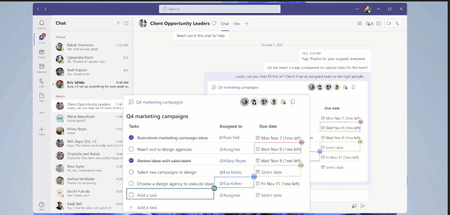
- 3 MIN READTask management while collaborating has never been easier. Now tasks created via Loop components sync across Microsoft 365 apps like Microsoft To Do, Microsoft Planner, and Tasks app in Teams. ...May 10, 202322KViews4likes7Comments
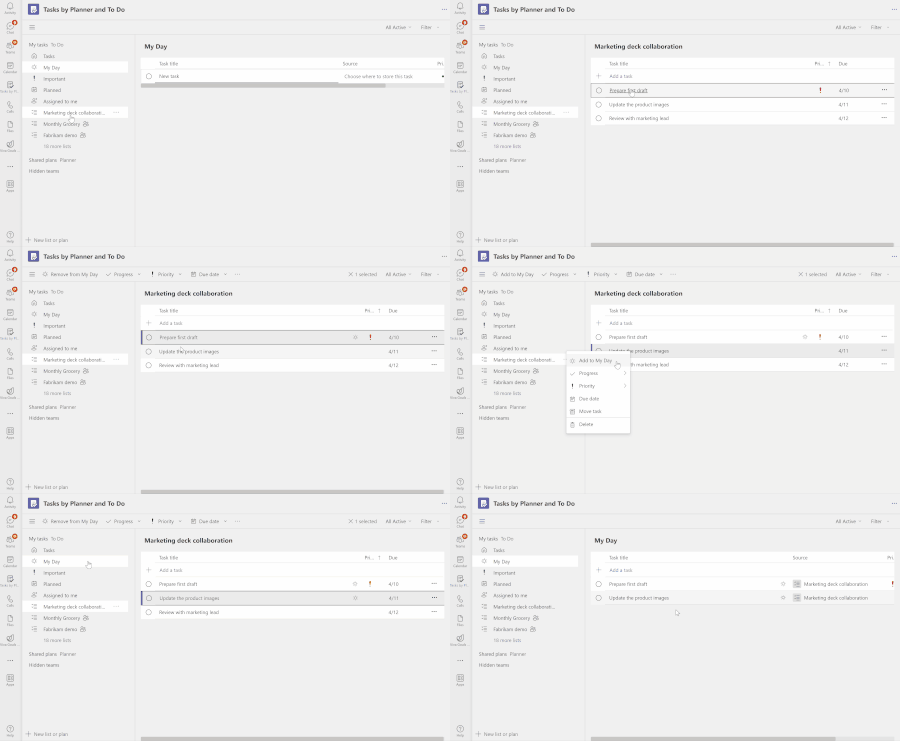
- 2 MIN READFeeling overwhelmed by tasks from multiple sources and struggling to stay organized? We have great news for you! We are thrilled to introduce the 'My Day' view in the 'Tasks by Planner and To Do' app...Apr 04, 202337KViews4likes37Comments