tasks
17 Topics
Tasks sync failure - Outlook web vs mobile Outlook vs desktop Outlook
--- # 📄 **Technical Report: Persistent Outlook Web App Sync Failure Affecting Microsoft To Do / Outlook Tasks Ecosystem** **Issue Duration:** At least 3 months probably more **Platforms Affected:** - Microsoft To Do (Android) - Outlook Tasks (Windows Desktop Outlook) - Outlook Tasks (Outlook Web App) - Exchange Online (backend sync service) --- ## 1. **Executive Summary** I have experience **persistent, intermittent, and platform‑specific synchronization failures** within the Microsoft To Do / Outlook Tasks ecosystem. The critical finding is: ### **The Outlook Web App is often isolated and does not sync with any other platform.** Meanwhile: - **Windows Desktop Outlook ↔ Android To Do sync perfectly in both directions.** - **Outlook Web App ↔ (Desktop / Android)** do not sync. This isolates the issue to the **web app’s sync pipeline**, not the task data, not the account, and not the other apps. The failures present as: - **“Synchronization in progress”** stuck indefinitely - **“Synchronization failed”** when manually attempting sync - Web app showing **stale, outdated, or incomplete task lists** - Web app failing to send or receive updates from Exchange Online The same tasks that fail to sync for hours later sync successfully without any modification, proving the data is not corrupted and the failure is backend‑related. --- ## 1.1 **Cross‑Platform Sync Behavior (Critical Diagnostic Insight)** ### ✔ **Windows Desktop Outlook ↔ Android To Do** - Full two‑way sync - Immediate updates - Reliable and consistent ### ✖ **Outlook Web App ↔ Desktop Outlook** - No sync in either direction ### ✖ **Outlook Web App ↔ Android To Do** - No sync in either direction ### ✖ **Outlook Web App ↔ Exchange Online** - Appears to be failing or stalling This proves the web app is **not participating in the sync ecosystem**. --- ## 2. **Symptoms Observed** ### 2.1 **Outlook Web App** - Sync button stuck on **“Synchronization in progress”** for hours - Manual sync results in **“Synchronization failed”** - Web app shows outdated task lists - Web app does not receive updates from desktop or mobile - Web app does not send updates to desktop or mobile ### 2.2 **Android To Do** - Tasks created on Android do not appear in the web app - Tasks created in the web app do not appear on Android - Edits fail to propagate to the web app - Manual sync does not resolve the issue - Logout/login sometimes helps, inconsistently ### 2.3 **Windows Desktop Outlook** - Syncs perfectly with Android - Does not sync with the web app - Shows correct, up‑to‑date task data ### 2.4 **Platform Sync Matrix** | Action | Desktop Outlook | Android To Do | Outlook Web App | |--------|-----------------|---------------|------------------| | Create/edit task on **Desktop** | ✔ Syncs to Android | ✔ | ✖ No sync to Web | | Create/edit task on **Android** | ✔ Syncs to Desktop | ✔ | ✖ No sync to Web | | Create/edit task on **Web** | ✖ No sync to Desktop | ✖ | ✔ Stays only on Web | **Conclusion:** The Outlook Web App is **fully isolated** from Exchange Online’s task sync pipeline. --- ## 3. **Troubleshooting Steps Already Attempted** ### 3.1 **Web App** - Hard refresh (Ctrl + Shift + R) - Full browser cache clear - Logout → close browser → reopen → login - Switching lists to force metadata reload - Creating tasks to trigger sync events - Deleting tasks to force backend updates ### 3.2 **Android** - Manual sync - Clear cache - Logout/login - Device restart - Network switching - Creating/completing tasks to trigger sync ### 3.3 **Desktop Outlook** - Verified account health - Verified Exchange Online connectivity - Verified task folder integrity ### 3.4 **Account / Backend** - Verified Microsoft Account stability - Verified no multi‑account conflicts - Verified Exchange Online service health None of these steps produce consistent or lasting resolution. --- ## 4. **Frequency and Pattern** - Occurs multiple times per week - Occurs regardless of recent task edits - Occurs across multiple browsers - Occurs across multiple Android versions - Sync resumes randomly after hours - Sync resumes without any data changes - Sync resumes after logout/login, but inconsistently This pattern strongly suggests **backend sync token stalling**. --- ## 5. **Technical Analysis** ### 5.1 **Two‑Way Sync Failure Confined to Web App** Because: - Desktop ↔ Android works - Web ↔ (Desktop / Android) fails The failure is isolated to the **web app’s connection to Exchange Online**. ### 5.2 **Sync Token Stalling (Most Likely Cause)** Symptoms match known sync token stall behavior: - Endless “Synchronization in progress” - Manual sync fails - Sync resumes randomly - Sync resumes after forced metadata refresh - Sync resumes after unrelated actions (e.g., completing a task) ### 5.3 **Not a Corrupted Task Issue** Because the same tasks later sync successfully: - No malformed tasks - No unsupported metadata - No blocked sync queue - No corrupted lists ### 5.4 **Backend Sync Pipeline Instability** The pipeline: **Web App → Microsoft Sync Service → Exchange Online → Desktop / Android** appears to be failing at the **first hop** (web app → sync service). ### 5.5 **Web App Lacks Retry Logic** The web app provides: - No manual retry - No way to cancel a stuck sync - No way to reset sync session - No way to regenerate sync token Thus, when the backend stalls, the web app remains stuck indefinitely. ### 5.6 **Android Background Sync Not the Cause** Android is syncing perfectly with desktop Outlook, proving Android is not the source of the issue. ### 5.7 **Web App Sync Isolation (New Insight)** The web app is the **only** platform failing to communicate with Exchange Online. This is now clearly a **web‑app‑specific sync session failure**, not a multi‑platform issue. --- ## 6. **Impact** - Tasks frequently out of sync - Web app becomes unusable for task management - Daily workflow disrupted - Manual intervention required multiple times per week - Task state inconsistent across platforms - Reduced confidence in Microsoft To Do as a reliable ecosystem --- ## 7. **Requested Assistance** ### 7.1 **Engineering‑Level Investigation** Specifically into: - Outlook Web App sync token behavior - Web app → Exchange Online sync session stability - Backend retry logic - Web app sync error handling - Web app task API connectivity ### 7.2 **Diagnostic Tools** If available: - Sync session logs - Sync token status - Task metadata inspection tools - Backend queue visibility - Error codes beyond “Synchronization failed” ### 7.3 **Known Issues** Requesting documentation on: - Known To Do / Outlook Web sync token stalls - Known Exchange Online sync delays - Known intermittent sync failures - Known web app pipeline instability ### 7.4 **Confirmation Whether This Is a Known Issue** Given the duration and reproducibility, this appears to be a **backend‑level web app sync failure**. ### 7.5 **Request for Web App Sync Session Reset** Specifically: - Manual reset of the web app’s sync session - Forced regeneration of sync token - Flush of stuck sync queues - Verification of web app’s Exchange Online connectivity --- ## 8. **Evidence Available** I can provide: - Screenshots of “Synchronization failed” - Screenshots of “Synchronization in progress” - Timeline of sync failures - Android device logs - Browser console logs --- ## 9. **Conclusion** This is a **persistent, platform‑specific sync failure** affecting only the Outlook Web App. Desktop Outlook and Android To Do sync perfectly, proving the backend and data are healthy. The web app is isolated and failing to communicate with Exchange Online. I am requesting **engineering‑level support** to reset or repair the web app’s sync session and investigate the underlying cause. ---Solved272Views0likes1Comment
To Do Task Details Not Showing
When I am in To Do, I can only add and complete tasks. I no longer have the option to click in and see details, add notes, or edit titles. I can see the area they are supposed to pop up in, but I can't expand the side window or see any information.223Views0likes0CommentsEntire Task List Lost
Last week, I had been working most of the day, when my entire task list was suddenly lost. There is nothing. No completed tasks, no in progress, none of the recurring ones. Everything is gone, and this is going to really disrupt my work for... who knows how long. Is there any way to get them back?854Views3likes11CommentsIntroducing the all-new 'My Day' view in 'Tasks by Planner and To Do' App for Microsoft Teams!
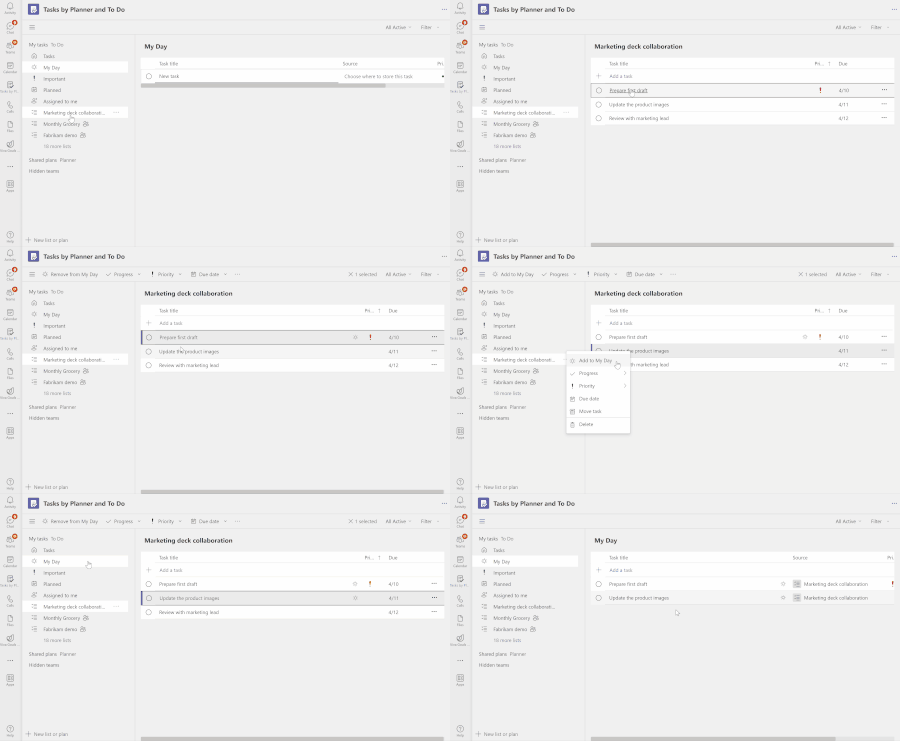
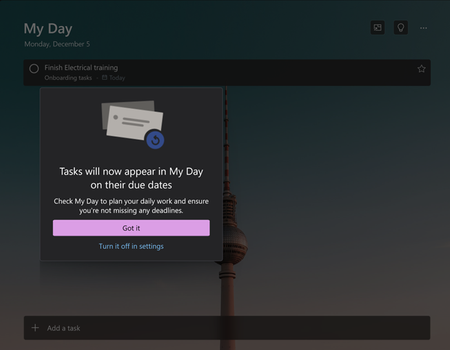
Feeling overwhelmed by tasks from multiple sources and struggling to stay organized? We have great news for you! We are thrilled to introduce the 'My Day' view in the 'Tasks by Planner and To Do' app for Microsoft Teams. This feature aims to help you effectively organize and prioritize your tasks, consolidate your task lists, and declutter your workspace.38KViews4likes37Comments
Shared ToDo deleted tasks > how to restore?
Hello everyone, We share a ToDo with my colleagues and I deleted some tasks by mistake. I tried to restore them but whitout success. I cannot find any place where those deleted items went. I tried a lot a of solutions found on the net but none of them worked. I also point out that those tasks were not mine. So I am looking for some help. Does anyone have an idea or even a solution about that?148Views0likes0Comments
Assign Task Reminders to Assigned Individuals
Currently, To-Do allows you to assign a new task to someone in your shared list. It is great! However, I notice that whenever I assign a task to someone I would have to contact them (via email or text, or phone call) to confirm they have completed the task. I think it would be a very nice feature to have the option to assign task reminders for workers or others to complete the task they are assigned instead of just being given the task. I understand that when a task is assigned you can manually input a reminder for yourself once assigned. However, more times than not, you often forget, therefore, when given a reminder from your boss or manager you are able to be reminded by the app. This would eliminate the need to have your boss remind you to complete the task.6.1KViews6likes3CommentsPlanner tasks in To-Do - Folders organisation
Hello! I'm new to using both ToDo and Planner and I'm quite keen to use ToDo to manage all my actions from my own personal projects AND from team projects (based in Planner). When a Planner task is assigned to me, it appears in the "Assigned to you" list. Is there a way to move the tasks from the "Assigned to you" list into one of my own ToDo lists? For example: I have a list in ToDo called "Waiting for" - i.e. any tasks in which I'm waiting for someone else to complete an action before I can progress. In "Assigned to me" I have 16 tasks from 3 different project. Several of those tasks require someone else to do something before I can progress (e.g. I'm waiting for an external company to get back to me with a quote). I'd like to move those tasks to my "Waiting for" folder so that I can review as part of my weekly review. Is there any way to make something work here? Thanks, AK3.5KViews4likes4Comments
Announcing: To Do is now rolling out to Outlook for Windows
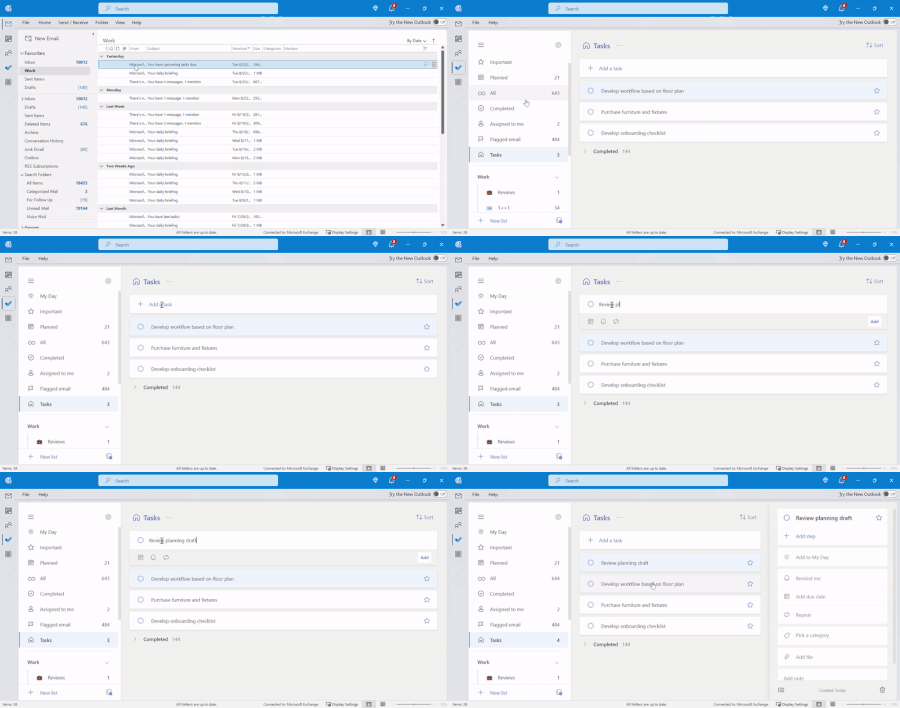
We’re excited to announce that To Do is rolling out to Outlook for Windows for the Current Channel users (starting with Current Channel version 2207). With this release, you can use the To Do app right from Outlook for Windows to plan your work and commitments effectively and stay focused on the tasks at hand.42KViews5likes30Comments