Recent Discussions

Is monthly BIOS updates via Intune overkill for enterprise Windows 11
Hey all, Looking for some opinions from others managing BIOS and Drivers on enterprise environments. We’re considering pushing BIOS/firmware updates monthly across our Windows 11 fleet using Intune, but it feels a bit too aggressive. Is anyone actually doing BIOS updates this frequently? Do you see real risk in not updating BIOS regularly? Or do you treat BIOS updates more as “only when needed” (security issue / vendor recommendation)? Any issues you’ve run into pushing BIOS updates at scale via Intune? My concern is stability risk vs actual security benefit — feels like monthly might be overkill unless there’s a critical vulnerability. Keen to hear how others are handling this in production environments.Solved137Views0likes2Comments
MS InTune - packaging Amazon DCV client
Hi, I used the InTune prep tool to bundle the Amazon DCV client. Everything seems to work correctly, bundle created and it uploads well. When I use the company portal to install, it looks like it pushes\installs properly but the DCV client does not run on the laptop after install. This is a .msi package so all the settings are in place when i create the InTune APP in the portal. Has anyone succesfully bundled DCV in InTune? Am I missing anything? or anything to try? Thank you,Solved156Views0likes5Comments
Intune Device Reset Issue After Recent Update
Hi everyone, We’re currently running into an issue with device reset scenarios in our environment and wanted to check if others are seeing something similar or have identified a reliable workaround. Environment: • Windows 11 25H2 • Windows Autopatch enabled • Devices managed via Intune Issue: When initiating any of the following actions from the Intune portal: • Autopilot Reset • Fresh Start • Wipe …the process consistently fails at around 38–40%. Observations: • Event Viewer logs Event ID 4502 during the failure. • This behavior started after applying a recent update. Troubleshooting performed: • We attempted to repair/rebuild the WinRE partition using the WinRE.wim from the latest Windows 11 ISO. • After this repair, the reset process completes successfully. However: • Post-reset, during re-enrollment, the device fails at the Account Setup (ESP) stage. Support status: • We had a case opened with Microsoft but they said that Reset was triggered from intune and reset process started on device so they cannot check anything further from their end and they have not received any similar cases or not aware of any known issue Has anyone else encountered: • Reset failures around 40% with Event ID 4502? • Issues tied to WinRE after recent updates? • Enrollment failures post-reset (ESP Account Setup stage)? If so, have you found: • A root cause? • A stable remediation or workaround? Appreciate any insights or shared experiences. Thanks!Solved1.1KViews0likes2Comments- 81Views0likes1Comment

IOS - Embedded Webkit - Not Reporting Correct Device info
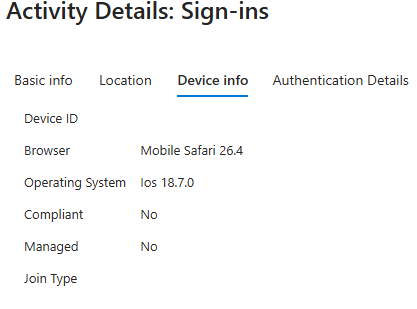
It appears that with the latest iOS versions (26.3.1 through 26.4), applications that rely on an embedded WebKit for sign-in are no longer reporting accurate device details within Device Info. Users have company-issued phones that are successfully enrolled in Intune, but when they attempt to sign in to Apple Mail, Conditional Access is denying the login. After reviewing the logs, iOS is reporting the OS version as 18.7.0 to Intune, even though the device is actually running iOS 26.4. Additionally, the device information is coming through as blank, so attributes are not being evaluated. When looking at other logins via the outlook app on that device it all appears normal and works. Has anyone else observed this behavior where WebKit is sending incorrect data to Intune? Does anyone know of a workaround other than relaxing Conditional Access policies?Solved2.3KViews1like7Comments
How to configure Intune to not allow remote wiping of personal devices
I’m a journalist seeking to do a story around best practices for configuring Intune, in the wake of last week’s destructive attack against Michigan-based medical device maker Stryker. It looks like attackers gained admin-level access to Intune and used it to wipe employees’ personal devices that were enrolled in Intune. I was speaking with someone who has recent Intune administration experience, and his take is that like other UEM/BYOD/endpoint management tools, none of this software should be configured with the ability to fully wipe a personal device. Instead, it should be only placing sandboxed apps or directories onto a device. Only this sandboxed stuff should be remotely nuke-able. His supposition is that if personal data can be wiped, then either the Intune admins set it up incorrectly, or their documentation for employees who self-configure didn’t specify how to add their device but not give Intune full wiping capabilities. My questions: 1) Is it possible to configure Intune so that it doesn’t have overly broad permission to wipe an entire, personally owned device? 2) How exactly would one do that (on either Android or iOS)? There’s lots of “ditch Intune” chatter on Reddit now, supposedly tied to CISOs/executives reacting to the Stryker attack. So I’m seeking clarity around whether the tool can be configured to not remotely wipe personal data, even if other defenses that should be in place (such as requiring multiple admins’ approval before wiping devices, setting alerts if more than a few devices get remotely wiped at once, and so on) aren’t there.Solved639Views0likes3Comments
Unable to deploy out of band update 26200.7628
Hello, I need to deploy OOB 26200.7628 on our computers. We use deployment rings. The 2026.1 OOB update appeared in Releases on January 24. I created an expedite policy with a group of users I want to target with this update (with a restart within 0 days). But nothing has happened since Monday, everyone is still on 26200.7623. Where am I going wrong? Thank you.Solved1.2KViews1like6CommentsEntra ID LAPS and BitLocker on Hybrid AD–Joined Devices
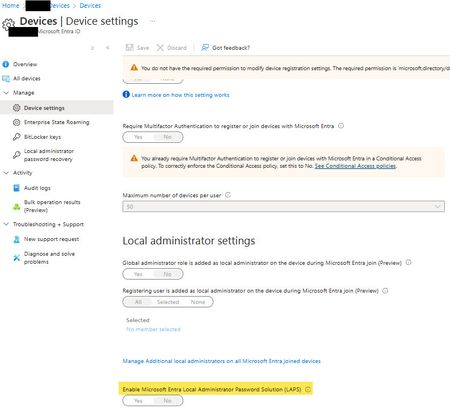
Hi All, We have Hybrid AD–joined Windows devices with BitLocker managed on-prem via GPO and BitLocker recovery keys already escrowed to Microsoft Entra ID. If we enable Windows LAPS in Entra ID (cloud LAPS), will this have any impact on: Existing BitLocker recovery keys stored in Entra ID, or Current/future BitLocker configuration and escrow behavior? Is there any dependency or interaction between Entra ID LAPS and BitLocker on hybrid devices? Thanks in advance DilanSolved
Intune Connection Issues in Defender for Endpoint
We have M365 E5 across the board which includes Defender for Endpoint P2. We're planning to enable Intune-MDE integration but getting this warning "A Microsoft Intune license was not found" Despite that message, I can still enable it (toggle the switch is allowed) and then the connection appears to be established.? But! more importantly, when it comes to the functionality, I cant create a "Auto from connector" EDR policy from Intune which could be due to the above glitch? "Create from Preconfigured Policy" option also greyed out. A custom policy also doesn't have the "Auto from connector" option to onboard devices. Has anyone seen this? Any inputs are highly appreciated ! Thank you KevSolved1.5KViews0likes5Comments
Make Windows Hello the default method for admin elevation prompts?
Hi everyone, I am trying to figure out how to set Windows Hello (Fingerprint or Face) as the default option when I'm prompted for admin elevation. Right now, Windows always defaults to asking for the admin email and password, so I have to click "More options" and select Windows Hello manually each time. Is there a way to make Windows Hello (Or just the pin) the default sign-in method for these prompts so I don't have to change it manually every time? Thanks in advanceSolved426Views1like3CommentsHow to deploy Win11 Security Baseline with Intune?
Hi, usually you can download the Security Baseline via SCT and deploy it via GPOs. How does that work with Intune? I only found this https://learn.microsoft.com/en-us/intune/intune-service/protect/security-baseline-settings-mdm-all?pivots=mdm-24h2 but it only describes the settings used by th ebaseline and which are available through Intune. To be honest I don't want do configure all those 1000 settings manually. Is there an easy and more comfortable way?Solved438Views0likes2CommentsBest Kiosk Setup for Public Library PCs (Cloud-Only, File Explorer and Printing Issues)??
I’m trying to configure kiosk devices for a public library. I’ve tested configuring kiosks through the Intune Template option, where you can select a single app or multiple apps. However, I ran into an issue with the Start menu configuration — I want to display only Chrome, Edge, and the Downloads folder (via File Explorer). I then decided to switch to a custom OMA-URI configuration using an XML string <AssignedAccessConfiguration xmlns="http://schemas.microsoft.com/AssignedAccess/2017/config" xmlns:rs5="http://schemas.microsoft.com/AssignedAccess/201810/config" xmlns:v5="http://schemas.microsoft.com/AssignedAccess/2022/config"> <Profiles> <Profile Id="{7877df8d78fd7f8d7fdf-a454a45ae45-7sd777}"> <AllAppsList> <AllowedApps> <App DesktopAppPath="%ProgramFiles%\Google\Chrome\Application\chrome.exe"/> <App DesktopAppPath="%SystemRoot%\explorer.exe"/> </AllowedApps> </AllAppsList> <v5:StartPins> <![CDATA[ { "pinnedList": [ { "desktopAppLink": "%ALLUSERSPROFILE%\\Microsoft\\Windows\\Start Menu\\Programs\\Google Chrome.lnk" }, { "desktopAppLink": "%SystemRoot%\\explorer.exe" } ] } ]]> </v5:StartPins> <Taskbar ShowTaskbar="true"/> </Profile> </Profiles> <Configs> <Config> <AutoLogonAccount rs5:DisplayName="kioskläge"/> <DefaultProfile Id="{7877df8d78fd7f8d7fdf-a454a45ae45-7sd777}"/> </Config> </Configs> </AssignedAccessConfiguration> The problem is that File Explorer doesn’t appear on the Start menu, while Chrome launches correctly (because I use a PowerShell script for that). Based on your experience — what would be the best setup for public library computers that run pure cloud (no domain join), where public users will download documents and print them? If printing is required, would Universal Print be the best option, considering that the printers are on-premises?Solved371Views0likes2CommentsSome devices not registering with Intune
We recently completed a migration Microsoft 365 Exchange, all users now have either E5 or E3 licenses. Now that employees have licenses, I was expecting machines to be added to Intune. The GPO was created months ago and worked in testing, and all of the items under Windows | Enrollment in Intune were validated. About 40% of devices have been Intune registered, and this is far lower that I would expect by now. Any suggestions for troubleshooting?Solved170Views0likes3Comments
Intune Confusion
Hey guys, I'm relatively new to Microsoft Intune and have been playing with the platform with a view of potentially using it as our corporate endpoint management solution. I've been playing with it for a few days and I'm a little confused. Within our organisation we have about 25 'hotdesks' shared by Call Centre staff working on shifts - I thought that Intune Plan 1 Device Only would be a good fit for these systems. For the remainder of our staff (circa 250), I was thinking maybe Device Only or maybe User license. I'm not sure we require a full user license for everyone as we have a small amount of corporate software (so no real requirement for corporate software catalogue within the user portal etc) and only really need to manage Windows updates, configuration / security policies and to push / remove software - which I 'believe' is possible with the device only licenses. I've started off by acquiring x4 device only licenses (thus have not assigned them to any users) for testing purposes. My 4 test systems were already AAD joined and so to enroll them I did this using by a Device Enrollment Manager account and joined through 'Settings > Accounts > Access work or school > Enrol only in device management' on each test workstation. All 4 test systems enrolled without issue and are visible within the Intune Portal and are checking in. This is where I get confused: 1 of the 4 test workstations has the IntuneManagementExtension service running in Windows. The other 3 do not. The system that does have the service running also has the IME log directory present = C:\ProgramData\Microsoft\IntuneManagementExtension\Logs - the others do not. Again, all 4 systems are enrolled and checking in and reporting as compliant. Also, I've pushed a test piece of software to all 4 test systems (mandatory push)... none have received it. This was 8 hours ago. I also noticed when running dsregcmd / status that the MDMurl was blank on these workstations. I have a personal M365 tenant with Intune Plan 1 user licenses that I've used for a year or two and have had no problems or oddities experienced with software pushes (probably not oddities but more of a lack of understanding of device licenses on my part perhaps). I checked one of my personal workstations and they do have the Intune service running and the logs directory. Can anyone shine any light on why: A) One system has the service running / the log directory present and the others do not? B) Is there something fundamentally wrong with my understanding of device only licensing perhaps? Is there something wrong with the way in which I have enrolled these systems perhaps? C) Any idea why the software would not install on any of these 'device only' systems (nothing is being reported at all RE the deployment in Intune and I deployed the software about 8 hours ago)? D) Why would the MDMurl be blank but all systems are successfully checking in? Any pointers appreciated as I've been tying myself in knots with this. Pretty certain this is due to a chronic lack of understanding on my part. Greatly appreciate any assistance guys.Solved432Views0likes7CommentsApp-Approval for Apps assinged via Intune
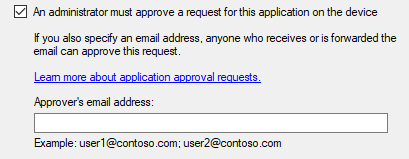
Hey there, when deploying Apps via Configuration-Manger (SCCM) there is an Option "An Administrator must approve a request for this application on the Device" where you also got an option for Mail Notification to Approvers: Do you know if there is an equivalent Feature when assigning Intune-Apps to Users? Or is there an alternative Method to reach the same result? Company Portal can handle Approvals from Configuration Manger: Wondering if there is a "Intune-Native" way? Looking forward to your answers.Solved425Views1like7CommentsManaging shared desktops using Intune
Hi All, We have a requirement to manage shared desktops using Intune. I know Intune has a user centric approach with device assigned primary user etc. Since these are shared devices, could you please shed some lights if you have done similar thing.Solved411Views0likes5CommentsBitlocker PIN
Hello, I would like to know what your Bitlocker PIN policies are and how you approach them. Do you use a PIN that consists only of numbers, or a PIN that allows the use of characters such as upper and lower case letters, symbols, numbers, and spaces? I am asking this from the perspective of “user acceptance,” but also as an additional layer of device security.Solved474Views0likes4CommentsBest Approach for Managing Microsoft 365 Apps Policies in Intune
Hi All, Our company is currently operating in a Hybrid Active Directory (AD) environment, with all policies being deployed via Group Policy Objects (GPOs). We have GPOs in place for Microsoft Office and Outlook, and we are planning to transition these to Microsoft Intune. My question is: What is the recommended approach for creating and managing policies related to Office 365 and Outlook (Microsoft 365 Apps) in Intune? Specifically, would it be better to implement these settings using Configuration Profiles, or should we use Policies for Microsoft 365 Apps within Intune? I’d appreciate guidance on the best practice for this migration. Thanks, DilanSolved






Events

Let's talk about what actually works. Each month, Unpacking Endpoint Management brings you practical tips, proven strategies, and honest discussions. Our goal? To help you optimize and simplify the w...
Thursday, Jul 30, 2026, 09:00 AM PDTOnline
0likes
36Attendees
0Comments
Recent Blogs
- 7 MIN READBy: Carol Burns - Principal Product Manager | Microsoft Intune and Sucheta Gawade, Microsoft MVP (Azure & Security / Intune) Practitioner perspective from Sucheta Gawade, Microsoft MVP (Azure & Sec...Jul 01, 2026432Views2likes1Comment
- Learn how customers are using Intune to protect endpoints, empower IT and optimize with AI.Jul 01, 202611KViews1like2Comments