Recent Discussions

Allow Teams desktop on unmanaged Windows, but block Outlook desktop using Entra conditional access
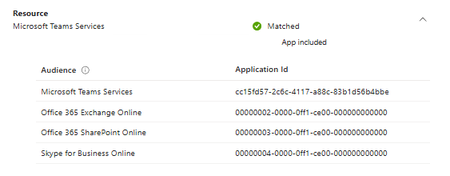
I need to allow Teams to run on non Intuned devices but not allow Outlook desktop to be available I am looking for a solution for Windows and Mac and ideally linux as well The issue is Ig I have Office 365 Exchange Online as my resource, it blocks Microsoft Team Services as well How can I fix this59Views1like1Comment
Intune Platform Scripts never target devices (0 targeted devices) despite healthy Intune environment
Hi everyone, I'm hoping someone has seen this before because I've exhausted most of the obvious troubleshooting. Environment Microsoft 365 Business Premium Windows 11 Pro Microsoft Intune Microsoft Entra ID Joined devices Intune Management Extension (IME) installed and healthy The Issue Platform Scripts never target any devices. Regardless of the script, assignment or device, the script always remains at: 0 Devices 0 Succeeded 0 Errors The device never appears under Device Status. What works The Intune environment is otherwise functioning normally. Configuration Profiles deploy successfully. Settings Catalog policies apply successfully. BitLocker policies apply. Windows Firewall policies apply. Windows LAPS is working. Win32 applications deploy successfully Devices are Entra Joined and managed by Intune. What I've tested To eliminate variables I created: Created a brand new PowerShell script that simply creates a text file. Created a brand new assigned Security Group containing a single Windows 11 device. Assigned only that Security Group to the Platform Script. The result is still: 0 Devices 0 Succeeded 0 Errors Device checks completed On the client: dsregcmd /status shows AzureAdJoined = YES. Intune Management Extension service is running. Win32 apps are deploying correctly. Intune Management Extension logs appear healthy. AgentExecutor.log contains WinGet application activity but no evidence of any Platform Script ever being downloaded or executed. The IntuneManagementExtension registry contains SideCarPolicies but there is no evidence of any PowerShell script policy being received. Additional observations I reproduced the issue on two separate Windows 11 devices. I reproduced the issue using both dynamic and assigned device groups. I reproduced the issue using different PowerShell scripts. This makes me believe the issue is not device specific. Question Has anyone seen Platform Scripts remain permanently at 0 targeted devices despite Intune otherwise functioning normally? Is there a known tenant-side issue, prerequisite or licensing requirement that would prevent Platform Scripts from ever targeting devices while Win32 apps and Configuration Profiles continue to work? Any suggestions would be appreciated.61Views0likes1Comment
Secure Score does not reflect settings in ASR rule
Hi, Our secure score ist pretty low, so I followed recommendations from M365 Security Center. The setting reside in one ASR rule, but Secure Score still does not reflect my settings still stating 0% achievement. I waited nearly a week. Defender is not the primary AV, but on other tenants the same setting led to success. Any ideas?49Views0likes4Comments
Intune Autopatch Reports - Expected Behavior
I utilize the Intune Autopatch Reports for Quality Updates to monitor the deployment of updates across our environment. We currently have a group of devices which have a 30-day deferral period due to the compliance/testing policy we have to follow. My Understanding is that the "Quality Update Status" Report will determine if the device is Up-to-Date based on if the device has the update that has been released to it but I am finding that all devices are marked as Not Up-to-Date even with the 2026.05 QU installed as the 2026.06 QU is not available for the devices. I am wondering if this is expected behavior or if this changed because before the changes to the reports in May (2026.05) it was showing correctly Thanks!98Views0likes3CommentsMicrosoft #IntuneForMSPs resource guide
Welcome to your home for all things #IntuneForMSPs! Our goal is to help you grow your Microsoft Managed Service Provider (MSP) business by combining productivity apps, intelligent cloud services, and the world-class security of Microsoft 365 with the multi-tenant management capabilities of our partners. Navigate to: Guidance and tutorials | Marketing and business development | Multi-tenant management partners | Additional resources #IntuneForMSPs community meetups Gain valuable insights from first-hand experiences with configuring and managing customer tenants. Up next: Follow this page for the next batch of #IntuneForMSP Community Meetups. We will reconvene in September. On demand: #IntuneForMSPs Community Meetup: June edition Hands on with device configuration and policy From box to business‑ready with Windows Autopilot Advanced automation and PowerShell for Intune Planning your customers' Intune migration Getting started with Microsoft #IntuneForMSPs Guidance and tutorials We hear from many MSPs that time for learning is limited. To help you ramp up quickly, we’ve pulled together ready-to-use decks, videos, and interactive demos you can follow step-by-step for the most common scenarios. A great place to begin is the checklist available by downloading Enhancing Security with Microsoft 365 Business: A Hands-on, Effective Guide. Microsoft 365 Business Premium deployment best practices Download PowerPoint decks that build on the videos listed below. They go deeper with additional guidance, context, and tips you can apply in customer environments. Identity and access controls (14.81 MB) Device enrollment (15.92 MB) Email and app protection (38.84 MB) Device security (17.89 MB) Data security (36.49 MB) Videos and demos ▶️ Achieve greater security and productivity with Microsoft Intune and Microsoft 365 - Follow along with each step of the checklist with complementary videos. Watch on one screen and follow along in your own tenant on the other. We’ll keep expanding this playlist with new content that goes beyond the checklist, so follow along on our social channels for the latest updates. 🖱️ Microsoft Intune guided demos - Learn how to configure app protection policies and Conditional Access, update Windows from the cloud, manage corporate devices, deploy and manage line of business (LOB) apps, enable Universal Print, protect corporate resources on personal-owned devices, utilize Windows Autopilot for new device delivery, and reduce update bandwidth consumption. Marketing and business development Step 1: Join Microsoft Partner programs AI Business Solutions for Partners Microsoft Security Partners Step 2: Join the Partner Skilling Hub Go to the Microsoft Partner Skilling Hub and create your free account. Select solution areas of interest. (Hint: Intune content: AI Business Solutions, Security) Explore these recommended modules: Implement with impact: Endpoint management with Microsoft Intune Implement with impact: Implement identity and access management with Microsoft Entra Step 3: Download turnkey campaign assets "Protect my devices" campaign-in-a-box (119.20 MB) Multi-tenant management partners Microsoft Intune is proud to collaborate with leading global providers of multi-tenant Intune management solutions. These companies are building innovative capabilities on top of Microsoft Intune, Microsoft Security solutions, and the broader Microsoft 365 platform. Their companion solutions empower you to: Centrally view and manage all customer tenants and action items through a unified partner dashboard. Take action across environments, leveraging Intune for device management, cloud security, and compliance. Standardize security settings, automate onboarding, and ensure policy consistency at scale-no more repetitive, manual tasks or risky policy drift. Want an introduction to multi-tenant management? ▶️ Watch this video from Jonathan Edwards. AvePoint is the global leader in data protection, unifying data security, governance, and resilience to provide a trusted foundation for AI. More than 28,000 customers rely on the AvePoint Confidence Platform to secure, govern, and rapidly recover data across multi‑cloud environments. Through AvePoint Confidence Platform: Elements Edition, AvePoint extends Microsoft Intune with secured multi‑tenant automation, lifecycle management, and centralized visibility—enabling partners to scale Intune delivery profitably and consistently across customers. With a single platform for governance, lifecycle control, and recovery, partners reduce operational overhead, prevent sprawl, and accelerate Copilot readiness. AvePoint supports a global partner ecosystem of 6,000 MSPs, VARs, and SIs, with solutions available in over 100 cloud marketplaces. CyberDrain CIPP provides MSPs with a centralized, multi-tenant management platform for Microsoft 365. It enables partners to securely manage tenants at scale, automate common administrative tasks, enforce standards across environments, and gain deep visibility into tenant security and configuration. With built-in automation, governance controls, and extensibility, CIPP reduces reliance on custom scripts and manual processes. MSPs can standardize operations, streamline user and tenant management, monitor security posture, and respond quickly to issues across all customers from a single interface. CIPP is supported by one of the largest and most active MSP communities in the Microsoft ecosystem, with thousands of partners contributing feedback, automation ideas, and best practices. As one of the most widely adopted platforms for Microsoft 365 multi-tenant management, CyberDrain CIPP continues to evolve rapidly to meet the needs of modern MSPs. inforcer empowers MSPs to standardize Microsoft 365 and Intune policies across all tenants, automate environment configuration, monitor compliance in real time, and reduce risk through policy drift detection. Its reporting and automation features free teams from manual, error-prone scripting and help deliver consistent, secure customer experiences, setting MSPs up to deliver advanced AI services to their customers. Nerdio brings deep automation and analytics to Intune, Windows 365, Azure Virtual Desktop, and the broader Microsoft cloud. MSPs benefit from multi-tenant dashboards, global policy insights, role-based access, centralized app deployment, and automatic policy versioning with rollback and drift correction. Nerdio’s tooling is designed specifically for MSPs and scales from small teams to large enterprise portfolios. Tenant Manager helps MSPs run Microsoft Intune across multiple customer tenants with consistency and control. MSP teams can standardize policies, manage applications and devices across environments, monitor configuration drift, perform device actions across their entire estate, and maintain cross-tenant visibility through reporting with scheduled email delivery and customer-facing report access, from a single platform. The platform runs entirely on Microsoft Azure with region-selectable deployment for your data protection requirements. It includes CIS certified security baselines, Secure Score monitoring, and license harvesting, helping MSPs deliver secure, repeatable Intune services as their customer portfolios grow, even without in-depth Intune knowledge . Additional resources Microsoft 365 Blog: small and medium business content Microsoft 365 Partner on LinkedIn Microsoft Intune Blog: MVP community content12KViews9likes5CommentsIntune application migration & app management
Migrating applications from Configuration Manager and other on-prem solutions to Microsoft Intune cloud native remains a challenging and time consuming undertaking, especially when dealing with complex line-of-business, legacy, and custom home-grown applications. Some organizations pursuing a full cloud-native management vision are encountering blockers related to application compatibility, re-packaging, and the scale of existing app estates - all while trying to maintain business continuity, device compliance, and preparing for the AI and Copilot era. Start here Read Face the future today by moving your application to cloud native Bookmark the Microsoft Intune planning guide Navigate to: Why app migration matters | Application packaging partners | Frequently asked questions Why app packaging matters Centralizing application management in Intune can deliver operational benefits such as unified enforcement and improved security posture—while supporting broader modernization goals. Common blockers that slow cloud-native adoption include: App compatibility and dependency complexity Manual repackaging effort at scale Risk of disruption during cutover Application packaging partners To address the complex realities of app migration, the Microsoft partner ecosystem has stepped up with specialized offers designed to reduce risk and accelerate cloud adoption. As part of this initiative our Microsoft partners Rimo3 and Robopack are offering no-cost, time-limited app migration service to all Intune customers who are looking to move from Configuration Manager to Intune. These services can help IT teams automate assessment, package conversion, and remediation for various app types, helping organizations realize the full value of Intune faster and with less disruption. Note: The app migration services listed on this page are offered directly by partners and are subject to their terms. Microsoft makes no guarantees or commitments regarding availability or outcome. Rimo3 helps IT professionals modernize, migrate, and manage applications at enterprise scale. The platform eliminates manual effort by automating packaging, validation, and patch testing. With patented IP, Rimo3 ensures every app is compatible, secure, and visible for dependencies and update readiness before deployment. Automated, unattended workflows reduce migration timelines from months to days, while contextual patch validation minimizes production risk. Rimo3 keeps environments evergreen with zero-touch app management and enhances Microsoft Intune with bulk operations, advanced controls, and unified reporting. Robopack is a cloud-native Intune app lifecycle platform that lets you package, deploy, and keep third-party apps updated, across one or many tenants, with phased control and PowerShell App Deployment Toolkit (PSADT)-based customization. Start with a self-service migration readiness report, mapped to the library of 41,000 pre-packaged, fully documented apps ready to go, or upload your own apps to be analysed and converted. Robopack Radar discovers apps installed across your estate, allowing you to quickly migrate to Intune and uncover Shadow IT. Frequently asked questions Q: Is this a Microsoft-managed service? A: No. Partner offers are provided directly by partners and subject to partner terms; Microsoft makes no guarantees regarding availability or outcomes. Q: What kinds of apps can these paths help with? A: The published focus is on helping migrations from Conifguration Manager to Intune, including complex legacy and line-of-business apps. Q: Where do I start if I’m early in planning? A: Start with the Intune Planning Guide and Migration Guide.521Views1like1Comment
enrolling in Intune MacBook Pro with an M5 Pro
Hi everyone We have tested the Wi-Fi and ethernet profile without success with Apple businesses manager. The Wi-Fi and the ethernet connection itself works, but the enrollment process into Intune does not complete successfully. At this stage, we cannot sign in, and neither the Wi-Fi nor the Ethernet connection appears to be working. The device is a 14-inch MacBook Pro with an M5 Pro chip, running macOS 26.5.1 the device connects to the server, the settings begin to apply, but the process suddenly stops, and we are then unable to log in. These are steps followed : Synchronize the device from Apple Business Manager to Intune. Assign the enrollment profile to the device. Perform a device wipe/reset. Start Automated Device Enrollment (ADE). Complete the device setup and user sign-in. The device successfully enrolls into Intune. Intune begins deploying configuration profiles, compliance policies, security policies, and applications. During the policy application process, Wi-Fi connectivity stops responding. The device loses network connectivity and cannot continue synchronizing policies. We are unable to sign in because the enrolment process has not been finalized. As a result, we have to wipe the Mac and start the process again each time. We have disabled some policies, but we are still experiencing the same issue. Have anyone experienced any issues like that ? Regards,53Views1like0CommentsCanReset value flipping on cloud only devices
Hello, I have a problem with cloud only Windows 11 devices configured with passwordless policy. I have noticed that when you run dsregcmd /status command, CanReset value under User State is flipping between "No" and "DestructiveAndNonDestructive". When it's latter, everything works fine, users can start wizard for facial recognition or make PIN changes under Sign In options in Windows. But when it flips to No, everything is blocked. It seems to happen randomly, you can leave device untouched for few hours and just check dcregcmd and the value will change. CanReset is the only value that changes in the dsregcmd report. It happens for different devices located on different networks. Also, I have disabled web gateway completely for one device just for testing but no change. Any suggestions would be welcome.55Views1like1Comment
Windows App Update Notification
Hi everyone, We have deployed the Windows App for a client. Currently, when an update is available, users are seeing an in app banner that says: "Click here to update the app. Meanwhile you can use the app." If the user clicks it, the update finishes successfully. However, our organization requires a completely hands off, automated update process. We do not want end-users to have to interact with a notification or manually click a button to keep the app up to date. Is there a specific Group Policy, registry key or Intune configuration that completely suppresses this in app notification and forces the MSIX package to install silently in the background when the app or machine is idle? Any advice on how to bypass this "Notification" behavior and enforce touchless updates enterprise wide would be greatly appreciated. Thanks!111Views1like1CommentIntune Install Printer Driver
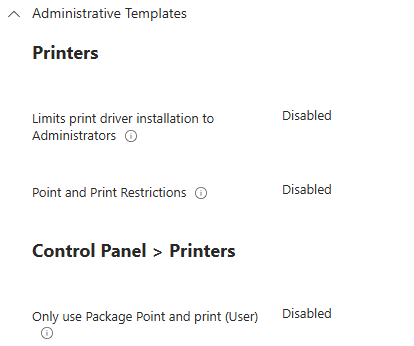
I am trying to install a Printer driver via a Win32app using System to install. Have set configuration as below: Its a simple powershell script which runs perfectly when installing on a device as an administrator. $printdriver = "PCL6 V4 Driver for Universal Print" C:\Windows\system32\pnputil.exe /add-driver "r4600.inf" /install Add-PrinterDriver -name $printdriver However installing it via Intune I get an event id 215 with failed error code 0x0 HRESULT 0x80070705 on the device. Any help appreciated.82Views1like1CommentMoving from Windows Server 2022 to 2025
And by moving I mean stand up a completely fresh Windows Server 2025 as the old server was patched for one too many times. (painfully slow and stuffy) What I figured out so far, is to install Windows Server 2025, and the exact same SQL Server 1:1 to the build # install ODBC v18 update current MECM to the latest and its OS (update other Microsoft products with windows update) go to sites / maintenance tasks and do an export robocopy the "software" folder as is Now next would be to shut down old MECM server, rename new to the old's hostname, and start the "recover site" What my concern is as always "What if" can I at this point or once I set up the new MECM up and running go back by shutting down this new server, and powering on the old (leave and rejoin domain for trust) and go back to business as usual? That if anything goes sideways, or things won't get better. By that i mean speeding up things which is the main reason of the 'move' which now I do not wish to troubleshoot. Our environment, database size is 7.9 Gb, which is far from being big. The reason must be the update over upgrade over update over 15 years or more no and never brand new OS. I can take care of the "how to" I know exactly how to recover a site 'on paper'. I just want to know there's no such thing as point of no return. (when not making a single change in the Db/console) I also understand I should not make any changes in the Db (console) while testing, which is no problem at all. All we use MECM for is staging computers. Nothing else really. Like nothing else at all. PXE. The end. Thanks for the inputs. (I hope I picked the right tags)69Views0likes1Comment
Intune macOS ADE: support for minimum macOS version enforcement before Platform SSO registration
Hi everyone, I would like to ask whether Microsoft Intune has any supported method, roadmap, or recommended workaround for enforcing a minimum or target macOS version during Automated Device Enrollment before Setup Assistant continues. The scenario is macOS zero-touch deployment with Intune, Automated Device Enrollment, Setup Assistant with modern authentication, Await final configuration, and Platform SSO registration during ADE. Platform SSO registration during Setup Assistant depends on newer macOS capabilities. In addition, some macOS deployment scenarios, such as Platform SSO password sync and macOS LAPS, may require or strongly benefit from a specific macOS version being installed before the user completes enrollment. Today, Intune can manage macOS software updates after enrollment using Declarative Device Management software update policies. However, that does not fully solve the issue where the Mac starts ADE on an older macOS version. In that case, the device may begin Setup Assistant and Platform SSO registration before the required macOS version is installed. What I am looking for is an Intune-native equivalent of enforcing a minimum or target macOS version during ADE, before Setup Assistant continues. Ideally, the macOS ADE enrollment profile in Intune would support options such as: - Minimum required macOS version - Target specific macOS version - Target specific build, if supported - Latest eligible macOS version for the device - Apply the OS update before Platform SSO registration and final configuration - Reporting in Intune showing whether the ADE OS update was required, started, completed, skipped, or failed Without this capability, organizations using Intune-only macOS deployment may still need manual IT staging or macOS restore/update before handing devices to users. This weakens the zero-touch deployment model, especially when adopting Platform SSO registration during Automated Device Enrollment. 1. Is there currently any supported way in Intune to enforce a minimum or target macOS version during ADE before Setup Assistant continues? 2. Is this capability on the Intune roadmap? 3. Are there any recommended workarounds for organizations deploying Platform SSO registration during ADE where a specific macOS version is required? Thanks in advance for any guidance from the Intune team or the community.8 hour wait time for Intune when "Configuring team site libraries to sync automatically"
I hate this, we dont want to wait for this long to find out it doesnt work because we forgot a curly bracket!!!!!!!!!!!!!!!!!!!!!!!!!!!!!!!!!!! Fix this or give us a solution to manually push this config policy out so we can see it working immediately!!!!!!!!!!!!!!!!!!!!!!!!!!!!!!!!!!!!!!!!!!!!!!!!!! More exclamation marks!!!!!!!!!!!!!!!!!!!!!!!!!!!!!! Thanks!82Views0likes1CommentIntune App inventory Graph
Hi All, I've enabled the configuration profile to receive app inventory data in Intune. In the GUI the data I can view the data just fine, but I would like to use Graph to automate this data and create custom reports. When I use the following https://graph.microsoft.com/beta/deviceManagement/managedDevices/[device-id]/deviceInventories('ApplicationProperties') I get an error: "Forbidden - 403 - 199 ms Either the signed-in user does not have sufficient privileges, or you need to consent to one of the permissions on the Modify permissions tab" even though the docs I can find about permissions are OK.197Views1like1CommentEdge displays a splash screen saying ‘Sign in to sync your data’
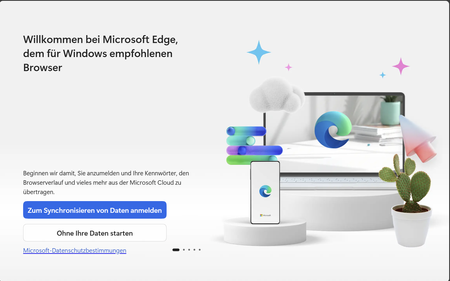
Hello When the user logs in to a device for the first time and launches Edge, the following splash screen appears, even though we have created the Intune configuration below, which is intended to prevent this. We have following Intune configuration: Why does the splash screen still appear?138Views0likes3CommentsBroken functionality of macOSWiFiConfiguration policies
I'm having trouble accessing macOSWiFiConfiguration policies. They are completely inaccessible via the Intune admin portal (no actual data is displayed) and the Microsoft Graph API. When using Graph (/beta/deviceManagement/deviceConfigurations or with policyId) an InternalServerError is returned mid-response, resulting in a truncated and malformed body. This error indicates that the 'wifiRequirePhysicalMacAddressEnabled' property (type Edm.Boolean, Nullable = False) has a null value stored in the back end. The policy also fails to load in the Intune which I suspect is caused by the same underlying issue. ERROR DETAILS: Endpoint: GET https://graph.microsoft.com/beta/deviceManagement/deviceConfigurations/{policy-id} Error code: InternalServerError Error message: "The property 'wifiRequirePhysicalMacAddressEnabled[Nullable=False]' of type 'Edm.Boolean' has a null value, which is not allowed." STEPS TO REPRODUCE: 1. Create a macOSWiFiConfiguration policy in the Intune admin portal. Additional note: front end will attempt to create the policy multiple times (around 20), even though the back end responds with a 201 HTTP code. 2. Try to GET the policy via Graph API (returns InternalServerError with malformed JSON body) or retrieve it using the WebUI (no data is shown). EXPECTED BEHAVIOR: The policy should be retrievable via Graph API and visible in the Intune admin portal. The property wifiRequirePhysicalMacAddressEnabled should hold a valid boolean value (true or false). ACTUAL BEHAVIOR: Failed to retrieve policy through Graph API and Intune WebUI. Has anyone else encountered this issue? Does anyone know how can I report this directly to Microsoft? All the options I have found lead me to AI chatbots which unfortunately are not helpful at all. Thank you.79Views0likes1CommentUpdates Not Installing by Install Deadline
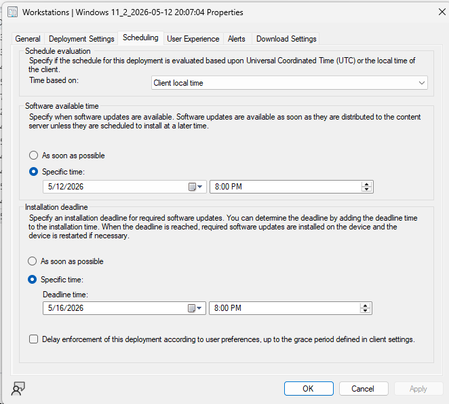
Hello all! We have an organization with about 12,000 Windows 11 Workstations. I'm noticing that even though install deadline is set, and updates are allowed to be installed before install deadline hits, we are noticing in Software Center that updates say "will install after _____" (deadline date). How can I change this? I want updates to install during the maintenance window as well as a reboot. What am I missing? Connor92Views0likes2CommentsYellowKey BitLocker Exploit
Hi All I hope you are well. Anyway, the YellowKey BitLocker Exploit has came to my attention. We already have automatic / silent BitLocker encryption enabled. So, is there anything we should be doing (preferably via Intune) to mitigate this new exploit? SK9.9KViews2likes14CommentsRetrieving the “Device inventory” of iOS devices via the Graph API
We use Microsoft Intune to manage our iOS mobile devices. To achieve the highest possible level of efficiency, we use PowerShell as a supplementary tool for administration. Since our devices may contain two SIM cards, it is important for us to be able to read this information in order to perform relevant processes (e.g., adding phone numbers to address books). In general, it would be desirable to be able to read the information from the “Device Inventory” of iOS devices. For the reasons mentioned above, we would like this information to be made available via the Graph API. Alternatively, there should be a way to provide this information for all devices in a single report.127Views0likes2Comments




Events
Let's talk about what actually works. Each month, Unpacking Endpoint Management brings you practical tips, proven strategies, and honest discussions. Our goal? To help you optimize and simplify the w...
Thursday, Jul 30, 2026, 09:00 AM PDTOnline
0likes
36Attendees
0Comments
Recent Blogs
- 7 MIN READBy: Carol Burns - Principal Product Manager | Microsoft Intune and Sucheta Gawade, Microsoft MVP (Azure & Security / Intune) Practitioner perspective from Sucheta Gawade, Microsoft MVP (Azure & Sec...Jul 01, 2026386Views2likes1Comment
- Learn how customers are using Intune to protect endpoints, empower IT and optimize with AI.Jul 01, 202610KViews1like2Comments