autopatch
4 Topics
Intune Autopatch Reports - Expected Behavior
I utilize the Intune Autopatch Reports for Quality Updates to monitor the deployment of updates across our environment. We currently have a group of devices which have a 30-day deferral period due to the compliance/testing policy we have to follow. My Understanding is that the "Quality Update Status" Report will determine if the device is Up-to-Date based on if the device has the update that has been released to it but I am finding that all devices are marked as Not Up-to-Date even with the 2026.05 QU installed as the 2026.06 QU is not available for the devices. I am wondering if this is expected behavior or if this changed because before the changes to the reports in May (2026.05) it was showing correctly Thanks!435Views0likes4CommentsAutopatch - Microsoft 365 Apps Update Rings
I’m trying to understand how the UpdateDeferredVersions registry value is updated in an Intune Autopatch scenario, specifically the version and FileTime values. Registry path: HKLM\SOFTWARE\Microsoft\Office\ClickToRun\Updates Example value: UpdateDeferredVersions = 16.0.19725.20170:13420719560293 | 16.0.19822.20180:13421142577563 I’ve observed the following and would appreciate any clarification: When I modify deadline or deferral settings via Autopatch (policy changes), the FileTime value does not update. Is there a delay or specific trigger (e.g., policy refresh, scheduled task, CDN sync) that updates this FileTime? How exactly is this FileTime calculated? Is it tied to when the build was released, assigned, or when the policy was applied? Is there any supported way to force or influence this FileTime update? Or is this value simply tracking when the build cap was issued, with deferral logic calculated relative to that timestamp? Additionally, I’ve noticed that updates only seem to apply when the FileTime is approximately 4 days behind the current date, is this expected behavior with Autopatch deferral logic? I was able to successfully test this updating FileTime 4 days behind ((Get-Date).AddDays(-4)).ToFileTime(). Any insights into how this mechanism works under the hood (especially with Click-to-Run + Autopatch interaction) would be really helpful. Below is Autopatch group settings for Microsoft 365 update rings that we set in our environment: Test - Deferral 0 - Deadline 0 Ring 1 - Deferral 1 - Deadline 0 Ring 2 - Deferral 2 - Deadline 0 Last - Deferral 4 - Deadline 1 Thanks in advance!299Views1like4CommentsWill Intune device-only subscription get additional value in FY27
Will the Intune device-only subscription (Microsoft Intune announces device-only subscription for shared resources | Microsoft Community Hub) get the additional features which Intune P1 will get in FY27 (Microsoft 365 adds advanced Microsoft Intune solutions at scale - Microsoft Intune Blog), Intune Remote Help, Intune Advanced Analytics and Intune P2? This would have a huge impact of our planning how to manage special purpose devices in production environments without any user affinity. Deploying security and configuration settings, Windows Autopilot for Windows IoT Enterprise LTSC kiosk deployment, Windows Autopatch (servicing), Remote Help and FOTA for Zebra devices would be drivers to add these production devices to Intune.154Views0likes0Comments
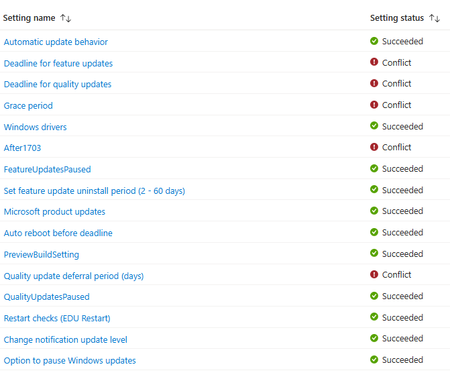
Autopatch reporting Errors and Conflicts, but I can't find them...
Greetings all. I am fairly new to Intune. I setup Autopatch to do Windows Updates (Quality & Features). I was looking over some of the stats today and noticed that some computers (<10%) have issues. When I click on one of the computers I get a list of Profile Settings... If I click on any of these (even the success, I get Not Found... How do I figure out what the error or conflict is so I can correct it? I thought I might have had another Windows Update policy (Non-Autopatch), but I deleted it a while back when I switched to Autopatch. Thanks in advance for your time. J320Views0likes1Comment