Recent Discussions

Microsoft's Copilot: A Frustrating Flop in AI-Powered Productivity
Microsoft's Copilot was supposed to be the game-changer in productivity, but it's quickly proving to be a massive disappointment. The idea was simple: integrate AI directly into Word, Excel, PowerPoint, and other Office tools to make our lives easier. But when it comes to actually performing specific functions, Copilot falls flat. Here’s the problem: when you ask Copilot to alter a document, modify an Excel file, or adjust a PowerPoint presentation, it’s practically useless. Instead of performing the tasks as requested, it often leaves you hanging with vague suggestions or instructions. Users don't want to be told how to perform a task—they want it done. This is what an AI assistant should do: execute commands efficiently, not just offer advice. What makes this even more frustrating is that other AI tools, like ChatGPT, can handle these tasks effortlessly. When you ask ChatGPT to perform a specific function, it does so without hesitation. It’s able to understand the request and deliver exactly what’s needed. But Copilot? It struggles with the basics, and that’s unacceptable, especially from a company like Microsoft. It’s frankly embarrassing that Microsoft can’t get this right. The whole point of integrating AI into these tools was to streamline workflows and boost productivity. But if Copilot can’t even manage simple tasks like formatting a document or adjusting a spreadsheet, then what’s the point? Users don’t need another tool that tells them how to do something—they need one that does it for them. Microsoft, you’ve missed the mark with Copilot. It's not just a minor inconvenience; it's a serious flaw that undermines the value of your Office suite. When other AI tools can easily accomplish what Copilot can't, it's time to reevaluate. Users expect more, and frankly, they deserve more for their investment. What’s been your experience with Copilot? Is anyone else finding it as frustrating as I am? Let’s talk about it.33KViews67likes95Comments
Copilot in Word can't read chat attachments; Word for web file picker shows “no token obtained”
Summary of the issue I am seeing a persistent failure with Copilot attachments specifically inside Microsoft Word. Copilot in Word desktop and Word for the web can recognize an uploaded chat attachment by filename or OneDrive URL, but it cannot read the file contents. It reports the uploaded file as empty, corrupted, or in a format it cannot process. The same files are successfully read by standalone Microsoft 365 Copilot Chat using the same Microsoft account, and file uploads also work in Excel Copilot and PowerPoint Copilot. Failure started 10 days ago, with no obvious changes in settings on my end. The most useful diagnostic clue so far is that Word for the web’s Copilot attachment/file-picker path has also failed before any file was selected, showing “Something went wrong, please try again or refresh the page, no token obtained.” In Chrome, Word for the web produced a SharePoint-style error page with a correlation ID. This makes the issue look less like a bad file or local Word installation problem and more like a Word Copilot attachment-picker, OneDrive/SharePoint authorization-token, or file-handoff problem. Environment and scope Windows 11, Pro. Microsoft Word desktop: issue reproduced after updating Office and Windows. Word for the web: issue reproduced in Edge, Edge InPrivate, and Chrome. Standalone Microsoft 365 Copilot Chat / copilot.microsoft.com / m365.cloud.microsoft/chat: uploaded files can be read successfully with the same Microsoft account. Excel Copilot and PowerPoint Copilot: uploaded files work. OneDrive in Chrome: upload/download and file access work normally with the same account. Same Microsoft account used throughout. File types tested include tiny TXT files, PDFs, and DOCX files, including a complex DOCX. Copilot in Word can read the active Word document normally; the failure is limited to files uploaded as Copilot chat attachments inside Word. Observed behavior In Word desktop, Copilot chat accepts or recognizes the attachment metadata, including filename and sometimes a OneDrive URL, but when asked to read or summarize the file it says the file appears to be empty, corrupted, or in a format it cannot process. This happens even with a very small TXT test file. In Word for the web, the same general failure occurs. In one clean test, I created a brand-new blank Word document in Word for the web, opened Copilot, attached a tiny TXT file, and asked what the uploaded TXT file said. Copilot responded: “The uploaded file ingestion_test_731_1915.txt appears to be empty, corrupted, or in a format I can’t process, so I can’t read any text from it.” In another Word for the web test, clicking Copilot’s “+” attachment button and choosing either “My Files” or “Recent” opened a mostly blank window saying: “Something went wrong, please try again or refresh the page, no token obtained.” This occurred before any file was selected. In Chrome, Word for the web produced this error when trying to use the Copilot attachment flow: “Sorry, something went wrong. An unexpected error has occurred. Technical Details: Troubleshoot issues with Microsoft SharePoint Foundation.” The error included Correlation ID 64062ea2-3083-8000-a0f7-fbf4f6bb617d and Date/Time 8/4/2026 12:21:38 PM. Evidence matrix Test Result Standalone Microsoft 365 Copilot Chat / copilot.microsoft.com DOCX, PDF, and TXT uploads can be read successfully with the same account. OneDrive in Chrome Upload, download, and file access work normally. Excel Copilot Uploaded files work. PowerPoint Copilot Uploaded files work. Word desktop Copilot Attachments are recognized but reported as empty, corrupted, or unprocessable. Word for the web in Edge/InPrivate Tiny TXT attachment reported as empty, corrupted, or unprocessable. Word for the web attachment picker “No token obtained” message before file selection. Word for the web in Chrome SharePoint Foundation-style error with correlation ID 64062ea2-3083-8000-a0f7-fbf4f6bb617d. Word Copilot reading the active document Works normally. Troubleshooting already tried Updated Microsoft Office / Microsoft 365 desktop apps. Updated Windows. Restarted Word multiple times. Restarted the computer multiple times. Signed out and signed back in. Confirmed that the same Microsoft account is being used; there is only one Microsoft account involved. Toggled connected experiences off and back on, including restarts between changes. Started Word in Safe Mode. In Safe Mode, Copilot chat opened but did not activate properly; the Copilot pane appeared to cycle in the background and sub-windows were blank/unusable. Tested with a brand-new blank Word document in Word for the web. Tested in Edge, Edge InPrivate, and Chrome. Tested with very small TXT files as well as PDF and DOCX files. Confirmed OneDrive itself works normally in Chrome by uploading and accessing files successfully. Confirmed standalone Copilot and Excel/PowerPoint Copilot can process uploaded files successfully. Why this does not look like a local file or browser problem The same uploaded files work in standalone Microsoft 365 Copilot Chat, and OneDrive upload/download works normally. The issue also reproduces across Word desktop and Word for the web, across multiple browsers, and with a brand-new blank Word document. Because Word Copilot can read the active document but cannot acquire or process uploaded chat attachments, the failure appears isolated to the Word-integrated Copilot attachment picker, authorization-token acquisition, or OneDrive/SharePoint file-handoff path. Most likely failure area My current working theory is that Word-integrated Copilot is failing to obtain or pass the required SharePoint/OneDrive authorization token for Copilot chat attachments. The “no token obtained” message and the SharePoint Foundation correlation ID point toward the file-picker or backend handoff path rather than file contents. It may be account-specific, feature-flight/routing-specific, or a Microsoft-side regression affecting Word Copilot attachment handling. Request for help Has anyone seen Word Copilot attachments fail in this way while standalone Copilot, OneDrive, Excel Copilot, and PowerPoint Copilot all still work? Are there known Word Copilot attachment-picker, OneDrive/SharePoint token, or feature-routing issues that can affect only Word-integrated Copilot? If Microsoft support or engineering can trace backend logs, the most relevant correlation ID I have is 64062ea2-3083-8000-a0f7-fbf4f6bb617d from 8/4/2026 at 12:21:38 PM in Word for the web in Chrome. I would especially appreciate suggestions for anything beyond the standard local troubleshooting already tried. At this point, the pattern suggests the next useful step is probably backend investigation of the Word Copilot attachment/file-picker authorization flow rather than more file-format testing or local repair.313Views0likes4Comments
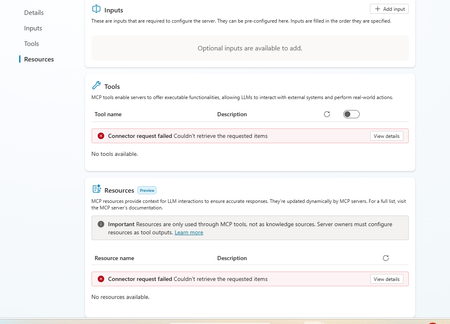
Dataverse mcp is broken in copilot studio
This is really annoying. I am having this experience where dataverse mcp is broken. I recreated the connection and after that the query is returning empty results. Everything was working fine until last week. Is anyone experiencing same problem120Views1like1Comment
Disabling Agent Creation for End Users with Copilot for Microsoft 365
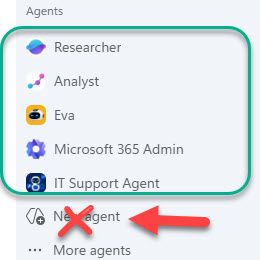
Hello! I am an IT admin at my organization, and we recently rolled out Copilot for Microsoft 365 for all end users. I would like our end users to be able to access agents published by my organization and Microsoft (Analyst, Researcher, etc.) but I do not want them to be able to create agents in Copilot Studio OR Agent Builder. We have disabled Copilot Studio at the license level, but our end users are still able to create agents in the M365 Copilot app with the "New Agent" button. To summarize, I want our users to be able to access Agents created by our organization and Microsoft, but I do not want them to be able to create any agents of their own at this time. Is there a way to do this? Thank you in advance, stevenwagnerHow to Avoid Tasks Copilot "You've reached our weekly Tasks limit"
I’ve been using both Chat‑Copilot (CC) and Tasks‑Copilot (TC) extensively, and I wanted to share a brief summary provided by TC, that may help others understand how each tool works, why TC sometimes stops responding, and how to avoid running into limits. ⭐ 1. Chat‑Copilot and Tasks‑Copilot serve different purposes Chat‑Copilot Real‑time conversational AI Great for brainstorming, drafting, coding, calculations, and iterative design Stateless — each message is processed independently Very stable and rarely gets stuck Tasks‑Copilot Designed for multi‑step workflows Can create and maintain documents Runs long‑lived background tasks Maintains persistent state More powerful for structured work More fragile because it depends on a task‑execution pipeline These two systems are independent. Chat can work perfectly even when TC is frozen. ⭐ 2. Why Tasks‑Copilot hits limits or becomes unresponsive TC can stop responding when: A task runs too long A multi‑step workflow fails mid‑execution The task state becomes corrupted The weekly quota system triggers The backend fails to reset on Friday Too many “pipeline‑style” requests are issued in a short time When this happens, TC may: stop responding entirely ignore all prompts remain stuck across all devices and browsers This is a backend state issue, not a browser or device problem. ⭐ 3. How to avoid triggering TC limits Here are practical ways to keep TC healthy: Use Chat‑Copilot for: brainstorming engineering design calculations drafting text generating diagrams or prompts step‑by‑step reasoning Chat handles these extremely well and never “uses up” TC capacity. Use Tasks‑Copilot only for: creating structured documents maintaining long‑form reports assembling multi‑section deliverables tasks that explicitly require persistent state Avoid these patterns in TC: “Build the entire document end‑to‑end” “Run this whole workflow” “Generate all sections at once” Rapid‑fire edits or repeated task triggers Very large or complex requests Instead, break work into small, single‑action steps. ⭐ 4. When TC gets stuck, what can users do? For consumer Microsoft 365 Personal accounts: There is no user‑accessible reset button Frontline support cannot reset TC’s task state Creating a business account does not fix the issue The only options today are: submit feedback post on the Tech Community wait for the backend to refresh This is a known limitation of the current TC preview. ⭐ 5. What would help users going forward A few improvements would make TC much more reliable: A user‑visible “Reset Task State” button Error messages instead of silent failures More predictable weekly resets Support tools that allow agents to clear stuck task containers647Views0likes1CommentIntermittent Post-Deployment Issues with Copilot Agent Using SharePoint Knowledge Sources
Summary We are testing a Copilot Studio agent following admin approval and installation for a set of users before we launch it to everyone in the organization - the objective being to test out the end user experience and check that everything is working fine. We have encountered several inconsistent behaviours using the agent across both the Copilot app and Microsoft Teams. The issues seem to be resolved after signing out, restarting the application, or signing in again. 📍Looks like a lot of instabilities and poor end user experience with this method & this is blocking us from launching the agent to the organization. Agent Setup Agent built in Copilot Studio & deployed via pipeline (Development > QA > Production) Knowledge source 1: SharePoint connection using Dataverse indexing/synchronisation Knowledge source 2: Live SharePoint connection Tested in the following apps after admin approval/publishing/pinning: Microsoft Copilot app Microsoft Teams Issues observed Agent not visible in Copilot app After agent is approved, installed, shared and pinned (to specific users) from Admin side, the agent is not visible in Copilot app. We gave it over 8 hours after the admin process. Agent appeared after signing out of Copilot app and signing back in again. SharePoint connection consent prompt not displayed Users are expected to receive a prompt with consent to connect to SharePoint (with "Allow" button). What appears is only a message but no card with the "Allow" button. This started working after signing out of Copilot app and signing back in again - so the sign out + sign in had to be done twice Responses not retrieved from Knowledge source 1 In spite of proceeding with the "Allow" prompts, for some users, the responses are coming only from Knowledge source 2 (live connection) & not Knowledge source 1 (connection with dataverse indexing). This is seen both when interacting with the agent in Copilot app and Teams. For some users, this was fixed after signing out and back into the apps Questions Has anyone experienced such instabilities with admin deployment/publishing of agents? If yes, what have you done to sort them out and have you been able to successfully launch agents organization wide with this approach? Does anyone know about known issues/glitches with admin deployment/publishing of agents? We did not see these issues when sharing the agent using Copilot Studio.90Views1like3Comments
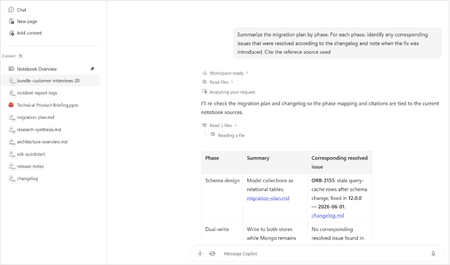
New Copilot update has made a chat inaccessible
I am experiencing an issue with a Copilot chat that appears to have become inaccessible after a recent update where the . This happened since Friday 21st August. I first noticed when all of my chats were migrated except one chat which is no longer visible in my chat history. I am logged into the same Microsoft account for the chat that is missing on which I created it. I have tried searching for it on the desktop app and in the browser with no luck. By some chance I had a Chrome browser tab open from an older Copilot session, which shows the older Copilot UI and the chat is there. The chat is fully functional: I can open it, view its history, send new messages, and receive responses. But this chat only is visible in the old UI and cannot be accessed in the new Copilot experience. The URL cannot be copied and pasted into a new tab because it redirects the copilot.microsoft.com URL to copilot.com and goes to a blank chat. The problem is if I close this browser tab, it will not be visible anymore. I have tried on the desktop app, a fresh browser tab, a fresh browser using incognito mode and even on mobile and on all of those, the new Copilot UI/Experience loads up without the chat I need. As part of my troubleshooting on the old Copilot Experience, I moved the chat to a "Project". But now I am unable to move it out of the "Project" And the new Copilot experience doesn't have a "Projects" section but instead a "Notebooks" section and I can't find it there either. You can see in both screenshots the UI is different. Because the chat now is in a Project it has a URL in the format: https://copilot.microsoft.com/projects/{project-id}/chats/{chat-id} Opening this URL on other devices or browsers redirects to the new Copilot experience and starts a new chat instead of opening the existing Project chat. As mentioned before on the new Copilot experience, this chat cannot be found anywhere else, even in the list "Chats". I can confirm that this is the same Microsoft account since my other chats have synced correctly. I have tested the URL on other browsers too with the redirect issue. The Project chat remains accessible and functional only within the old Copilot session. The chat I need contains an active, ongoing project. Although it remains accessible in the current browser tab, I have no reliable way to reopen it elsewhere, and I am concerned that if the session is lost or if I have to restart my browser or PC, I may permanently lose access to the Project chat and its accumulated context. Could you please investigate whether this Project chat is associated with an older Copilot experience, a migration issue, or a synchronisation problem between Project chats and the newer Copilot interface? Thanks, J10Views0likes0Comments
Agent response duplicated in email
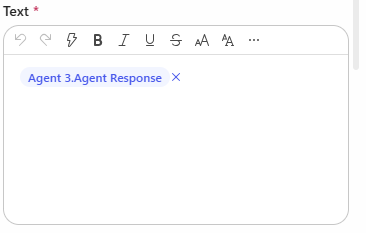
Hi, I have created a Copilot Studio Flow which has 3 agents. 2 agents do some research in parallel, I catch the results in 2 different string variables and hand the variables over to a third agent. The third agent should merge both variables, format them and hand them over to "Send Email". In the email body I add the output of agent 3. The workflow itself works. But I always have the complete email body text twice in the email received by the recipients. Where is the duplicate of the agent output coming from? I have this issue also when I add the agent response of agent 1 and agent 2 directly to the "send email" node. Does anyone have an idea? Would be great to get feedback. Appreciate it. Thanks!159Views0likes7CommentsCopilot Studio agents problems connecting to Sharepoint knowledge source
Hello, Since last week users in my tenant are experimenting issues regarding the connection between copilot studio agents and Sharepoint. The agents are not able to extract information from Sharepoint sites, printing there is not information in the Sharepoint site regarding the user's question when that information is in Sharepoint. These agents used to work well till last week. Does have been any update in Microsoft 365 services that can be affecting these agents ability to retrieve information from Sharepoint?1.1KViews1like17Comments
Integrating Copilot Studio Chatbot with Power BI Semantic Models for Natural Language KPI Queries
I am developing a Copilot Studio chatbot, and my goal is to enable users to ask for metrics or KPI-related information in natural language. The chatbot should then query existing Power BI semantic models (datasets) to retrieve the relevant data and provide answers. I do not want to rely on DAX or SQL queries directly the interaction should be conversational, with the chatbot translating user intent into queries against Power BI datasets. Currently, I am exploring the “Run query against Power BI datasets” capability and available tools, but I am stuck. I’m looking for guidance, best practices, or reference documentation that explains how to connect Copilot Studio with Power BI semantic models for natural language queries.226Views0likes1Comment
Copilot Chat Retention vs Memory: What Happens to Chat History Inferences?
How do Chat History inferences behave after tenant retention deletes the underlying Copilot interactions? Microsoft's documentation explains that: Saved Memories persist until explicitly deleted. Chat History personalization creates inferred details. Purview retention policies do not apply to Copilot Memory. What is unclear is the lifecycle of Chat History inferences when the Copilot interactions that originally contributed to those inferences are permanently removed by a tenant retention policy. Example: A tenant has a 60-day retention policy for Microsoft 365 Copilot interactions. Copilot infers user preferences from conversations. The source conversations are later removed due to retention. Does Copilot: Retain those inferred details? Recompute them from remaining conversations? Remove them because the source interactions no longer exist? Understanding this is important because users may experience changes in Copilot personalization without understanding why.47Views0likes1CommentCopilot API for usage
From the microsoft admin backend it is possible to download usage from copilot, so it is possible to see how many prompts users have made etc. But i struggle to find an API that support that lookup. If have found API that show last activity date - but need an API that shows how many prompts etc has been used. I don´t want to see what is prompted of course - but just to show amount of prompts, so we can verify how much usage there is and make some automation in case copilot is not used, as license then can be removed128Views0likes2CommentsHow to Fix Microsoft Copilot Not Working on Windows: Easy Solutions That Actually Help
Microsoft Copilot can be a genuinely useful Windows companion. Whether you use it to brainstorm ideas, summarize information, create images, find answers, or get help with Windows settings, it can save a surprising amount of time. But when Copilot suddenly refuses to open, gets stuck loading, crashes, shows a blank screen, or simply stops responding, the experience can be frustrating. Link to the postCreated agents are shown twice in "Shared with you"
Hi all I've noticed for myself, and for several of our users, that when agents are created in Copilot Studio, and shared. Each agent is shown twice, when people access their "Shared with you" in Copilot. Why is that, and does anybody else experience this?67Views0likes1CommentCopilot Notebook features missing
I think it was back in March or April that improved features for Notebooks in Copilot were added as General Availability: the Audio overview, Mind Map and others. I have Copilot Premium, can and have created a notebook, but those features are greyed out for me. I'm pretty sure I have enough content (3 files with approximately 500 pages of content) in the Notebook but when I click those buttons, I see a message: More in OneNote Power BI Notebook isn't available here yet, but coming soon. For now, you can open it in OneNote. Those features are in OneNote, but not in Copilot. What's wrong, and what can I do to get them working in Copilot Notebooks? Thank you for your answer103Views0likes1Comment
Copilot in OneNote cannot access content in sidebar (Microsoft 365 Premium)
a { text-decoration: none; color: #464feb; } tr th, tr td { border: 1px solid #e6e6e6; } tr th { background-color: #f5f5f5; } Hello everyone, I'm hoping someone from the OneNote or Copilot team can help with an issue that has prevented me from using Copilot in OneNote for approximately two months despite having an active Microsoft 365 Premium subscription. Issue Copilot can detect that a OneNote page is open, but it cannot access or read the contents of the page. For example, if I open a page named 1Cor4:1-16.onepart or create a brand-new test page, Copilot acknowledges that the page exists but responds with something similar to: "I can see that the file is open, but I cannot access the note contents." As a result, Copilot cannot summarize, analyze, answer questions about, or otherwise interact with the contents of the current page. Environment Microsoft 365 Premium (Personal Subscription) OneNote for Microsoft 365 Version 2608 Build 16.0.20326.20100 (64-bit) Windows Desktop Notebooks stored in and synced through OneDrive Troubleshooting Completed I have already performed extensive troubleshooting, including: Verifying my Microsoft 365 Premium subscription is active Verifying I am signed into the correct Microsoft account Signing out and back into Office and OneNote Confirming notebooks are syncing properly Updating Office and OneNote to the latest version Restarting OneNote and Windows multiple times Creating brand-new notebooks and test pages Testing across multiple days and sessions The issue is fully reproducible on both existing notebooks and newly created notebooks. Microsoft Support Findings I have already worked directly with Microsoft Support. A support technician remotely connected to my computer and reviewed my configuration. They confirmed that Copilot in OneNote should be functioning in my environment. During the support session they performed multiple troubleshooting and repair actions, including uninstalling and reinstalling components, repairing Office, and verifying account and licensing status. Despite all of this, the problem remained unchanged. The technician indicated that the issue appears to be on the Copilot/OneNote side rather than being caused by my local setup. Since they were unable to resolve it, they recommended that I post here in the Microsoft Tech Community to seek further escalation and visibility. Questions Has anyone else experienced an issue where Copilot can see the currently open OneNote page but cannot access the page contents? Is there a known service-side, provisioning, or feature-rollout issue that could cause this behavior? Is there a way to escalate this directly to the OneNote or Copilot engineering teams? At this point, I've been paying for the feature for roughly two months and have not been able to use the core OneNote Copilot functionality at all. Any assistance or guidance would be greatly appreciated. Thank you.Copilot Call Delegation Does Not Work with Compliance Recording Applications
Hello, I was able to isolate an issue related to Copilot Call Delegation and compliance recording applications. We have successfully configured Copilot Call Delegation and confirmed that it functions as expected in a standard Teams Phone environment. However, when a compliance recording application is assigned to the user, Copilot Call Delegation no longer works correctly. The Copilot delegate does not join or participate in the call as expected. Has anyone else encountered this behavior? Is there a known limitation, compatibility issue, or recommended configuration when using Copilot Call Delegation alongside Teams compliance recording solutions? Any guidance from the Microsoft product team would be greatly appreciated. Thank you.54Views0likes1CommentAccepted the new Copilot update from Mac, iPhone, and iPhone and lost my entire Library
Greetings, all. I just accepted the install for a new Copilot update for my three Apple devices, and lost all pages in my Copilot Library. Microsoft promotes the sustainability of the Library storage as their AI continues to evolve and improve. But, really not happy that I've lost all of the documents where my edits to the pages were not covered in a chat conversation. Has anyone else experienced this problem and hopefully found solutions to retrieve the lost pages? I've tried to use Copilot to solve this problem without any success. Thanks, all.25Views0likes0CommentsCopilot Voice featured no longer available for M365 Personal Subscription
Hello, after an hour with MS Support trying to troubleshoot, they told me to ask here, as they were unable to help. Copilot Voice used to be available on my M365 Personal subscription (it's actually a Family subscription, but I am the primary account owner and only real user). However a few months back (maybe more), the voice chat feature disappeared from my account. Specifically, I enjoyed using this on my iPhone with the M365 Copilot app so I could use Copilot in Carplay while driving. But I confirmed it's gone everywhere on my account; MacOS M365 Copilot app, Windows 11 M365 Copilot app, and even missing on https://m365.cloud.microsoft/chat. I have a Work account and verified that I can logout of personal, and login to Work and all the same apps will work fine with Copilot Voice. Everything I read, this feature should still be present and available on my personal subscription (EX: https://support.microsoft.com/en-US/Microsoft-365-Copilot/ai-credits-and-limits-for-microsoft-365-subscriptions), but I could not get MS support to check my account to see what the issue was. Their focus was on having me uninstall all software and reinstall until they finally got fed up with me, told me to ask here, and hung up on me. Yes the basic Copilot app will allow voice, but I would prefer to use the M365 Copilot apps and website for the full feature set (notebooks, etc) and get the Carplay back working (not available in the basic app). If anyone knows what the issue could be, and how I could get Copilot Voice chat back for my account, would you please help? Thank you!202Views0likes3Comments




Events
Recent Blogs
- Bring READMEs, wikis, logs, transcripts, and rich-text files into Copilot NotebooksAug 13, 20266.7KViews4likes4Comments
- Now the LegalZoom agent works inside Microsoft 365 Copilot so a legal task no longer means stepping away from your work.Aug 12, 20261.1KViews0likes0Comments