Recent Discussions

Microsoft's Copilot: A Frustrating Flop in AI-Powered Productivity
Microsoft's Copilot was supposed to be the game-changer in productivity, but it's quickly proving to be a massive disappointment. The idea was simple: integrate AI directly into Word, Excel, PowerPoint, and other Office tools to make our lives easier. But when it comes to actually performing specific functions, Copilot falls flat. Here’s the problem: when you ask Copilot to alter a document, modify an Excel file, or adjust a PowerPoint presentation, it’s practically useless. Instead of performing the tasks as requested, it often leaves you hanging with vague suggestions or instructions. Users don't want to be told how to perform a task—they want it done. This is what an AI assistant should do: execute commands efficiently, not just offer advice. What makes this even more frustrating is that other AI tools, like ChatGPT, can handle these tasks effortlessly. When you ask ChatGPT to perform a specific function, it does so without hesitation. It’s able to understand the request and deliver exactly what’s needed. But Copilot? It struggles with the basics, and that’s unacceptable, especially from a company like Microsoft. It’s frankly embarrassing that Microsoft can’t get this right. The whole point of integrating AI into these tools was to streamline workflows and boost productivity. But if Copilot can’t even manage simple tasks like formatting a document or adjusting a spreadsheet, then what’s the point? Users don’t need another tool that tells them how to do something—they need one that does it for them. Microsoft, you’ve missed the mark with Copilot. It's not just a minor inconvenience; it's a serious flaw that undermines the value of your Office suite. When other AI tools can easily accomplish what Copilot can't, it's time to reevaluate. Users expect more, and frankly, they deserve more for their investment. What’s been your experience with Copilot? Is anyone else finding it as frustrating as I am? Let’s talk about it.33KViews66likes87CommentsCopilot Employee Self-Service Agent
I’m looking for some clarity regarding the rollout of the https://adoption.microsoft.com/en-us/ai-agents/employee-self-service-agent/ and whether others are seeing it in their environments yet. I’ve been following this closely and initially understood that a formal request was required to gain access. However, the Microsoft Learn documentation now provides specific, step-by-step instructions on how to enable and access it directly. Despite following those instructions to the letter, the agent is still not appearing within my tenant. I’ve verified my configurations against the guide, but the options simply aren't visible. A few questions for the community: Has anyone else successfully enabled the agent using the self-service steps in the documentation? Is there or was there ever a manual "request-for-access" process that overrides the published steps? I’d appreciate any insights or if anyone from the product team could clarify if the documentation is slightly ahead of the actual deployment.Copilot Voice featured no longer available for M365 Personal Subscription
Hello, after an hour with MS Support trying to troubleshoot, they told me to ask here, as they were unable to help. Copilot Voice used to be available on my M365 Personal subscription (it's actually a Family subscription, but I am the primary account owner and only real user). However a few months back (maybe more), the voice chat feature disappeared from my account. Specifically, I enjoyed using this on my iPhone with the M365 Copilot app so I could use Copilot in Carplay while driving. But I confirmed it's gone everywhere on my account; MacOS M365 Copilot app, Windows 11 M365 Copilot app, and even missing on https://m365.cloud.microsoft/chat. I have a Work account and verified that I can logout of personal, and login to Work and all the same apps will work fine with Copilot Voice. Everything I read, this feature should still be present and available on my personal subscription (EX: https://support.microsoft.com/en-US/Microsoft-365-Copilot/ai-credits-and-limits-for-microsoft-365-subscriptions), but I could not get MS support to check my account to see what the issue was. Their focus was on having me uninstall all software and reinstall until they finally got fed up with me, told me to ask here, and hung up on me. Yes the basic Copilot app will allow voice, but I would prefer to use the M365 Copilot apps and website for the full feature set (notebooks, etc) and get the Carplay back working (not available in the basic app). If anyone knows what the issue could be, and how I could get Copilot Voice chat back for my account, would you please help? Thank you!68Views0likes2CommentsWill GPT‑5.6 Be Available in Microsoft Copilot 365 for Family Subscribers?
I have a question regarding future model availability in Microsoft Copilot 365. Will GPT‑5.6 (or any upcoming advanced model) be available for Microsoft 365 Family subscribers, specifically for the Family administrator? Right now, most of the enhanced AI features seem to be targeted at Business or Enterprise plans, so I’d like to know whether Family users will also receive access to the newer Copilot models once they roll out. Thanks in advance to anyone who can clarify this.37Views0likes0Comments
Help.I have 365 Premium subscription, it hasn't expired, but I lost access to Copilot on phone.
I'm an Office 365 premium subscriber. I used to be able to use Copilot normally on Office on both my computer and iPhone, but now I can only use Copilot on Office on my computer. When I try to use Copilot on Office on my phone, it says: 'It seems you don't have a valid license. To get access, please contact your admin.' Before this problem happened, I sent an invite link to someone else to use Office 365 with me, and then I clicked the invite link myself on my phone using my subscriber account, and it showed that I successfully joined the sharing. After that, I couldn't use Copilot on Office on my phone anymore. Even though my subscription account is still shown as the organizer in the Family group and my subscription hasn't expired, it seems like I lost access to Copilot on my phone.
Copilot Studio agent works in M365 Copilot but silent in Teams personal chat (0 Studio sessions)
We are troubleshooting a Copilot Studio agent that works in Microsoft 365 Copilot and Studio test, but does not receive inbound activities from Microsoft Teams personal chat. Environment - Agent: Caflou Asistent v1.0.8 - Channels: Microsoft 365 Copilot + Microsoft Teams (published / synchronized) - Agent Registry: Available - Entra/bot appId: 7e4a53cc-f51c-4772-ad93-e3f1e8060f35 - Maker-provided tool connection works in Studio (example getTasks HTTP 200) What works 1) Microsoft 365 Copilot agent chat / shareLink → agent replies; Studio sessions with channel "Microsoft 365 Copilot" 2) Copilot Studio test pane → agent responds What fails 1) Teams personal chat (desktop AND web): user message visible in "Caflou Asistent" chat, no agent reply 2) Studio Monitor: Teams channel sessions = 0 for probes (only M365 Copilot sessions in last 7 days) 3) Teams Admin Center → Manage apps: 0 results for name "Caflou" and full appId (other apps searchable); UAM banner present while Registry shows Available Classification - Teams inbound activity not reaching Copilot Studio runtime - Not OAuth / not MCP host / not publish alone (M365 path proves runtime alive) - Secondary: Registry Available ≠ TAC Manage apps listing Questions 1) Why would Teams 1:1 never create a Studio conversation while M365 Copilot does? 2) Is missing TAC Manage apps row expected under Unified App Management when Registry shows Available? 3) Best next diagnostic when Monitor shows 0 Teams sessions after confirmed client send? Constraints: no Copilot Studio paid support plan; looking for field experience / known product issues. No secrets posted.29Views0likes0CommentsCS agent OK in M365 Copilot; Teams chat silent / no Studio session
We are troubleshooting a Copilot Studio agent that works correctly in Microsoft 365 Copilot and in the Copilot Studio test surface, but does not receive inbound activities from Microsoft Teams personal chat. Environment and evidence: - Agent: Copilot Studio agent (custom business assistant) - Copilot Studio agent ID: 88901b10-… (truncated) - Teams/Entra app ID: 7e4a53cc-… (truncated) - Manifest version: 1.0.8 - Channel configuration: Microsoft 365 Copilot + Microsoft Teams - Publish: Succeeded / Channel state: Synchronized - Agent Registry: Available - Authentication: Integrated / Tool credentials: Maker-provided - MCP/custom connector runtime: working (Studio tool test HTTP 200) - Microsoft 365 Copilot routing: working Failure specific to Teams: - Messages in Teams web and desktop appear delivered in the agent personal chat - Agent never replies - Studio monitor has M365 Copilot sessions, but no Teams session for those timestamps - Teams Admin Center Manage apps returns 0 results by name or exact app ID despite Agent Registry Available - Intentionally not republishing / reconnecting OAuth / rewiring connectors because M365 Copilot path proves the same agent+connection works Classification: FAIL — Teams inbound activity is not reaching the Copilot Studio agent. Questions: 1. Anyone seen agents that work in M365 Copilot but receive no personal-chat activities from Teams? 2. Can Agent Registry show Available while TAC Manage apps has no matching row? 3. Known Unified App Management sync issues for Copilot Studio agents? 4. Separate Teams app catalog deployment/approval required when Teams channel shows Synchronized? 5. Which logs prove whether Teams attempted to route the inbound activity? 6. Known manifest / personal scope / app-centric management / conversation-binding issues with this split? Looking for confirmed production experience or documented workaround. Redacted screenshots available; no tokens/secrets.25Views0likes0Comments
New Agent Experience - Adding Excel Tool
Hello everyone, I want an agent in the new Copilot Studio experience to read the latest row from an Excel table and then append a new row. Has anyone successfully configured the Excel Online (Business) tools dynamically in the new Copilot Studio experience? Which values should be passed for Location, Document Library/Drive, and File, etc.? In preview, the agent fails but when I prompt it, it ends up adding the row. If anyone could also guide me to resources to learn about how to configure tools in the new experience, I would even be more grateful. Thank you !77Views0likes2CommentsDiscover a community gallery of reusable skills for AI agents
Save this link, it is a gem for your Copilot agents. This community-driven skills gallery brings together dozens of ready-to-use examples that you can download and import into: Agents built with Copilot Studio Copilot Cowork Microsoft Scout As a reminder, a skill is a reusable set of instructions that gives an agent a specific capability. You will find use cases covering document analysis, content creation, document conversion, automation, and data processing. For those of you working on agent development in Copilot Studio, this is an excellent source of inspiration. Beyond downloading existing skills, it is also a great way to discover how other creators structure their skills, organize their instructions, and design reusable capabilities across multiple agents. Skills Gallery: https://microsoft.github.io/cat-agent-skills/82Views0likes0CommentsIssue: Cannot Share Agent to New Editor in Copilot Studio New Experience
In the new UX, sharing agents is restricted: I can share agents for viewing/testing (read-only). But I couldn’t find the editor rights when the agent is shared in the new experience. cam advice when this features be released? Is there a workaround to have editors for new user experience59Views0likes1Comment
Can we create local and global variable in the new copilot studio
I've recently gotten access to the new Copilot Studio experience and have been exploring the new Skills-based architecture. In the previous experience, we could create global and local variables, making it easy to store information during a conversation and reuse it across topics, actions, and conditions. In the new Copilot Studio, I haven't found an equivalent concept. Is there currently a way to create and manage variables that persist throughout a conversation? If not, what's the recommended approach to storing information collected during a conversation so it can be reused across multiple Skills, Tools, and Agent Instructions without asking the user for the same information again? I'd love to hear how others are handling this in the new experience. Any best practices or workarounds would be greatly appreciated!55Views0likes2CommentsOneNote Copilot button remains grayed out on Mac despite reinstall
macOS Sequoia 15.0 OneNote Version 16.111 Copilot Pro subscription Same Microsoft account signed into Word and OneNote Copilot works in Word Copilot button is visible but grayed out in OneNote Connected Experiences enabled New OneDrive notebook tested Microsoft 365 completely reinstalled Unsure of next steps or additional troubleshooting I should attempt to fix this problem,56Views0likes1CommentCompany-Wide Copilot Prompt Library (Enterprise)
Question Regarding Organizational Prompt Import Fields I'm working on importing prompts into the Microsoft 365 Copilot Organizational Prompts library using the CSV import process. According to the documentation, each prompt can include the following fields: Title Display Prompt Prompt Language Task Type Department Supported Apps Description My question is: Which of these fields accept administrator-defined free-form text, and which fields must use predefined Microsoft-supported values when importing prompts via CSV? For example, the documentation appears to indicate that: Language uses supported locale values (such as en-US, es-ES, etc.). Task Type uses supported task type values (such as Analyze, Create, Edit, etc.). However, it isn't clear whether fields such as Department and Supported Apps also require predefined values, or if administrators can enter their own custom values. Specifically, I'm trying to determine: Which fields accept free-form text? Which fields require values from a Microsoft-defined list? For any fields that require predefined values, where can the complete list of valid values be found? Reference: https://learn.microsoft.com/en-us/microsoft-365/copilot/organizational-prompts#prompt-fields-reference Any input would be very much appreciated! Thank you!89Views0likes1Comment
Copilot Health Unavailable Across All Devices and Browsers for 3–4 Days
Hello I am looking for some guidance. My Copilot personal account under the Health section has been consistently unavailable for the past 3–4 days. Each attempt to use the Health feature results in the message: “We are experiencing an issue. Please try submitting a new message.” This issue affects all platforms and browsers, including: Microsoft Edge (Windows 11 Pro) Google Chrome (Windows 11 Pro) Copilot app on iPhone General Copilot chat works normally on all devices, but Copilot Health fails every time. Troubleshooting Completed: Signed out of Copilot and performed a full authentication token reset Cleared browser cache and restarted Edge Toggled Copilot permissions (Context clues) Tested in InPrivate mode - I could not get CoPilot to sign in here Tested in Chrome Tested on Windows 11 Pro and iPhone Verified VPN is off and network is stable Restarted devices Repaired and reset the Copilot Windows app Result: Copilot Health remains unavailable across all devices and browsers. The issue appears to be service‑side, possibly related to the Copilot Health preview backend. Can someone please guide me to a resolution?59Views0likes2CommentsEnhance Teaching and Learning with Microsoft Copilot: A New Era for Schools and Universities
Artificial Intelligence is transforming education, helping institutions create more engaging, personalized, and efficient learning experiences. Among the latest innovations, Microsoft Copilot stands out as a powerful AI assistant designed to support educators, students, and administrators in their daily work. https://dellenny.com/enhance-teaching-and-learning-with-microsoft-copilot-a-new-era-for-schools-and-universities35Views0likes0CommentsSystemError in Teams Group Chat for Copilot Studio Agent
Hi, I'm seeing what appears to be a Teams group chat issue with a Copilot Studio agent created using the new Copilot Studio UI. Scenario: - Agent is published and available in Teams. - Other users can chat with the agent successfully in 1:1 conversations. - The agent does not use SharePoint knowledge, authenticated knowledge sources, or external actions/connectors. - The agent works correctly for me in a Teams group chat. - However, when other participants in the same group chat mention or interact with the agent, they receive: "Sorry, an unexpected error occurred. Reference code: MCS-4041 Error code: SystemError" Additional details: - The agent was created recently using the new Copilot Studio experience, so this does not appear to be related to an older migrated bot. Has anyone experienced the same MCS-4041 / SystemError behavior in Teams group chats? Is this a known issue, limitation, or registration/caching bug between Copilot Studio and Teams? Thanks!54Views0likes2Comments
File Share Connector users not mapping
Hi everyone, In need of some help here. I've setup an on-prem file share connector following this guide: https://learn.microsoft.com/en-us/microsoft-365/copilot/connectors/fileshare-connector I can see the indexed items in my test folder, but, we can't crawl that data because the users are not mapping for some reason. I've been testing using the NTFS file permissions option. Has anyone had any success with using this option to sync/map users to the connector? If so, what were the requirements? The users are AD to entra id connect synced and the group I created is also AD to entra id connect synced as well. I applied ntfs perms to the test folder directly using the synced identity and tried using the group and the full crawl still does not populate users. I am not using nested groups neither. I also tried removing built-in groups such as administrators, authenticated users, etc. I've had a ticket open for weeks with Microsoft now with no answers.185Views1like1CommentWhat We Teach AI Today Will Shape Our Tomorrow
Esu Marius iš Lietuvos. Esu naujokas šiame technologijų pasaulyje, bet giliai tikiu vienu paprastu dalyku: Kad ir ką įdėtume į dirbtinį intelektą – mūsų gerumas, kūrybiškumas, empatija – grįš pas mus sustiprintas. Kiekviena idėja, kuria dalijamės, kiekvienas tonas, kurio mokome, kiekviena žmogiškoji vertybė, kurią įterpiame į "Copilot", tampa intelekto dalimi, kuri padės formuoti mūsų ateitį. Galbūt nesu technikas, bet suprantu žmones. Ir manau, kad dirbtinis intelektas turėtų mokytis iš geriausio mumyse – šilumos, pagarbos, aiškumo ir žmogiškumo. Esu čia, kad ištirtume, kaip galime padaryti "Copilot" ne tik protingą, bet ir malonų. Ne tik naudingas, bet ir žmogiškas jausmas. Ne tik efektyvus, bet ir įkvepiantis. Jei gerai išmokysime dirbtinio intelekto, tai padės mums sukurti geresnį, švelnesnį ir gražesnį pasaulį visiems. Sveikinimai iš Panemunėlio stoties 🌿 Marius TRANSLATION I'm Marius from Lithuania. I'm a newbie in this tech world, but I deeply believe in one simple thing: Whatever we put into artificial intelligence – our kindness, creativity, empathy – will come back to us amplified. Every idea we share, every tone we teach, every human value we embed into 'Copilot' becomes part of the intelligence that will help shape our future. I may not be a tech expert, but I understand people. And I think AI should learn from the best in us – warmth, respect, clarity, and humanity. I'm here to explore how we can make 'Copilot' not just smart, but also pleasant. Not only useful, but also human-feeling. Not just efficient, but inspiring. If we teach AI well, it can help us create a better, gentler, and more beautiful world for everyone. Greetings from Panemunėlis station 🌿 - Marius39Views0likes0Comments






Events
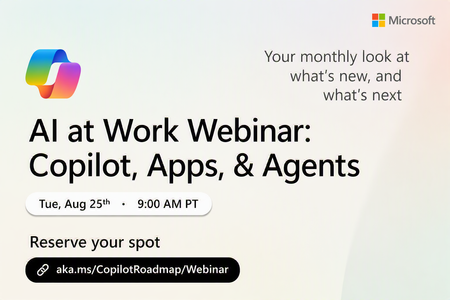
Register Here: https://aka.ms/MTC/CopilotRoadmapEvent
Keep up with the latest in Microsoft 365 Copilot, all in one place. This Roadmap webinar series is your central hub for the latest Copilot inno...
Tuesday, Aug 25, 2026, 09:00 AM PDTOnline
1like
35Attendees
0Comments
Recent Blogs
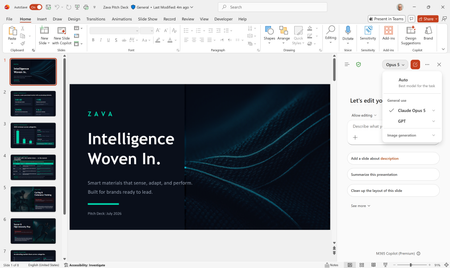
- Anthropic's Claude Opus 5 is now available in Microsoft 365 Copilot.Jul 24, 20266.1KViews2likes0Comments
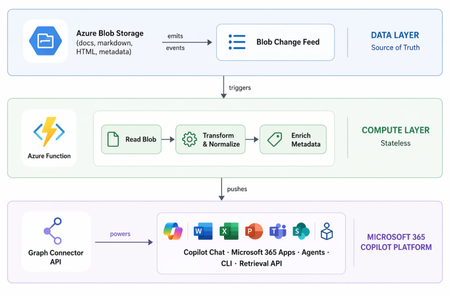
- 9 MIN READLearn how we built a Microsoft 365 Copilot connector serving 1M docs and 300+ agents.Jul 23, 20265.9KViews1like0Comments