Recent Discussions

Root DFS and ntlm hardening
Hi all Recently we have tried to harden our NTLM. After applying some settings the access to the root of our domain has become intermittent \\domain.co.uk but all the namespaces as well as symbol etc I der the root are working fine and can be navigated to without an issue. DCs have now been applied the same settings which are send LM and ntlm and use V2 if negotiated. The issue is intermitted as it it will work on a DC and then stop and then work again. Similar is on the end user devices. We have on prem DCs and all devices are in tuned and entra joined. We are hybrid but we do not sync or write the devices to ad. Replication and DFS itself are healthy. Issue are some users who have AFS paths already mapped to their devices it fails to connect to them sometimes. But new mapping works. Any ideas or assistance will be appreciated.7Views0likes0Comments
How can we paste markdown into one of these posts, to get formatted text?
Pasting markdown into the text entry box does not create formatted text. It just puts in the characters that the markdown is using. Publishing does not convert it to formatted text. The Help icon in the formatting bar gives a pop up with three tabs, one of which is for Markdown Syntax. Which strongly implies that markdown is a supported format. Markdown is VERY commonly used and a straight paste is incredibly useful.9Views0likes1Comment
Mailbox automatically Pinning every new incoming email - Desktop and Mobile
I have a user that, whenever they receive a new email, that email will automatically pin to the top of their inbox. We have tried to recreate the outlook profile Adjust and create mail rules to not pin emails Modify settings within webmail Remove all flags and all disable all setting pertaining to flagging and pinning Reset customization reset nav panes reinstalled office Tested in the "new outlook" On the mobile side, Deleted all mail profiles Installed the outlook app instead of the ios mail app made sure he has no specific mailbox retention or policies that would apply a setting like this This issue has been going on for months with no sign of being fixed. pretty much nothing at all has stuck and the issue persists. I am a systems admin, so i have the ability work on this from the backend. My entire team is just at a loss with this issue.24Views0likes1CommentMailbox automatically Pinning every new incoming email - Desktop and Mobile
I have a user that, whenever they receive a new email, that email will automatically pin to the top of their inbox. We have tried to recreate the outlook profile Adjust and create mail rules to not pin emails Modify settings within webmail Remove all flags and all disable all setting pertaining to flagging and pinning Reset customization reset nav panes reinstalled office Tested in the "new outlook" On the mobile side, Deleted all mail profiles Installed the outlook app instead of the ios mail app made sure he has no specific mailbox retention or policies that would apply a setting like this This issue has been going on for months with no sign of being fixed. pretty much nothing at all has stuck and the issue persists. I am a systems admin, so i have the ability work on this from the backend. My entire team is just at a loss with this issue.4Views0likes0Comments
Using a Proxy outlook address, but still got "too many times user name or password".
Hi all For months I was getting the dreaded "too many times user name or password" and a check of attempt "sign ins" showed numerous attempts to sign in from IP addresses all over the world. In other discussions and internet search it has been suggested A) Create a Proxy address only known to me (done) B) Make this new Proxy address the only way to sign into Hotmail Microsoft (done) C) Check to see if the original address is no longer recognized as a valid address, so that no attempt to sign in be even be attempted (done) Yesterday morning in my first attempt (previous successful attempts were during the day before) to sign in I got the "too many times user name or password" to an address nobody else knows exists? I tried several times yesterday to all receiving the dreaded "too many times etc" Obviously I have been successful to sign into Hotmail (and this community) today, though I don't know if it because of time passed and/or clearing of cookies and internet data? So my primary Questions A) How could I possibly be locked out to a Address no one else on the planet, except outlook knows about? B) If there was something my PC could have done to inadvertently trigger the "too many times etc" error by mistake? I am running the current up to date versions of Windows 11 and Norton 360.12Views0likes1Comment"In Review" means what? Can't message Allen"
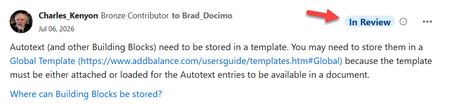
I am a VM in Q&A (Office) and have been a participant here in the Word Community for some time. Recently I've notice the tag "In Review" on my posts. Here is an example: https://techcommunity.microsoft.com/discussions/word/dynamic-pages-in-mail-merge/4531584/ What does this mean? Am I doing something wrong? I tried to send a message to Allen but do not believe it went through. When I click on "Send Message" it seems to be processing and then "Send Message" comes back active. When I checked in my profile under sent messages, nothing shows up for this. Thanks in advance. Charles KenyonSolved181Views3likes20Comments
Power Automate
Good afternoon all, I am working with a non for-profit organization. I am slowly trying to implement processes to manage 365 for them as most of them are not tech savy. I have been playing around with power automate (not too familiar with it myself) in order to create a user and add it to certain teams' groups and mail distribution groups. So far I have managed to get it to create the account and add the user to the teams group. However, in doing my research I have found Microsoft has removed the functionality to add users to a mail distribution group. Is there a way around this that I can implement? I came across this article but am not sure from here https://damobird365.com/add-members-to-a-distribution-list/ Thanks all for your help.52Views0likes3CommentsHello
Hello everyone, Just wanted to introduce myself being new to the community. My name is Roberto. I have been a coder for 30 years, mostly C++. Im a UNIX guy. I have used a lot of flavors of UNIX and Linux over the years. I have also used a lot of Windows products over the years, starting with Windows NT 3.1, 3.51, 4.0, 2000 etc.46Views1like1Comment
Hello from a new member!
Hi everyone, I’m new to this forum and I’m currently studying Business Administration. As part of my IT coursework, I’m learning how online technical forums work and how people use them to ask questions and share advice. I’m looking forward to reading through the discussions and learning more about different technology topics. Thanks!47Views0likes1Commenthelp.microsoft.com talk to a person - now microsoft get live help
Frustrated with automated bots? Learn how to navigate help.microsoft.com, bypass virtual menus, and connect with a live Microsoft person instantly.Solved59Views0likes1Comment
How to remove Windows Updates
and I don't mean "a" windows update! I want to completely remove the malware integrated into Windows 11 that downloads stuff without my consent and despite my explicit prohibition in all the possible settings. Simply removing wuapihost files makes Windows refuse to boot.34Views0likes1Comment
Office 365 Tenant-to-Tenant Migration Best Practices
Hello Everyone, I’m currently working on an Office 365 tenant-to-tenant migration project and would like to get recommendations and insights from the community based on real-world experience. The goal is to ensure a smooth migration with minimal downtime and user impact. I’m currently reviewing areas such as tenant preparation, DNS and mail flow planning, identity management, licensing, MFA, and Conditional Access policies. I would also like to understand: Important prerequisites before starting the migration Best practices for source and target tenant preparation Common issues faced during migration Steps to validate the environment after migration Recommendations to reduce migration risks and downtime If anyone has handled similar migrations, please share your suggestions, lessons learned, or things that should be avoided during planning and execution.167Views4likes2CommentsPre-attestation health checks confirm a critical component has failed...
I have been having some trouble with my Windows and PC overall because of an error, event ID 1040. The entire PC crashes, fully reboots, and this is the error that I get in the event viewer. I am making a post about this because I have tried persistently to attempt to resolve this issue, but to no avail. I am hoping to receive some input from the community.131Views1like1CommentContent disappears when trying to access UserHoverCard when not logged in
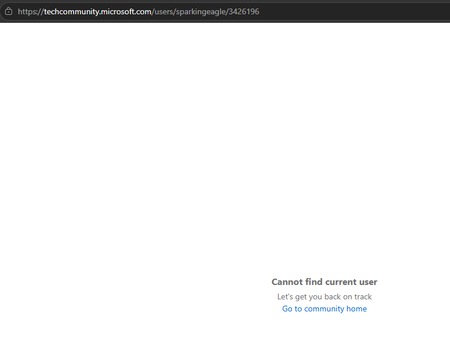
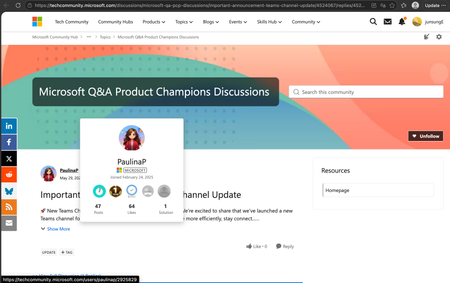
Hi, When trying to access UserHoverCard (including mine and other people's) when logged out, the whole content disappears, but not when logged in. Happens both on desktop and mobile. When logged in: When logged out: Not only in the discussion page, but also in the list page. When I try to access UserHoverCard in the list page, each section disappears separately. For example, when I hover over here in the Latest Discussions section, the section disappears. Pinned Posts section remains. When I hover over here in the Pinned Posts section, the section disappears. I couldn't see any previous report, so I am starting a new discussion.81Views0likes2Comments




Events
Recent Blogs
- We’re excited to share the latest updates to the Microsoft Tech Community! This release focuses on improving User Group management, along with a collection of behind‑the‑scenes updates and bug fixes...Feb 11, 2026531Views5likes5Comments
- We’re excited to share the latest updates designed to improve your experience on the Microsoft Tech Community! This quarter, we’ve focused on modernising the interface, enhancing event features, and ...Oct 08, 2025669Views3likes3Comments