account management
133 Topics
PROBLEME mit onmicrosoft.com - Konto - Löschung
Hallo! Habe noch aus alten Zeiten - evtl. auch als Testaccount angelegt - ein sog. ´onmicrosoft.com` - Konto. Dieses würde ich gerne löschen wollen - das Problem: Wenn ich mich anmelden möchte, fragt er zunächst nach dem Passwort - das ich dann eingebe und dann verweist er auf die Authenticator-App. Diese habe ich auf dem iPhone installiert. Dort ist vermutlich aber das Konto nicht registriert, bzw. bekomme ich keine Nachricht. Will ich das betreffende Konto dann dort einrichten, dann fragt er mich wieder ständig nach einem Code, den ich aber nicht habe? Über den Support komme ich nicht weiter, da das KI - gesteuert ist, aber so schlecht, dass man fast wahnsinnig wird. Ansonsten hab ich nach ner Mail gesucht auf der Kontaktseite...lost im Wahnsinn. FRAGEN: Wie kann ich da weiterkommen? Ich will und brauche eigentlich die AuthenticatorApp überhaupt nie. Evtl. wurde dieses Konto mal bei dem Versuch eine geschäftliche Seite einzurichten, testweise benutzt. Ich habe aber zwei funktionierende PRIVATE Mailkonten, die für 365 zuverlässig funktionieren. Mehr brauche ich nicht und will eigentlich nur Ordnung in das ganze System bringen... - weil ich mit all den Microsoft-Konten ansonsten nicht mehr durchblicke: - Löschung des onmicrosoft.com Kontos...aber wie? - zwei weitere Konten habe ich über den privaten Weg gut löschen können...allerdings habe ich unter den privaten bestehenden Konten z.B. auf die gleiche Mailadresse ein eigenes Konto für TEAMS, incl. eigenem Passwort - braucht man das noch? Vielen Dank für sachdienliche, wegweisende, gut nachvollziehbare Unterstützungen, Tom Jugl.
I need to talk to a person from microsoft.
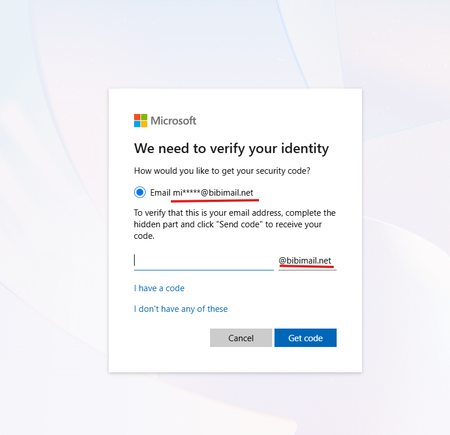
Hello, recently my account (email address removed for privacy reasons) got compromised. Someone changed my password and changed the email. I've tried to use the Account Recovery Form, but no matter what, they say my data was not sufficient. I really need help because I purchased products on this account that I don't want to lose. If any person can help me recover my account, that would be very appreciated. I can try to provide as much proof as I can in this post.84Views0likes1Comment
copilot chats not avalible
Title: Two of my most-used Copilot chats still won't open after the September update My two most-used Microsoft Copilot conversations have been inaccessible since September 25, following the update. When the update took place, I received the message “ALL DATA WAS SAFELY TRANSFERRED,” so I expected my previous conversations to remain accessible. However, these two chats still appear in my chat history, but I cannot open them. I have used them for more than a year, and they are very important to me because I use them for inspiration and continuity while writing my books. It is especially frustrating because my other conversations are still accessible. I have contacted Microsoft Support twice. During my second contact, I was told that they needed remote access to my computer. I was uncomfortable with this request because the problem began after an update to Microsoft Copilot, and the affected conversations still appear in my history. I would appreciate a clear explanation of why remote access is necessary and whether Microsoft can investigate the issue on its side instead. I have also noticed that, in the one chat I can currently use, I seem to hit a usage limit after less than 30 minutes, which makes it difficult to continue my work. Has anyone else experienced the same problem after the September update? Have your old conversations remained visible in your history but refused to open? Most importantly, has anyone managed to get their conversations working again after experiencing this issue? If so, what happened, and how was it resolved? I would really appreciate hearing about other people's experiences, especially from anyone who has successfully regained access to their old conversations.100Views1like1Comment
Microsoft Account Stolen
Hello. Two or three days ago, a hacker managed to change the email address associated with my Microsoft account and added an authenticator app—all without any security codes being triggered. The password was also changed. I am currently unable to access the account, and I cannot reset the password. Furthermore, I am receiving no response to my account recovery form submissions. How is it possible for someone to add a new email address and an authenticator app to my account without any security codes, especially when my payment methods and games are linked to it? Also, why are the forms left unanswered for days on end? It’s absolute nonsense.119Views0likes2CommentsProblem with my VS Subscription
Hi, I am an active MCT and my Visual Studio subscription got disabled because I reached spending limit. However, my subscription didn't get activated next month. Kindly help me out in reactivating my VS subscription. I tried reactivating from MCT benefits portal but it says you don't have azure subscription.134Views0likes1Commentcopilot chats not avalible
I also want to add. What makes this even more concerning is that it has now been more than a month since the problem began, and I still cannot access my two most-used conversations. Despite receiving the message “ALL DATA WAS SAFELY TRANSFERRED,” the issue remains unresolved. These conversations contain important material that I have built up over more than a year, and I rely on them for inspiration and continuity in my books. I would really like to know whether Microsoft is still investigating this issue and whether anyone else has managed to recover access to their conversations after such a long time.47Views0likes0CommentsHi Community! I have been locked out of my MCT MSDN subscription.
Hi Community, I have been locked out of my MCT MSDN subscription. It is a full MFA lockout with no backdoor accounts available. Tech Support suggested to create another Azure trial subscription and submit a support request from there, and mark it for the Datarecovery Team. I did that but have not received any help so far. Your help and advise would be greatly appreciated.58Views0likes0Comments
Guidance Required on Hands-on Labs for AI-500 Training
Dear MCT Support Team, Greetings! I am preparing to deliver the AI-500: Azure AI training course and would like some clarification regarding the hands-on labs. Could you please confirm whether Microsoft provides official lab environments for AI-500 through XtremeLabs, Skillable, or any other authorized lab provider? If lab environments are available, could you please guide me on how MCTs can access, provision, and conduct these labs during instructor-led training? If no hosted labs are currently available, could you please advise on the recommended approach for instructors and students to complete the practical exercises? Your guidance would be greatly appreciated, as I want to ensure a smooth and effective hands-on learning experience for participants. Thank you for your support. Best regards, Suman Jha Microsoft Certified Trainer (MCT)206Views0likes1CommentI cannot log in to my work account using SMS authentication
Hi everyone! I am requesting assistance with the following issue. I receive the message: Sorry, we're having trouble verifying your account. Please try again. Previously, SMS authentication worked, but now I am getting the error mentioned above. Error Code: 399287 Request Id: 8cf24bf5-1607-4ab6-80c7-d00221f84d00 Correlation Id: 4b22fb8b-b772-49be-ba47-7b0142da5da5 Timestamp: 2026-03-27T08:00:09Z My password is accepted, but I get stuck at the authentication step afterward. Maybe blocked my mobile number. Thank you in advance for your help!1.6KViews1like4Comments