Recent Discussions

ServiceEndpointProxy activity on ADO Service Connection
I have an ADO Service Connection which I don't think is being used by any pipelines but I still see regular entries in the usage history like: Type: ServiceEndpointProxy Details: ServicePrincipalSignInAudience I've not been able to find any information about what causes this. What is causing this activity and will deleting the service connection adversely affect anything assuming this is the only thing using it?35Views0likes2Comments
Azure Admin Login
We have a client who has lost their access information to get into their Azure global admin. This is a non-profit institution that moved the ownership of their Azure account to another entity years ago now can't get in to the global admin for their entire Azure setup. Microsoft requires the global admin login to create a support ticket and in this case, how are they supposed to open up a case when they can't login. The customer is furious and now disputing the CC charges so we open an Azure support ticket 10 days ago for ourselves and since it's not a Critical issue, have gotten no response. This is untenable situation and there is no way to contact some one from MS without the login, how does this get resolved??34Views0likes2Comments
Building Production-Ready Pipelines in Azure DevOps: Beyond the Documentation Examples
Hi everyone, When moving from basic Azure DevOps tutorials to enterprise production environments, we all quickly realize that documentation examples don't always cover real-world complexities. Handling multi-stage dependencies, keeping Terraform state secure, and managing secrets across environments requires a highly strategic approach. To help DevOps engineers bridge this gap, I recently put together a deep-dive architecture breakdown detailing how to build a resilient, multi-stage YAML pipeline from scratch. Here is a quick look at the core enterprise architecture I focus on: - Multi-Stage Lifecycle: Safe progression flows through Build, Dev, QA, UAT, and Production stages. - Infrastructure Automation: Clean integration with Terraform, including state and secrets management using Azure Key Vault. - Security Gates: Implementation of SAST scanning, Workload Identity, and automated approval policies. - Team Alignment: Connecting Azure DevOps with project tools like Asana to streamline cross-platform tracking. I wanted to share this pattern here to get some community feedback on the YAML structure. Before I post the full configuration snippets, I would love to hear how your teams handle environment gates and approvals. What are the biggest bottlenecks you run into with multi-stage YAML pipelines? Let's discuss in the comments below! Best regards, Abdullah Shahid27Views0likes0Comments
Azure VM resize: PowerShell lists Dv5 sizes, but Azure Portal only offers Dv4
Hello, We recently migrated two production Azure virtual machines away from the retiring Bv1 family. Initially, the VMs were running as: Standard_B2ms Standard_B4ms Our goal was to move them to a newer supported VM family. Environment Region: France Central Managed OS disks (one Standard SSD, one Standard HDD/Standard LRS) SCSI disk controller Windows Server virtual machines What we observed After stopping and deallocating the VM, we queried the available resize targets using PowerShell: Get-AzVMSize ` -ResourceGroupName "<ResourceGroup>" ` -VMName "<VMName>" For one VM, PowerShell returned, among others: Standard_D2ads_v5 Standard_D2ds_v5 Standard_D2d_v5 Standard_D2as_v4 Standard_D2ds_v4 For the other VM, it returned: Standard_D4ads_v5 Standard_D4ds_v5 Standard_D4d_v5 Standard_D4as_v4 However, when opening VM → Size in the Azure Portal, the v5 sizes were not available. Only the following sizes appeared: Standard_D2as_v4 Standard_D4as_v4 As a precaution, we resized both VMs using the sizes proposed by the Azure Portal: Standard_B2ms → Standard_D2as_v4 Standard_B4ms → Standard_D4as_v4 The migration completed successfully and both VMs are running correctly. Question Can someone explain why there is a difference between: the sizes returned by Get-AzVMSize, and the sizes displayed by the Azure Portal? More specifically: Does Get-AzVMSize return VM sizes that are not actually valid resize targets? Does the Azure Portal apply additional compatibility or capacity checks that PowerShell does not? Is this related to: regional capacity, VM generation, disk controller, managed disk type, host cluster, or another compatibility requirement? Would you recommend staying on Das_v4, or should we plan another migration to Dads_v5 if possible? I am trying to understand the reason behind the different behavior rather than forcing the resize through PowerShell. Thank you in advance for your insights.35Views0likes2CommentsBuilding Production-Ready Pipelines in Azure DevOps: Beyond the Documentation Examples
Hi everyone, When moving from basic Azure DevOps tutorials to enterprise production environments, we all quickly realize that documentation examples don't always cover real-world complexities. Handling multi-stage dependencies, keeping Terraform state secure, and managing secrets across environments requires a highly strategic approach. To help DevOps engineers bridge this gap, I recently put together a deep-dive architecture breakdown detailing how to build a resilient, multi-stage YAML pipeline from scratch. Here is a quick look at the core enterprise architecture I focus on: - Multi-Stage Lifecycle: Safe progression flows through Build, Dev, QA, UAT, and Production stages. - Infrastructure Automation: Clean integration with Terraform, including state and secrets management using Azure Key Vault. - Security Gates: Implementation of SAST scanning, Workload Identity, and automated approval policies. - Team Alignment: Connecting Azure DevOps with project tools like Asana to streamline cross-platform tracking. I wanted to share this pattern here to get some community feedback on the YAML structure. Before I post the full configuration snippets, I would love to hear how your teams handle environment gates and approvals. What are the biggest bottlenecks you run into with multi-stage YAML pipelines? Let's discuss in the comments below! Best regards, Abdullah Shahid34Views0likes0Comments
Microsoft 365 business tenant blocked – AADSTS5000228 – sole Global Administrator
Please create a service request for a blocked Microsoft Entra tenant and escalate it to the Data Protection / Tenant Recovery Team. Tenant: valtechme.onmicrosoft.com Tenant ID: 80940ba0-e307-45b2-b5fd-05b9759a4594 Error: AADSTS5000228 I am the sole Global Administrator. I am posting this here, since getting microsoft support is almost impossible , via phone, email or web. Can someone please help me with this issue.66Views0likes2Comments
Cost increases when selecting Amortised cost in cost analysis
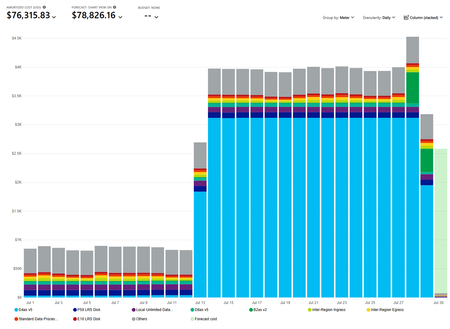
Hi, this seems like a bug. When i select Amortized cost in Cost analysis, our monthly cost jumps from $25,664.54 to $76,315.83. The resource that causes the jump is a Reservation for a D4asv5 virtual machine. It jumps to $3,120.09 per day. Can someone please try it their side.55Views0likes2CommentsAgentic AIOps vs Traditional AIOps: What Actually Changes in Practice?
Artificial Intelligence for IT Operations (AIOps) has transformed how organizations monitor, manage, and optimize modern IT infrastructure. By combining machine learning, analytics, and automation, Traditional AIOps has helped IT teams reduce alert fatigue, identify anomalies faster, and improve operational efficiency. https://dellenny.com/agentic-aiops-vs-traditional-aiops-what-actually-changes-in-practice/36Views0likes0CommentsHow to Build Your First IT Support Agent Using Azure AI
Artificial Intelligence is transforming the way businesses provide IT support. Instead of waiting for a technician to answer every question, organizations are increasingly using AI-powered support agents that can troubleshoot common issues, answer employee questions, and automate repetitive tasks. Thanks to Microsoft Azure AI, building an intelligent IT support agent is no longer limited to data scientists or large enterprises. Even beginners can create a functional AI assistant with minimal coding. https://dellenny.com/how-to-build-your-first-it-support-agent-using-azure-ai/42Views0likes0CommentsDealing with Legacy Systems and Services in Cloud Computing
Every organization reaches a point where technology that once powered innovation begins to slow progress. Legacy systems, although reliable and familiar, often become barriers to growth, agility, and digital transformation. As businesses increasingly adopt cloud computing to improve scalability, reduce operational costs, and enhance security, one major challenge remains how to deal with legacy systems and services without disrupting business operations. https://dellenny.com/dealing-with-legacy-systems-and-services-in-cloud-computing/27Views0likes0Comments
Microsoft.Maps reports Registered but account creation returns InvalidSubscription
Subscription de4c9e7e-6aea-487d-aace-3d1cf56a5a7c is Enabled PAYG. ARM reports Microsoft.Maps Registered and lists accounts/API versions/locations, but Microsoft.Maps is absent from the Portal provider list. Creating a Gen2 G2 Maps account through Portal, Azure CLI, and REST in Global or East US returns InvalidSubscription. We re-registered and waited over 30 minutes. Latest correlation ID: 50e56235-39b7-493e-9faf-fabf329b61db, timestamp 2026-07-28T18:09:02.3104310Z. How can the Maps subscription registration be repaired?39Views1like2CommentsOpen in VS Code for the web fails ... tunnel 400 error ?
Hello everyone, The last week I have problem connecting to VS Code for the Web, my cloudshell works correctly, my account is ok, everything works BUT when tryont to open through browser - azure portal the VS Code for the Web, I got errors similar to .... *************************** https://ccon-prod-northeurope-aci-01.servicebus.windows.net/.../tunnel Result: 400 Bad Request Response: {"error":{"message":"Error creating dev tunnel","details":""}} Tested from: - Multiple browsers - InPrivate - Different PC - Azure VM *************************** I even renamed ~/code , ~/.vscode-server-insiders and restart cloudshell and VSCode web, same errors (and folders were not recreated) Any help would be greatly appreciated !! BR, Panos75Views0likes4Comments
Free Extension: Generate AI Development Prompts from Azure DevOps Work Items — Verity Framework
Hi Azure DevOps community, I wanted to share a free extension we just published to the Visual Studio Marketplace: the Verity Framework ADO Extension. **What it does** It adds a "Verity Prompt" tab to your work items. When you populate five custom fields on a User Story or Delivery Item, the extension generates a structured prompt ready to paste into Claude Code, Cursor, or GitHub Copilot Workspace. The five fields: - VF Intent — the problem and who experiences it - VF Value — the expected outcome - VF Appetite — time/resource ceiling (not an estimate) - VF Trust Criteria — Gate 2 hardening requirements - VF Failure Scope — Narrow / Moderate / Broad / Systemic **Why it matters** Most engineers using AI tools start from a blank context or a vague task description. The extension carries the team's planning judgment — including production risk level and hardening requirements — directly into the implementation context. It also includes field validation that flags vague Trust Criteria, incorrectly formatted Appetite values, and solution-framed Intent statements before generating the prompt. **Setup** About 20 minutes. You add five custom fields to your existing User Story work item type (no new work item type required). Full instructions are in the extension tab. **Install** Search "Verity Framework" on the Visual Studio Marketplace or visit idearoost.com/verity for the full framework context. Free. No subscription required. Happy to answer questions about the field definitions or the setup process. — Jacques Steward, IdeaRoost33Views0likes0CommentsAzure Architecture Best Practices for Enterprise Applications
As businesses continue to modernize their IT infrastructure, Microsoft Azure has become one of the leading cloud platforms for building enterprise-grade applications. Organizations of all sizes rely on Azure to improve scalability, strengthen security, reduce operational costs, and accelerate digital transformation. However, simply moving an application to the cloud does not guarantee success. A well-designed Azure architecture is the foundation of a secure, reliable, and high-performing enterprise application. https://dellenny.com/azure-architecture-best-practices-for-enterprise-applications/58Views0likes0CommentsQuestion for OAuth setting for "Try me" function in APIM developer portal
I am working on a APIM deployment that will have developer portal available to developers. Login to portal will only allow Azure B2C accounts and thus will have OAuth already performed. On the APIM instance settings in Azure portal the "OAuth 2.0 + OpenID Connect" section has a option to create OAuth server for B2C, which then can be used for each API. The "try me" function for that API in the developer portal can then use this OAuth server to perform OAuth and use the token. As we have already performed OAuth for developer portal login itself, so I don't want users to perform OAuth twice for better user experience. But one thing I am unsure off is if either there is a global jwt token validation policy or a API specify jwt policy requiring OAuth tokens, then if I don't set the OAuth for "Try me" function, will that succeed or fail? And are there any other security/general concerns if we don't set the OAuth for "Try me" function in developer portal.55Views0likes3CommentsAzure App Service secure hostname
Hey Everyone, I see a new change in app service deployment related to the secure hostname. Is it now mandatory to have a secure hostname, because I don't see the option to toggle between the secure hostname and just the format for appservicename.azurewebsites.net ? I wasn't able to find any update notification to verify this change.464Views0likes5Comments
AKS Architecture: Mitigating Pod Latency and Request Bottlenecks
Hello team, While optimizing our production workloads on Azure Kubernetes Service (AKS), our engineering squad hit a specific architectural performance challenge that I wanted to document here, along with how we resolved the runtime bottleneck. As our concurrent API query spikes scaled past normal operational baselines, our application pods running decoupled microservices containers began experiencing noticeable synchronization latency. Initially, we looked into scaling up our cluster sizing or adjusting standard load balancing layers, but telemetry data revealed that the core issue was database connection pooling and microservices processing delays under sudden traffic spikes. Here is the strategic checklist we implemented to stabilize our Azure cloud environment: 1. Transitioning to Asynchronous Container Configurations Monolithic data pipelines often create heavy thread blockages under peak loads. We shifted our core backend workflows into isolated AKS containers managed via automated Azure DevOps pipelines. This granular separation allowed independent loops to process concurrently, successfully preserving our 99.9% operational runtime resilience. 2. Managing Infrastructure Sourcing & Tech Overheads Designing, tuning, and monitoring these decoupled distributed systems is an intensive task that demands advanced architecture experience. Trying to orchestrate multi-cluster routing without deep domain expertise often leads to configuration drift, cloud budget bloating, and unnecessary performance gaps. For enterprise teams planning to bridge this talent gap, it is highly efficient to onboard specialized cloud developers and backend optimization experts on demand. If you want to review structured execution timelines, technical developer vetting checklists, and enterprise pricing models, you can inspect this guide to https://www.decipherzone.com/hire-developer. 3. Offloading Heavy Automation Pipelines To protect our user-facing request paths, we separated our backend traditional logic from our heavy data workflows. We configured self-healing internal pods to handle background automation scripts completely outside the main client-side execution path. Enforcing TLS 1.3 encryption across endpoints and performing routine peer-level compliance audits finally stabilized our cluster velocity. How are you currently managing microservices synchronization loops inside your AKS clusters? Are you relying on custom stateful sets or advanced service meshes to curb cross-pod latency? Let’s share some insights below!39Views0likes1Comment
Windows App iOS RemoteApp Won't Reconnect
We are building a RemoteApp environment using AVD for the session hosts. On iOS, what happens is the screen powers off/device goes to sleep. When a user logs back into the iPad, the RemoteApp was still the focus, so they see buttons to reconnect or disconnect. If we press reconnect, it will either spin endlessly OR it will report an error on reconnection attempt. If we then close the error OR if we press disconnect where it drops us into the Windows App, then reopen the exact same Windows App it immediately reconnects. This does not happen in Windows at all, we have no Android deployments to test, and are trying iOS deployments on iPad and troubleshooting with iPhones. Both device types experience the issue. To troubleshoot, I've tried multiple iOS devices by multiple users; same problem. Those same users connecting to our AVD desktops, not RemoteApps, reconnect without issue. Our AVD and RemoteApp session hosts all use the same Group Policies and are, at this point, only domain joined, not Entra or Hybrid. Any thoughts on why this happens? Would logs be helpful?64Views0likes3CommentsWindows App expands auto logoff support to managed Android devices (Public Preview)
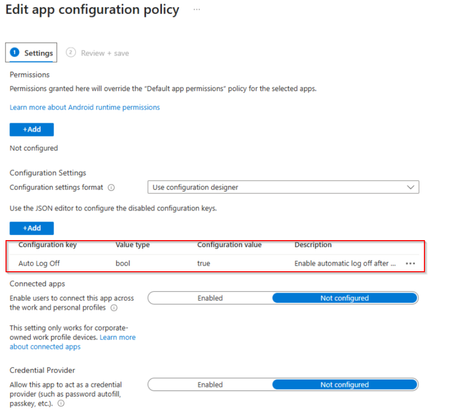
We're excited to announce that Windows App auto logoff on Android is now in public preview, giving administrators a simple, Mobile Device Management (MDM)–configured way to keep shared devices clean between sessions. Already available on Windows, auto logoff now extends to MDM-enrolled Android devices, a key step toward enabling frontline and shared-device scenarios on Android hardware. What is auto logoff? Windows App auto logoff on Android is an admin-configured setting that signs the user out of Windows App and removes locally stored app data when the app is closed, disconnected, or left inactive for a configured period. By removing locally stored app data, auto logoff helps ensure that every session starts with a clean state when users sign in with their own credentials. It's designed for operational convenience and device hygiene — not as a security boundary — and it does not interrupt active Azure Virtual Desktop or Windows 365 sessions. Only the local Windows App state is reset. Why it matters for shared devices Auto logoff is ideal for shared-device deployments where Windows App is the primary app users interact with to access Azure Virtual Desktop or Windows 365: Clean handoffs: when one worker finishes and closes the app, the next person signs in fresh Local Windows App data is removed automatically: cached app data is cleared when configured logoff conditions occur (app close, disconnect, or inactivity) Streamlined re-entry: an optional setting skips the onboarding and privacy screens after logoff, so shared agreements are accepted once per device rather than by every user Flexible triggers: reset on app close, sign-out, remote-session disconnect, or after a defined period of inactivity How to configure it Windows App auto logoff on Android is set from your MDM admin console (for example, Microsoft Intune) via a managed app configuration profile assigned to Windows App. Core settings include: Enable auto logoff: the master switch (off by default) Inactivity timeout: minutes of idle time (with the screen locked) before Windows App signs out and resets; set to 0 to rely only on close/disconnect triggers Skip first-run experience: recommended for shared devices so users aren't re-prompted through setup The setting names and value types are the same across MDM providers, only the admin UI differs. Prerequisites Windows App version 11.0.0.113 or later on a supported Android device The device enrolled in your MDM, with Windows App installed as a managed app Admin access to a supported MDM provider that can deliver app configuration to Windows App Note: Inactivity-based auto logoff depends on the Android device’s screen lock setting. If a device is configured never to lock, the inactivity timer won't fire (close, sign-out, and disconnect triggers still work). Learn more For the full setup walkthrough, configuration examples, and known limitations, see Configure auto logoff for Windows App on Microsoft Learn. We'd love to hear how you're using auto logoff for your shared-device and frontline deployments, drop a comment below and let us know what scenarios you'd like to see us light up next.95Views0likes1Comment


Events
Recent Blogs
- Enhanced Dashboarding and Visualization Experience Grafana 13 introduces a number of improvements that make dashboards easier to build, reuse, and manage at scale. Teams can create richer observabi...Aug 07, 2026138Views0likes0Comments
- Build durable MCP Tasks on Azure App Service with .NET, Azure Table Storage, and Service Bus, including reconnects, approvals, cancellation, retries, and hosting tradeoffs.Aug 07, 2026138Views0likes0Comments