msignite
73 Topics
Workload Orchestration in the Azure portal is now available: Deploy in minutes, scale with ease
Edge deployments rarely stay simple for long. What begins as an application running on a single Kubernetes cluster can quickly expand across stores, factories, branches, or other distributed locations, each having different configuration needs. That is exactly where workload orchestration for Azure Arc comes in. Workload orchestration helps teams manage that complexity by providing a centralized approach to consistently define, configure, and deploy applications across distributed cloud, on-premises, and edge environments, all while catering to custom configuration needs of individual sites and deployment targets. See the experience in action Evaluating a new deployment approach often starts slowly: study the documentation, package an application, complete the setup, and only then decide whether it fits. The Azure portal reverses that order with its jumpstart onboarding experience. Bring your Azure Arc-enabled Kubernetes cluster and deploy a pre-packaged application in minutes. Whether you are validating a proof of concept or introducing the product to your broader team, the new portal onboarding experience turns the end-to-end workflow into something you can quickly try on your own cluster. Scale from first deployment to production Once you have validated the first deployment, you can evolve the same approach for production. Onboard your infrastructure into workload orchestration, organize your deployment sites into hierarchies, and define shared configurations for all deployments – all without leaving the portal. This lets you expand from one cluster to a distributed fleet while retaining centralized governance, repeatability, and site-level flexibility. Ready to try it? Try now by deploying your first application with workload orchestration in the Azure portal. Explore the product documentation for the complete set of capabilities.426Views0likes0CommentsAnnouncing the General Availability (GA) of the Premium v2 tier of Azure API Management
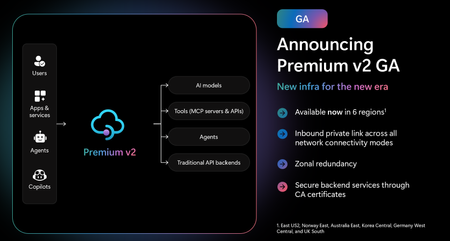
Superior capacity, highest entity limits, unlimited included calls, and the most comprehensive set of features set the Premium v2 tier apart from other API Management tiers. Customers rely on the Premium v2 tier for running enterprise-wide API programs at scale, with high availability, and performance. The Premium v2 tier has a new architecture that eliminates management traffic from the customer VNet, making private networking much more secure and easier to setup. During the creation of a Premium v2 instance, you can choose between VNet injection or VNet integration (introduced in the Standard v2 tier) options. In addition, today we are also adding three new features to Premium v2: Inbound Private Link: You can now enable private endpoint connectivity to restrict inbound access to your Premium v2 instance. It can be enabled along with VNet injection or VNet integration or without a VNet. Availability zone support: Premium v2 now supports availability zones (zone redundancy) to enhance the reliability and resilience of your API gateway. Custom CA certificates: Azure API management v2 gateway can now validate TLS connections with the backend service using custom CA certificates. New and improved VNet injection Using VNet injection in Premium v2 no longer requires configuring routes or service endpoints. Customers can secure their API workloads without impacting API Management dependencies, while Microsoft can secure the infrastructure without interfering with customer API workloads. In short, the new VNet injection implementation enables both parties to manage network security and configuration settings independently and without affecting each other. You can now configure your APIs with complete networking flexibility: force tunnel all outbound traffic to on-premises, send all outbound traffic through an NVA, or add a WAF device to monitor all inbound traffic to your API Management Premium v2—all without constraints. Inbound Private Link Customers can now configure an inbound private endpoint for their API Management Premium v2 instance to allow your API consumers securely access the API Management gateway over Azure Private Link. The private endpoint uses an IP address from an Azure virtual network in which it's hosted. Network traffic between a client on your private network and API Management traverses over the virtual network and a Private Link on the Microsoft backbone network, eliminating exposure from the public internet. Further, you can configure custom DNS settings or an Azure DNS private zone to map the API Management hostname to the endpoint's private IP address. With a private endpoint and Private Link, you can: Create multiple Private Link connections to an API Management instance. Use the private endpoint to send inbound traffic on a secure connection. Apply different API Management policies based on whether traffic comes from the private endpoint. Limit incoming traffic only to private endpoints, preventing data exfiltration. Combine with inbound virtual network injection or outbound virtual network integration to provide end-to-end network isolation of your API Management clients and backend services. More details can be found here Today, only the API Management instance’s Gateway endpoint supports inbound private link connections. Each API management instance can support at most 100 Private Link connections. Availability zones Azure API Management Premium v2 now supports Availability Zones (AZ) redundancy to enhance the reliability and resilience of your API gateway. When deploying an API Management instance in an AZ-enabled region, users can choose to enable zone redundancy. This distributes the service's units, including Gateway, management plane, and developer portal, across multiple, physically separate AZs within that region. Learn how to enable AZs here. CA certificates If the API Management Gateway needs to connect to the backends secured with TLS certificates issued by private certificate authorities (CA), you need to configure custom CA certificates in the API Management instance. Custom CA certificates can be added and managed as Authorization Credentials in the Backend entities. The Backend entity has been extended with new properties allowing customers to specify a list of certificate thumbprints or subject name + issuer thumbprint pairs that Gateway should trust when establishing TLS connection with associated backend endpoint. More details can be found here. Region availability The Premium v2 tier is now generally available in six public regions (Australia East, East US2, Germany West Central, Korea Central, Norway East and UK South) with additional regions coming soon. For pricing information and regional availability, please visit the API Management pricing page. Learn more API Management v2 tiers FAQ API Management v2 tiers documentation API Management overview documentationUnlocking Storage Optimizations: Smart Tiering for Blobs and ADLS in Azure Storage
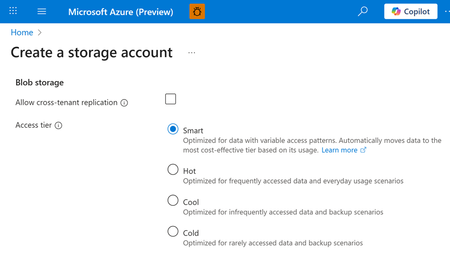
We are excited to introduce the public preview of smart tier for Azure Blob and Azure Data Lake Storage. Smart tier is a fully managed, automated data tiering solution that takes the guesswork and manual effort out of optimizing your storage costs. Smart tier continuously analyzes your data’s access patterns and automatically moves objects between the hot, cool, and cold tiers. Smart tier will keep regularly accessed objects on the hot capacity tier to optimize transaction costs and moves inactive objects after 30 days to the cool tier capacity tier and after an additional 60 days of inactivity to the cold capacity tier. If you access an object in cool or cold tiers again, it’s instantly promoted back to the hot tier, restarting the cycle. This ensures your data is always in the most cost-effective tier with zero manual intervention, making it the ideal online tier for datasets with mixed or unknown access patterns. Getting started Using smart tier is quick and easy: Enabling smart tier is simple: Just select smart tier as the default access tier through the storage account configuration for any storage account with zonal redundancy. Smart tier is available in all zonal public cloud regions, supporting both flat and hierarchical namespaces. Billing is straightforward: You will pay the regular hot, cool, and cold capacity rates, with no extra charges for tier transitions, early deletion, or data retrieval. Even moving existing objects into smart tier does not incur tier change fees. There’s just a small monitoring fee for the orchestration. Smart tier is configured at the account level. It can be configured via API or the Azure portal as the default access tier setting for new and existing storage accounts. Existing objects following the default access tier setting from the account will be moved to smart tier automatically. Objects that are explicitly tiered, i.e. to the hot tier, will remain in the same account and will not be moved to other capacity tiers. Smart tier will always keep small objects that are below 128 KiB in size in the hot capacity tier for efficiency and those objects will not incur a monitoring charge. If objects below 128 KiB increase in size, the smart tiering patterns apply for those objects as well. The automatic down tiering of inactive data, paired with the billing model simplifications of Smart tier can lead to large cost savings over time. In the metrics view of the storage account you can see the distribution across the capacity tiers for smart tiered objects by both object count and capacity. This account shows smart tier in action, moving inactive objects to the cool and cold capacity tier, thereby drastically reducing the capacity charges without any manual intervention. "2 years ago, Qumulo partnered with Microsoft to deliver the first truly elastic, unlimited capacity, fully managed file system, Azure Native Qumulo, which was built on Azure Blob," said Brandon Whitelaw SVP of Product at Qumulo. "Qumulo shared feedback with Microsoft on our ideal solution for data tiering and Microsoft clearly delivered, meeting all expectations. With today's smart tier announcement, Qumulo will immediately enhance our offerings with these new capabilities, delivering greater functionality and control over data lifecycle management. We are thrilled with the feature set Azure is delivering at launch” Note that smart tier is not supported with append and page blobs. Smart tier is the ideal tier to choose when you are looking to store your data on standard online tiers but are not fully aware of the data access patterns or do not want to manage data transitions across online tiers. Objects managed by smart tier are not subject to lifecycle management policies, ensuring that automated tiering decisions are based solely on access patterns. Smart tier for block blobs is now available in public preview for both Azure Blob Storage and Azure Data Lake Storage for storage accounts with zonal redundancies, including ZRS, GZRS and RA-GZRS. Unlock cost savings by adding smart tier to your blob storage accounts in one easy step: https://aka.ms/BlobSmarttier. Please reach out to us for any feedback or questions, we would love to hear from you: smartblob@microsoft.com2.9KViews3likes6CommentsPUBLIC PREVIEW - Azure Monitor - Collect Azure Resource Platform Logs at Scale with DCRs
PUBLIC PREVIEW - Azure Monitor - Collect Azure Resource Platform Logs at Scale with DCRs. How DCR-based platform logs simplify the telemetry collection for organizations managing 1,000+ resources.1.2KViews2likes1CommentAzure Event Grid: Powering IoT and Event-Driven Applications at Scale
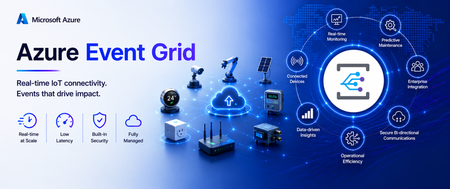
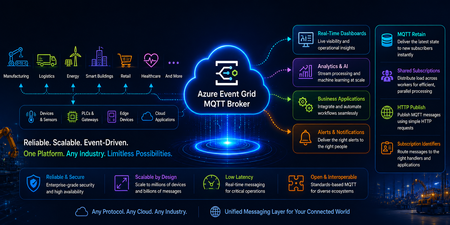
Modern IoT and event-driven applications demand more than reliable messaging. They require the ability to handle larger payloads, efficiently route data at scale, and automatically adapt to changing workloads. Today, we're excited to introduce a new set of capabilities in Azure Event Grid Namespace (MQTT Broker & Event Broker) that help organizations build more scalable, resilient, and cost-efficient connected solutions. With support for MQTT v5 Subscription Identifiers, larger messages(1MB), and Auto scale-up and scale-down, customers can simplify architecture, reduce operational overhead, and accelerate deployments across manufacturing, automotive, retail, energy, and other connected industries. Event Grid Standard: MQTT v5 Subscription Identifier (GA) What it solves In many MQTT applications, one client subscribes to several topics at the same time. When a message arrives, the application needs a quick way to tell which subscription triggered it and what should happen next. Which subscription triggered this message? Which business rule should process it? What’s new MQTT v5 Subscription Identifier is now generally available in Event Grid MQTT broker. Each subscription can have an ID, and that ID is included when the message is delivered. Each subscription can have an ID, and when a message is delivered, that ID comes with it. Why it matters Faster message routing Cleaner application logic No need to parse topic strings Simple example Example subscriptions: Subscription ID 101 = factory/line1/temperature Subscription ID 202 = factory/line1/vibration When a message arrives If the message comes in with Subscription ID 101, the app immediately knows it is temperature data and can send it to the correct processing path without inspecting the topic string. Common use cases Manufacturing lines with hundreds of sensors Automotive telemetry platforms Multi‑tenant IoT solutions Rule engines and stream processors Event Grid Standard: 1MB Message Support (GA) - Coming Soon Applies to both MQTT and non-MQTT workloads. What it solves As devices and applications become more capable, the events they send are becoming richer too. In many real-world scenarios, a single message may need to include things like: Sensor batches Telemetry snapshots Diagnostics data Configuration payloads Before this, customers often had to split large messages into smaller pieces or store the payload somewhere else and send only a reference. What’s new Event Grid Standard Namespace now supports larger event payloads upto 1MB for both MQTT and non-MQTT scenarios. That means customers can send more complete information in one message and reduce complex workarounds in design. Why it matters Fewer architectural components Simpler producers and consumers Lower latency for real‑time decisions Example Before: A factory device sent the main payload to storage and then published a small event that pointed to that file. Now: The same device can publish the full event payload directly through Event Grid, making the flow easier to build and easier to operate. Example: A smart machine can send a larger diagnostic package in one event, including the machine ID, a batch of readings, and a timestamp, instead of splitting the information across multiple services. Common use cases Smart manufacturing telemetry Vehicle diagnostics and firmware data Batch sensor readings from edge devices Rich business events for analytics Event Grid Standard: Autoscale Up and Down (Preview) - Coming Soon Applies to both MQTT and non-MQTT workloads. What it solves Event-driven systems rarely operate at a constant rate. Traffic patterns fluctuate throughout the day, with predictable peaks, seasonal surges, and unexpected bursts that can quickly overwhelm static infrastructure. Think about: Morning factory startup Fleet check‑ins at the top of the hour Flash sales or system bursts Manually sizing infrastructure leads to: Over‑provisioning (higher cost) Under‑provisioning (missed events) What’s new Azure Event Grid Standard Namespace now supports Autoscale Up and Down, automatically adjusting capacity based on real-time workload demand. Whether you're running MQTT-based IoT workloads or event-driven applications using HTTP, AMQP, or CloudEvents, Event Grid dynamically scales resources to match traffic patterns without manual intervention. As demand grows, Event Grid automatically adds capacity to absorb increased traffic and maintain performance. When activity subsides, resources scale back down to optimize efficiency and reduce costs. Why it matters With Autoscale, customers can focus on building applications instead of managing infrastructure and reap benefits like: Scale seamlessly during traffic spikes without pre-provisioning for peak demand. Reduce costs during quieter periods by automatically scaling capacity down. Maintain consistent performance and reliability across changing workloads. Eliminate manual tuning and capacity planning, reducing operational overhead. Optimize resource utilization while supporting millions of devices and high-volume event streams. Use case: A Modern Event-Driven Manufacturing Platform A smart manufacturing company uses Microsoft to connect factory machines, sensors, edge gateways, and enterprise applications through a single scalable eventing platform. Devices publish rich telemetry and diagnostic payloads using MQTT, while cloud applications send operational and business events using HTTP. The company has steady traffic during the day, a large spike during shift changes, and much lower usage overnight. With autoscale, Event Grid adjusts capacity automatically, so performance stays strong when traffic is high and costs stay more efficient when traffic is low. Common use cases Shift‑based manufacturing systems Connected vehicle platforms Event‑driven commerce backends Analytics pipelines with bursty data Building IoT platforms, manufacturing and automotive solutions, or high-scale event-driven applications? Azure Event Grid MQTT Broker now delivers larger messages, subscription Identifiers, and autoscale up/down, helping you simplify operations, improve performance, and optimize costs all on a single eventing platform. Event Grid Basic: Powering Event Driven Payments with Stripe (GA) Developers can seamlessly route Stripe events into Azure Event Grid to build scalable, event driven architectures without managing webhooks or custom brokers. Event Grid acts as a fully managed event broker between Stripe and Azure services. Azure Event Grid now delivers Stripe events directly to Azure subscribers, including: Azure Functions Logic Apps Event Hubs Service Bus And more With Event Grid’s native integration with Microsoft Fabric, Stripe events can also be ingested as continuous streams, enabling real time transformation, enrichment, and analytics within Fabric. Learn more.313Views0likes0Comments
Moving the Logic Apps Designer Forward
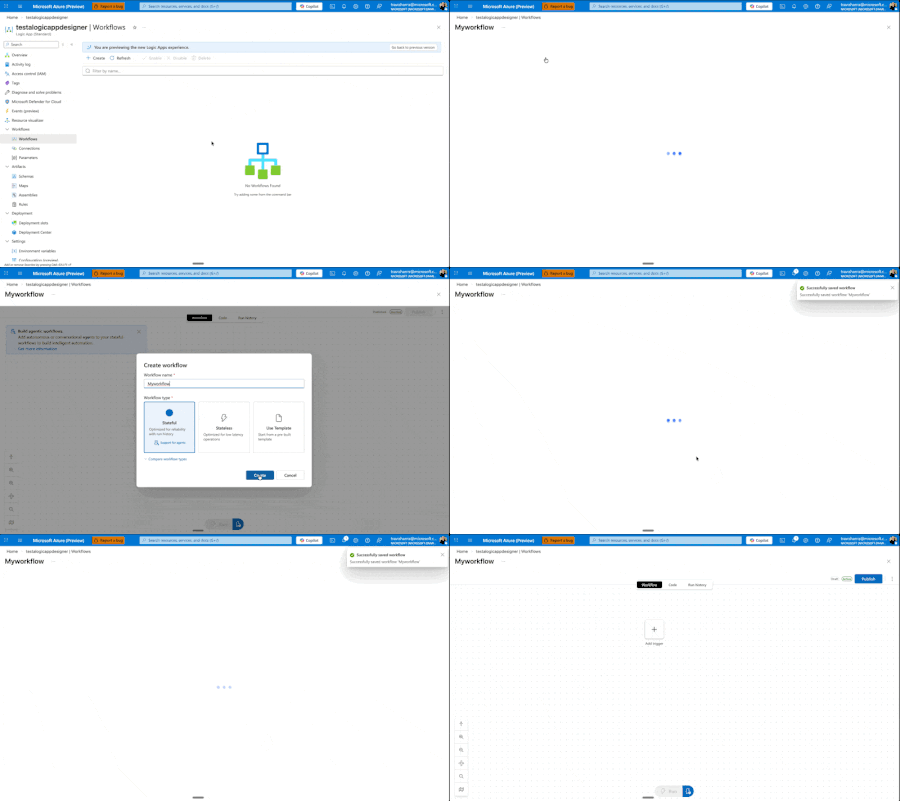
Today, we're excited to announce a major redesign of the Azure Logic Apps designer experience, now entering Public Preview for Standard workflows. While these improvements are currently Standard-only, our vision is to quickly extend them across all Logic Apps surfaces and SKUs. ⚠️ Important: As this is a Public Preview release, we recommend using these features for development and testing workflows rather than production workloads. We're actively stabilizing the experience based on your feedback. This Is Just the Beginning This is not us declaring victory and moving on. This is Phase I of a multi-phase journey, and I'm committed to sharing our progress through regular blog posts as we continue iterating. More importantly, we want to hear from you. Your feedback drives these improvements, and it will continue to shape what comes next. This redesign comes from listening to you—our customers—watching how you actually work, and adapting the designer to better fit your workflows. We've seen the pain points, heard the frustrations, and we're addressing them systematically. Our Roadmap: Three Phases Phase I: Perfecting the Development Loop (What we're releasing today) We're focused on making it cleaner and faster to edit your workflow, test it, and see the results. The development loop should feel effortless, not cumbersome. Phase II: Reimagining the Canvas Next, we'll rethink how the canvas works—introducing new shortcuts and workflows that make modifications easier and more intuitive. Phase III: Unified Experiences Across All Surfaces We'll ensure VS Code, Consumption, and Standard all deliver similarly powerful flows, regardless of where you're working. Beyond these phases, we have several standalone improvements planned: a better search experience, streamlined connection creation and management, and removing unnecessary overhead when creating new workflows. We're also tackling fundamental questions that shouldn't be barriers: What do stateful and stateless mean? Why can't you switch between them? Why do you have to decide upfront if something is an agent? You shouldn't. We're working toward making these decisions dynamic—something you can change directly in the designer as you build, not rigid choices you're locked into at creation time. We want to make it easier to add agentic capabilities to any workflow, whenever you need them. What's New in Phase I Let me walk you through what we're shipping at Ignite. Faster Onboarding: Get to Building Sooner We're removing friction from the very beginning. When you create a new workflow, you'll get to the designer before having to choose stateful, stateless, or agentic. Eventually, we want to eliminate that upfront choice entirely—making it a decision you can defer until after your workflow is created. This one still needs a bit more work, but it's coming soon. One View to Rule Them All We've removed the side panel. Workflows now exist in a single, unified view with all the tooling you need. No more context switching. You can easily hop between run history, code view, or visual editor, and change your settings inline—all without leaving your workflow. Draft Mode: Auto-Save Without the Risk Here's one of our biggest changes: draft mode with auto-save. We know the best practice is to edit locally in VS Code, store workflows in GitHub, and deploy properly to keep editing separate from production. But we also know that's not always possible or practical for everyone. It sucks to get your workflow into the perfect state, then lose everything if something goes wrong before you hit save. Now your workflow auto-saves every 10 seconds in draft mode. If you refresh the window, you're right back where you were—but your changes aren't live in production. There's now a separate Publish action that promotes your draft to production. This means you can work, test your workflow against the draft using the designer tools, verify everything works, and then publish to production—even when editing directly on the resource. Another benefit: draft saves won't restart your app. Your app keeps running. Restarts only happen when you publish. Smarter, Faster Search We've reorganized how browsing works—no more getting dropped into an endless list of connectors. You now get proper guidance as you explore and can search directly for what you need. Even better, we're moving search to the backend in the coming weeks, which will eliminate the need to download information about thousands of connectors upfront and deliver instant results. Our goal: no search should ever feel slow. Document Your Workflows with Notes You can now add sticky notes anywhere in your workflow. Drop a post-it note, add markdown (yes, even YouTube videos), and document your logic right on the canvas. We have plans to improve this with node anchoring and better stability features, but for now, you can visualize and explain your workflows more clearly than ever. Unified Monitoring and Run History Making the development loop smoother means keeping everything in one place. Your run history now lives on the same page as your designer. Switch between runs without waiting for full blade reloads. We've also added the ability to view both draft and published runs—a powerful feature that lets you test and validate your changes before they go live. We know there's a balance between developer and operator personas. Developers need quick iteration and testing capabilities, while operators need reliable monitoring and production visibility. This unified view serves both: developers can test draft runs and iterate quickly, while the clear separation between draft and published runs ensures operators maintain full visibility into what's actually running in production. New Timeline View for Better Debugging We experimented with a timeline concept in Agentic Apps to explain handoff—Logic Apps' first foray into cyclic graphs. But it was confusing and didn't work well with other Logic App types. We've refined it. On the left-hand side, you'll now see a hierarchical view of every action your Logic App ran, in execution order. This makes navigation and debugging dramatically easier when you're trying to understand exactly what happened during a run. What's Next This is Phase I. We're shipping these improvements, but we're not stopping here. As we move into Phase II and beyond, I'll continue sharing updates through blog posts like this one. How to Share Your Feedback We're actively listening and want to hear from you: Use the feedback button in the Azure Portal designer Join the discussion in GitHub/Community Forum – https://github.com/Azure/LogicAppsUX Comment below with your thoughts and suggestions Your input directly shapes our roadmap and priorities. Keep the feedback coming. It's what drives these changes, and it's what will shape the future of Azure Logic Apps. Let's build something great together.4.1KViews5likes4Comments[Public Preview] Introducing Customizable Security Baseline Policies in Machine Configuration
Background: Azure Machine Configuration remains committed to enabling greater security and simplicity in at-scale server management for all Azure customers. Machine Configuration (previously known as Azure Policy Guest Configuration) enables both built-in and custom configuration as code allowing you to audit and configure OS, app, and workload level settings at scale, both for machines running in Azure and hybrid Azure Arc-enabled servers. We’re excited to announce Public Preview support for Customizable Security Baselines in Azure Policy and Machine Configuration. This feature empowers you to tailor industry security benchmarks—such as CIS benchmarks for Linux or Azure Security Baselines for Windows and Linux —to align with your organization’s unique compliance standards across both Azure and Arc-connected machines. This feature builds on top of our existing audit baseline capabilities for Windows and Linux. Now you can create, parameterize, and assign custom baselines at scale, enabling continuous compliance visibility across your entire environment. Learn more about how to get started here: Customize Security Baselines with Azure Policy and Machine Configuration. What's New? Customizable security baselines in Azure Policy and Machine Configuration bring a powerful new way to assess, monitor, and improve your security posture across both Windows and Linux servers. Built on industry benchmarks such as the Center for Internet Security (CIS) and Microsoft’s own Azure Compute Security Baselines, this capability enables you to adapt compliance frameworks to your organization’s specific needs — all while maintaining a consistent governance model across Azure and hybrid environments. By passing custom baseline parameters directly into Azure Policy, you can represent internal controls at scale, ensuring that compliance reflects your enterprise’s unique standards and regulatory requirements. This cloud-native approach embodies Microsoft’s Secure by Design and Secure by Default principles — ensuring your workloads stay compliant, wherever they run. Key Scenarios Baseline Customization Tailor your security standards through the Modify Settings wizard under Policy > Machine Configuration. You can: Enable, exclude, or adjust rules from existing benchmarks Apply organization-specific parameters Export your custom configuration as a downloadable JSON file Each baseline JSON file serves as a reusable, declarative artifact—ideal for policy-as-code workflows, version control, and CI/CD integration. Assign Audit Policies When you assign a baseline via Azure Policy, it automatically: Evaluates configurations against your defined standards Reports compliance in near real time Surfaces findings in Azure Policy, Azure Resource Graph, and the Guest Assignments view This integrated visibility helps IT administrators, security teams, and auditors track compliance status with minimal overhead. Integration and Automation Security baselines integrate seamlessly into your DevOps pipelines and configuration management workflows. Each baseline produces a declarative settings catalog (JSON) that can be versioned and deployed using: Azure CLI ARM templates Bicep CI/CD automation This ensures reproducible, traceable compliance configurations across environments. Supported Standards Standard Description CIS Linux Benchmarks Official CIS Benchmarks for Azure-endorsed Linux distributions, matching the latest CIS versions. Azure Compute Security Baseline for Windows Applies security controls for Windows Server 2022 and 2025, aligned with Azure Compute guidance. Azure Compute Security Baseline for Linux Enforces consistent controls aligned with Azure Compute recommendations. Availability Customizable security baselines are available in all public Azure regions. NOTE: Support for Azure Government and Sovereign Clouds will be added in a future release. These environments are not included in the current Public Preview. Getting Started Prerequisites Before you begin: Deploy the Azure Machine Configuration prerequisite policy initiative. (This installs the required Guest Configuration extension on supported VMs.) Ensure your Azure subscription or management group includes supported Windows or Linux VMs. Have sufficient permissions (Owner or Resource Policy Contributor) to create and assign custom policy definitions. Step-by-Step Guidance Select a baseline from the Machine Configuration tab in Azure Policy. Modify settings to enable, exclude, or parameterize rules to match your internal policies. Download JSON to export your customized baseline configuration file for programmatic and repeatable customization. Assign the policy which can be deployed through the Azure portal, CLI, or your CI/CD pipeline. Review compliance results to track outcomes in Azure Policy, Azure Resource Graph, or the Guest Assignments page. Coming Soon Leverage baseline customization to gradually remediate server security non-compliance using Azure Policy! Join the waitlist here: https://aka.ms/BaselineRemediationWaitlist Learn More Azure Machine Configuration security baselines official documentation CIS Benchmark for Linux documentation Azure Windows Baseline and Azure Linux Baseline documentation Please note that the use of Azure Machine Configuration on Azure Arc-enabled servers will incur a charge.
What’s new in Azure Local: Cloud infrastructure for distributed locations enabled by Azure Arc
Today’s enterprises are navigating competing challenges: delivering AI-enabled digital experiences at the edge while also meeting growing demands for data sovereignty and regulatory compliance. Whether it’s a hospital needing local compute for patient care, or a government agency requiring full control over its infrastructure, the need for flexible, secure, and cloud scale solutions has never been greater. That’s why we introduced Azure Local—Microsoft’s solution for running Azure services and workloads at distributed locations, all managed through Azure Arc. With Azure Local, customers can deploy cloud-native and traditional applications on their own infrastructure while maintaining centralized visibility and control through the Azure portal. This approach is resonating: Microsoft has been named a Leader in the Gartner® Magic Quadrant™ for Distributed Hybrid Infrastructure every year since its inception. Azure Local is the foundation of Microsoft’s Sovereign Private Cloud, delivering Azure consistent services in customer controlled environments which meet strict data residency and compliance requirements. Read more about our recent Sovereign announcements here. See the Sovereign Private Cloud come to life here: Today, we’re so excited to tell you about the incredible new capabilities on Azure Local including support for external SAN storage, rack aware clustering, larger scale deployments, and more. Operate and scale with the power of the cloud Azure Local empowers organizations to operate and scale infrastructure with the power of the cloud, no matter where it’s deployed. From the Azure portal, customers can define and deploy infrastructure across distributed locations, apply one-click updates to entire clusters, and centrally monitor performance, health, and security. This cloud-based control plane ensures consistency and agility across environments—whether in datacenters, branch offices, or sovereign sites. NEW: Local Identity with Azure Key Vault (Preview) Azure Local now supports deployments without Active Directory using local identity with Azure Key Vault, currently in preview. This new option simplifies setup by removing the need for domain controllers, while still providing secure access and centralized secret management through Azure. Read the announcement here. Ready for all your apps, VMs and containers alike Azure Local is built to run all your applications—whether they’re virtual machines, containers, or Azure services. It offers full-featured, general-purpose VMs with cloud-consistent management, and includes Azure Kubernetes Service (AKS) built-in for modern containerized workloads. Customers can also deploy some of Azure’s most popular PaaS services like Azure Virtual Desktop, SQL Managed Instance, and Azure IoT Operations directly on Azure Local. With support for GPU-enabled nodes and Arc VM extensions, Azure Local is ready for everything from legacy line-of-business apps to AI-powered workloads. Migrate from VMware to Azure Local (Generally Available) Azure Migrate from VMware to Azure Local is now generally available, enabling customers to seamlessly move VMware virtual machines into their Azure Local infrastructure. This agentless migration path keeps data flows local, minimizes downtime, and simplifies onboarding with a cloud-consistent experience. Customers can discover, replicate, and migrate workloads using the Azure portal, with support for validated hardware and reference architectures. Azure Migrate unlocks a fast path to modernization for organizations consolidating legacy infrastructure. Read the announcement here. Customer Spotlight: How Publix Employees Federal Credit Union strengthened its disaster recovery strategy with Azure Loc... NEW: Microsoft 365 Local to meet your Private Sovereign Cloud needs (Generally Available) Microsoft 365 Local brings trusted productivity services like Exchange Server, SharePoint Server, and Skype for Business Server into customer-controlled environments, running directly on Azure Local infrastructure. Designed for those who need productivity tools in a private cloud environment, it leverages Azure Arc to provide a unified control plane for easy infrastructure management, simplified deployment, and streamlined updates. The solution features a validated reference architecture with certified hardware to ensure optimal performance and reliability, along with a hardened security baseline and robust controls to safeguard your infrastructure. It’s a key part of Microsoft’s Sovereign Private Cloud strategy, now generally available. Read the announcement here. Flexibility to meet your requirements Azure Local gives customers the flexibility to deploy infrastructure that fits their exact needs—whether that’s choosing from over 100 validated hardware platforms in the Azure Local catalog or operating in fully connected or disconnected environments. You can run Azure Local in public Azure regions or in Azure Government cloud, supporting both commercial and regulated workloads. Azure Local adapts to everything from retail edge sites to sovereign datacenters, disconnected oil rigs to connected manufacturing plants, all while maintaining a consistent Azure management experience. NEW: SAN Support (Preview) Azure Local now delivers greater infrastructure flexibility with expanded support for leading external SAN storage solutions, a capability that customers have long sought. Customers can now integrate their existing Fiber Channel-based SAN storage from leading vendors such as Pure Storage, NetApp, Dell, Lenovo, HPE, and Hitachi directly with Azure Local clusters. External storage support allows organizations to achieve high performance, scalability, and resilience while continuing to use their trusted storage infrastructure. It also enables consistent management across virtual machines, AKS clusters, and Arc-enabled services through the familiar Azure experience. Customers now have the freedom to modernize their environments while maximizing the value of their existing investments. Our customers are already exploring the impact this brings to enterprise customers. “We’re excited to partner with Microsoft and their trusted storage vendors to test external storage support for Azure Local,” said David McKenney, VP of Public Cloud Products at TierPoint. “This milestone gives customers greater flexibility to address performance, scalability, resilience, and investment protection needs. It reflects Microsoft’s ongoing dedication to making Azure Local the leading distributed cloud solution by listening to the needs of their customers and partners.” Support for more Storage protocols and other storage capabilities coming soon. Reach out to Microsoft or our storage partners to be part of this limited preview. NEW: Rack Aware Clusters (Preview) Rack aware clustering is now available in preview for Azure Local, enabling intelligent placement and resiliency across multi-rack deployments using one storage pool. This feature allows Azure Local to detect physical rack boundaries and distribute workloads accordingly, improving fault tolerance and minimizing impact from localized hardware failures. It’s especially valuable for larger deployments where high availability and service continuity are critical. Rack awareness integrates seamlessly with Azure Local’s update orchestration and VM placement logic, helping ensure infrastructure stays resilient at scale. Read the announcement here. NEW: Support for NVIDIA RTX PRO 6000 Blackwell Server Edition GPUs (Generally Available) Azure Local now supports the NVIDIA RTX PRO 6000 Blackwell Server Edition GPU, generally available for high-performance workloads including AI inferencing, simulation, and visualization. This enterprise-grade GPU delivers exceptional compute density and energy efficiency, making it ideal for deployments that require advanced acceleration. Customers can deploy this powerful GPU in new Azure Local solutions—including Dell AX-770, Lenovo ThinkAgile MX650a V4, and HPE ProLiant DL380 Gen 12. Read the announcement here. NEW: Azure Local for larger deployments (Preview) Azure Local now scales further, with instances of up to 10,000+ cores across 100+ nodes delivered as multiple integrated racks with disaggregated storage. This enables customers to run the same familiar Azure Arc-enabled infrastructure and services at significantly larger scale, supporting a greater variety of workloads and scenarios. This new capability is available now in preview. Contact your Azure account representatives to learn more. Secure by default Azure Local is built with security at its core, offering a hardened infrastructure stack aligned with Microsoft’s secure-by-default principles, built-in Microsoft Defender for Cloud integration, and trusted launch VMs. Every VM is Azure Arc-enabled, allowing customers to apply security baselines, monitor threats, and enforce policies using familiar Azure tools. These protections are automatically enabled, so customers can operate confidently from day one. Network segmentation (Generally Available) To protect and isolate your network traffic between VMs or logical networks, Azure Local now supports network security groups (NSGs), generally available as of the 2510 release. NSGs enable precise filtering of network traffic using policy-driven access controls by applying inbound and outbound allow/deny rules. Rules support the full five-tuple of source IP, source port, destination IP, destination port, and protocol, and are enforced within the virtual switch at the virtual port level. NSGs can be applied to both logical networks and individual network interfaces and can be managed using the Azure Portal for centralized policy management of your edge workloads. Read the announcement here. Get Started Today For new production deployments Azure Local is generally available for production use. Explore the solutions catalog to find hardware from your preferred vendor and read the deployment overview to get started today. For evaluation (virtual) Want to try out Azure Local but don’t have hardware? Get a dedicated Azure Local sandbox in one click with Azure Arc Jumpstart. All you need is an Azure subscription to get started. Thank you! As we mark the second year since announcing Azure Local, we want to extend a heartfelt thank you to our customers, partners, and community. It’s incredibly rewarding to see Azure Local continue to be the infrastructure of choice for enterprises seeking flexibility, security, and innovation at the edge. We’re excited to continue delivering the solutions you need to thrive in a rapidly evolving world. Thank you for trusting Azure Local to power your most important workloads—here’s to another year of partnership and progress! If you’re at Ignite this week, please come say hello at: Our session dedicated to Azure Local What’s new in Azure Local Our booth “Azure Arc and Azure Local” in the Cloud and AI Platforms neighborhood See everything going on with Adaptive Cloud on our Ignite website Adaptive Cloud @Ignite 2025 FAQ What is Azure Local? Azure Local is Microsoft’s full-stack infrastructure software that runs on validated hardware in your own facilities. It brings Azure capabilities to distributed or sovereign locations, so you can run virtual machines, containers, and select Azure services locally while maintaining a consistent management experience through Azure Arc. How are Azure Local and Private Sovereign Cloud related? Azure Local is the foundation and core product fueling Microsoft’s Private Sovereign Cloud offering. It enables customers to meet strict data residency and regulatory requirements by hosting workloads on-premises, disconnected or semi-connected, while still benefiting from Azure innovation and security. When should I use Azure Local? Use Azure Local when you need modern cloud capabilities in locations where connectivity is limited, data sovereignty is critical, or latency-sensitive applications must run close to where data is generated. It’s ideal for industries like manufacturing, retail, and government that require local control with Azure consistency.13KViews4likes3CommentsBuild Smarter, Simpler IoT Messaging with Azure Event Grid MQTT Broker
Why this matters for modern IoT solutions As IoT solutions grow, teams need messaging that is reliable, scalable, and simple enough to operate across devices, apps, and cloud services. Azure Event Grid MQTT broker helps organizations connect devices and applications using standard MQTT patterns while also integrating with Azure services for downstream processing and automation. The result is a managed, cloud-native approach to messaging that supports both technical flexibility and business agility. With support for MQTT v3.1.1 and MQTT v5, Azure Event Grid MQTT broker enables device-to-device, device-to-cloud, and server-to-device communication patterns. It is especially useful in scenarios where customers want to ingest telemetry, send commands, broadcast alerts, and route data into analytics or workflow systems without building and maintaining broker infrastructure themselves. In this post, we focus on four capabilities that make the experience even more powerful and easier to adopt: MQTT Retain support, Shared Subscriptions, HTTP Publish of MQTT messages, and Subscription Identifiers. These features help new subscribers get context immediately, allow multiple consumers to scale out work, let HTTP-native back-end services participate in MQTT workflows, and make message handling more efficient for clients. Four features that make MQTT messaging easier to use These capabilities are designed to solve everyday problems that customers face when building real-world IoT systems. MQTT Retain support helps newly connected clients get the latest known value right away. Shared Subscriptions help distribute message processing across multiple consumers for better scale and resilience. HTTP Publish of MQTT messages enables back-end services to send MQTT messages without keeping long-lived MQTT sessions open. Subscription Identifiers help clients understand which subscription matched a received message, making routing and processing simpler. Together, these features reduce application complexity, improve responsiveness, and make it easier for teams to build user-friendly, production-ready IoT experiences. MQTT Retain support: Give new subscribers the latest known value instantly One of the most helpful MQTT patterns is the ability to retain the latest message on a topic. With MQTT Retain support in Azure Event Grid, the broker stores the last known good value for a topic and delivers it immediately to a new subscriber. That means a client does not have to wait for the next live publish to understand the current state. This is especially valuable for scenarios such as device state, configuration settings, last reported sensor readings, and control values. When a new application, dashboard, or device comes online, it can immediately understand the current state of the system and take action faster. Example Imagine a smart factory dashboard subscribing to the topic factory/line1/status. If the latest retained message says Running, a newly opened dashboard can display that status immediately instead of waiting for the next update. Retained messages ensure new subscribers instantly receive the latest device state without waiting for the next publish Why customers like it Faster onboarding for newly connected devices and apps Better user experience in dashboards and operator tools Less waiting for current state information Simpler application logic for recovering context Common use cases Device online or offline state Latest environmental reading such as temperature or humidity Machine mode, recipe, or configuration profile Current command state for field equipment Shared Subscriptions: Scale message processing without extra complexity As message volume grows, a single subscriber may not be enough to process all incoming data efficiently. Shared Subscriptions solve this by allowing multiple consumers to share the work for a subscription. Instead of every consumer receiving every message, the broker distributes messages across members of the shared group. This is a powerful pattern for scaling out telemetry processing, command handling, or event enrichment pipelines. It also helps improve resilience because work can continue even if one consumer instance goes offline. Example Suppose you have a fleet of connected vehicles publishing telemetry to vehicles/+/telemetry. A back-end processing service might run three worker instances subscribed through a shared subscription. Rather than each worker processing all messages, the workload is divided across the three instances, which improves throughput and reduces duplicate effort. Shared subscriptions distribute telemetry messages across multiple worker nodes for scalable, load-balanced, and resilient stream processing. Why customers like it Easier horizontal scaling for high-volume topics Improved throughput for back-end processing Better fault tolerance for worker-based applications Cleaner architecture for stream processing pipelines Common use cases Telemetry ingestion at scale Alarm processing pipelines Order or command handling across multiple workers Message transformation before routing to analytics platforms Shared Subscriptions help teams grow from pilot projects to production-scale deployments without redesigning their application model. They make it easier to add processing capacity as business needs expand. HTTP Publish of MQTT messages: Bring HTTP-native back-end systems into MQTT workflows Not every application wants to maintain a persistent MQTT connection. Many back-end systems are built around stateless HTTP APIs and prefer simple request-based interactions. Azure Event Grid supports publishing MQTT messages over HTTP, which makes it easier for server-side applications to send messages into MQTT-based solutions. This capability is a strong fit for server-to-device command and control, updates from enterprise systems, and retained message management. It also helps protect broker stability by reducing the need for a large number of long-lived sessions from services that do not truly need them. Example Imagine a support application that needs to send a message to a field device asking it to refresh its configuration. Instead of opening an MQTT session, the application can make an HTTP POST request that maps to an MQTT publish operation and sends the command to the desired topic. Why customers like it Simple integration for HTTP-native applications No need for persistent broker sessions in back-end services Consistent messaging flow across HTTP and MQTT publishers Easier integration with business systems and automation workflows Common use cases Server-to-device commands Application-driven updates and prompts Retained message management Integration with business processes, portals, and line-of-business apps Subscription Identifiers: Make client-side message handling smarter As applications grow, a single client may subscribe to many topic filters at the same time. Subscription Identifiers help the client understand which subscription matched a delivered message. This makes application logic cleaner because the client does not have to guess why a message arrived or manually compare it against every subscribed filter. In practical terms, this is useful when one client is listening for different kinds of data such as telemetry, alerts, and control acknowledgments. Instead of writing extra parsing logic, the client can use the identifier to route the message to the right processing path immediately. Example A monitoring application subscribes to one filter for devices/+/telemetry and another for devices/+/alerts. When a message arrives, the subscription identifier helps the application know whether the message should be shown on a live dashboard, routed to alert handling, or stored for analysis. Why customers like it Simpler client code Cleaner separation of processing paths Easier troubleshooting and observability Better support for sophisticated MQTT v5 client applications Common use cases Applications subscribing to multiple topic categories Edge gateways handling mixed streams Dashboards that separate operational data from alerts Services that apply different business logic based on subscription intent Putting it all together: A simple customer scenario Consider a smart manufacturing plant. Machines, PLCs, and industrial sensors continuously publish telemetry such as production counts, machine health, vibration, and temperature. Operations dashboards subscribe to real-time machine status and line performance. Maintenance systems send commands to equipment when anomalies or thresholds are detected. Meanwhile, analytics workers process high-volume telemetry streams in parallel for quality monitoring, predictive maintenance, and throughput optimization. In this scenario, MQTT Retain support ensures that a newly opened operations dashboard immediately sees the latest machine state without waiting for the next update. Shared Subscriptions enable multiple analytics workers to process telemetry streams in parallel, improving scalability and avoiding duplicate processing. HTTP Publish of MQTT messages allows MES or maintenance applications to send commands to machines through simple HTTP requests, without needing a persistent MQTT connection. Subscription Identifiers help downstream systems distinguish between telemetry, alerts, and control signals, enabling clean routing to the right processing pipelines. The result is a unified, event-driven architecture that is scalable, efficient, and easier to operate—supporting real-time visibility, faster decision-making, and continuous optimization across the manufacturing floor. Azure Event Grid MQTT broker continues to make cloud-scale MQTT messaging more approachable for customers building modern IoT and event-driven solutions. Features such as MQTT Retain support, Shared Subscriptions, HTTP Publish of MQTT messages, and Subscription Identifiers help simplify application design while improving responsiveness, scale, and operational efficiency. For teams looking to build customer-ready solutions faster, these capabilities can reduce custom code, accelerate onboarding, and create a smoother path from proof of concept to production. Whether you are building connected products, industrial monitoring systems, smart spaces, or data-driven operations, Azure Event Grid MQTT broker provides a flexible foundation for reliable communication across devices, services, and applications. Now is a great time to explore how these features can help simplify your architecture and unlock new patterns for device connectivity and cloud integration.399Views0likes0Comments