msignite
98 TopicsYour guide to FinOps for AI at Microsoft Ignite 2026
AI has moved from pilots to production, and the questions have changed with it. It is no longer enough to know what AI costs. Leaders want to know whether spend is predictable, who is driving it, and which investments are delivering real business value. That is the job of FinOps for AI: bringing finance, IT, engineering and business teams together to plan, control and optimize AI spend and value. At Microsoft Ignite, November 17–20, 2026, in San Francisco and online, FinOps for AI shows up across the agenda, from keynotes to breakouts, demos, lightning talks, table talks and hands-on labs. Whether you manage Microsoft 365 Copilot and agents, build on Microsoft Foundry and GitHub, or own the AI budget, there is a session for you. We've gathered them all in one place so you can plan your week. Innovation sessions Start with the big picture. These sessions will showcase how cost and value fit into Microsoft's broader AI vision, and what's new across the stack. INV642: Observability at every layer of the stack As AI and agents scale, visibility, trust, and security become business imperatives. Join Charles Lamanna, Executive Vice President, Copilot, Agents, and Platform, and Hayete Gallot, Executive Vice President, Microsoft Security, to explore how observability at every layer of the stack helps organizations understand where AI is being used, how agents are operating, what risks are emerging, and whether investments are delivering results. See how organizations can turn visibility into action to scale AI with confidence. Session page: https://ignite.microsoft.com/en-US/sessions/INV642 INV641: Harnessing Your IQ with a continuously improving agent platform Join Arun Ulag and Jay Parikh to discover how Microsoft IQ helps your organization activate, protect, and build on the knowledge that makes it unique. Learn how to keep improving as models evolve, with model choice and control intact. Explore how your data and expertise become AI that understands your business, so work runs faster, more accurately, and at lower cost. Session page: https://ignite.microsoft.com/en-US/sessions/INV641 Breakout sessions Breakouts go deeper, with technical content and live demos. We've grouped them by topics and scopes. Understand economics and value BRK537: From AI Ambition to Value at Scale As AI moves from experimentation into everyday business operations, growing usage alone does not tell leaders whether an investment is working. Learn how organizations can connect AI consumption to measurable business value, establish the visibility and accountability needed to manage it, and determine whether the economics continue to hold as adoption grows. Leave with a practical approach for deciding where AI has earned the right to scale, where to adjust, and where continued investment may not be justified. Session page: https://ignite.microsoft.com/en-US/sessions/BRK537 BRK308: How Microsoft IQ shapes the cost of enterprise AI Enterprise AI does not have one cost model. It has three: people, consumption, and capacity. Through a retail AI scenario and a live cost estimation demo, this session shows how Work IQ, Foundry IQ, Fabric IQ, and Web IQ create different cost shapes, and how to optimize each one for scale, value, and control. Session page: https://ignite.microsoft.com/en-US/sessions/BRK308 BRK260: The next evolution of AI FinOps: From cost to value Visibility into AI spend is just the beginning. Learn how leading organizations optimize investments across Microsoft 365 Copilot, Copilot Studio, and GitHub Copilot to maximize business impact. Discover how new capabilities, help you manage costs, prove value, and scale the AI initiatives that deliver the biggest results. Session page: https://ignite.microsoft.com/en-US/sessions/BRK260 Establish governance and guardrails BRK263: Master AI spend management with Agent 365: Govern your AI budget See the tools IT needs to govern, control, and optimize AI spend at scale. Join this deep dive into Agent 365 and Microsoft 365 Admin Center capabilities for AI FinOps. Learn how to establish guardrails with policies, monitor consumption across AI vendors, measure value, and confidently scale AI across your organization. This is the essential session for IT to understand the latest innovations in AI cost management and governance. Session page: https://ignite.microsoft.com/en-US/sessions/BRK263 BRK262: Scale agents, not risk: Governance and FinOps for the enterprise As agents move from experimentation to enterprise-wide deployment, IT needs a new approach to governance and FinOps. Learn how to build a scalable operating model across agent inventory, lifecycle, security, cost management, and optimization, giving teams the freedom to innovate while maintaining the visibility, guardrails, and financial discipline IT needs. Session page: https://ignite.microsoft.com/en-US/sessions/BRK262 BRK290: Humans, agents, and a game plan: AI governance with GitHub Enterprise Give developers, knowledge workers, and AI agents room to innovate with enterprise control. Follow an admin journey in GitHub Enterprise and Copilot: set model policies and managed settings, customize for teams, onboard fast, and manage access and spend. Review config changes via pull requests and use agent activity data to assess governance. See the roadmap linking policy, usage, and cost. Leave with a plan to set guardrails, measure impact, and grow AI adoption without friction. Session page: https://ignite.microsoft.com/en-US/sessions/BRK290 Optimize spend and technical choices BRK266: Maximize your Copilot Investment: Scale with flexibility and control AI investments are growing, but are organizations getting the most value from them? Learn not only how to gain visibility and control over AI spend, but also how to measure business value and continuously optimize. Explore new capabilities designed to help organizations manage spend against budget, allocate resources effectively, and maximize the value of their AI investments. Session page: https://ignite.microsoft.com/en-US/sessions/BRK266 BRK271: Manage GitHub Copilot spending and understand team adoption Make informed decisions about your Copilot investment. Explore how model choices, agent workflows, and GitHub Actions contribute to development costs, then use billing reports, budgets, and alerts to manage spending. Learn to interpret adoption and engagement trends, spot underused capabilities, and target support where teams need it. IT admins and engineering leaders will leave with practical steps to manage costs and help developers use Copilot effectively. Session page: https://ignite.microsoft.com/en-US/sessions/BRK271 BRK216: Multi-model AI in Copilot: Performance and value with built-in trust No single AI model is best for every task. As AI advances, organizations need access to the latest models without adding complexity for users, cost uncertainty for leaders, or administrative risk for administrators. Join us to see how Microsoft Copilot provides one governed front door to multi-model AI, with Microsoft evaluation and integration, intelligent routing with Auto, and cost management tools to you optimize AI value while maintaining security, compliance, and control. Session page: https://ignite.microsoft.com/en-US/sessions/BRK216 BRK280: Designing an agent harness that orchestrates models Choosing a model is becoming less important than deciding how and when models are used. Explore how routing can match models to different tasks, constraints, and stages of development. We’ll examine the signals and tradeoffs that guide these decisions, and approaches such as HydraFusion that coordinate models as a portfolio. Leave with a framework for building adaptable agent systems across quality, latency, cost, and control. Session page: https://ignite.microsoft.com/en-US/sessions/BRK280 BRK249: From traces to better agents: The Foundry improvement loop Building an agent is the start. Improving it in production is the real work. See how Microsoft Foundry connects traces, evaluations, and optimization to help teams find high-impact issues, test improvements, and re-measure results. Learn a repeatable loop to improve quality, manage cost, and ship better agents while developers stay in control. Session page: https://ignite.microsoft.com/en-US/sessions/BRK249 Session for partners BRK482: FinOps for AI: Partner Playbook for Building AI Solutions and Services AI is creating unprecedented opportunities for partners, but success requires more than innovative solutions. It requires managing the economics behind AI. In this session, Microsoft leaders and industry experts share a practical FinOps framework for AI to help partners anticipate and govern costs, optimize token consumption, and build repeatable, profitable services. Hear real-world partner examples and leave with actionable guidance to turn AI cost management into a competitive advantage. Session page: https://ignite.microsoft.com/en-US/sessions/BRK482 Theater sessions, lightning talks, table talks and labs Short on time or want to get hands-on? These shorter formats include product demos, focused talks, small-group discussions and labs. Labs require an RSVP, so reserve your seat early. Code Session Format Session page PREB23 Optimize your Copilot Investment Pre-day session https://ignite.microsoft.com/en-US/sessions/PREB23 THR865 Navigating AI spend across your organization Theater https://ignite.microsoft.com/en-US/sessions/THR865 THR895 AI for FinOps, continuous optimization for every workload Theater https://ignite.microsoft.com/en-US/sessions/THR895 LTG1170 AI That Pays Off: New Ways to Measure Value and Optimize Spend Lightning talk https://ignite.microsoft.com/en-US/sessions/LTG1170 LTG1165 Preparing for usage-based billing Lightning talk https://ignite.microsoft.com/en-US/sessions/LTG1165 LTG1193 A practical guide to FinOps for GitHub Copilot Lightning talk https://ignite.microsoft.com/en-US/sessions/LTG1193 LTG1342 FinOps for AI: Unlocking value across the AI lifecycle Lightning talk https://ignite.microsoft.com/en-US/sessions/LTG1342 LTG1206 Agent FinOps: Designing agents that scale responsibly Lightning talk https://ignite.microsoft.com/en-US/sessions/LTG1206 TT1669 Agent ROI, optimization and FinOps Table talk https://ignite.microsoft.com/en-US/sessions/TT1669 LAB660 Configuring, monitoring, and managing AI spend with Agent 365 Hands-on lab https://ignite.microsoft.com/en-US/sessions/LAB660 LTG1201 Optimizing AI decisions with the model router in Foundry Models Lightning talk https://ignite.microsoft.com/en-US/sessions/LTG1201 Plan your FinOps for AI week Every session above maps to the same journey: plan AI spend so it's predictable, control it so costs stay visible and accountable, and optimize it to get more value from every AI investment. Add the sessions that match your role to your Ignite schedule and stop by to talk with our team. We look forward to seeing you at Ignite. Next steps Join us at Microsoft Ignite, November 17–20 in San Francisco to see it in action and go hands-on with the team that built it. Catch us on 'Live at Microsoft Ignite' which will be broadcasted on Ignite.com, starting Tuesday, November 17th, through Thursday, November 19th.466Views0likes0CommentsMigrate Arc-registered SQL Server instances to Azure without deploying the Arc agent
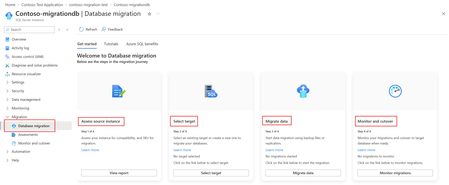
Agent deployment restrictions no longer need to block migration from Arc-registered SQL Server instances. Choose Azure SQL Managed Instance, SQL Server on Azure VMs, or Azure SQL Database, including Hyperscale. Start in the Azure portal, with options to skip assessment and manually add missing databases.192Views0likes0CommentsAnnouncing flex nodes for AKS (preview) in Azure portal
Explore how AKS flex nodes can address regional CPU and GPU capacity constraints, bring distributed compute under one control plane, and support on-premises workload placement for data residency, now with the Azure portal experience to simplify onboarding.293Views1like0Comments
Let’s talk speed and scale: Azure Managed Redis at Microsoft Ignite 2026
What could you build if your apps kept pace with your biggest ideas? At Microsoft Ignite 2026 explore how Azure Managed Redis can help you build fast, scalable applications and get practical guidance directly from Redis, Microsoft, and customers putting it into practice. Here’s where to find us at Ignite, from our featured breakout session to hands-on resources and conversations with our experts. Bring your toughest scaling questions to Ignite What does building applications for scale look like beyond an architecture diagram? Add this session to your Ignite agenda to explore a real-world customer scenario and discover actionable patterns for your own applications. Whether you are navigating a performance bottleneck or planning to modernize your application estate, bring your questions and get ready to connect these lessons to your workloads. Breakout Session: Beyond the cache: How Sitecore builds to scale on Azure Managed Redis – BRK 374 Attend: In person or online When: Thursday, November 19, 2026, at 5:15 p.m. PT Where: Moscone Center, San Francisco Explore how Sitecore uses Azure Managed Redis to support Azure Kubernetes Service-based workloads in Content Hub, its platform for governing and distributing content and digital assets. Then connect that story to your own architecture with practical caching patterns, guidance for complementing database-backed applications, and Azure Managed Redis agent kit resources to help you plan your next steps. View the session and save it to your Ignite Favorite Your app, Your questions, Let’s talk at the booth Visit the Azure Managed Redis team at the Cosmos DB, DocumentDB & Redis on Azure in the Expo Hall to discover what’s new, explore demos, or simply say hello. Talk through an architecture idea, get guidance on a challenge, or chat with us about what you’re building. Bring your questions, your next big idea, or just your curiosity, we’d love to meet you. Get Ignite-ready: Explore, plan, and try Azure Managed Redis yourself Make your time at Ignite count with a little exploration before you arrive: Plan your Microsoft Ignite experience - Explore the event and build an agenda around your priorities. Get to know Azure Managed Redis - Discover common scenarios and consider where it could fit into your application architecture. Create your first Azure Managed Redis instance - A focused alternative for readers who want a quick starting point rather than a full workshop. We look forward to meeting you there!173Views1like0CommentsScale Data Collection Endpoint private connectivity with IP Endpoint Compression - Preview
Scale Azure Monitor Private Link with data collection endpoint IP compression As organizations expand their Azure Monitor deployments, private networking needs to scale with them. For enterprises running large, distributed environments, that can create an increasingly important challenge: how do you grow private monitoring without consuming private IP address space at the same rate? Azure Monitor is introducing private IP endpoint compression for data collection endpoints (DCEs) connected through Azure Monitor Private Link Scope (AMPLS). This capability is designed to reduce the private IP footprint by ~90%-95% associated with DCEs while preserving the Azure Monitor Private Link architecture and the security controls customers already use. The challenge: private monitoring at enterprise scale Organizations often centralize Azure Monitor connectivity through carefully governed hub-and-spoke networks. As these environments grow, they can include monitored resources, data collection rules (DCRs), DCEs, and Log Analytics workspaces distributed across multiple regions. When private connectivity is required, DCEs are connected through AMPLS. The associated private endpoint uses addresses from a customer-managed subnet. As more DCEs are added, this can increase the private IP footprint required for Azure Monitor connectivity and create challenges such as: Increased subnet-capacity planning Additional network-governance reviews Delays when onboarding workloads or regions Provisioning challenges when available subnet capacity becomes constrained More operational complexity in centralized DNS and hub-and-spoke environments As customers onboard more Azure resources to send telemetry over private networks, they need a scalable way to preserve valuable private IP address space without increasing the operational complexity of their network-isolated monitoring environment. Introducing DCE private IP endpoint compression DCE private IP endpoint compression changes how DCE service endpoints are represented behind an AMPLS private endpoint. Instead of having the private IP footprint scale directly with every DCE, the compressed architecture groups compatible DCE service endpoints regionally and allows them to use a smaller, bounded set of private IP configurations. Requests continue to be routed to the intended DCE based on the requested endpoint and the existing Azure Monitor authorization context. The result is a more scalable private-network architecture without introducing a new data collection model. What does this mean for customers? Large enterprises have limited, tightly managed, often fragmented private IPv4 spaces. Private endpoints require IP addresses from customers' private IPv4 subnets. With private IP endpoint compression, all DCEs in a region share 3 regional private IPs. For example, 20 DCEs drop from 60 private IPs to 3, which is 95% fewer. Private IP address use stops growing with every DCE you add. There are no changes to how DCEs, DCRs, AMPLS, Azure Monitor Agent or Log Analytics work. Use private address space more efficiently A smaller, bounded private IP footprint can preserve valuable subnet capacity for additional workloads and Azure services. This can be particularly useful for enterprises operating with constrained private IP address space or centralized network-allocation processes. Make network planning more predictable Instead of treating each additional DCE as a proportional increase in private IP requirements, network teams can plan capacity around the regional architecture. This approach makes the network planning more predictable for enterprise customers. Scale monitoring across more workloads and regions Reducing pressure on private IP address space can make it easier to expand monitoring across applications, subscriptions, and regions without repeatedly redesigning private endpoint subnets. Reduce operational friction A more compact endpoint representation can reduce the networking work associated with subnet capacity reviews, expansion planning, and Private Link onboarding. What stays the same? One of the goals of this design is to improve network scalability while preserving the Azure Monitor model customers already use. DCE private IP endpoint compression doesn't change: The role of AMPLS as the private Azure Monitor network boundary The role of the private endpoint connecting a virtual network to AMPLS AMPLS Open and Private Only access modes DCR collection, transformation, and routing logic Azure Monitor Agent configuration semantics Log Analytics tables, retention, or KQL query behavior The amount of telemetry ingested into Azure Monitor Application Insights data collection, which doesn't use DCEs Azure Monitor ingestion charges Azure Private Link data-processing charges based on data volume Customers should continue following their existing DNS, routing, network security, public network access, and AMPLS configuration requirements. Preparing for the controlled preview DCE private IP endpoint compression is currently intended for subscriptions participating in a controlled preview. For customers participating in the preview, we recommend starting with a nonproduction or limited deployment. Before expanding the deployment: Map your topology. Understand the virtual networks, peering, AMPLS resources, private endpoints, DCEs, DCRs, workspaces, DNS zones, and supporting subnets involved. Review DNS ownership. Pay particular attention to networks sharing Azure Monitor private DNS zones and use a deliberate AMPLS topology. Establish a baseline. Record your existing private endpoint IP configurations and DCE DNS responses. Confirm regional alignment. Review the relationship between monitored resources, DCE configuration access, ingestion endpoints, and destination workspaces. Review access modes. Confirm the appropriate use of AMPLS Open or Private Only access modes for your security requirements. Validate end to end. Verify DNS resolution, Azure Monitor Agent configuration access, DCR health, ingestion, transformation, and query behavior before expanding the deployment. Looking ahead Bottom line: DCE private IP endpoint compression is designed to make private Azure Monitor deployments easier to scale by reducing the relationship between DCE growth and private IP consumption, while preserving the Azure Monitor and AMPLS architecture customers use today. Customers interested in participating in the controlled preview can contact the author via email with their subscription need to be allowlisted for the preview. This preview is available only to allowlisted subscriptions. To request access, submit your Azure subscription ID through the DCE IP Endpoint Compression preview onboarding form. Wait for Microsoft to confirm that your subscription is preview-enabled before you create the test DCEs. IP compression applies automatically to newly created DCEs in preview-enabled subscriptions. There's no additional setting to enable when you create a DCE or associate it with AMPLS. We look forward to helping customers scale private Azure Monitor deployments while making more efficient use of their network address space. Resources Learn more about designing and configuring private connectivity for Azure Monitor: Scale Data Collection Endpoint (DCE) private connectivity with IP Endpoint Compression (Preview) - Azure Monitor | Microsoft Learn Use Azure Private Link to connect networks to Azure Monitor Learn how Azure Monitor Private Link Scope (AMPLS), private endpoints, and Azure Monitor resources work together to provide private connectivity. Design your Azure Monitor Private Link configuration Review network topology, DNS, AMPLS limits, hub-and-spoke architectures, and other considerations when planning Azure Monitor Private Link. Configure Azure Monitor Private Link Follow the configuration guidance for creating an AMPLS, connecting Azure Monitor resources such as Data Collection Endpoints (DCEs), and connecting the AMPLS to a private endpoint. Prevent IPv4 Exhaustion in Azure - Azure Architecture Center | Microsoft Learn224Views0likes0Comments
Workload Orchestration in the Azure portal is now available: Deploy in minutes, scale with ease
Edge deployments rarely stay simple for long. What begins as an application running on a single Kubernetes cluster can quickly expand across stores, factories, branches, or other distributed locations, each having different configuration needs. That is exactly where workload orchestration for Azure Arc comes in. Workload orchestration helps teams manage that complexity by providing a centralized approach to consistently define, configure, and deploy applications across distributed cloud, on-premises, and edge environments, all while catering to custom configuration needs of individual sites and deployment targets. See the experience in action Evaluating a new deployment approach often starts slowly: study the documentation, package an application, complete the setup, and only then decide whether it fits. The Azure portal reverses that order with its jumpstart onboarding experience. Bring your Azure Arc-enabled Kubernetes cluster and deploy a pre-packaged application in minutes. Whether you are validating a proof of concept or introducing the product to your broader team, the new portal onboarding experience turns the end-to-end workflow into something you can quickly try on your own cluster. Scale from first deployment to production Once you have validated the first deployment, you can evolve the same approach for production. Onboard your infrastructure into workload orchestration, organize your deployment sites into hierarchies, and define shared configurations for all deployments – all without leaving the portal. This lets you expand from one cluster to a distributed fleet while retaining centralized governance, repeatability, and site-level flexibility. Ready to try it? Try now by deploying your first application with workload orchestration in the Azure portal. Explore the product documentation for the complete set of capabilities.513Views0likes0CommentsAnnouncing the General Availability (GA) of the Premium v2 tier of Azure API Management
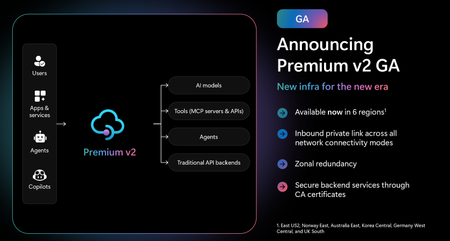
Superior capacity, highest entity limits, unlimited included calls, and the most comprehensive set of features set the Premium v2 tier apart from other API Management tiers. Customers rely on the Premium v2 tier for running enterprise-wide API programs at scale, with high availability, and performance. The Premium v2 tier has a new architecture that eliminates management traffic from the customer VNet, making private networking much more secure and easier to setup. During the creation of a Premium v2 instance, you can choose between VNet injection or VNet integration (introduced in the Standard v2 tier) options. In addition, today we are also adding three new features to Premium v2: Inbound Private Link: You can now enable private endpoint connectivity to restrict inbound access to your Premium v2 instance. It can be enabled along with VNet injection or VNet integration or without a VNet. Availability zone support: Premium v2 now supports availability zones (zone redundancy) to enhance the reliability and resilience of your API gateway. Custom CA certificates: Azure API management v2 gateway can now validate TLS connections with the backend service using custom CA certificates. New and improved VNet injection Using VNet injection in Premium v2 no longer requires configuring routes or service endpoints. Customers can secure their API workloads without impacting API Management dependencies, while Microsoft can secure the infrastructure without interfering with customer API workloads. In short, the new VNet injection implementation enables both parties to manage network security and configuration settings independently and without affecting each other. You can now configure your APIs with complete networking flexibility: force tunnel all outbound traffic to on-premises, send all outbound traffic through an NVA, or add a WAF device to monitor all inbound traffic to your API Management Premium v2—all without constraints. Inbound Private Link Customers can now configure an inbound private endpoint for their API Management Premium v2 instance to allow your API consumers securely access the API Management gateway over Azure Private Link. The private endpoint uses an IP address from an Azure virtual network in which it's hosted. Network traffic between a client on your private network and API Management traverses over the virtual network and a Private Link on the Microsoft backbone network, eliminating exposure from the public internet. Further, you can configure custom DNS settings or an Azure DNS private zone to map the API Management hostname to the endpoint's private IP address. With a private endpoint and Private Link, you can: Create multiple Private Link connections to an API Management instance. Use the private endpoint to send inbound traffic on a secure connection. Apply different API Management policies based on whether traffic comes from the private endpoint. Limit incoming traffic only to private endpoints, preventing data exfiltration. Combine with inbound virtual network injection or outbound virtual network integration to provide end-to-end network isolation of your API Management clients and backend services. More details can be found here Today, only the API Management instance’s Gateway endpoint supports inbound private link connections. Each API management instance can support at most 100 Private Link connections. Availability zones Azure API Management Premium v2 now supports Availability Zones (AZ) redundancy to enhance the reliability and resilience of your API gateway. When deploying an API Management instance in an AZ-enabled region, users can choose to enable zone redundancy. This distributes the service's units, including Gateway, management plane, and developer portal, across multiple, physically separate AZs within that region. Learn how to enable AZs here. CA certificates If the API Management Gateway needs to connect to the backends secured with TLS certificates issued by private certificate authorities (CA), you need to configure custom CA certificates in the API Management instance. Custom CA certificates can be added and managed as Authorization Credentials in the Backend entities. The Backend entity has been extended with new properties allowing customers to specify a list of certificate thumbprints or subject name + issuer thumbprint pairs that Gateway should trust when establishing TLS connection with associated backend endpoint. More details can be found here. Region availability The Premium v2 tier is now generally available in six public regions (Australia East, East US2, Germany West Central, Korea Central, Norway East and UK South) with additional regions coming soon. For pricing information and regional availability, please visit the API Management pricing page. Learn more API Management v2 tiers FAQ API Management v2 tiers documentation API Management overview documentationGenerally Available: Azure SQL Managed Instance Next-gen General Purpose
Overview Next-gen General Purpose is the evolution of General Purpose service tier that brings significantly improved performance and scalability to power up your existing Azure SQL Managed Instance fleet and helps you bring more mission-critical SQL workloads to Azure. We are happy to announce that Next-gen General Purpose is now Generally Available (GA) delivering even more scalability, flexibility, and value for organizations looking to modernize their data platform in a cost-effective way. The new #SQLMINextGen General Purpose tier delivers a built-in performance upgrade available to all customers at no extra cost. If you are an existing SQL MI General Purpose user, you get faster I/O, higher database density, and expanded storage - automatically. Summary Table: Key Improvements Capability Current GP Next-gen GP Improvement Average I/O Latency 5-10 ms 3-4 ms 2x lower Max Data IOPS 30-50k 80k 60% better Max Storage 16 TB 32 TB 2x better Max Databases/Instance 100 500 5x better Max vCores 80 128 40% better But that’s just the beginning. The new configuration sliders for additional IOPS and memory provide enhanced flexibility to tailor performance according to your requirements. Whether you require more resources for your application or seek to optimize resource utilization, you can adjust your instance settings to maximize efficiency and output. This release isn’t just about speed - It’s about giving you improved performance where it matters, and mechanisms to go further when you need them. Customer story - A recent customer case highlights how Hexure reduced processing time by up to 97.2% using Azure SQL Managed Instance on Next-gen General Purpose. What’s new in Next-gen General Purpose (Nov 2025)? 1. Improved baseline performance with the latest storage tech Azure SQL Managed Instance is built on Intel® Xeon® processors, ensuring a strong foundation for enterprise workloads. With the next-generation General Purpose tier, we’ve paired Intel’s proven compute power with advanced storage technology to deliver faster performance, greater scalability, and enhanced flexibility - helping you run more efficiently and adapt to growing business needs. The SQL Managed Instance General Purpose tier is designed with full separation of compute and storage layers. The Classic GP version uses premium page blobs for the storage layer, while the Next-generation GP tier has transitioned to Azure’s latest storage solution, Elastic SAN. Azure Elastic SAN is a cloud-native storage service that offers high performance and excellent scalability, making it a perfect fit for the storage layer of a data-intensive PaaS service like Azure SQL Managed Instance. Simplified Performance Management With ESAN as the storage layer, the performance quotas for the Next-gen General Purpose tier are no longer enforced for each database file. The entire performance quota for the instance is shared across all the database files, making performance management much easier (one fewer thing to worry about). This adjustment brings the General Purpose tier into alignment with the Business Critical service tier experience. 2. Resource flexibility and cost optimization The GA of Next-gen General Purpose comes together with the GA of a transformative memory slider, enabling up to 49 memory configurations per instance. This lets you right-size workloads for both performance and cost. Memory is billed only for the additional amount beyond the default allocation. Users can independently configure vCores, memory, and IOPS for optimal efficiency. To learn more about the new option for configuring additional memory, check the article: Unlocking More Power with Flexible Memory in Azure SQL Managed Instance. 3. Enhanced resource elasticity through decoupled compute and storage scaling operations With Next-gen GP, both storage and IOPS can be resized independently of the compute infrastructure, and these changes now typically finish within five minutes - a process known as an in-place upgrade. There are three distinct types of storage upgrade experiences depending on the kind of storage upgrade performed and whether failover occurs. In-place update: same storage (no data copy), same compute (no failover) Storage re-attach: Same storage (no data copy), changed compute (with failover) Data copy: Changed storage (data copy), changed compute (with failover) The following matrix describes user experience with management operations: Operation Data copying Failover Storage upgrade type IOPS scaling No No In-place Storage scaling* No* No In-place vCores scaling No Yes** Re-attach Memory scaling No Yes** Re-attach Maintenance Window change No Yes** Re-attach Hardware change No Yes** Re-attach Update policy change Yes Yes Data copy * If scale down is >5.5TB, seeding ** In case of update operations that do not require seeding and are not completed in place (examples are scaling vCores, scaling memory, changing hardware or maintenance window), failover duration of databases on the Next-gen General Purpose service tier scales with the number of databases, up to 10 minutes. While the instance becomes available after 2 minutes, some databases might be available after a delay. Failover duration is measured from the moment when the first database goes offline, until the moment when the last database comes online. Furthermore, resizing vCores and memory is now 50% faster following the introduction of the Faster scaling operations release. No matter if you have end-of-month peak periods, or there are ups and downs of usage during the weekdays and the weekend, with fast and reliable management operations, you can run multiple configurations over your instance and respond to peak usage periods in a cost-effective way. 4. Reserved instance (RI) pricing With Azure Reservations, you can commit to using Azure SQL resources for either one or three years, which lets you benefit from substantial discounts on compute costs. When purchasing a reservation, you'll need to choose the Azure region, deployment type, performance tier, and reservation term. Reservations are only available for products that have reached general availability (GA), and with this update, next-generation GP instances now qualify as well. What's even better is that classic and next-gen GP share the same SKU, just with different remote storage types. This means any reservations you've purchased automatically apply to Next-gen GP, whether you're upgrading an existing classic GP instance or creating a new one. What’s Next? The product group has received considerable positive feedback and welcomes continued input. The initial release will not include zonal redundancy; however, efforts are underway to address this limitation. Next-generation General Purpose (GP) represents the future of the service tier, and all existing classic GP instances will be upgraded accordingly. Once upgrade plans are finalized, we will provide timely communication regarding the announcement. Service update August 2026: Zone-redundancy for Next-gen General Purpose is now in preview. Conclusion Now in GA, Next-gen General Purpose sets a new standard for cloud database performance and flexibility. Whether you’re modernizing legacy applications, consolidating workloads, or building for the future, these enhancements put more power, scalability, and control in your hands - without breaking the bank. If you haven’t already, try out the Next-gen General Purpose capabilities for free with Azure SQL Managed Instance free offer. For users operating SQL Managed Instance on the General Purpose tier, it is recommended to consider upgrading existing instances to leverage the advantages of next-gen upgrade – for free. Welcome to #SQLMINextGen. Boosted by default. Tuned by you. Learn more What is Azure SQL Managed Instance Try Azure SQL Managed Instance for free Next-gen General Purpose – official documentation Analyzing the Economic Benefits of Microsoft Azure SQL Managed Instance How 3 customers are driving change with migration to Azure SQL Accelerate SQL Server Migration to Azure with Azure Arc6.8KViews5likes4Comments
Stream data in near real time from SQL to Azure Event Hubs - Public preview
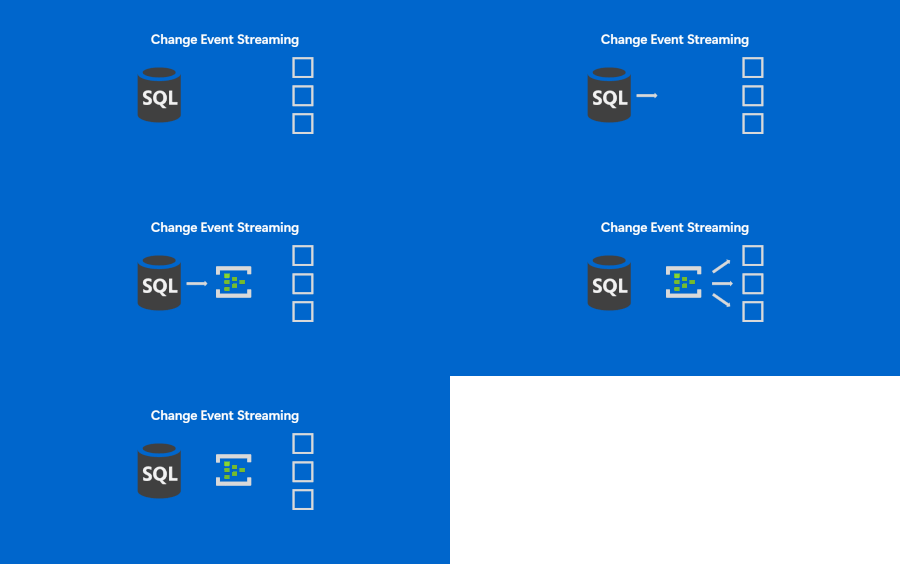
If near-real time integration is something you are looking to implement and you were looking for a simpler way to get the data out of SQL, keep reading. SQL is making it easier to integrate and Change Event Streaming is a feature continuing this trend. Modern applications and analytics platforms increasingly rely on event-driven architectures and real-time data pipelines. As the businesses speed up, real time decisioning is becoming especially important. Traditionally, capturing changes from a relational database requires complex ETL jobs, periodic polling, or third-party tools. These approaches often consume significant cycles of the data source, introduce operational overhead, and pose challenges with scalability, especially if you need one data source to feed into multiple destinations. In this context, we are happy to release Change Event Streaming ("CES") feature into Public Preview for Azure SQL Database. This feature enables you to stream row-level changes - inserts, updates, and deletes - from your database directly to Azure Event Hubs and Fabric Eventstreams in near real time. Change Event Streaming addresses the above challenges by: Reducing latency: Changes are streamed (pushed by SQL) as they happen. This is in contrast with traditional CDC (change data capture) or CT (change tracking) based approaches, where an external component needs to poll SQL at regular intervals. Traditional approaches allow you to increase polling frequency, but it gets difficult to find a sweet spot between minimal latency and minimal overhead due to too frequent polls. Simplifying architecture: No need for Change Data Capture (CDC), Change Tracking, custom polling or external connectors - SQL streams directly to configured destination. This means simpler security profile (fewer authentication points), fewer failure points, easier monitoring, lower skill bar to deploy and run the service. No need to worry about cleanup jobs, etc. SQL keeps track of which changes are successfully received by the destination, handles the retry logic and releases log truncation point. Finally, with CES you have fewer components to procure and get approved for production use. Decoupling: The integration is done on the database level. This eliminates the problem of dual writes - the changes are streamed at transaction boundaries, once your source of truth (the database) has saved the changes. You do not need to modify your app workloads to get the data streamed - you tap right onto the data layer - this is useful if your apps are dated and do not possess real-time integration capabilities. In case of some 3rd party apps, you may not even have an option to do anything other than database level integration, and CES makes it simpler. Also, the publishing database does not concern itself with the final destination for the data - Stream the data once to the common message bus, and you can consume it by multiple downstream systems, irrespective of their number or capacity - the (number of) consumers does not affect publishing load on the SQL side. Serving consumers is handled by the message bus, Azure Event Hubs, which is purpose built for high throughput data transfers. Key Scenarios for CES Event-driven microservices: They need to exchange data, typically thru a common message bus. With CES, you can have automated data publishing from each of the microservices. This allows you to trigger business processes immediately when data changes. Real-time analytics: Stream operational data into platforms like Fabric Real Time Intelligence or Azure Stream Analytics for quick insights. Breaking down the monoliths: Typical monolithic systems with complex schemas, sitting on top of a single database can be broken down one piece at a time: create a new component (typically a microservice), set up the streaming from the relevant tables on the monolith database and tap into the stream by the new components. You can then test run the components, validate the results against the original monolith, and cutover when you build the confidence that the new component is stable. Cache and search index updates: Keep distributed caches and search indexes in sync without custom triggers. Data lake ingestion: Capture changes continuously into storage for incremental processing. Data availability: This is not a scenario per se, but the amount of data you can tap into for business process mining or intelligence in general goes up whenever you plug another database into the message bus. E.g. You plug in your eCommerce system to the message bus to integrate with Shipping providers, and consequently, the same data stream is immediately available for any other systems to tap into. How It Works CES uses transaction log-based capture to stream changes with minimal impact on your workload. Events are published in a structured JSON format following the CloudEvents standard, including operation type, primary key, and before/after values. You can configure CES to target Azure Event Hubs via AMQP or Kafka protocols. For details on configuration, message format, and FAQs, see the official documentation: Feature Overview CES: Frequently Asked Questions Get Started Public preview CES is available today in public preview for Azure SQL Database and as a preview feature in SQL Server 2025. [update 20-Mar-2026] Change Event Streaming is now in public preview for Azure SQL Managed instance. Read more here. [update 3-Aug-2026] Change Event Streaming is now also in public preview for Fabric SQL database. Read more here. We encourage you to try the feature out and start building real-time integrations on top of your existing data. We welcome your feedback—please share your experience through Azure Feedback portal or support channels. The comments below on this blog post will also be monitored, if you want to engage with us. Finally, CES team can be reached via email: sqlcesfeedback [at] microsoft [dot] com. Useful resources Free Azure SQL Database. Free Azure SQL Managed Instance.1.8KViews0likes0Comments