tags
22 TopicsPreventing and recovering from accidental deletion of an Azure Database for MySQL flexible server
Accidental deletion of critical Azure resources, such as Azure Database for MySQL flexible servers, can disrupt operations. To help avoid such accidental deletions, you can use a couple of options, including Azure Resource Locks and Azure Policy. This post explains how to implement these mechanisms, and how to revive a dropped MySQL flexible server by using the Azure CLI.1.6KViews3likes1Comment
Revert to old Planner?
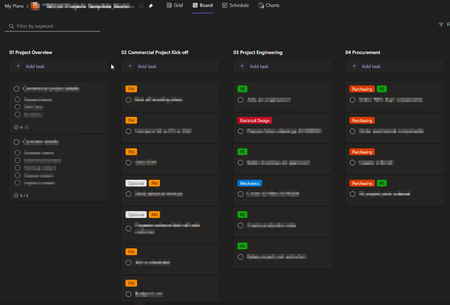
As of today, the new Planner version has been rolled out for our organisation. MS Planner is pretty much the most important tool for our project management. With the update, we can no longer copy plans without deleting all tags. In our organisation, the tags assign the responsible department to the respective tasks. This makes them extremely important. "Template Plan": Plan after we did a copy&paste: Even the Tags have to be renamed: Is there a way to revert to the old Planner? Is Microsoft aware of this problem? Kind Regards Jonathan4.2KViews19likes27Comments
Grades app - filter by TAG
On the grades app, I can filter by date range, and by grading category. I have the need to filter by TAG (I co-teach a class with a colleague, we use categories for TYPE of assignment, and tags to mark WHICH of us is associated with the assignment.... and I'd like to filter this). Hopefully, it should be an uncontentious tweak to make!312Views0likes0Comments
Color category preview for Calendar Items unavailable in the latest release of Outlook for Windows
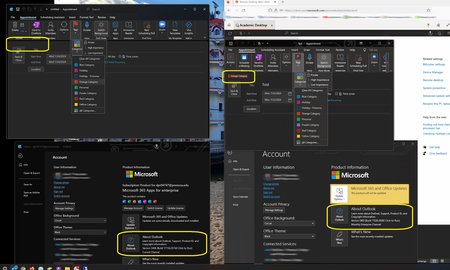
Greetings, There appears to be a problem with the color category (tags) preview for calendar items are unavailable in the latest release of Outlook for Windows. In the example below, on the right is the On the left is the latest version of Outlook for Windows (Version 2406 (Build 17726.20160 Click-to-Run)), where the color category preview does not works. On the right is a slightly older version of Outlook for Windows (Version 2402 (Build 17328.20282 Click-to-Run)), where the color category preview does works. Has Microsoft acknowledged this bug, and will a fix be issued soon? Thank you, Denis256Views0likes0CommentsTeams Private and Shared Channels Get Support for Tags
Teams Tags Support for Private and Shared Channels should arrive in targeted tenants soon. The new tag capability uses channel memberships instead of the team roster. It’s a small but useful change, as is the option to start a chat with tagged members. On the downside, Microsoft is deprecating suggested tags. But on the upside, you can include emojis in tag names. https://office365itpros.com/2024/02/22/teams-tags-channels/1.2KViews1like0Comments
Using Graph API to retrieve results with custom column tags
We're currently developing an app which retrieves documents from a SharePoint list (documents page). The files within this list have a custom column called 'Tags' in which we add multiple tags for classification. Currently I'm having trouble pulling these tags with the Graph API. Any tips where to look?1.2KViews0likes1Comment
manage tags option not avail
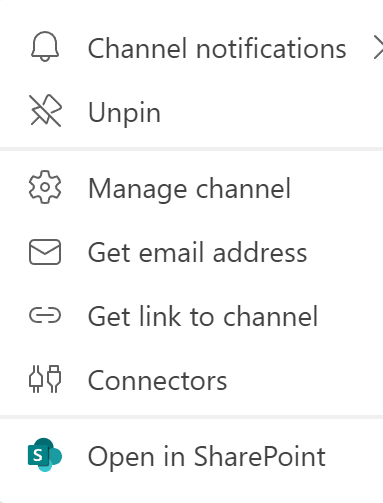
hello - im trying to manage tags in a team i am the owner of according to this page i should just hit the 3 dots and the menu option should come up https://support.microsoft.com/en-us/office/using-tags-in-teams-667bd56f-32b8-4118-9a0b-56807c96d91e pretty self-explanatory but heres what i get none of which the submenus point to managing tags any ideas? ps. ive already uninstalled/ reinstalled the appSolved1.6KViews0likes2CommentsTags with keywords in SharePoint
I know much about SharePoint metadata already. Also about the term store and the content type hub, where I can assign content types to many SharePoint pages. What I don't know is a smart way how to implement tagging. My scenario looks like this: 1. We have many SharePoint pages for our customer projects, each one for a machine we sold to a customer. 2. Sometimes failures in our customer projects happen. Those failures are repeating through many of our projects. 3. Each failure has a name 4. A failure can be described with different keywords in different languages. For example: 1. Name: Ram broke down Search terms: Ram break, Ram failure, Hopper leackage, Stempel fehlerhaft, ... 2. Name: Oil too hot Search terms: Oil issue, Öl zu heiß, Öl boiling 3. Name: Pressure too high Search terms: Pressure problem, Druck zu hoch, ... If a failure happens, people should be able to assign the Name of the failure to a set of files (a document set, a library or something similar) If other people search later for specific search terms, the cases should be found. For example: In ten different SharePoint pages I assigned the "Ram broke down" failure to a set of documents. If people are now searching for "ram failure", they should find all ten SharePoint pages, because "ram failure" is a search term for the failure "Ram broke down". However, with normal metadata something like this cannot be archived. One idea would be to use a managed metadata field for each failure and store all search terms below it. But assigning those to documents will be tedious, because all "search terms" have to be added manually. There must be a better idea... Do you have any alternative solution?1.7KViews0likes0Comments