partner question
103 Topics
Employment verification failed - Fix Now - Not Working
Fix Now button does nothing, or at least not as pictured in your own guide article. Account Verification side-screen is NOT showing up after clicking on the Fix Now button, as depicted the image in your own article. https://learn.microsoft.com/en-us/partner-center/enroll/verification-responses Fix Now button just restarts the process of verification, which fails constantly, without specifying what is wrong. This is an issue that needs to be resolved by Microsoft, there are multiple such reports.1.3KViews4likes13Comments
Unable to pass Employment Verifcation step in Partner Center
Hello everyone, I am stuck at the Employment Verification step while trying to enroll in the Microsoft Partner Center. I have already submitted the required documents, including the domain invoice and the assignment letter, but Microsoft responded with: "Based on the information you have provided to date, we have determined that your organization does not currently meet the requirements to pass verification." This leaves me very confused, as the reply does not explain what exactly is missing or what additional documents are required. I have carefully checked the documentation, but there is no clear guidance. As a company focusing on IT security, this is extremely frustrating. We recently shifted from Linux to Windows development, and without a Microsoft Partner account we are unable to proceed with building kernel-level antivirus solutions for our users. This has a devastating impact on our business. Could anyone please share their experience or advise on what specific documents or requirements Microsoft usually expects in order to pass Employment Verification? Any help would be greatly appreciated. Thank you!937Views2likes15Comments
Legal-entities and sub-units in Microsoft Partner Center terms
Hi, I represent several partners with Microsoft, and we are fast growing. In our enterprise, we do as several others, we move around locations, merge them, and restructure to improve efficiency and quality. Recently Microsoft also notified us to update and improve several of our MPN/CSP identifiers with updated information, which resulted in this post about missing features and hidden Microsoft data not available in Partner Center. Starting out as a partner, you add your company in Partner Center, creating your PGA and first PLA account. Your PGA now refers to your legal entity, and your PLA is now a sub-unit under your PGA. So far so good (for a CSP business, you have your PGA be the MPN id and your PLA the CSP id). As time goes by, your business grows and you start buying other MS partner companies. In comes account merge in partner center to the rescue. This will merge your MPN (not CSP, I know, atleast not in terms of your GDAP or customer relationships, but everything else), so that all your competencies, reports and information is updated accordingly. The company you have bought and merged now still has their CSP business, but reporting under your PGA. Both their original PGA and PLA accounts are now PLA under you PGA. So far this seems to be good, but now you are missing out on some data hidden internally in Microsoft, that is nowhere to be seen, and impossible to update: this original merged PGA still refers to the original legal-entity, and the PLA is still NOT connected to your PGA, but the original PGA, which is now a PLA under your PGA. So, something like, Your PGA --> The merged PGA (which is now a PLA) --> The merged PLA. Confused yet? Now, this merged company should at some point in time become something else, maybe a department or separate location of your company. Or maybe you even move that as a department or location below some other company you have in your enterprise portfolio. Now comes the headache of updating your CSP - PLA identifiers with correct legal information. There is currently nowhere you can read what PLA id-s are considered as legal entities, and nowhere your PLA says which legal entity they are connected to. Even filing this with MS partner support is a no-go, this information is hidden so far behind support/MCAIPP/CSP/direct/indirect/vetting/engineering/developers and god knows what, that it is currently not possible to update any of it. Not even getting to read the structure of the identifiers is possible. I hope Microsoft can understand this is a big compliance issue over time. How many tax forms or payout accounts do you need? How many are using the same legal info for the same tax forms? Regardless of being a direct or indirect partner, who should really receive the bill? Who ends up as the owner of the different agreements? (I know this usually works out one way or another, but how many hours could have been saved on partner support if this was not a headache?) We need to be able to see where each identifier is connected in terms of sub-units and legal-entities. Whether by self-service or MS partner support, we need to be able to provide updates on this structure. We need to be able to change any PLA between being a legal entity or a sub-unit, and telling which legal-entity owns the sub-unit or parent legal-entity. Different partners have different setups, we have an enterprise setup where one company fully owns all the others and plan to fully merge them within a single legal entity, but still owned by the enterprise. Others have separate companies working together sharing Microsoft competencies and benefits under one umbrella. Having a way to let Microsoft know about structural changes and having this information visible and correct in partner center is crucial when working as a partner over time. Bonus tip: Most countries, even Norway has officially available records on all companies registered, on official website or by official APIs - by looking up any company registration id, you can have the 100% accurate information for all legal entities, and all sub-units, we even give you the company registration id inside partner center for your benefit.Microsoft Store Developer registration
follow the link register store develper account: https://developer.microsoft.com/en-us/microsoft-store/register I keep getting the following error message: Microsoft runs on trust. We engage in a rigorous set of evaluation and certification processes; as a result your request was blocked. If you require further information please reach out to Microsoft support with reference number: xxx and transaction ID: xxxx I found this post and encountered the same problem, but he said that re-registering an account can solve it, but I re-created 2 accounts and it still doesn't work. Microsoft developer registration | Microsoft Community Hub what should i do next
AI Cloud Partner Program enrolled but vetting record missing ("Program Not Found")
Our company, Dill Technologies, Inc., is enrolled in the Microsoft AI Cloud Partner Program. The enrollment page shows the program under "Active In," and the agreement was accepted on 10/3/2026. However, our Verification status has stayed at "None" since enrollment, and the Verification Summary page returns "Program Not Found – Failed to load vetting details." Verification never started, and there's no self-service way to begin it. Support ticket 2610050010001898 hasn't resolved it. Support told us to complete enrollment, which is already complete, and attachments fail to upload on the ticket. Could a community manager please escalate this to the Vetting / Trust & Safety team to manually initiate legal entity verification? We need it to complete publisher verification for our Microsoft Entra multitenant app. I'm happy to share our Partner ID and business documents privately.Partner Center enrollment blocked – 715-123160 – requesting manual review
Our Microsoft AI Cloud Partner Program enrollment was blocked by the automated trust filter. Reference number: 715-123160. Correlation ID: 60efdff8-0e40-4745-8d33-d7b950000571. Company: Newox Group AB (Sweden), org. no. 559318-6280, trading as Aida Labs (aidalabs.io). Tenant domain: aidalabs.io (verified). We are an ISV building a B2B analytics SaaS with a planned Microsoft Teams integration. Since no workspace was created, we cannot open a ticket in Partner Center, and the Swedish support phone numbers listed in the M365 admin center do not connect. Please route this to the Partner Center vetting team for manual review. We can provide our company registration certificate immediately.
Error 2100 during MAICPP enrollment – Legal info blank
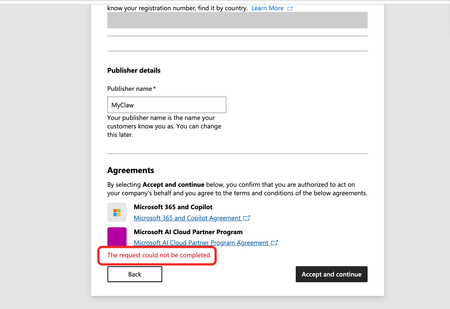
Issue: I'm stuck at the Agreements step of the Microsoft AI Cloud Partner Program (MAICPP) enrollment. When I click Accept and continue, the page displays: The request could not be completed. No further details are provided (no reference number, no transaction ID). Evidence of orphaned legal entity (error 2100): After the failed submission, I navigated to Settings → Account settings → Organization profile → Legal info, and the page renders only the title and description text—no tabs, no form fields, completely blank (screenshot attached). This matches the documented symptom of error 2100 / orphaned legal entity: the backend created a legal entity record during the first submission attempt, but it was never linked to a program enrollment. Subsequent attempts to accept the agreements fail because the system tries to create a duplicate entity. Environment: Tenant ID: 70a418c9-dca7-4bf3-90b0-765294ae60aa Verified domain: http://myclaw.ai/ Publisher name: MyClaw Account type: Company Submitting user role: Global Administrator Target program: Microsoft AI Cloud Partner Program (MAICPP) Goal: Obtain Partner ID → apply for Verified Publisher in Entra ID Already tried: Clearing cache, incognito mode, different browsers – no change Checked Identifiers page – also blank (no Partner ID, no publisher table) Cannot use the standard support form (requires a workspace, which I don't have until enrollment completes) Cannot use the no-login support form (Submit button fails) Request: Please manually clear the orphaned legal entity record or link the existing entity to the MAICPP enrollment, so I can complete the registration. Attached screenshots: "The request could not be completed" error at the Agreements step Legal info page rendering no tabs Thank you.
MAICPP enrollment: Create work account redirects to signup.live.com and support form fails
I am trying to enroll IT-ICU, an Australian IT services business, in the Microsoft AI Cloud Partner Program as a Partner / Managed Services Provider / Systems Integrator. IT-ICU does not currently have a Microsoft Entra work account. During the MAICPP enrollment flow, I select Create work account as instructed. Instead of taking me through creation of an organizational Microsoft Entra work account/tenant, Microsoft redirects me to signup.live.com and displays the consumer Microsoft Account creation flow ("Add your name to your Microsoft account"). I reproduced this in a fresh Incognito browser session using a valid and working business-domain mailbox. I deliberately did not complete that consumer signup because I do not want to create the wrong account type or an unnecessary duplicate Microsoft identity. I then tried the Microsoft Partner support route for users without a Partner account: Enrollment > Enroll > How do I enroll into MAICPP program I completed the support request form, but submitting it repeatedly returns: "There is a problem submitting your request, try again!" Therefore I currently have no MAICPP enrollment, no Partner ID, no Microsoft Entra organizational work account created through the enrollment process, and no support case/reference number because the support form itself will not submit. Could a Microsoft Community Manager please advise the correct way to create the required organizational work account for MAICPP enrollment, or escalate this to the Partner Center Enrollment / Provisioning team? I can provide screenshots, redirect information and business-domain ownership evidence privately through an official Microsoft support channel if required. Thank you.
Subject: URGENT: MAICPP Enrollment Blocked - Do LOOP Requesting JillArmourMicrosoft Escalation
Hi Microsoft Partner Compliance Team / JillArmourMicrosoft, Company: Virtru Tenant ID: 6140bbf1-26f9-43e0-9a2e-4e119d869634 Enrollment Error: I am stuck in every do loop possible!! I am the global admin in entra - i assigned rights that would enable me on partner center - but still not seeing legal tabs to upload docs to verify org !!! All support paths have failed: ❌ Partner Center support — no workspace available ❌ Public no-sign-in support link — returns "There is a problem submitting your request" ❌ Microsoft 365 Admin Center support — unable to route to Partner Center team Requesting escalation to Partner Trust & Safety / Vetting team for manual review. We are a legitimate, established cybersecurity company and can provide incorporation documents, EIN, and any other verification materials immediately.