partner question
272 Topics
To enroll in Microsoft's Windows Hardware Developer Program for kernel driver attestation signing
Hello Partner Compliance team and JillArmourMicrosoft, We are an enterprise security software vendor trying to enroll in the Windows Hardware Developer Program so that we can attestation sign our own kernel-mode driver. Current status: - We followed the documented registration steps: https://learn.microsoft.com/en-us/windows-hardware/drivers/dashboard/hardware-program-register - We have a valid EV code signing certificate (not expired, not revoked) - We signed in with our Microsoft Entra global administrator account - The Hardware program status now shows Rejected - There is no Fix now option available to correct anything - Trying to enroll again is blocked With no Hardware workspace, we cannot raise a ticket through Help + support, and Services Hub asks for a paid support plan What we have done: - Submitted a request through the "Provide issue details" form for users who cannot sign in - Ticket number: 2608030040002698 - So far we have received only the automated confirmation Request: Could someone please route this ticket to the Windows Hardware Program / Hardware Dev Center team? We would like to know the specific reason for the Rejected status so we can correct our Legal info, complete account verification and have the enrollment reactivated. Our requirement is limited to attestation signing our own driver for Windows 10/11 client systems. We are not requesting Windows Update distribution. We can share our Seller ID, tenant details, ticket number and screenshots privately. Thank you for your help.
CSP Program enrollment was DEACTIVATED
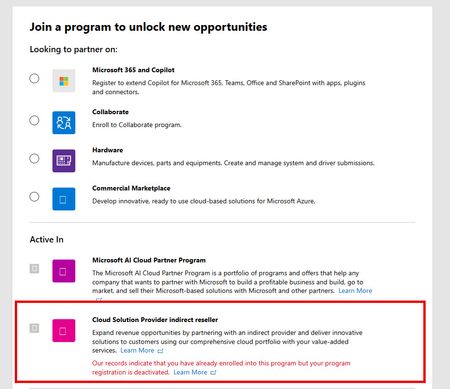
We are an active Microsoft reseller in the AI Cloud Partner Program. We were also enrolled in the CSP Indirect Reseller Program. Last year, our CSP enrollment was DEACTIVATED (not SUSPENDED and not TERMINATED). Of course, we got the typical response on our tickets when asking WHY we were deactivated stating that MS can walk away with no explanation. We BELIEVE it is because we had not sold at least $1000 in the previous 12 month period. Everything I read states that we can re-enroll 12 months after our "onboarding date" which I am not sure what that date is. We were deactivated around October 2025. The "Learn More" link doesn't really help, and focuses mostly on SUSPENSIONS which I believe is different. Even using that link, none of the reasons for a suspension apply to us other than the "program requirements" which is where the $1000 minimum comes from. Can anyone offer some additional guidance here? Thanks!
Poor Partner Center Support
I'm trying to register for the Hardware Program and it shows account suspended (we have not subscribed before), because we simply need a driver to be signed. But after many frustrating weeks this is the final answer we got (8+ weeks, TrackingID#2609140040004120): "Thank you so much for your patience while we reviewed the account. During the reinstatement review, it was confirmed that the account was never registered in the Hardware Program and therefore was never active. Because of this, the existing account cannot be reinstated. To move forward, you will need to start a new Hardware Program enrollment using a new tenant. I understand this may not be the outcome you were expecting, but this will allow you to proceed with a new registration rather than continuing with the previous account. As we have now received the final outcome of the reinstatement review and the required next step has been provided, I will proceed with closing this support ticket." How it the world is this a possible solution since it did not work in the first place. We have a our whole company tied to this tenant, and now I have to register a new one, most likely incur some costs again, just because of some buggy software that cannot resolve the issue??
Verified by email, but Legal info still shows Verification status None
Hello, Our company (Atlas Software LLC) is stuck on partner verification and we have not been able to get a response through support. What we have done and what we see: - We submitted all the requested documents, and we received an email from Microsoft saying our account was verified. - In Partner Center, the Developer program (Microsoft 365 and Copilot / Teams) shows "Authorized". - Our AI Cloud Partner Program enrollment is "Active". - However, Account settings > Legal info still shows Verification status "None" ("Program Not Found"). Because of this, we cannot complete Microsoft Entra publisher verification, which we need to publish our Teams / Microsoft 365 Copilot app in the store. We opened a support request on October 5 (TrackingID#2610050010000197), added a note to it, and emailed the support engineer, but we have not had a reply. It looks like the verification was completed on one side but not linked to our account's legal information. Could someone from the Partner Center team check this or tell us the right way to get it fixed? Thank you.
AI Cloud Partner Program enrolled but vetting record missing ("Program Not Found")
Our company, Dill Technologies, Inc., is enrolled in the Microsoft AI Cloud Partner Program. The enrollment page shows the program under "Active In," and the agreement was accepted on 10/3/2026. However, our Verification status has stayed at "None" since enrollment, and the Verification Summary page returns "Program Not Found – Failed to load vetting details." Verification never started, and there's no self-service way to begin it. Support ticket 2610050010001898 hasn't resolved it. Support told us to complete enrollment, which is already complete, and attachments fail to upload on the ticket. Could a community manager please escalate this to the Vetting / Trust & Safety team to manually initiate legal entity verification? We need it to complete publisher verification for our Microsoft Entra multitenant app. I'm happy to share our Partner ID and business documents privately.AI Cloud Partner Program enrolled but vetting record missing ("Program Not Found")
Our company, Dill Technologies, Inc., is enrolled in the Microsoft AI Cloud Partner Program. The enrollment page shows the program under "Active In," and the agreement was accepted on 10/3/2026. However, our Verification status has stayed at "None" since enrollment, and the Verification Summary page returns "Program Not Found – Failed to load vetting details." Verification never started, and there's no self-service way to begin it. Support ticket 2610050010001898 hasn't resolved it. Support told us to complete enrollment, which is already complete, and attachments fail to upload on the ticket. Could a community manager please escalate this to the Vetting / Trust & Safety team to manually initiate legal entity verification? We need it to complete publisher verification for our Microsoft Entra multitenant app. I'm happy to share our Partner ID and business documents privately.Verification "Authorized" but Partner Center remains deactivated. No support channel reachable.
We are a company seeking help with a Partner Center account state inconsistency (Seller ID available by direct message to a Community Manager or Microsoft employee). Timeline: - Our Windows Hardware Developer Program enrollment was rejected at the Employment Verification stage. - Microsoft Vetting Operations instructed us in writing to update our profile to a company-owned domain and provide domain registration documentation. We complied fully and same-day: registered and verified a company domain on the enrolling tenant, updated the seller contact and company approver to an address on that domain, and supplied registrar documentation. - The verification pipeline re-ran: Email, Identity, and ultimately all stages completed. Legal Info now shows Verification Status: AUTHORIZED. - However, the Partner Center account itself returns "your Partner Center account has been deactivated" on every workspace — Hardware, Programs, and the support wizard — so we cannot file an in-portal support case from the deactivated account. - Email follow-ups to the Vetting Operations thread and to an assigned Dev Center support engineer have gone unanswered for over a week. We hold multiple correlation IDs (most recent: f4fd02fd-d21f-462f-8765-1ea3d6132ad2, 02 Oct 2026). Our read: the account object was deactivated when the earlier application was closed, and was never re-activated when the verification subsequently authorized — a state inconsistency between the vetting record and the account. Ask: could a Community Manager or Microsoft employee escalate this to the team that can re-activate a verified account? The verification work is complete; only the deactivation flag remains, and it is blocking a driver-signing deliverable. We can provide the Seller ID, case numbers, correlation IDs, and full documentation through any private channel indicated. Thank you. Access restricted We're sorry, you don't have permission to access this page because your Partner Center account has been deactivated. For assistance, please contact your Partner Center administrator or support. Correlation ID: f4fd02fd-d21f-462f-8765-1ea3d6132ad2 Correlation vector: leO3sWI4S0K2fExK.4 Time: 02 Oct 2026 22:36:07 +00:00Partner credits (billing profile redemption): Cost Analysis shows $0 everywhere
Hi all, I'm a Microsoft partner (MAICPP, Partner Success Core) and I'm stuck on cost visibility for the Azure credit benefit. Has anyone run into this with the new redemption model? Redeemed the $2,400 Azure credit in Sep 2026 through the new Partner Center flow, where credits are deposited directly onto an MCA billing profile. No separate "sponsored" subscription was created. The credit sits on the billing profile and applies to the subscriptions under it. The subscription runs Azure DevOps and Microsoft Fabric. The problem Billing profile > Payment methods > Azure credits shows the credit as Active, with about $320 already consumed (balance around $2,079). Cost Analysis shows $0.00 for everything, at both subscription scope and billing account scope. Services appear in the breakdown, but every value is zero and Actual cost shows "--". So the credit is clearly being drawn down, but I can't see what is consuming it. What I already know / tried I know Cost Analysis doesn't show credits themselves, but it should still show pre-credit usage cost for an Azure plan subscription. The older threads about Sponsorship subscriptions (MS-AZR-0036P) and microsoftazuresponsorships.com seem to describe the legacy model, not this one. I've seen that Microsoft documents a "Transactions" view on the credit resource for MAICPP credits issued after Aug 1, 2026, but I'm still checking it. Questions Has anyone on the new billing profile model seen Cost Analysis stay at $0 while credits were consumed? Did it eventually fix itself? Where did you finally get per-resource usage? The credit Transactions page, the usage CSV on the invoice, the Cost Details or Consumption APIs, or a support ticket? If you opened a billing ticket, what did support say? Is this expected or a bug? Any tips for budgets or alerts while credits are active, so usage doesn't burn silently? Thanks!87Views0likes1Comment
Identity verification closed after a corrected name typo, and no route to support
Our Partner Center identity verification failed and was closed ("no further action will be taken"). The cause was a typo in the primary contact name, which has since been corrected to match the ID exactly. In Help + support the assistant doesn't offer a support request, so we can't ask for the existing verification to be reopened. Could a moderator help reopen verification on the existing account, or point us to the right channel? Happy to share account details privately.The Indentity Verification step failed due to Microsoft Trusted IDV AU10TIX issue
JillArmour is there a way to get this resolved? My company has been and still Authorized and Active Microsoft Partner for more than 8 year. Without any reason (no changes to Legal Info, no changes in Primary or Security Contacts, etc.), the Indentity Verification was triggered in Partner Dashboard on June 24, 2026. I followed the steps to verify via Microsoft's only trusted IDV AU10TIX ( https://www.au10tix.com ). The driver's license was correctly OCR-ed, etc. Yet, the VerifiedID that was issued by AU10TIX platform had the Last Name completely missing! As the result the Indentity Verification failed due to a basic name mismatch, the Verification status switched to Rejected, and the Resolve button no longer available for me to retry again. I opened two support tickets already 2606250010001105 (this one was closed without even reading my request details, and I re-opened it again and re-sent the details asking to re-start the Indentity Verification step, so I could retry) and 2606260010001921 (since there has been no reply at all to the first ticket, despite 8 business hours of response SLA that is mentioned in the official support ticket confirmation email) My company's benefits package is up for renewal and we cannot now publish our ISV offering on the Marketplace also. Now, I'm not even sure how the retry is going to work, will the trusted IDV AU10TIX issue a new VerifiedID or it will tell me that it already issued one for that email address...?Solved