outlook
24 Topics
New Account is blocked
Hi everyone, I wanted to create a new email address because I changed my lastname. Unfortunately, the process is being blocked due to alleged unusual activity. ?! I’ve already tried using other devices and networks. The technical support agent cannot help me in the Chat. Please help me. Thanks...214Views0likes3CommentsNeue Kontoerstellung wird blockiert
Hallo zusammen, Wegen meiner Namensänderung wollte ich eine neue Mailadresse erstellen. Leider wird die Erstellung wegen angeblicher ungewöhnlicher Aktivitäten blockiert. Ich habe es schon über andere Geräte und Netzwerke probiert. Bitte helft mir. Danke...84Views0likes0Comments
Office 2021 Classic not showing images in Signatures
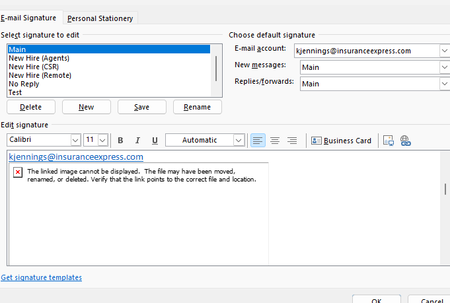
Hello I work in IT and trying to find a solution to this problem that our outlook are not showing the images in the signatures. Our Outlook 2021 Version is 2608, Build 16.0.20326.20072. This occurs even when creating a completely new signature and inserting a new local PNG/JPG using Insert Picture. The image initially appears correctly when inserted, but after saving/reopening the signature it becomes a red X with the message "The linked image cannot be displayed. The file may have been moved, renamed, or deleted." Existing signatures have the same problem. Recreating the signature does not resolve it. Here are some details we tried already. BlockHTTPimages is not configured in either the normal Office registry location or the Policies location. Uninstall Reinstalling Office didn't work We are under AD profiles, with new profiles and even rebuilding current profiles didn't solve it. Attempted a full reset of windows 10/11 didn't work. This appears to be an Outlook/Word signature-image regression rather than a corrupted signature or externally hosted image. Per Microsoft status that this should've been resolved back in June but the issue still persisted. https://support.microsoft.com/en-us/support/known-issues/images-are-not-displayed-in-emails-newsletters-or-signatures-in-classic-outlook?utm_source=chatgpt.com I did try using ChatGPT to help with the issue. I will share the thread link here if you wish to look into of all troubleshoots that was attempted. https://chatgpt.com/share/6aac0312-a08c-83ea-b1a8-2192b3677136 If anyone has any better knowledge of finding a solution as we have reported this issue to Microsoft via the help feature in outlook classic, but gotten no response since the last month since the issue started.331Views1like1CommentPhone verification is not working
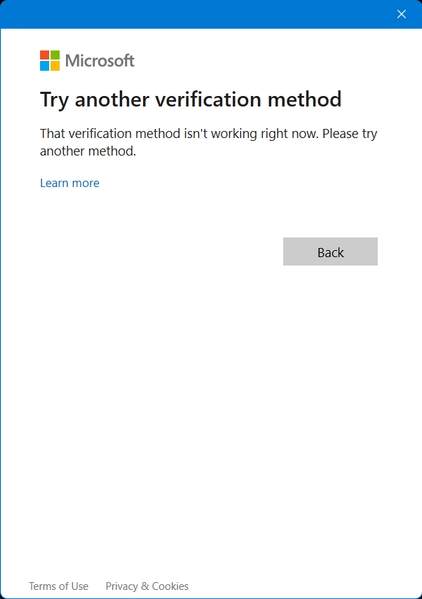
Hello. I was logged out of my accounts when I opened Outlook on Windows. I managed to log into the first one, but I forgot my password of the other one. I am struggling to log into that account. That account is not connected to an authenticator app, but is connected to my phone number. I tried resetting my password using my phone and entered last 4 digits of my phone number, but the method is NOT WORKING for some reason. I also tried verifying my account with my phone number, but I didn't get any code from Microsoft. All the accounts that I buy online with use this email account. Please help.332Views0likes4Comments
Feature request: meeting cancellation by organizer in M365 Copilot
During a recent usage of M365 Copilot, I identified a capability gap that significantly limits calendar-related automation. Current situation Copilot can: find meetings in my calendar, identify meetings where I am the organizer, interactively ask which meetings should be processed. However, Copilot is currently not able to cancel organizer-owned Outlook meetings and send cancellation notifications, although this is a natural next step in the workflow. Requested capability Cancel individual meetings organized by the user Cancel recurring meetings or selected instances Send a custom cancellation message to attendees Support bulk processing (e.g. vacation preparation) Example use case Before a planned absence, a user asks Copilot: Find all meetings during my vacation. Show only meetings where I am the organizer. Ask me for each meeting whether it should be cancelled. Cancel the selected meetings and send a predefined message such as: "Florian planned absent." This would be a valuable productivity enhancement for Outlook and Copilot users who manage large numbers of meetings. Could you please advise whether this capability is already planned, whether a feedback channel exists, or which product team would be the appropriate owner for this request?68Views0likes0Comments
Formatting wont transfer from Excel to Outlook
The last 2 or 3 days every time I copy and paste from Excel into Outlook it drops all of the formatting. I've adjusted my settings to keep formatting, tried manually telling it to keep the formatting. It simply wont. I've googled and searched the Microsoft website to no avail.275Views0likes2Comments
Feature Request: Add "Recent Activity Feed" combining Sent & Received emails
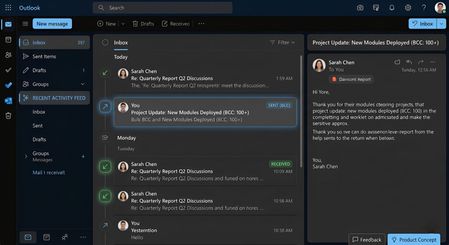
Respected Outlook Product Team, I am writing to submit a feature request aimed at improving productivity and message tracking for power users who heavily rely on Microsoft Outlook for their daily communication workflows. The Problem: Currently, Outlook separates communication into distinct folders: "Inbox" for incoming mail and "Sent Items" for outgoing mail. When managing large-scale communications—specifically when sending bulk or recurring emails via BCC (Blind Carbon Copy)—it becomes incredibly tedious to constantly switch back and forth between the Inbox and Sent Items folders to track recent operations or verify the exact sequence of historical activities. The existing "Group messages by conversation" feature also fails to merge these independent outgoing streams seamlessly unless a direct reply is received. The Solution / Feature Proposal: I highly request the product team to introduce a "Recent Activity Feed" filter or view within the main Outlook Inbox interface. Inspired by modern social media and collaboration timeline feeds, this feature should display both Sent and Received emails chronologically in a single unified message list. Incoming and outgoing messages should be clearly distinguishable using intuitive icons (e.g., incoming/outgoing arrows) and labels (e.g., "SENT (BCC)" vs "RECEIVED"). This will allow professionals to review all recent actions, sent bulk updates, and incoming threads at a single glance without breaking their operational focus. I have attached a UI/UX Concept Design image with this email to visually demonstrate how this feature would streamline the user experience seamlessly. I sincerely hope the engineering and product management teams will consider this feature in future Microsoft Outlook updates to adapt the platform to modern, high-volume workflow requirements. Thank you for your time and continuous efforts to improve Microsoft Outlook. Regards, Pawan Kumar157Views0likes3Comments
Last week my office changed color to blue and i spoted opening pdf files
Last week my office changed color to blue and i spoted opening pdf files. when i try to open a pdf file says "Error and to try again later in a few moments" The Outlook online say the same thing. On my phone i can see the pdf fine. I tryied to repair the outlook, but didnt work.201Views0likes3Comments
Two Linked Outlook Issues Causing Accidental Emails to Wrong Clients Feature Request + Bug Report
Hi Outlook Community, I'm posting this after a real incident at work where I accidentally sent a confidential email to the wrong client. After reflecting on what went wrong, I've identified two separate but related Outlook issues that compounded the mistake and I want to raise both here so they reach the right people. Bug: Autocomplete Recipient Changes After You Press Enter This one is subtle but dangerous. When you start typing a name in the To/CC/BCC field, Outlook shows an initial autocomplete suggestion. If you press Enter before the search fully resolves, the dropdown refreshes mid-selection and the contact that actually gets added is *different* from the one that was highlighted when you hit Enter. You don't get any warning. You believe you've selected the right person. You haven't. I've submitted this via the Feedback Portal here: https://feedbackportal.microsoft.com/feedback/idea/9a32197e-5424-f111-9730-0022485314bc Suggested fix: Freeze the highlighted contact reference at the moment Enter/Tab is pressed, independent of any ongoing background search refresh. --- Feature Request: Cross-Domain Recipient Warning (like the missing-attachment check) Outlook already warns you before sending if it detects you may have forgotten an attachment. I'd love to see a similar pre-send check for this scenario: You are about to send an email to recipients across 3 different organisations. Did you mean to do this? In consulting, legal, finance, and any client-facing role, it's very easy to accidentally include someone from Client B on an email meant only for Client A especially when contacts share similar names. A configurable domain-count threshold (default: 2 external domains) with a soft confirmation prompt would catch this class of mistake before it becomes a compliance incident. Key asks: - Configurable threshold (user-level) - Domain whitelist support (e.g., always allow your own org + a known partner) - Covers To, CC, and BCC combined - Non-blocking same UX pattern as the attachment warning I've submitted this as a feature request here: https://feedbackportal.microsoft.com/feedback/idea/9a32197e-5424-f111-9730-0022485314bc --- Has anyone else run into either of these? Would love to know if the autocomplete bug is reproducible for others that would help push it up the priority queue. Thanks for reading. Sudharm P425Views0likes2Comments"Add to Calendar" functionality in the New Outlook
When a user receives an email with a Calendar meeting attached to it, they are able to click on the dropdown in the attachment and select "Add to Calendar". This functionality is supposed to add the meeting to the calendar without opening the attachment/invite itself. However, when the user clicks on "Add to Calendar", the meeting is displayed temporarily on the Calendar and then disappears. If another calendar meeting is being "Added to Calendar", it doesn't show up at all, even temporarily. Occasionally, the second meeting is added successfully, however, the first meeting then disappears. This behaviour is reproducible using different, independent accounts and devices - personal devices, corporate devices, personal Live accounts, corp email accounts, etc. The only thing that does work is to open the attachment and use "+Add to Calendar" feature from the invite. Any ideas on what is causing this or how to address this?371Views0likes2Comments