outlook
2168 Topics
Microsoft Sign In Loop
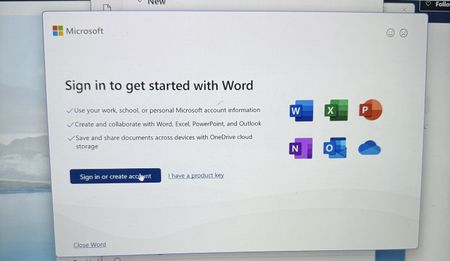
I am trying to sing into Microsoft 365, but every time I do, it takes me back to the login screen. I sing in with my outlook account, but I can't reach the applications. I can sign in on the browser, but not the applications on my computer. I have tried uninstalling and reinstalling M365, but the issue still persists76Views0likes1Comment[Community tool] Find the GPO, registry value and Intune setting for any Office ribbon button
Hi everyone, as a technical service owner for Microsoft 365 Apps, one question comes up for me again and again: which policy actually controls this button or option? The information is all there – in the Office ADMX/ADML templates, the Office Fluent UI control ID lists, the Intune Settings Catalog and many Learn articles. But I never found it in one place, so every answer meant connecting several sources by hand. Especially when onboarding new colleagues, this costs a lot of time. So I built a free community tool for it: Office Admin Explorer https://tools.pascal-donath.de/office-admin-explorer/ How it works It's a clickable mock of Word, Excel, PowerPoint and Outlook (ribbon, File menu, Options, Trust Center). Click any element and you get: idMso and Policy ID (for customUI and the "Disable commands" policy) the ADMX policy with its exact path in Group Policy Management the registry value it writes, with ready-to-copy PowerShell or .reg the matching Intune Settings Catalog entry Cloud Policy notes, step-by-step guides and Microsoft Learn links The search covers all Office ADMX policies (2,400+) and command IDs (8,000+), including elements that aren't part of the mock. Also included Ribbon builder – hide or disable buttons, groups or tabs and export the result as customUI XML, a macro-free add-in (.dotx / .xlam / .ppam) or the "Disable commands" policy for Group Policy and Intune Deployment view – configuration.xml generator for the Office Deployment Tool User Support view – typical user problems: symptom → cause → fix Policy names and registry values are checked against Microsoft's ADMX/ADML files, and the Intune mapping against the Graph settings catalog. It runs in the browser without sign-in and is available in English and German. Please test any configuration on a lab device or pilot group first. I'd like your input How do you handle this today – ADMX search, Group Policy Search, the Intune catalog, your own documentation? Which Office settings do you get asked about most often? I'd like to add the most requested ones next. If you find a wrong or outdated entry, every entry has a "Report it on GitHub" link – corrections are very welcome. Thanks! Pascal --- *Transparency note: The tool was developed with the help of AI. The content is based on my own admin experience, and policy names, registry values and Intune mappings are validated automatically against Microsoft's official sources (ADMX/ADML templates, Fluent UI control lists, Microsoft Graph settings catalog). This is a community project and not affiliated with Microsoft.*Why do Apple macOS and Ubuntu clients display Exchange meeting times one hour earlier than scheduled
If a meeting is generated from Apple macOS and Ubuntu clients showing the meeting time as one hour earlier than the actual scheduled time email solution is exchange server 2019, what will be the issue.164Views0likes1Comment
Microsoft Account Login
HI All I recently reinstall windows on the same PC where I had my Microsoft account as a default. During the set-up process I wasn't able to create Hello Pin so I used another Hotmail account and also choosing to go offline option having tried several times with the Microsoft account which I have set-up as a profile but cannot login using my Microsoft account as nothing happens when I click on sign in with no option prompt to sign in. I have checked my Microsoft, but no issues found through troubleshooter as I'm logged into the account submitting this support discussion not via windows profile account. I can't work out why I'm no longer able to login using my Microsoft account. Help on this would be appreciated. Regards, Sergio248Views0likes3CommentsNew Account is blocked
Hi everyone, I wanted to create a new email address because I changed my lastname. Unfortunately, the process is being blocked due to alleged unusual activity. ?! I’ve already tried using other devices and networks. The technical support agent cannot help me in the Chat. Please help me. Thanks...214Views0likes3CommentsNeue Kontoerstellung wird blockiert
Hallo zusammen, Wegen meiner Namensänderung wollte ich eine neue Mailadresse erstellen. Leider wird die Erstellung wegen angeblicher ungewöhnlicher Aktivitäten blockiert. Ich habe es schon über andere Geräte und Netzwerke probiert. Bitte helft mir. Danke...84Views0likes0Comments
Unable to Open an Old OST File After Outlook Profile or Mailbox Changes
Hi everyone, I am looking for suggestions on handling an old OST file where the original Outlook profile or mailbox is no longer available. The situation is that an OST file contains important mailbox data, but Outlook cannot open it normally after changes to the user account or profile. This can happen after a Microsoft 365 mailbox change, Exchange migration, user account removal, or when an OST file becomes damaged. Since OST files are linked to the Outlook profile and mailbox that created them, simply moving the file to another system does not always make the data accessible. Before attempting any recovery approach, I would like to understand the recommended steps: Is there any Microsoft-recommended method to access an orphaned OST file? What checks should be performed before trying to recover data from the OST? How do administrators usually handle old OST files when the original mailbox is no longer available? What is the best way to validate recovered mailbox data? I would appreciate feedback from anyone who has handled similar Outlook OST recovery scenarios after Microsoft 365 or Exchange changes.376Views0likes5Comments