office 365
20532 TopicsMicrosoft Teams – “Save this message” feature missing in both Desktop and Web clients
a { text-decoration: none; color: #464feb; } tr th, tr td { border: 1px solid #e6e6e6; } tr th { background-color: #f5f5f5; } Hello, We are experiencing an issue in our Microsoft 365 tenant where the “Save this message” feature in Microsoft Teams is not available, neither in the Teams desktop app nor in Teams Web. Details The feature should be available globally, as Microsoft planned full rollout between August and October 2025 (Microsoft 365 Roadmap ID 496369). This is confirmed in multiple official and community‑published sources. https://m365admin.handsontek.net/microsoft-teams-users-can-save-chats-channel-messages-later/, https://supersimple365.com/teams-save-chats-and-channel-messages-for-later/ Microsoft also stated that no admin controls exist to disable this feature and no configuration is required in the tenant. https://m365admin.handsontek.net/microsoft-teams-users-can-save-chats-channel-messages-later/ Despite this, the option does not appear at all in the message overflow menu (… → More actions) in both: Microsoft Teams Desktop (version 26032.206.4355.6508) Microsoft Teams Web (teams.microsoft.com) Troubleshooting already performed Full cache removal for the new Teams client under: %localappdata%\Packages\MSTeams_8wekyb3d8bbwe\LocalCache Log out / sign‑in cycle Full Teams desktop restart Verification across different clients (desktop + web) Verification from multiple messages and channels28Views0likes1Comment
Office outlook 365 .. where are emails saved?
I have office outlook (not the desktop version), i.e. https://outlook.office.com/mail/ After hours of searching I have found no way to save/export all my emails to a new computer. The office outlook does not have any export function even for the archive folder. The new computer has a 365 desktop outlook.57Views0likes2Comments
#Connect Error in Excel for StockHistory Function
Evening, I am an O365 subscriber and am trying to set up an Excel sheet as a VAR template, and I wanted to populate my workbook with some historical data without uploading a CSV. Figured I would try out the StockHistory function. I keep getting "#connect" for my cells, and I am not sure why. I am not in developer mode, do not have any crazy add-ins, I am signed in, and connected to the internet. Do I need to be connected to a source? I am fairly new to learning about the StockHistory Function. Any thoughts on the matter are welcome. I tried all that I could from this site below: https://support.microsoft.com/en-us/office/how-to-correct-a-connect-error-584f7de9-b238-480c-8e8f-de0ba2c1aac98Views0likes0Comments
Exchange online - track deleted mail
I am 365 admin and see quite often people rapport "all my mails are in deleted post - and I have done nothing" or similar What is the best practice to investigate that. I know in powershell I have made some auditsearches, where it rapports like softdelete, hardelete etc - but is there any more specific way proving that the user actually did in on his own ? - I know with retention policies it is hard delete - but just wondering what the best practice is like to prove to the user that this is the user. Just write that it is soft deleted and means user have done it, often the user think is not understandable51Views0likes1Comment
Excel not publishing OLE
Excel no longer publishes any OLE clipboard formats in build 16.0.19725.20078. Copying a cell and using Paste Special in Word/OneNote shows no “Paste Link” and no “Microsoft Excel Worksheet Object.” Only text/HTML/bitmap formats appear. This blocks creation of linked or embedded Excel objects. Issue is fully reproducible: new workbook, enter value, copy, open Word → Paste Special. Expected: Paste Link + Excel object formats. Actual: missing. Verified after full repair, reinstall, Safe Mode, new profile, add‑ins disabled. Excel→Excel copy works; Excel→external OLE formats do not. This appears to be a regression in the OLE clipboard publishing pipeline for this build family.19Views0likes0Comments
Publish an Excel Add-in by just submitting the add-in manifest to Microsoft Marketplace
I am working on Excel Add-in built using the react template. We are planning to host the add-in code on our domain and update the manifest to point to the URL for our domain. Can I just submit the add-in manifest to Microsoft to publish it in Microsoft Marketplace?32Views0likes1CommentMacros open server file hyperlinks in 2nd instance
Macros open server file hyperlinks in 2nd instance, preventing macros from seeing and interacting with the newly opened file. Manual clicking of hyperlink opens the files in the same instance as expected. Users with fresh login have no trouble with the macros opening the files in the same instance. Esoteric macro and/or Microsoft 365 Active Directory problem. Macros using hyperlink in a cell to .follow them to open. Then the next line is a sheet selection of a sheet in the new workbook. Error thrown because the new workbook is not visible to the macro and does not see the sheet name. This works for everyone everywhere. Including on fresh logins. Recently User1 started having the 2nd instance problem. I thought it was isolated and fixed it by removing and recreating his profile. Worked fine for a week. Then it came back. Then User2 logged in on the same machine had the issue. Then the next day User3 on a separate machine had the issue. All 3 users have no issues if they just use a clean login on a different machine. If you manually open all the necessary files, THEN run the macro, it still errors because when it tries to open the already-open-file, it gives the standard Read only Notify me Cancel dialogue. It says [self user] is using it and the file is locked. So is it even a macro problem or is it a server problem? Our server admin says it's not his problem and he has no idea what's happening and it's probably our crappy macros. Yes, our macros are crappy, recorded decades ago. But they work as expected except in these rare but spreading cases, seemingly due to some background environment development.8Views0likes0CommentsMy MS-Excel window goes black partially and intermittently.
Dear Microsoft Office Team, When I open and add data to an Excel sheet, the screen goes black partially (in some parts) and intermittently. It is like black sections flashing on the screen. The problem happens when Excel window is maximized or restored. First, I thought that my laptop screen was broken down. However, the screen works normally and correctly with all other apps, except when opening and using the Excel desktop app. This had happened before, some weeks ago. But last week started again to flash with the black sections on the screen. It is probable that this problem came along with the installation of a Windows 11 update. I am using: Windows 11, HP laptop, Excel desktop app (Office 2019). I tried the following actions to fix this problem but they did not work: - I installed Windows 11, version 22H2, x64 - I uninstalled and installed again Office 2019 - I ran the diagnostic tests of HP Support Assistant (Hardware and OS) - I installed subsequent Windows updates. Can you help me please?Solved64KViews0likes26CommentsWord - Same Line Page Breaks Visibly Change Formatting
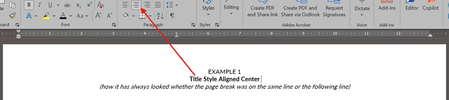
Within the last week or so, Word suddenly has started changing the formatting of visible text when a page break is used on the same line. How can this be corrected? (To be clear, yes, a page break could moved to the next line or deleted if there is not room for the extra line, but this impacts dozens of templates I have been using for years and I just want to set the formatting back to how it has worked in the past, where a page break inserted at the end of a line with centered text did not change the formatting of the visible text in said line.) Example 1 below is how it always used to appear whether the page break was on the same line as the centered title text or not. Example 2 below is how it looks now when the page break is on the same line.205Views2likes6Comments