User Profile

EPNAdam
Iron Contributor
Joined Jan 15, 2021


User Widgets
Recent Discussions
Re: Chat icon disappears in the M365 Copilot Chat
Interesting, which region are you in? I have provided tons of material to MS in my ticket from multiple tenants both EDU and non-edu. The issue only happen for users that use the Copilot Free (unlicensed). My ticket has been escalated to the internal team and they have acknowledged the issue. Workaround is that you have to pin the chat icon then it stays. For licensed users the chat icon is pinned by default is my understanding hence this is not an issue if you have a Copilot license assigned.266Views0likes0CommentsRe: Chat icon disappears in the M365 Copilot Chat
The issue occurs for unlicensed users and is present in both the M365 Copilot Chat app and on the Web. The issue occurs in other tenants as well e.g a tenant I have with E5 license. I have create a MS support ticket for this issue. Workaround (refresh) is not a viable option especially if you want to conduct a company-wide training. Starting off with "hey, there are issues in the app" might not be a best starting point. :)306Views0likes0CommentsChat icon disappears in the M365 Copilot Chat
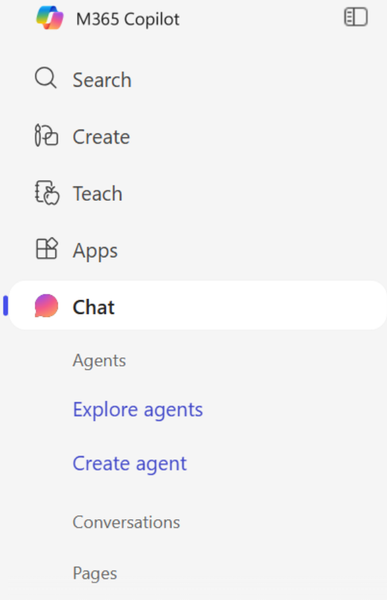
Hi, We are an Education tenant and have an issue where the "Chat" icon disappears from the left hand navigation in the M365 Copilot Chat app (or Web) after you click on e.g. "Search". The only way to get the Chat icon back is to restart the app or refresh the web page. This only happens to unlicensed users while users with a paid license don't have this issue. Version we are running is: bizchat.20251030.51.4 Anyone else experiencing this issue? ** Screenshots ** 1. When starting the M365 Copilot Chat app the "Chat" icon is present 2. Clicking the "Search" (or any other icon) then "Chat" disappears and will not come back until you restart the app. Same behavior in Web.792Views1like7CommentsRe: onBehalfOfUserMri cannot be null or empty - Team installedApps
Some additional details: Test code to reproduce the issue I used as follows and the App I'm trying to add is the Dynamics 365 App. As mentioned, it has been working for years. ... $teamsAppId = "cd2d8695-bdc9-4d8e-9620-cc963ed81f41" # Dynamics 365 App $requestBody = @{ # Note {at sign} shall be @ "teamsApp{at sign}odata.bind" = "https://graph.microsoft.com/v1.0/appCatalogs/teamsApps/$teamsAppId" } | ConvertTo-Json -Compress $installParams = @{ Method = 'Post' Uri = "https://graph.microsoft.com/v1.0/teams/$teamId/installedApps" Headers = @{ 'Authorization' = "Bearer $token" 'Content-Type' = 'application/json' } Body = $requestBody ErrorAction = 'Stop' } $response = Invoke-RestMethod @installParams Write-Host "Teams app installed successfully" -ForegroundColor Green75Views0likes0CommentsonBehalfOfUserMri cannot be null or empty - Team installedApps
Hi, Posting this in the Graph community as I suspect the issue is Graph related since I can reproduce this via PowerShell script as well. Anyone else with this issue? Reading up on the https://learn.microsoft.com/en-us/graph/api/team-post-installedapps?view=graph-rest-1.0&tabs=http then there is nothing on the "onBehalfOfUserMri" Background: I have an flow that is via an HTTP Request call installing an App on a Team. This via an Service Principal in Azure using Client Id and Client Secret. Reference to the Graph API call can be found https://learn.microsoft.com/en-us/graph/api/team-post-installedapps?view=graph-rest-1.0&tabs=http. The flow has been running for years without any issues until yesterday. Error: Graph Error Message: onBehalfOfUserMri cannot be null or empty. (Parameter 'onBehalfOfUserMri') Details: I have been able to reproduce this issue in PowerShell as well: Write-Error: Graph Error Message: onBehalfOfUserMri cannot be null or empty. (Parameter 'onBehalfOfUserMri') Write-Error: Graph Inner Error: { "code": "InvalidRequest", "message": "onBehalfOfUserMri cannot be null or empty. (Parameter 'onBehalfOfUserMri')", "details": [], "date": "2025-04-24T15:02:02", "request-id": "4b71b933-...-...-...-094bfa5b78f4", "client-request-id": "4b71b933-...-...-...-094bfa5b78f4" }239Views0likes3CommentsRe: Cloning/duplicating sharePoint site
I have been using https://learn.microsoft.com/en-us/sharepoint/dev/solution-guidance/introducing-the-pnp-provisioning-engine which allows us to "clone" sites. Its very powerful but requires some skills in PowerShell etc. However there are plenty of guides out there.188Views0likes0CommentsRe: How to Configure Site Access with sites.Selected Permission
If this is a single site then you can use https://developer.microsoft.com/en-us/graph/graph-explorer and do something like https://devblogs.microsoft.com/microsoft365dev/sharepoint-now-supports-delegated-sites-selected-authentication/. Please note: This requires that you have an service principal registered which requires certain permissions in your Azure tenant. This depends on your solution, but if possible then use Managed Identity in first place. The above describes a simple approach for a single site and if your solution covers many sites then you should consider a more "production-ready" approach.474Views0likes0CommentsRe: Column filter bug?
Here is another post with the same issue: Filtering autocompletes based on top result | Microsoft Community Hub It impacts fields such as managed metadata fields as well and this issue is super annoying. I have filed and MS ticket on this as mentioned in the referenced post.140Views2likes0CommentsRe: Unable to Save Site as Site Template: Unable to convert the HeaderColorIndexInLightMode XML
Hi, It doesn't tell in your case so checking, are your site pages classic- or modern sites? If Modern, then save site as template is not supported as outlined https://learn.microsoft.com/en-us/sharepoint/dev/general-development/save-download-and-upload-a-sharepoint-site-as-a-template. You should then be using https://learn.microsoft.com/en-us/sharepoint/dev/declarative-customization/site-design-overview or possibly PnP Site Provisioning.195Views2likes3CommentsRe: Filtering autocompletes based on top result
Same here, our users reported this as well. I just tested this on a manage metadata field where we have hundreds of entries which all starts with a 3-digit number i.e. "001 Introduction", "001 AAA", "002 Another value" etc. Before users just stated typing and could easily tag with whatever but now and as described above it doesn't work. You type "0" and then it autocompletes to "001 Introduction" and you have to use backspace to delete most of it. Super annoying. 😖414Views2likes3CommentsRe: Winget in Remediation scripts
Managed to get it working. # Find the path to winget.exe $winget = Get-ChildItem "C:\Program Files\WindowsApps\" -Recurse -File | Where-Object { $_.Name -eq 'winget.exe' } | Select-Object -ExpandProperty FullName -First 1 if($winget) { Write-Host "- Found winget.exe at: $winget" Write-Host "- Checking winget version" $wingetVersion = & "$winget" --version Write-Host "Winget version: $wingetVersion" }772Views0likes0CommentsWinget in Remediation scripts
Does the remediation scripts and the execution envrionment support winget? Running this returns nothing: $version = winget --version | Out-String Have also tried to use the Start-Process approach: # Define the path to winget.exe $WingetPath = "C:\Program Files\WindowsApps\Microsoft.DesktopAppInstaller_8wekyb3d8bbwe\winget.exe" Start-Process -FilePath $WingetPath.... Is it even possible to get winget working in detection- and remediation scripts?Solved559Views0likes1CommentCustom document templates ("New" document button) not showing under sub folders
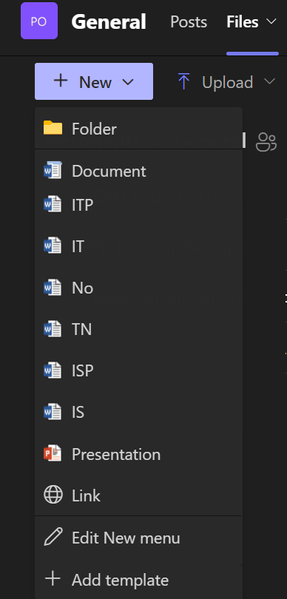
Hi, Is this a bug and anyone else with this? (Running latest version of Teams: 24277.3504.3180.7017) Issue: I have custom content types (document templates) so when clicking the "New" button under Files in Teams we can use our document templates. It works fine however when in a sub folder then my custom templates are not there and I only see the default ones. This works when in SharePoint and the issue is isolated to teams. Have tested on multiple teams with the same behavior. See screenshots. Root folder (General) - my templates are there: Sub folder - my templates are missing:314Views0likes0Comments
Recent Blog Articles
No content to show