User Profile

Carl_Karawani
Brass Contributor
Joined Dec 26, 2020


User Widgets
Recent Discussions
Granting App ability to change group memberships by making it an owner?
Hello, We'd like an app to be able to control memberships of only certain security groups using app-based authentication. Today it is documented that a GroupMember.ReadWrite.All role is needed to do this on the app registration: https://learn.microsoft.com/en-us/graph/api/group-post-members?view=graph-rest-1.0&tabs=http This, however, grants access to the app to make changes to any group. However, we have noticed that API calls to change memberships work on groups owned by the Service Principal. For example, if I make a call to the API below for memberships and the app is assigned as the owner of the group, it works. https://graph.microsoft.com/v1.0/groups/{{group-id}}/members/ Is this a supported mechanism? I don't see it documented anywhere.105Views0likes1CommentFocused vs Other in Outlook - How does it work?
I am trying to identify the default algorithm for Outlook to sort my e-mails in Focused vs Other. I see the doc references to an https://support.microsoft.com/en-us/office/focused-inbox-for-outlook-f445ad7f-02f4-4294-a82e-71d8964e3978, and there are ways to customize specific https://learn.microsoft.com/en-us/microsoft-365/admin/setup/configure-focused-inbox?view=o365-worldwide#use-the-ui-to-create-a-transport-rule-to-direct-email-messages-to-the-focused-view-for-all-your-users for either a particular user/inbox or at the org level, I'm just trying to understand the default behaviour at a high level. Anyone have any links/docs that can elaborate on this? Much Appreciated!Solved771Views0likes2CommentsIncoming Teams Call does not Display Phone Number on iOS
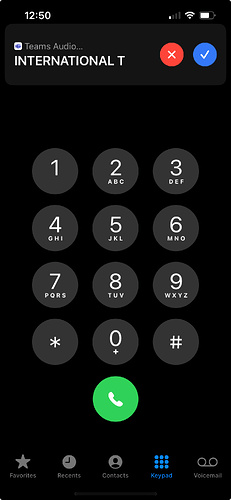
When receiving a Phone Call to Teams (using Direct Routing) the iOS notification does not include the phone number. It only shows the caller Name. Same goes for Microsoft Teams Call in the iOS Call history: The only way to see phone number on the phone is to open the Microsoft Teams App: I'm assuming this is 100% by design, but I'm curious if anyone has come up with any guidance or suggestions for users wanting to see the missed call #. The best solve I have found to reduce confusion is to remove Teams Calls from Mobile Call History. Forcing users to use the Teams App Which forces endusers to use Teams App, but it's not an ideal workaround. Does anyone have any better suggestionsSolvedRe: Admin programmed Teams speed dial
this is a great post AlexanderHolmeset , I think this could definitely work in certain contexts but I believe there are still limitations given it requires the enduser creds. Seems there's no central way to do this as a signed-in Teams Admin. (Sort of how teams admins today can apply configuration profiles across devices)3.9KViews0likes0CommentsRe: CoPilot in everything BUT Teams!
Have you tried clearing the client cache? I had the same issue with my teams client a few months ago when I first enabled CoPilot and clearing the cache got it to pop up https://easy365.io/how-to-clear-new-or-classic-microsoft-teams-cache-on-windows-or-mac-29cc065b0a921.6KViews1like5CommentsRe: Teams Auto Attendant - Dial by Extension transfer to Resource Accounts
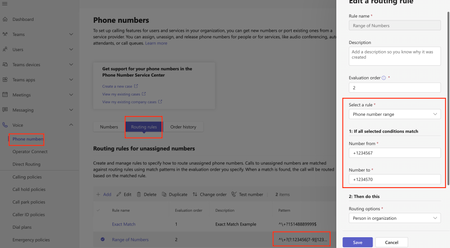
What you are doing does seem very much correct and I agree that the dial by extension doesn't look at LineURI but one of the supported Entra fields instead: - TelephoneNumber (AD and Microsoft Entra ID) - HomePhone (AD) - Mobile (AD and Microsoft Entra ID) - OtherTelephone (AD) https://learn.microsoft.com/en-us/microsoftteams/dial-voice-reference#dial-by-extension I haven't noticed anything broken on our end, but I'll keep an eye out for an advisory.2.5KViews1like8CommentsURL for granting Teams Administrator Role to an Application?
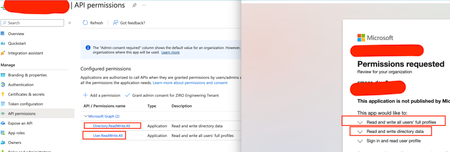
Hello, I have an application that requires Teams Administrator Role to perform certain administrative tasks via the Teams Powershell Module. I am able to build the correct URL to grant any Graph related roles ( doc - https://learn.microsoft.com/en-us/entra/identity/enterprise-apps/grant-admin-consent?pivots=portal But I'm still stuck using PIM to assign the Teams Administrator Role (because it is not a graph API role) to ensure I has the necessarily privileges to authenticate to the Teams Powershell Module. (https://learn.microsoft.com/en-us/microsoftteams/teams-powershell-application-authentication😞 I have seen other apps give themselves the ability to RW RBAC and give themselves that role via Graph API. I'm curious if anyone has a more elegant solution to enable the assignment of the Teams Administrator Role that wouldn't require my app to request RBAC permissions.Solved885Views0likes4CommentsRe: How to stop the pop-up of this window in Teams?
I'm assuming that the reason you're seeing that pop up every time is because teams is for some reason logging you out everytime you kill the app (hence asking to log back in). Clearing the cache was the top suggestion found online, but the next suggested item was also clearing the logged in users. Although I've never experienced the exact issue you have, I could attest to similar issues with logins where removing/adding account fixed it. https://techcommunity.microsoft.com/t5/microsoft-teams/teams-keep-logging-me-out-and-or-crashes/m-p/2910979 https://answers.microsoft.com/en-us/msteams/forum/all/teams-keep-logging-me-out/4c9a12e0-4ecb-44ce-b85a-b0a9111a5473 Figured it's worth a shot.1.4KViews0likes1CommentRe: How to stop the pop-up of this window in Teams?
tanacal You may need to remove the accounts as well: For personal accounts: Start button Start > Settings > Windows Accounts >Email & accounts. For work/school accounts: Start button Start > Settings > Accounts > Access Work or School Ref. https://support.microsoft.com/en-us/office/sign-out-or-remove-an-account-from-microsoft-teams-a6d76e69-e1dd-4bc4-8e5f-04ba483844871.4KViews0likes3CommentsRe: Microsoft Teams on MAC wont let me change log in
If you are using newer version of teams, there are different files to delete to clear cache: rm -rf ~/Library/Group Containers/UBF8T346G9.com.microsoft.teams rm -rf ~/Library/Containers/com.microsoft.teams2 Ref. https://learn.microsoft.com/en-us/microsoftteams/new-teams-mac-install-prerequisites#how-to-clear-cache12KViews0likes1CommentRe: Connect Cisco with Teams
I'm assuming you're referring to Cisco Video Endpoints? If they are registered to ControlHub, you can follow some of the instructions here to ensure they can join a Microsoft teams meeting. https://help.webex.com/en-us/article/nffx8kj/Deploy-the-Webex-video-integration-for-Microsoft-Teams2KViews0likes0CommentsRe: Teams Telephony on Citrix
Teams is supported on VDI like Citrix - https://learn.microsoft.com/en-us/microsoftteams/teams-for-vdi When you say Teams for UC, do you mean Teams as your Phone system / PSTN? You have various PSTN connectivity options for teams https://techcommunity.microsoft.com/t5/microsoft-teams-blog/microsoft-teams-phone-gives-you-pstn-connectivity-choice/ba-p/3767571 And all of them should work and are not at all impacted by the different ways your users may connect to teams. (ex. Citrix, mobile app, desktop)918Views0likes0CommentsRe: Teams Shared Channel PowerShell, Retrieve Members and Teams
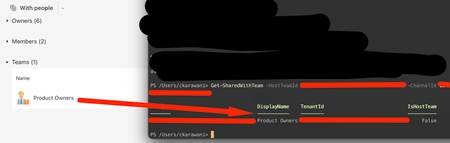
AlistairKeay1 to retrieve the list of teams a for a shared channel, use the https://learn.microsoft.com/en-us/powershell/module/teams/get-sharedwithteam?view=teams-ps command For example, Get-SharedWithTeam -HostTeamId id-of-the-team-that-created-the-shared-channel -ChannelId id-of-the-shared-channel It will return the teams that shared channel is shared with Also, you can see all the Shared Channels that are shared with a specific team (the reverse lookup of what you are doing) via https://learn.microsoft.com/en-us/powershell/module/teams/get-teamallchannel?view=teams-ps cmlet2.1KViews1like2CommentsRe: Teams Reporting - Call Queue Agents
I think the brand-new improvements to the delegate function might be able to address this use case. Microsoft introduced a separate Call Log for the Delegates and Delegator. Making it really easy to see history (and even call barge!) There's a good write-up about it here: https://networking-talks.blogspot.com/2023/07/microsoft-teams-has-added-new-features.html5.6KViews0likes2Comments
Recent Blog Articles
No content to show