User Profile

ChapmanBryan
Brass Contributor
Joined Apr 15, 2020


User Widgets
Recent Discussions
Re: Yealink MP56 Microsoft Teams Certified handsets do not sync Outlook contacts
Yes, this is correct. The AudioCodes C450HD resolves contacts and they did sync immediately once the phone has been deployed. The Yealink MP56 has a number of issues, this being on of them. I would stay away from this model, as we've tested the Yealink MP54, and no issues. Haven't gone to the extent of testing the Yealink MP58, but I can imagine for an executive category phone, you get what you pay for. Although the AudioCodes aren't the best aesthetically pleasing phones, they did resolve the majority of our problems we were running into with the Yealink MP56 handsets we deployed. Just to be clear, we did eliminate any potential risks with it being the network or any other external factors. Also, be sure to purchase the new C450HD handsets. They just recently released a new model TEAMS-C450HDPS-DBW. This includes dual band WiFi, more internal memory and an external power supply.20KViews0likes0CommentsRe: Yealink MP56 Microsoft Teams Certified handsets do not sync Outlook contacts
Mickkey Interesting, thanks for trying! much appreciated. We ended up just replacing the Yealink MP56 handsets with the AudioCode C450HD and most, if not all our problems were resolved at our client site. It has been a three month RMA process going back and forth with Yealink support and engineering team.21KViews1like4CommentsRe: Yealink MP56 Microsoft Teams Certified handsets do not sync Outlook contacts
Yes, all users have their relevant phone numbers in the correct fields. What firmware and Teams version are you currently on, or is your policy to just update immediate as updates are available? We had to go into the Yealink admin portal for each phone to turn off acoustic sound shield. This improved the latency, however, still have considerable delays.21KViews0likes6CommentsRe: Yealink MP56 Microsoft Teams Certified handsets do not sync Outlook contacts
Mickkey The sync would be with the users Outlook contacts to Teams desktop client. That works, it just breaks as soon as you provision the MP56. Only shows Speed Dial contacts from Teams. We've also had numerous complains about the Yealink MP56 phones because of poor call quality. There has been severe latency issues that otherwise forced our hands to deploy the Polycom CCX models or the AudioCodes C450HD handsets. The moment we plugged these phones into the same network, latency issues were gone. Have you too also had issues with latency? We've gone through Yealink Support and Engineering teams to try and mitigate these issues, across multiple firmware updates, but it seems as those these are a constant problem with these phones. Almost as if they are underpowered for MS Teams to begin with. Any help would be greatly appreciated.21KViews0likes11CommentsYealink MP56 Microsoft Teams Certified handsets do not sync Outlook contacts
We've deployed a number of Yealink MP56 headsets and cannot get Outlook contacts to sync. We've attempted just about everything to force a sync, but it appears as though the handsets only display contacts in the Speed Dial list from the desktop client. Has anyone come across a fix for this, or is it just a Teams bug? Microsoft Teams desktop client syncs great, however, those contacts don't sync on the handset.27KViews1like21CommentsRe: Restrict Sharing of Root Folder in Document Library
KellyDJones thanks for your input. For this particular situation we just opted to create a document library for each of the project folders so there wouldn't be an option for users to inadvertently share all project folders. Trying to facilitate a File Transfer Protocol site in SharePoint Online - this is probably as close as it can get. Thanks!4.9KViews1like0CommentsRe: Restrict Sharing of Root Folder in Document Library
KellyDJones thanks for the feedback. Yeah, I am coming to realize that there is not a great way to restrict the "root" folder in a site that allows external sharing. We're attempting to create a SharePoint document library as it's own File Transfer Protocol Site. Where it's fine to share the sub-folders within that "root" to anyone externally, and restricted to anyone that attempts to share the "root" folder where all those sub-folders reside. Perhaps I have to treat the sub-folders individually as their own document library within that site collection - removing that "root" folder all together. Was also thinking of governing that "root" folder by creating a Microsoft Automate flow to require approval prior to sharing a folder. I don't know if that is possible.5.2KViews0likes2CommentsLicensing SCCM in a cluster environment
To my knowledge, server MLs follow the same core-based licensing model as Windows Server. Meaning, you would need to license all physical nodes in a cluster, correct? Is it possible to set the virtual machine affinity to one of the hosts within a cluster, and the only way the virtual machine would be off loaded to another host is if that particular host is down? From my understanding, SCCM follows the same Product Terms of Use as Windows Server, so you have to license the appropriate number of licenses on each of the physical hosts in the cluster. Just needing to verify this for SCCM server MLs.1.5KViews0likes1CommentRestrict Sharing of Root Folder in Document Library
Is there any way to restrict sharing of a root folder in a document library to anyone outside the organization, or create an approval flow on the root folder for greater governance? We need users to be able to share sub-folders, however, need to restrict the sharing of the root folder (top-level) with anyone outside the organization. Any guidance or insights here is greatly appreciated! Thank you.Solved5.2KViews0likes5CommentsRe: Create a list of users who did not complete Power Apps form
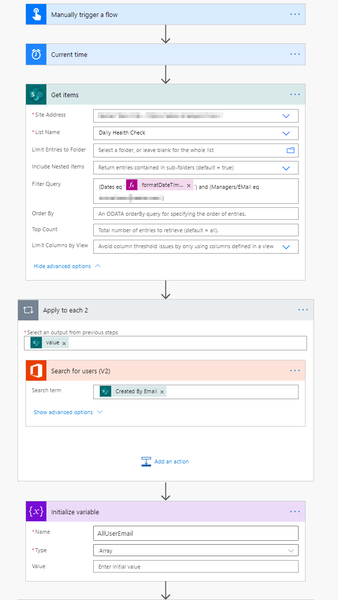
Latest update: Right now, the only work around I have found to filter all users by assigned manager to capture all users who have not submitted a PowerApp form would be using filter array with the following: @or(equals(item()?['Mail'], 'useremail'),equals(item()?['Mail'], 'useremail')) This is currently added to the Filter Array - Direct Reports step Is there any way to filter by manager automatically, without having to manually update this step? We may have to update this frequently if there are a lot of staff changes.Create a list of users who did not complete Power Apps form
Needing help in creating a flow to create a list of users (filtered by manager) who did not complete a Power Apps form. I am referencing a SharePoint list in which the Power App is built upon, however, drawing a blank as to how to generate a list of users who have not completed the form (Daily Health Check). This is what I have right now. Don't know if I am on the right track or not. Any help is greatly appreciated!Populate a Microsoft Word template for all unique IDs
I created the flow (see image attached), however, it only punches out a single Word document for the specified Room ID I populate on the trigger. Instead of doing a single Room ID I am wanting to generate a single document for all Room IDs from a recurring Word template using the Populate a Microsoft Word template action. I cannot figure out how to accomplish this. Do I need to make an array and apply to each for all the SharePoint lists? Each list has the Room ID to group by.

Recent Blog Articles
No content to show