User Profile

scooter133
Copper Contributor
Joined Jan 29, 2019


User Widgets
Recent Discussions
Re: How to Send-As a Distribution Group (via SSIS ScriptTask) via Exchange Online using Modern Auth?
If I'm understanding your correctly, This means I'm not able to use an App-Registration Credentials and that I need to 'login' to MS Graph as a user which that user has Mail.Send Permissions for the Group and not application permissions (ApplicationAccessPolicy and client credentials). So the user I'd need to login as would need to have MFA disabled, I'd need to store its password, etc in Key vault that the App-registration Client can get to. then crate the ,mail payload and just include the From in the payload: { "message": { "subject": "Hello from the DG", "body": { "contentType": "HTML", "content": "<p>This is a test from the email address removed for privacy reasons distribution group</p>" }, "from": { "emailAddress": { "address": "email address removed for privacy reasons" } }, "toRecipients": [ { "emailAddress": { "address": "email address removed for privacy reasons" } } ] }, "saveToSentItems": "true" }24Views0likes1CommentHow to Send-As a Distribution Group (via SSIS ScriptTask) via Exchange Online using Modern Auth?
We have a SQL Server Integration Services (SSIS) task that retrieves emails from a table in our Customer Relationship Management (CRM) system. The emails contain From:, To:, Cc, and Bcc: addresses, in addition to the body and other data. The SSIS task then reads the data, connects to a local on-premises Exchange 2016 server to send the emails, and allows the SQL Server IP address to log in anonymously and send emails as any user in the From field, provided the address is valid on the Exchange server. We are considering removing the local on-premises Exchange 2016 server and need to modify the SSIS task to connect to Exchange Online to send the emails. We are exploring the use of Modern Authentication, App Registration, and Microsoft Graph to send the emails. The From addresses in the CRM can be an address of a User Mailbox, Shared Mailbox, or Distribution Group. Based on my research, it appears there is no way to send emails as a Distribution Group via Microsoft Graph. Therefore, I am forced to use SmtpClient and logging in as a user with Send-As permissions on all of the groups, which has its own drawbacks. What is the proper way to programmatically send as a Distribution Group? We have about 40 Groups we send as.194Views0likes3CommentsMake Print Spooler and DHCP services Redundant?
Looking to get our print Spooler and DHCP redundant/Failover. The Spooler currently Spools to about 25 Printers DHCP and the Spooler are installed on a Primary AD DC. We have About 120 users. Servers are Windows Datacenter 2022. The AD DC is one of 2 at this Location. Looking at Windows Server Failover Clustering, it looks like I can install WSFC on a AD DCs and then Add the Print Spooler to the cluster. (Yes, loosing the original \\host\share) My 2 Questions are: 1) WSFC on DCs is Supported, though Wanted real World experience. Is this fine? I dont want to have to spin up 2 more VMs to just maintain printing. Is this a good way to do redundant Print Spooling? 2) DHCP has its own built in Failover as you can tie it to another DHCP server and make them function as one. Is the built in failover Better than adding DHCP as a WSFC Resource? Thank you, Scott<-Using the Admins Centers with Safari (15.1)
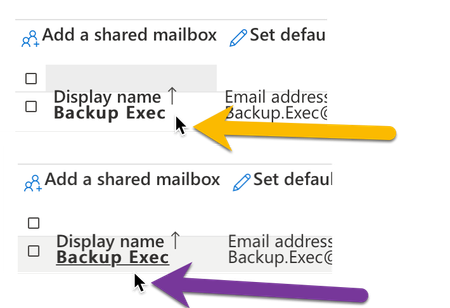
The Formatting of the web pages in many of the O365 and Azure Admin portals have the pages rendering incorrectly. Mostly the lists of users, the header is merged with the first user. When searching and only have one user in the list its hard to select that user, you end up clicking in another location to get the click on the user. Here is one Example: You can see in the Image that the Mouse is on the user 'Backup Exec' (Orange) Though it's selecting the 'Display Name' Header Move down a coupe Pixels and I can select the user (Purple), but its only like 2 Pixels wide to select that first user.Outlook 2019 Search - No Results - Tried Privacy and mdutil
After an Upgrade to the new Mac OS Big Sur 11.2.1, Outlook (16.47 (21021804) was acting a bit odd. Searching only brought up old content, nothing new. I added my Main profile to the Spotlight Privacy, rebooted, removed from Spotlight Privacy, rebooted. Nothing (yes I waited Days) I did the full spotlight re-index via: sudo mdutil -i off / sudo rm -rf /.Spotlight-V100 sudo rm -rf /.Spotlight-V200 sudo mdutil -i on / sudo mdutil -E / Waited a few days, and nothing still shows up in Outlook search. "No Results" is all I ever get. I was going to create a new Profile today, I just hate doing that with a 24GB Mailbox Profile. Any other Suggestions?1.1KViews0likes1Comment2008 Certificate CA Server - Upgrade, Toss, Azure?
We have an Old Windows 2008 R2 VM that has a CA installed on it. It has been giving out <domain>\<Machine>$ and <domain>\<User> Certs. Nothing else on the Machine. I've never been a Fan of Upgrading Servers vs Fresh installs. There are no Certs on here besides the ones that it gave to the PCs and Users. No Special Templates or anything. I May have used it for an Exchange Server, though have a Wildcard Cert for that now. What is best to replace this CA. Do I need to replace it? Thanks!
Recent Blog Articles
No content to show