outlook for mac
365 Topics
I bought MS Office v19 for Mac and upgraded to silicone chip.
I bought MS Office v19 for Mac and upgraded to silicone chip. Outlook refuses to block the tons of spam I get...I click block and the same spam appears again and again. I pay premium price, use premium mac/with Tahoe OS, and what need I do to stop this hideous spam? Thanks in advance.2Views0likes0Comments
Outlook for Mac Update 16.113
With the upcoming expiration of support for the Legacy version from 01 October 2026, I refrained from updating my Outlook from 16.111. I've read of many problems with 16.113, including patches up to 16.113.2, so it seems I'd be better off just updating to 16.112.4 & avoid 16.113 altogether. Appreciate any comments/advice on this. Also, anyone know when 16.114 will be released to hopefully, resolve these issues? And I'm still using MacOS Sequoia.175Views0likes1Comment
Frustrating! The new update has logged me out - and I cant get back in, Mac!
The new update has taken me back to outlook legacy, logged me out of all my emails! and I cant get back in. I try to switch back to the new interface and get a notification to say i am offline, to which I try to log back in, but I get another message to say my relevant emails hold no subscription. it takes me to the subscription page where I keep getting an error message that says something has gone wrong! The actual email I am trying to log into is IMAP - so I assume I need to log in with a genuine outlook email address first, which I have tried but get the notification to say I hold no subscriptions. I have installed and re-downloaded but still no luck! Please help!283Views2likes4Comments
can't verify my outlook account while logging in on IOS mail app
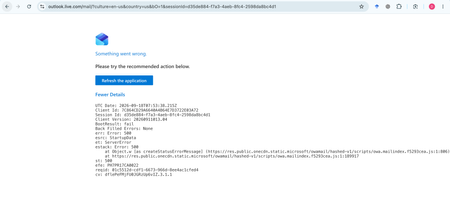
My Outlook.com mailbox cannot be opened on Outlook Web, macOS Mail, or iPhone Mail. Other accounts work normally. Outlook Web shows: HTTP 500, BootResult: fail, esrc: StartupData, et: ServerError. Please check the mailbox provisioning/backend status for my account.242Views0likes1CommentOutlook emails are not syncing on macOS
I have been experiencing several synchronization issues with Outlook for Mac when using my IMAP email account. My environment: macOS 26.6.2 Outlook for Mac 16.112.3 Microsoft 365 subscription First, emails that I delete from my Inbox sometimes reappear several minutes later. In addition, I have confirmed with my IT support team that incoming emails are successfully delivered to my IMAP mailbox. However, Outlook often fails to synchronize and display those messages. Even when I manually initiate a sync, the missing emails do not appear. I do not understand why the synchronization is so unreliable. I have already reviewed several online articles and troubleshooting suggestions, but none have resolved the issue. 1.Update Microsoft 365 or Office on macOS: https://support.microsoft.com/en-us/office/lifecycle/officeinstall/update-m365-office-macos-ios 2.Clear the cache in Outlook for Mac https://support.microsoft.com/en-us/outlook/clear-the-cache-in-outlook-for-mac 3.Repair Outlook Data Files (.pst and .ost) https://support.microsoft.com/en-us/outlook/repair-outlook-data-files-pst-and-ost 4.Outlook for Mac – Email Synchronization Troubleshooting https://learn.microsoft.com/en-us/answers/questions/6003894/outlook-for-mac-legacy-outlook-not-syncing-one-ema Has anyone experienced similar behavior with Outlook for Mac and IMAP accounts? Any assistance or recommendations would be greatly appreciated. Thank you very much for your help.153Views0likes0Comments
No New Folder Creation?
I'm in Mac Outlook 16.112, using Legacy view. I'm trying to add a new sub folder and that option is disabled on every right click menu I can find, and doesn't appear in any ribbon menu. What is going on? I have quite a few subfolders, all created using the right-click option. Why is that suddenly unavailable? This is incredibly frustrating. -Monica Sandler Director of Customer Success EstateWorks Systems343Views0likes4CommentsThousands of Sent Items moved to Deleted Items, no rules, no retention
Hello everyone, I'm investigating a very unusual Exchange Online mailbox issue and would appreciate any insights from anyone who has seen something similar. Environment Exchange Online (Microsoft 365) Mailbox: User mailbox Outlook for Mac Outlook for iOS Outlook Web (OWA) Incident Summary On August 13, 2026, approximately 4,997 messages were moved from: The activity occurred over roughly a 3-hour period. Mailbox audit logs show thousands of: Operation: MoveToDeletedItems events. Hourly breakdown: 01:00 - 2,046 events 02:00 - 1,540 events 03:00 - 1,408 events Audit Findings All sampled audit events show: LogonType = 0 (Owner) UserId = affected mailbox owner Result = Succeeded I sampled 5,000 records and all of them were: LogonType = 0 No events were recorded as: LogonType = 1 (Admin) LogonType = 2 (Delegate) Source and Destination Folders Examples from mailbox audit records: Folder : \Sent Items Destination : \Deleted Items Operation : MoveToDeletedItems Message Trace Findings Extended Message Trace was performed on one of the affected emails. The trace confirmed: CopiedToSentItems=True DeleteAfterSubmit=False which indicates: The email was successfully sent. The email was copied to Sent Items. Exchange did not delete the message during transport. So the message existed in Sent Items and was later moved to Deleted Items by a mailbox operation. Rules Investigation Checked: Get-InboxRule -Mailbox <mailbox> -IncludeHidden Findings: No Inbox Rules targeting Sent Items. No hidden Inbox Rules targeting Sent Items. Only two legitimate rules that delete messages from specific Jira/Confluence senders. Delegation Investigation Mailbox permissions reviewed. Known permissions exist, but mailbox audit logs show: 5000/5000 sampled events = LogonType 0 Therefore: No evidence of delegate activity. No evidence of administrative activity. Retention / Compliance Investigation Checked: Get-Mailbox Get-RetentionPolicy Get-RetentionPolicyTag Get-RetentionCompliancePolicy Get-RetentionComplianceRule Findings: No Sent Items retention tag. No retention policy targeting Sent Items. No Purview retention/compliance policy appears to explain this behavior. Activity pattern does not resemble normal retention processing. Add-ins Investigation Mailbox add-ins: Polls Share to Teams Send to OneNote Action Items Bing Maps My Templates Unsubscribe No third-party mailbox-management or archiving add-ins found. Client Information Seen During Investigation Examples observed in mailbox audit logs: Client=OutlookService;MacOutlook/16.112 a { text-decoration: none; color: #464feb; } tr th, tr td { border: 1px solid #e6e6e6; } tr th { background-color: #f5f5f5; } What Has Been Ruled Out ✅ Admin activity ✅ Delegate activity ✅ Inbox Rules ✅ Hidden Inbox Rules ✅ Outlook add-ins ✅ MRM retention policies ✅ Sent Items retention tags ✅ Purview compliance retention policies ✅ Exchange transport deleting the messages Question Has anyone encountered a similar case where: Thousands of messages were moved from Sent Items to Deleted Items Operation = MoveToDeletedItems LogonType = 0 (Owner) No rules No retention policy No delegate activity particularly involving: Outlook for iOS Outlook for Mac Client=OutlookService Any similar experiences, findings, or recommendations would be greatly appreciated. As we need to know the root cause for this issue. Thanks289Views0likes2Comments
Unable to drag cursor to select text in a draft.
For as long as I can remember, I have been unable to drag my cursor to select any text in a draft message. I can however drag the cursor to select text in a received message, as long as I'm not in the midst of drafting a response. I can use a combination of SHIFT+ arrow keys to select text. I also have no issue dragging the cursor to select text in Outlook on the Web. I have to assume this is intentional being that this bug has existed for so long. Is there any explanation as to why Microsoft feels Outlook for Mac users should not be permitted to drag their cursor to select text? I've just updated Outlook for Mac via the App Store to version 16.83 (24031120).1.6KViews0likes2Comments
Signature displayed wrong in New Outlook on Mac
When creating a new e-mail, my signature is displayed in Times New Roman (?) instead of the default font. In the Signature editor, the display is correct. In Sent, the mail is displayed correctly as well. Signature editor: New email: Outlook version: 16.110 Mac M4 Mac OS 26.5.1Solved604Views3likes7CommentsMAC - Importing Legacy POP On My Computer data
The end is nigh for Legacy thus I did the switch as a test knowing I could still revert. Background: I have long time POP account. In the UBF8T346G9.Office, Outlook, Outlook 15 Profiles, Main Profile: Data folder: 159 GB. Largest folders: Message Attachments: 90 GB Message Sources: 65 GB Messages: 5 GB Before I switching I tried: Export Data to OLM – don't have enough room Delete attachments from multiple emails – can only do one email at a time. Rules can't help After switch it began importing On My Computer data which was hopeful, but it held at 141498 items, and would take days I read. I reverted back to Legacy and will go another way about it when I have a few off days. My question: Apart from deleting years of emails, what's a better way to get the most data out of Legacy, and/or speeding up the import? Get another drive and Export Data to OLM, then manually import? Delete attachment folders directly from Message Attachments folder? Find something like Clean my Mac? ?? Perfect world I get all my in out mail with whatever attachments remain and Calendar data, but I'll take what I can get at this point. Appreciated!239Views0likes1Comment