outlook for mac
367 Topics
Outlook Version 16.114.1 (26102031) not *sending* mail-BT is my mail service provider
Over the last few weeks I have had an intermittent problem whereby I cannot send emails from Outlook. BT is my email provider. I use the Legacy version of Outlook but occasionally switch to New Outlook to test whether I have the same issue and much of the time I do not, but this morning I do. Nobody on the Microsoft Support Team (as per "Help-Contact Support") has been able to advise or help. Having done my own AI/Google search, it seems that there is a conflict between BT and Outlook re-BT's servers? Does anyone know what is going on? I can send when I use BT's web based mail but I want to use Outlook, which I am paying for!104Views0likes2Comments
Use of Categories in the new Outlook for Mac: search in the category list and server-side rules
Categories are a useful way to tag emails in the Inbox by topic. They make it easier to group and find messages later, without having to move emails manually into topic-specific folders. However, when many categories have been created, assigning one to a message becomes inconvenient: the category list can be difficult to navigate, and I cannot search within the Categories menu. A search field in that menu would make it much easier to find and apply the right category. I also have a question about rules. In our company environment, Outlook connects to on-premises services, and server-side rules are important because they continue to run when I work from home without a VPN. In my experience, I cannot create a server-side rule that assigns a category. As a result, a rule that uses categories appears to run only when Outlook is open and connected. Could category assignment be added as an option for server-side rules in the new Outlook for Mac? And could a search function be added to the category picker? It would also be helpful to know whether these limitations depend on the Outlook version or the mailbox/server configuration.118Views0likes1CommentI bought MS Office v19 for Mac and upgraded to silicone chip.
I bought MS Office v19 for Mac and upgraded to silicone chip. Outlook refuses to block the tons of spam I get...I click block and the same spam appears again and again. I pay premium price, use premium mac/with Tahoe OS, and what need I do to stop this hideous spam? Thanks in advance.116Views0likes1Comment
Outlook for Mac Update 16.113
With the upcoming expiration of support for the Legacy version from 01 October 2026, I refrained from updating my Outlook from 16.111. I've read of many problems with 16.113, including patches up to 16.113.2, so it seems I'd be better off just updating to 16.112.4 & avoid 16.113 altogether. Appreciate any comments/advice on this. Also, anyone know when 16.114 will be released to hopefully, resolve these issues? And I'm still using MacOS Sequoia.325Views0likes1Comment
Frustrating! The new update has logged me out - and I cant get back in, Mac!
The new update has taken me back to outlook legacy, logged me out of all my emails! and I cant get back in. I try to switch back to the new interface and get a notification to say i am offline, to which I try to log back in, but I get another message to say my relevant emails hold no subscription. it takes me to the subscription page where I keep getting an error message that says something has gone wrong! The actual email I am trying to log into is IMAP - so I assume I need to log in with a genuine outlook email address first, which I have tried but get the notification to say I hold no subscriptions. I have installed and re-downloaded but still no luck! Please help!393Views2likes4CommentsOutlook emails are not syncing on macOS
I have been experiencing several synchronization issues with Outlook for Mac when using my IMAP email account. My environment: macOS 26.6.2 Outlook for Mac 16.112.3 Microsoft 365 subscription First, emails that I delete from my Inbox sometimes reappear several minutes later. In addition, I have confirmed with my IT support team that incoming emails are successfully delivered to my IMAP mailbox. However, Outlook often fails to synchronize and display those messages. Even when I manually initiate a sync, the missing emails do not appear. I do not understand why the synchronization is so unreliable. I have already reviewed several online articles and troubleshooting suggestions, but none have resolved the issue. 1.Update Microsoft 365 or Office on macOS: https://support.microsoft.com/en-us/office/lifecycle/officeinstall/update-m365-office-macos-ios 2.Clear the cache in Outlook for Mac https://support.microsoft.com/en-us/outlook/clear-the-cache-in-outlook-for-mac 3.Repair Outlook Data Files (.pst and .ost) https://support.microsoft.com/en-us/outlook/repair-outlook-data-files-pst-and-ost 4.Outlook for Mac – Email Synchronization Troubleshooting https://learn.microsoft.com/en-us/answers/questions/6003894/outlook-for-mac-legacy-outlook-not-syncing-one-ema Has anyone experienced similar behavior with Outlook for Mac and IMAP accounts? Any assistance or recommendations would be greatly appreciated. Thank you very much for your help.250Views0likes0Comments
can't verify my outlook account while logging in on IOS mail app
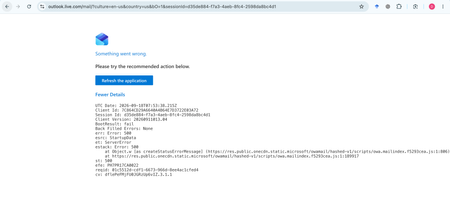
My Outlook.com mailbox cannot be opened on Outlook Web, macOS Mail, or iPhone Mail. Other accounts work normally. Outlook Web shows: HTTP 500, BootResult: fail, esrc: StartupData, et: ServerError. Please check the mailbox provisioning/backend status for my account.356Views0likes1CommentNo New Folder Creation?
I'm in Mac Outlook 16.112, using Legacy view. I'm trying to add a new sub folder and that option is disabled on every right click menu I can find, and doesn't appear in any ribbon menu. What is going on? I have quite a few subfolders, all created using the right-click option. Why is that suddenly unavailable? This is incredibly frustrating. -Monica Sandler Director of Customer Success EstateWorks Systems489Views0likes4CommentsThousands of Sent Items moved to Deleted Items, no rules, no retention
Hello everyone, I'm investigating a very unusual Exchange Online mailbox issue and would appreciate any insights from anyone who has seen something similar. Environment Exchange Online (Microsoft 365) Mailbox: User mailbox Outlook for Mac Outlook for iOS Outlook Web (OWA) Incident Summary On August 13, 2026, approximately 4,997 messages were moved from: The activity occurred over roughly a 3-hour period. Mailbox audit logs show thousands of: Operation: MoveToDeletedItems events. Hourly breakdown: 01:00 - 2,046 events 02:00 - 1,540 events 03:00 - 1,408 events Audit Findings All sampled audit events show: LogonType = 0 (Owner) UserId = affected mailbox owner Result = Succeeded I sampled 5,000 records and all of them were: LogonType = 0 No events were recorded as: LogonType = 1 (Admin) LogonType = 2 (Delegate) Source and Destination Folders Examples from mailbox audit records: Folder : \Sent Items Destination : \Deleted Items Operation : MoveToDeletedItems Message Trace Findings Extended Message Trace was performed on one of the affected emails. The trace confirmed: CopiedToSentItems=True DeleteAfterSubmit=False which indicates: The email was successfully sent. The email was copied to Sent Items. Exchange did not delete the message during transport. So the message existed in Sent Items and was later moved to Deleted Items by a mailbox operation. Rules Investigation Checked: Get-InboxRule -Mailbox <mailbox> -IncludeHidden Findings: No Inbox Rules targeting Sent Items. No hidden Inbox Rules targeting Sent Items. Only two legitimate rules that delete messages from specific Jira/Confluence senders. Delegation Investigation Mailbox permissions reviewed. Known permissions exist, but mailbox audit logs show: 5000/5000 sampled events = LogonType 0 Therefore: No evidence of delegate activity. No evidence of administrative activity. Retention / Compliance Investigation Checked: Get-Mailbox Get-RetentionPolicy Get-RetentionPolicyTag Get-RetentionCompliancePolicy Get-RetentionComplianceRule Findings: No Sent Items retention tag. No retention policy targeting Sent Items. No Purview retention/compliance policy appears to explain this behavior. Activity pattern does not resemble normal retention processing. Add-ins Investigation Mailbox add-ins: Polls Share to Teams Send to OneNote Action Items Bing Maps My Templates Unsubscribe No third-party mailbox-management or archiving add-ins found. Client Information Seen During Investigation Examples observed in mailbox audit logs: Client=OutlookService;MacOutlook/16.112 a { text-decoration: none; color: #464feb; } tr th, tr td { border: 1px solid #e6e6e6; } tr th { background-color: #f5f5f5; } What Has Been Ruled Out ✅ Admin activity ✅ Delegate activity ✅ Inbox Rules ✅ Hidden Inbox Rules ✅ Outlook add-ins ✅ MRM retention policies ✅ Sent Items retention tags ✅ Purview compliance retention policies ✅ Exchange transport deleting the messages Question Has anyone encountered a similar case where: Thousands of messages were moved from Sent Items to Deleted Items Operation = MoveToDeletedItems LogonType = 0 (Owner) No rules No retention policy No delegate activity particularly involving: Outlook for iOS Outlook for Mac Client=OutlookService Any similar experiences, findings, or recommendations would be greatly appreciated. As we need to know the root cause for this issue. Thanks396Views0likes2CommentsNew Outlook: Calendar view cannot open modal dialogs (e.g. new event/settings) – Mail view works
I've been troubleshooting the above new issue (to me) with Copilot to produce the below summary. Hope this is helpful and you can advise and/or resolve ASAP! Thanks. --- We are experiencing a consistent issue in New Outlook for Windows, with similar reports from Outlook for Mac, where Calendar view fails to display modal dialogs. This affects: Creating new calendar events Editing or duplicating events Opening Settings When triggered from Calendar view, no dialog appears and the UI becomes unresponsive for that action. Note: Once calendar view 'breaks' Outlook, even switching back to mail view doesn't always work (incl. inability to close via usual X top right). Key behaviour ✅ Issue occurs only in Calendar view ✅ Same functionality works correctly from Mail view: New → Event opens and works Settings opens normally ✅ Outlook Web (PWA) and Teams Calendar work without issue ✅ Switching from Calendar → Mail immediately restores functionality Impact Users cannot effectively manage calendars using the desktop app (only view) Disrupts scheduling workflows Requires switching views or using other apps to complete basic actions Scope Multiple users affected Reproduced across: Windows (New Outlook) Mac (similar behaviour reported) Not device-specific Not account-specific Troubleshooting already attempted App repair/reset Full reinstall Restarting WebView2 processes Clearing local app data No resolution (only temporary, same as killing task and restarting app). Observed pattern This appears to be isolated to the Calendar view UI layer, specifically: Modal/dialog rendering fails only when invoked from the Calendar canvas The same dialogs work when invoked from Mail context Suspected cause Likely a regression in the Calendar canvas/modal framework in New Outlook (Monarch) affecting dialog rendering. This is consistent with previously observed Calendar-specific rendering issues in New Outlook (UI-layer defects limited to Calendar view rather than Exchange Online service). Request Confirm whether this is a known or emerging issue Provide workaround or mitigation guidance Advise if this is linked to a recent feature rollout / flighting Share ETA for fix if available Workaround (confirmed) Use Mail view → New → Event Use Outlook Web (PWA) or Teams Calendar Additional notes (optional) Issue appears tied to Calendar view state rather than service/backend Switching views consistently resets behaviour (albeit not consistently/long term) Suggest investigating Calendar modal rendering lifecycle432Views1like6Comments