outlook for mac
360 Topics
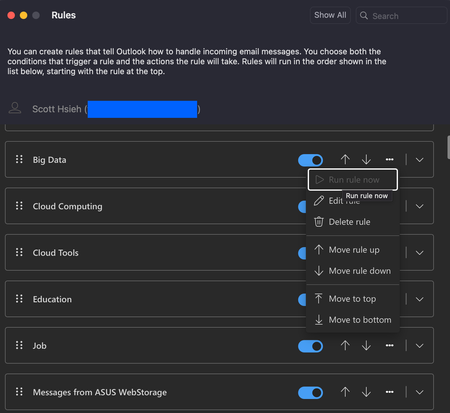
Run rule now is grayed out
My rules in Outlook are grayed out again. The part of manual execution. And this status has been remained for at least 3 days. I encountered this circumstance before like few months ago and here we go again. My account is personal account (Outlook.com). When I use Microsoft Outlook for Mac, Version 16.101 (25091314), to see my rules and wanna execute one of the rules, it's greyed out, a.k.a, cannot be executed. When I open a browser, say Edge, (Version 140.0.3485.66 (Official build) (arm64)), the same status as well. My findings so far: All of rules that will categorize email cannot be executed manually now. Rules that will delete emails can be executed manually. It's manual execution that won't work. Coming emails will still be categorized by the rules automatically. Any clue how to solve this? Or somewhere is wrong internally in the system so far?Solved4.6KViews14likes20Comments
My Outlook for Mac HTML email reply quoted body blank, only headers show
I've been using Legacy Outlook for Mac for years without issues, but since Wednesday afternoon (June 17, CET) something broke after the latest update rolled out. When I reply to any HTML email, the quoted original message is completely blank. Only the From, Date, To and Subject headers show up — the actual email body is gone. It makes it impossible to have a proper email thread because the recipient can't see the conversation history. This started right after Version 16.110 (Build 26061317) was released on June 16, 2026. The release notes only mention "Quality and performance improvements" for Outlook, so whatever changed in this build seems to have broken HTML reply quoting as an unintended side effect. My setup: MacBook Air M5, macOS (Legacy Outlook for Mac Exchange on-premises account (EWS), domain login What I'm experiencing: Replying in HTML mode → quoted body is completely blank, only headers show Switching to plain text → body comes back but with massive blank line gaps throughout (not professional to send) Outlook Web (OWA) → works perfectly fine What I've already tried: Cleared app data (Document Cache + Experimental Features) — no fix Cleared Outlook cache manually — no fix Toggled composing settings — no fix Checked settings in Preferences → Email → Composing — everything looks correct I've also tested Apple Mail as an alternative but it breaks embedded signature images (CID images show as placeholders), and it doesn't support Teams meeting integration — so going back to Legacy Outlook is really the only option for my daily work. Outlook Web App OWA is my current workaround but it's not sustainable long term. I really hope this can be looked at as a regression fix in the next update. Has anyone else experienced this since the June 16 build? Does anyone has this issue as well?1.9KViews13likes24Comments
Outlook for Mac missing ToDo
Since a recent update, our Mac clients don't have any way to view ToDo or Tasks in the New Outlook. The tasks don't show in the My Day/Task pane, nor do we have a ToDo Icon ion the left sidebar like users of New Outlook on Windows do. Accessing OWA is now the only way for users to see tasks/flagged emails, but very much not the preferred solution since there IS a desktop client which should do that. Microsoft® Outlook for Mac Version 16.105 (26011018) This is a serious usability issue, is this really a design decision or some sort of an issue?4.9KViews13likes10Comments
Outlook for Mac - Version 16.99 (25071321) - No Address Book
Latest version of Outlook for Mac released, and I don't seem to be able to see my address book. What was strange was I couldn't see any type ahead style emails, you know when it pre-populates based on conversations you've had with others in the past. When I click the address book, nothing shows. I reverted to legacy and can see the address book entries in there no issues and the type ahead works? Version is: Microsoft® Outlook for Mac Version 16.99 (25071321) Licence: Microsoft 365 Subscription, Copilot for Microsoft 365 This has only just happened with the latest update. Anyone else seeing the same?3.4KViews13likes26Comments
UPDATED (5/9/19) - Outlook for Mac now supports sending items to OneNote in Insider Fast
Outlook for Mac has been working closely with the OneNote for Mac team to move to the new OneNote add-in that is based on the Office add-ins framework. Over this quarter, this add-in will roll out to customers in Production! This feature will allow you to send your mails and meetings to OneNote.113KViews13likes111Comments
Outlook for mac no longer respects reading pane choice
I normally view my emails on Outlook for Mac with the Reading Pane set to "right". Got an update of Outlook this morning and now Outlook changes the Reading Pane setting back to "Bottom" whenever I quit and restart Outlook. I am on Version 16.102.2 (25102623) Please advise how I can get Reading Pane setting back to a default of "Right". Many thanks.Solved2.9KViews11likes23Comments