microsoft graph api
65 TopicsFrom Domain Lists to Decisions: Scaling WHOIS Threat Intelligence with MDTI and Microsoft Graph
The real problem isn't WHOIS. It's what WHOIS costs you at scale. Ask any SOC analyst whether WHOIS data is useful and they'll say yes without hesitation. Registrant emails, creation dates, registrars, and nameservers are among the most durable pivots in domain-based threat intelligence — the threads that tie a single phishing domain back to an entire adversary campaign. Now ask them how often they actually pull WHOIS for every suspicious domain in an alert. The honest answer is: not always. And that gap is the real problem. Here's why. When a campaign surfaces two hundred lookalike domains, manual WHOIS becomes a losing game: It's slow. One-domain-at-a-time portal lookups don't finish before the incident clock runs out. It's inconsistent. Different analysts capture different fields, so the data can't be compared or correlated. It's un-auditable. Screenshots and copy-paste don't hold up in an investigation review months later. It loses the pattern. By the time you've checked twenty domains by hand, the shared registrant email that connected them has scrolled off the screen. The outcome of all this friction is the part that should worry a security leader: analysts quietly stop enriching, or enrich only a sample. The pivot that would have collapsed twenty alerts into one campaign never happens. The newly registered domain that should have been escalated gets triaged as routine. The intelligence exists — the process just can't reach it fast enough. The outcome we're actually after Reframe the goal. This isn't a project to "run WHOIS." It's a project to produce a specific set of outcomes: Every suspicious domain gets enriched — not a hand-picked sample. Enrichment is consistent and structured, so patterns across domains become visible instead of buried. The output is audit-ready — defensible in an investigation and reusable in a report. The whole thing is fast enough to happen inside the incident, not the day after. Get-MDTIWhois.ps1 exists to deliver exactly those outcomes. It reads a list of domains, calls Microsoft Defender Threat Intelligence (MDTI) through Microsoft Graph, and returns both a normalized CSV for immediate triage and the raw JSON for deep investigation — in one pass, read-only, with nothing changed in your environment. What changes for the analyst The clearest way to see the value is the before-and-after. Before: An alert fires on a suspected phishing campaign with two hundred candidate domains. The analyst opens a portal, checks a handful of domains, eyeballs a few registrant fields, and makes a judgment call on incomplete data. Correlation is mental and fragile. Twenty related alerts stay twenty separate alerts. After: The analyst drops the domains into a text file, runs one command, and gets a spreadsheet where all two hundred are enriched with the same fields. Sorting by registrant email instantly reveals that forty of them share one address, one budget registrar, and creation dates in the same week. Twenty alerts become one campaign. One judgment call becomes one defensible conclusion. That's the outcome: not "we ran WHOIS," but "we saw the campaign the manual process would have missed." Where the value shows up This translates into concrete wins across several SOC workflows: Faster campaign triage. Shared registrant emails and nameservers collapse dozens of alerts into a single adversary-infrastructure story — directly reducing mean-time-to-respond. Better newly-registered-domain hunting. Enrich domains from DNS or proxy logs, sort by registration date, and surface the freshly registered domains that are disproportionately malicious — before they're clicked. Enrichment that feeds the platform. The normalized CSV drops straight into a Sentinel watchlist, or the same Graph call can be wrapped in a Logic App / Azure Function playbook to auto-enrich domain entities the moment an incident is created. Reusable intelligence. Registrant and nameserver pivots become custom indicators and hunting queries — value that compounds over time instead of being thrown away after each investigation. Why this approach, specifically There are other ways to get WHOIS. A few reasons this approach earns its place in a modern, Defender-portal-centric SOC: It uses first-party intelligence. MDTI is Microsoft's own threat-intelligence graph, queried natively through Microsoft Graph — no third-party data broker, no separate contract, no data leaving your Microsoft trust boundary. It's read-only by design. The script cannot modify Sentinel, Defender, tenant settings, or domain records. Enrichment tooling should never be able to change the environment it observes — and this one can't. It's built to survive real-world APIs. Throttling (HTTP 429) and transient 5xx errors are retried with backoff; permanent misses (404) aren't retried needlessly; a single failed domain never aborts the run. You always get a complete, dependable result set. It handles secrets the way you'd want. Client secrets come from an environment variable or a secure prompt — never hard-coded, never committed to source control. The engineering exists to protect the outcome: a complete, consistent, trustworthy enrichment set every single time, even when the input list is messy or the API is having a bad day. The output is built for decisions, not just data Two files, two jobs: The normalized CSV is the decision surface. One row per domain, every registrant/registrar/date/nameserver field an analyst pivots on — sortable, filterable, watchlist-ready. This is where twenty alerts become one campaign. The raw JSON is the safety net. Full API fidelity per domain, preserved for the audit trail and for the registrar-specific edge cases the normalized view can't anticipate. Together they answer both questions a SOC actually asks: "What do I do right now?" (CSV) and "Can I stand behind it later?" (JSON). What it takes to get there The barrier to entry is low: An Entra ID app registration with the Graph application permission ThreatIntelligence.Read.All (admin-consented), on a tenant with MDTI API access. A text file of domains, one per line. One command: $env:MDTI_CLIENT_SECRET = "<client-secret>" .\Get-MDTIWhois.ps1 ` -TenantId "<tenant-id>" ` -ClientId "<client-id>" ` -InputTxt ".\domains.txt" Under the covers it authenticates with a client-credentials grant, normalizes and de-duplicates the input, calls GET /security/threatIntelligence/hosts/{domain}/whois per domain, and writes both outputs. Minutes of setup; a repeatable capability afterward. Use it responsibly The project is provided as-is, for educational and demonstration purposes, and is not intended for production use without independent review, validation, and monitoring. Keep in mind: A 404 means MDTI has no current WHOIS record for that host — not that the domain is safe. WHOIS fields vary by registrar — always retain the raw JSON for anything you'll act on. WHOIS can contain personal data — validate your storage and sharing obligations before distributing enrichment output. Never commit secrets — use the environment-variable or secure-prompt path. The bottom line The value here isn't that WHOIS is difficult. It's that the friction of doing WHOIS well, for everything, quietly erodes detection quality — analysts under time pressure enrich less, correlate by memory, and miss the campaign hiding in plain sight. Get-MDTIWhois.ps1 removes that friction. It turns a flat list of domains into structured, audit-ready intelligence in a single read-only pass, so the pivot that reveals the adversary's infrastructure actually happens — inside the incident, not after it. That's the outcome worth automating. Disclaimer This article and the referenced tooling are provided “as-is,” for educational and demonstration purposes only, without warranties of any kind, express or implied. They are not intended for production, safety-critical, or regulated use without independent review, testing, validation, and appropriate safeguards. The views expressed are the author’s own and do not necessarily represent those of any employer or of Microsoft. You are solely responsible for how you deploy, modify, or adapt this tooling, and for ensuring compliance with all applicable laws, regulations, licensing terms, privacy obligations, and organizational security policies. Source: MDTI-WHOIS in the Microsoft Security Operations Toolkit. Provided as-is for educational purposes; test in a controlled environment before production use.
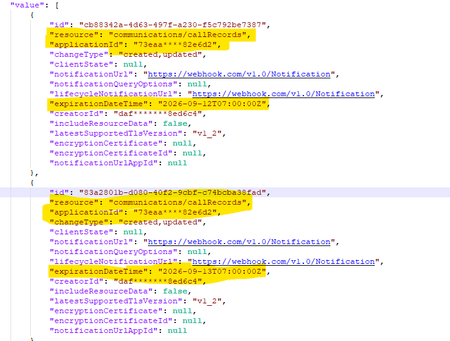
Duplicate subscriptions for a specific resource
Hello, Previously, we were not allowed to create duplicate subscriptions for the same resource. But now we can create duplicate subscriptions for a specific resource. Could you please confirm whether this functionality has been newly enabled or supported? Why duplicate subscriptions are now allowed for the same resource like (/users, /groups & communications/callRecords). Whether this is a change or a bug. We would appreciate clarification on the expected behavior and the supported use cases.417Views0likes2CommentsFrom hours to minutes: Rethinking Microsoft Intune compliance reporting with the Export API
By: Daniel Gerrity – Principal Product Manager | Microsoft Intune If you manage a large device fleet with Microsoft Intune, you’ve almost certainly needed to get reporting data out of the service at scale — compliance state, device inventory, app status, endpoint analytics, or one of the many other reports admins rely on for operations and audit evidence. Intune supports this pattern through the export API, which generates supported reports as asynchronous export jobs instead of requiring you to retrieve the same data through thousands of operational Graph calls. You can see the full list of reports available through the export API in Intune reports and properties available using Graph API documentation. In the illustrative scenario below, moving one nightly job from operational Graph reporting endpoints to the Intune export API (exportJobs) cuts the work from roughly 100,000 API calls to about 15 while producing the same report data. The runtime drops from ~2.5 hours to ~15 minutes. Here’s how, and why the pattern holds up as your fleet grows. Note on the numbers The figures below are a representative example for a hypothetical 50,000-device enterprise, “Contoso,” and are rounded for clarity. Your results may vary based on fleet size, policy count, and how many compliance settings you evaluate. The scenario Contoso runs a nightly job that answers a deceptively simple question: For each device, across every compliance policy assigned to it, what is the state of each individual setting? This is a classic per-device, per-compliance-policy, per-setting state export. It’s the raw material behind compliance dashboards, audit evidence, remediation targeting, and “why is this device noncompliant” investigations. In Intune’s reporting catalog, this is the DeviceStatusSummaryByCompliancePolicySettingsReportV3 report. Contoso has ~50,000 managed devices, and the job runs once a day. The old way: Operational Graph APIs The intuitive approach treats compliance data as something you fetch, per device, right now. The script: Enumerates the fleet (managedDevices). Loops over every device, and for each one calls the operational reporting or setting-state endpoints (such as managedDevices detail and settingStates) to pull that device’s per-policy, per-setting results. Pages through the results in small JSON pages (often 50 rows at a time), reassembling everything client-side. It works. It just doesn’t scale because the number of calls is a function of the number of devices. At roughly two operational calls per device, 50,000 devices is on the order of ~100,000 Graph calls per run. That volume brings its own tax: Throttling. You hit service protection limits and have to implement retry/back-off logic. Threading. To finish inside the window at all, you parallelize which means concurrency bugs, partial failures, and harder debugging. Fragility. A run that makes 100,000 calls has 100,000 chances to fail, and a mid-run failure often means starting over. Time. End=to-end, the job lands around ~2.5 hours. Every time Contoso onboards more devices, this job gets slower and more expensive - the worst possible scaling direction for something that runs every night. The new way: Export API (exportJobs) The export API flips the model. Instead of asking Graph to compute results device-by-device in real time, you ask Intune to generate the entire report once, server-side, and hand you back a single file. The flow is a short, asynchronous handshake: 1. POST /deviceManagement/reports/exportJobs { "reportName": "DeviceStatusSummaryByCompliancePolicySettingsReportV3", "format": "csv", ...optional filter/select... } → returns a jobId, status: "notStarted" 2. GET /deviceManagement/reports/exportJobs('{jobId}') → poll until status: "completed" (a handful of polls while it builds) → response includes a short-lived download URL 3. GET {download URL} → one zipped CSV containing every device × policy × setting row That’s the whole pattern: request → poll → download → unzip → load. One report, one file, the entire fleet inside it. Count the calls: one POST to start the job, a handful of GET polls while Intune builds the file, and one GET to download it - call it ~15 calls total. Not ~15 per device. ~15 for the whole 50,000-device run. And that number barely moves whether Contoso has 50,000 devices or 150,000. Runtime drops to about ~15 minutes, most of which is simply waiting for the export to finish - cheap poll calls, not active compute. Most importantly, the output schema is identical. The CSV columns match what the old per-device loop assembled, so nothing downstream; dashboards, warehouse tables, alerting, has to change. You swap the acquisition layer and leave everything else alone. Side by side Comparison Operational Graph APIs Recommended Export API ( exportJobs ) Pattern Per-device loop plus paging Async export → download one file API calls per run ~100,000 ~15 Calls scale with Number of devices Nothing. The handshake remains fixed. Runtime ~2.5 hours ~15 minutes Concurrency Threading required None needed Output schema — Unchanged and drop-in compatible Net result — ~6,000× fewer API calls ~10× faster runtime Why it scales: Roundtrips, not bytes Here’s the subtlety worth internalizing, because it’s easy to get wrong. There are two different costs in this job, and they scale on different axes: The number of API calls - round-trips across the wire. The volume of data - the actual compliance rows you move. The data volume is the same either way. 50,000 devices × N settings is 50,000 × N rows, whether you assemble them from 100,000 little paged responses or receive them in one CSV. The export doesn’t move less data - it moves the same data. And yes, that file grows with both device count and setting count. More devices, bigger file; more settings, bigger file. So the win isn’t fewer bytes. The win is fewer round-trips. Every one of those 100,000 operational calls relies on authentication, TLS setup, network latency, and service-protection (throttling) accounting regardless of how much data it returns. Multiply that fixed overhead by 100,000 and it dominates everything. The export only pays that tax twice: once to start the job, once to download the file. Intune does the assembly server-side and streams you the result in a single bulk transfer. That reframes the scaling story: Call count is essentially constant - it doesn’t grow with devices or settings. It’s one job and one download. Data volume grows with devices and settings but a bigger CSV is a bigger single download, not more calls. Bulk transfer is exactly what HTTP is good at. Runtime has a mild data dependency: a larger fleet takes Intune a little longer to build the file. But you absorb that as a few extra seconds of poll-waiting, not as thousands of extra calls you have to orchestrate, retry, and throttle-manage. What the IT admin actually gets Beyond the raw speed, here’s the value that shows up in day-to-day operations: Your maintenance window comes back. A 15-minute job leaves room for everything else. Fewer moving parts to maintain. No custom throttling handler, no thread pool, no resumability logic. Less code is less to break at 2 a.m. Reliability by design. Two roundtrips means two failure points, and the server does the heavy lifting of assembling a consistent snapshot. Lower cost and lower service impact. Eliminating ~100,000 calls is easier on your tenant’s throttling limits and a better citizen for the Intune service overall. Room to grow. Because call count is decoupled from device count, doubling the fleet doesn’t double the job, you just download a somewhat larger file. No downstream disruption. Same schema for the output means the migration is contained to the ingestion step which is a low-risk swap, not a re-platforming. When to use which The export API isn’t a universal replacement, it’s best used for bulk, point-in-time snapshots: Reach for exportJobs when you need the whole fleet’s state (or a large, filtered slice) on a schedule such as nightly compliance loads, audit exports, warehouse hydration. Stick with the operational endpoints when you need a single device right now, an interactive “check this one device” lookup, or a real-time remediation trigger where waiting on an async job doesn’t make sense. The two are complementary. The mistake isn’t using the operational APIs, it’s using them in a loop to reconstruct something the export API will hand you in one file. The takeaway The per-device loop feels natural because it mirrors how we think about devices, one at a time. But at fleet scale, the question isn’t “what’s the state of this device?” a hundred thousand times over. It’s “give me the state of everything,” once. The export API is built for exactly that question, and answering it the right way turned a multi-hour nightly grind into a coffee break - from ~100,000 calls to about 15, ~10× faster, with zero downstream changes. If you have any questions, leave a comment below or reach out to us on X: @IntuneSuppTeam!2.5KViews0likes1Comment
Graph /users query with mailboxSettings filters/expands excludes unlicensed users
Hello Microsoft Graph team, I would like to report what appears to be a bug in Microsoft Graph user queries involving mailboxSettings. Issue summary: When mailboxSettings is used in a filter or expand clause on /users, unlicensed users are not returned, even when they should match the filter. Example scenario: Filter used: mailboxSettings/userPurpose ne 'room' Observed behavior: Users without Exchange license/mailbox are excluded from results (or result set appears truncated to mailbox-enabled users). Expected behavior: All users should be considered in /users query evaluation. If a user has no mailbox settings, behavior should be consistent and documented (for example null handling), but those users should not be silently dropped from /users results unless explicitly filtered out by query semantics. Reproduction steps: In a tenant with mixed users: Licensed mailbox users Unlicensed users without mailbox Run a /users query that includes mailboxSettings in filter and/or expand. Compare returned users with a baseline /users query without mailboxSettings conditions. Notice unlicensed users disappear when mailboxSettings is involved. Sample request patterns: GET https://graph.microsoft.com/v1.0/users?$filter=mailboxSettings/userPurpose ne 'room' GET https://graph.microsoft.com/v1.0/users?$expand=mailboxSettings&$filter=mailboxSettings/userPurpose ne 'room'428Views0likes1Comment
Migrating Teams Calling Bot (EchoBot) from VMSS to Windows Containers / ACI?
Hi everyone, I have built a Microsoft Teams Calling Bot using Application-Hosted Media based on the official C# EchoBot sample: https://github.com/microsoftgraph/microsoft-graph-comms-samples/tree/master/Samples/PublicSamples/EchoBot Currently, our signaling logic is fully serverless and runs efficiently on Azure Functions. However, the actual media processing (using the C# Calling SDK which relies on native Windows media binaries) is deployed on VMSS with Windows Server, just like the repository's default deployment guide suggests. Running these Windows VMs continuously is becoming extremely expensive, and we are looking for a cheaper, modern, or "on-demand" alternative to handle the media pipeline. Since raw audio processing strictly requires these native Windows-based Media binaries, I would like to ask the community: 1. Windows Containers (ACI / AKS): Has anyone successfully run this C# EchoBot/Media SDK inside Windows Containers (such as Azure Container Instances or AKS)? If so, how do you handle the public IP and port-binding requirements for the media sockets (since the platform needs direct public connectivity for UDP/TCP traffic)? 2. On-Demand Provisioning: Are there any known architectures or best practices for spinning up the media processor only when a call starts (e.g., triggering an ACI instance via the Azure Function signaling bot) and tearing it down afterwards to keep costs near zero when idle? 3. Alternative Approaches: If you have solved this high-infrastructure cost problem for a real-time raw audio bot in production, what architecture did you end up using? Any documentation, GitHub references, or architectural advice would be highly appreciated! Thanks!309Views0likes2Comments
Retrieve all Teams transcripts a bot has attended to using Graph API
Hi there, I've been struggling for a lot of time trying to get this done. Has anyone been able to achieve something like this ? I wanted to : 1- Get all the meetings and transcripts of the tenant 2- Filter on those where the bot was attending 3- Get the transcripts when available. 4- Add rules to restrict the bot's access Right now I am stuck with the OAuth : The application 'bot-transcript' asked for scope 'OnlineMeetings.Read.All' that doesn't exist on the resource '00000003-0000-0000-c000-000000000000'. But this permission was added, and really seems to exist. Right ? Thanks in advance for any kind of help you could give me.463Views0likes1CommentExporting all Microsoft Intune Enterprise App Management catalog apps to CSV using Microsoft Graph
By: Joe Lurie, Sr. Product Manager | Microsoft Intune Managing applications at scale is one of the biggest time-consuming tasks for IT admins. Between packaging installers, writing detection rules, and keeping everything up to date - it adds up fast. That's exactly the problem Enterprise App Management in Microsoft Intune is designed to address. Enterprise App Management gives you access to a curated Enterprise App Catalog with hundreds of popular Win32 apps that are pre-packaged, pre-tested, and ready to deploy. Microsoft handles the install commands, detection logic, and update-ready packaging. Automatic updates for catalog apps are expected to roll out in mid-2026, making the experience even more hands-off. You just pick the app, assign it, and move on. But what if you want a full inventory of what's available in the catalog? Maybe you're evaluating which apps your organization can migrate from manual packaging, or you want to share the list with your app owners for review. In this post, I'll show you how to pull the complete catalog using Microsoft Graph PowerShell and export it to a CSV file. Prerequisites Before you start, make sure you have: Intune admin permissions: An account with Intune permissions to read app and catalog data (such as Intune Administrator or a custom role with app read access). You will also need Microsoft Graph delegated scope: DeviceManagementApps.Read.All (you'll consent to this when connecting). An Intune Suite or Enterprise App Management add-on license: Enterprise App Management is part of the Intune Suite or available as a standalone add-on. Note: Microsoft has announced that Enterprise App Management will also be included in Microsoft 365 E5 licensing starting July 1, 2026 - check current licensing guidance to confirm availability for your tenant. Microsoft Graph PowerShell SDK (Beta module) installed: Note that the catalog API is currently in the beta endpoint which means cmdlet names and properties may change before reaching v1.0. If you don't have the beta module installed yet, run: Install-Module Microsoft.Graph.Beta.Devices.CorporateManagement -Scope CurrentUser -Force Step 1: Connect to Microsoft Graph First, authenticate to Microsoft Graph with the required scope: Connect-MgGraph -Scopes "DeviceManagementApps.Read.All" You'll get a browser prompt to sign in and consent. Once connected, you're ready to query the catalog. Step 2: Retrieve all Catalog apps Microsoft Graph exposes the Enterprise App Catalog through the /beta/deviceAppManagement/mobileAppCatalogPackages collection. The PowerShell cmdlet for it is: $catalogApps = Get-MgBetaDeviceAppManagementMobileAppCatalogPackage -All The -All parameter is important as it handles pagination automatically so you get every catalog package, not just the first page of results. 💡 Tip To see every property available on a catalog package object, pipe the first result to Format-List . $catalogApps | Select-Object -First 1 | Format-List * Step 3: Export to CSV Next, let's select the most useful fields and write them to a CSV file: $csvPath = "C:\Temp\IntuneCatalogApps.csv" New-Item -ItemType Directory -Path (Split-Path $csvPath) -Force | Out-Null $catalogApps | Select-Object ProductDisplayName, VersionDisplayName, PublisherDisplayName | Export-Csv -Path $csvPath -NoTypeInformation Open the CSV in Excel and you've got a clean, sortable list of every catalog package in the Intune Enterprise App Catalog. Putting it all together Here's the complete script you can save and run: # Connect to Microsoft Graph Connect-MgGraph -Scopes "DeviceManagementApps.Read.All" # Pull all Enterprise App Catalog packages $catalogApps = Get-MgBetaDeviceAppManagementMobileAppCatalogPackage -All # Export to CSV $csvPath = "C:\Temp\IntuneCatalogApps.csv" New-Item -ItemType Directory -Path (Split-Path $csvPath) -Force | Out-Null $catalogApps | Select-Object ProductDisplayName, VersionDisplayName, PublisherDisplayName | Export-Csv -Path $csvPath -NoTypeInformation Write-Host "Exported $($catalogApps.Count) catalog apps to $csvPath" -ForegroundColor Green # Disconnect when done Disconnect-MgGraph Sample output Your CSV will look something like this: Product Version Publisher Mozilla Firefox 137.0.1 Mozilla Corporation Google Chrome 135.0.6998.89 Google LLC Zoom Workplace 6.4.6 Zoom Video Communications, Inc. Adobe Acrobat Reader DC 25.001.20467 Adobe Inc. 7-Zip 24.09 Igor Pavlov Why this matters Having a complete list of what's in the catalog is useful for a few scenarios: App rationalization - Share the list with app owners and identify which apps you can stop manually packaging and switch to the catalog instead. Gap analysis - Compare the catalog against your current app portfolio to see what's missing. Change management - Track what's available over time as Microsoft continues to add new apps. Compliance and auditing - Document which catalog apps are available for your tenant. Wrapping up Enterprise App Management is one of the most impactful features in the Intune Suite. It takes the most tedious parts of endpoint management - app packaging and updates - and just handles it for you. And with a short Graph script, you can get full visibility into what's available. And to see how Enterprise App Management secures your app catalog, check out the companion post here: aka.ms/Intune/EAM-Security. Give the script a try and let us know what you think along with other Enterprise App Management topics you’d like to see by leaving a comment below or reaching out on X @IntuneSuppTeam. Want to learn more about Enterprise App Management? Check out the official documentation for the full details. Join our community! Discuss real-world scenarios, get expert guidance, connect with peers, and influence the future of Microsoft Security products. Learn more at https://aka.ms/JoinIntuneCommunity.2.6KViews0likes1CommentMicrosoft Graph: Private channel SharePoint site URL naming appears to have changed
📄 Question We are creating private channels using the Microsoft Graph API: POST https://graph.microsoft.com/v1.0/teams/{team-id}/channels With the following payload: { "@odata.type": "#microsoft.graph.channel", "displayName": "Project-Channel-001", "description": "Sample private channel for testing", "membershipType": "private", "members": [ { "@odata.type": "#microsoft.graph.aadUserConversationMember", "******@odata.bind": "https://graph.microsoft.com/v1.0/users/{user-id}", "roles": ["owner"] } ] } 🔍 Observed Behavior When the private channel is created, the associated SharePoint site is provisioned automatically (as expected). However, the URL format appears to have changed. Previously observed behavior: https://{tenant}.sharepoint.com/sites/ProjectTeamURL-Project-Channel-001 Current behavior: https://{tenant}.sharepoint.com/sites/ProjectTeamName-Project-Channel-001 ❗ Impact This change introduces several issues: Breaks deterministic URL generation logic Produces longer and less predictable URLs Introduces dependency on display name, which is mutable and may contain unexpected characters Impacts existing automation and integrations relying on the previous pattern ❓ Questions Has there been a recent change in how SharePoint site URLs are generated for private channels? Is this behavior intentional and documented, or a regression? Is there any way (via Graph or otherwise) to: Control the generated SharePoint site URL, or Retrieve the final site URL deterministically without relying on pattern assumptions? Is the previous {ParentTeamUrl}-{ChannelName} format still expected in some scenarios, or has it been deprecated? 🧪 Additional Notes This behavior is observed when creating channels via Microsoft Graph (v1.0) The issue is reproducible across multiple test scenarios 🙏 Any clarification from Microsoft or others encountering this would be appreciated.258Views0likes0Comments
Unable to retrieve all attachments from forwarded Outlook emails using Graph API
We have integrated Outlook with our system using Microsoft Graph API and subscribed to message events. Whenever we receive an event, we process the email message at our end. Currently, we are facing an issue related to attachments in forwarded email conversations. Scenario An email conversation contains multiple replies. Some of these replies contain attachments. When a user forwards the entire email thread, Outlook generates a forwarded email that includes the conversation history in the email body. Problem When we receive the forwarded email event and fetch the message details using the Microsoft Graph API, we observe the following: The forwarded email only contains the latest reply's attachment. Attachments from earlier replies in the thread are not included in the forwarded message attachments. In some cases: The first reply contains an attachment. Subsequent replies do not contain attachments. When the user forwards the email, the forwarded message JSON shows: hasAttachments: false But, the forwarded email body still contains the previous conversation that had attachments. Our Questions Is there a way to retrieve all attachments from the entire email thread when a conversation is forwarded? Can we retrieve these attachments using the current user's access token via Microsoft Graph API? If there is a way, please also let us know how we can identify forwarded emails using the Microsoft Graph API, so that we can apply this solution only for forwarded emails. Our Requirement We need a reliable solution that works in production to ensure that all attachments from the email conversation are retrieved, even when the email thread is forwarded. This issue is currently impacting our production system, so we would greatly appreciate any guidance on the correct approach. Thank you in advance for your support.289Views0likes0Comments
Is principalId Always a GUID in Microsoft Graph ??
{ "error": { "code": "Request_BadRequest", "message": "Invalid GUID:HR", "innerError": { "date": "2026-02-13T06:44:24", "request-id": "87678d90-1d94-4131-a705-4356ad3568a4", "client-request-id": "63569c7b-1dea-42d4-8d72-aa3668c78418" } } } We’re encountering an issue with the Microsoft Graph API response for directoryRole Recently, one of our Graph API calls started returning a response where the principalId value appears to be a custom string instead of the expected GUID. In our code, we loop through each id from the delta response, assuming it will always be a valid GUID. However, we are now getting errors because one of the returned principalId values does not match the expected format. Our questions: Is it possible for Microsoft Graph API to return a custom string instead of a GUID for principalId? Has anyone experienced similar behavior with delta queries for directoryRole or any other object? Are there any known scenarios where the principalId format differs from the standard GUID? Any insights would be appreciated.247Views0likes0Comments