microsoft graph api
64 Topics
How to get User teams id using Microsoft Graph API or via any another method
I want to extract user id of a user to send a proactive message via a bot. I'm able to find the basic details of the user using graph API but unable to find a way where i can query user teams id which looks something like this -> 09:1YuoZA9DSJPbW3ITaCUEHAlIhyLYt8vgFLm9X3dB-L9wQ5YbMZEWi I'm not sure whether this id is only needed to send a message to a user or any basic detail will work to send the notification for ex-: User Principle Name, Azure Active Directory ID etc.Solved34KViews1like1CommentMicrosoft Graph Api Teams and Channels - filesFolder
Hello everyone, we want to extend the script by Tommy Lee https://www.lee-ford.co.uk/backup-team so that the Team Channels can download the files and folders. With the new Microsoft Graph Api Teams Beta I found the filesFolder see "https://graph.microsoft.com/beta/teams/$Teamsid/channels/$($channelId)/filesFolder". I would like to use this so that we (see script below) can download all files and folders or am I on the wrong way? # List all items in drive $itemList = Invoke-GraphAPICall -URI "https://graph.microsoft.com/v1.0/groups/$($chosenTeam.id)/drive/list/items?`$expand=DriveItem" # Loop through items $itemList.value | ForEach-Object { $item = Invoke-GraphAPICall -URI "https://graph.microsoft.com/v1.0/groups/$($chosenTeam.id)/drive/items/$($_.DriveItem.id)" # If item can be downloaded if ($item."@microsoft.graph.downloadUrl") { # Get path in relation to drive $itemPath = $item.parentReference.path -replace "/drive/root:", "" $fullFolderPath = "$Path/_Backup_Team_Temp_/Files/$itemPath" -replace "//", "/" $fullPath = "$Path/_Backup_Team_Temp_/Files/$itemPath/$($item.name)" -replace "//", "/" # Create folder to maintain structure New-Item -ItemType Directory -Force -Path $fullFolderPath | Out-Null # Download file Write-Host " - Saving $($item.name)... " -NoNewline try { Invoke-WebRequest -Uri $item."@microsoft.graph.downloadUrl" -OutFile $fullPath Write-Host "SUCCESS" -ForegroundColor Green } catch { Write-Host "FAILED" -ForegroundColor Red } } } } else { Write-Host " - Excluding Files..." }4.3KViews0likes1Comment
Teams onlinemeeting recording file creating and saving error
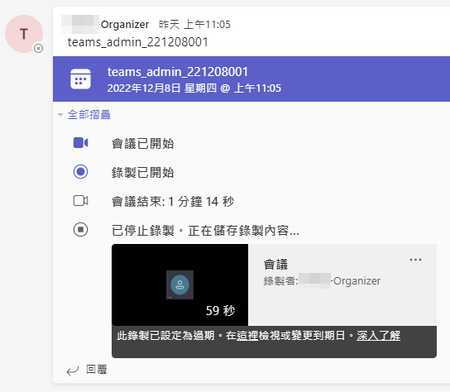
Hello team I created an online meeting on the specified group\channel via MS Graph API: https://learn.microsoft.com/en-us/graph/api/application-post-onlinemeetings?view=graph-rest-1.0&tabs=http When a group user join the meeting, starts meeting recording, and after the meeting ends, the recording file can be correctly created and stored in the Sharepoint file library. But when a non-group user join the meeting, after the meeting ends, we received a message that an error occurred while saving the recording file. I would like to know what is the problem of this error, is there a way to solve it. grateful. Teams group users permission: Group:TeamsMeetingReservation Channel:General Users admin organizer shawn Role Owner Member Example request to create meeting: { "subject" : "{subject}", "startDateTime" : "{StartDateTime}", "endDateTime" : "{endDateTime}", "Participants":{ "Organizer":{ "Identity":{ "User" :{ "Id" : "{OrganizerId}" } } } }, "ChatInfo":{ "ThreadId" : "{ChannelId}" } }Solved4.2KViews0likes16CommentsFacing issues while using ImportExcel PowerShell module
Hi All, I am trying to export Azure AD group member details to a single excel workbook where every group member details should be mentioned in a separate worksheet. For example, group1 worksheet should contains members of one AAD group and group2 worksheet contains members of another AAD group and so on so forth. For this I am using two PowerShell modules: Microsoft.Graph and ImportExcel. The issue is that once 34 worksheets are added to the excel workbook, I get this error : InvocationInfo : MyCommand : Add-ExcelTable ScriptLineNumber : 428 OffsetInLine : 39 HistoryId : 122 ScriptName : C:\Users\ashish\Documents\PowerShell\Modules\ImportExcel\7.8.4\Public\Export-Excel.ps1 Line : Add-ExcelTable -Range $ws.Cells[$dataRange] -TableName $TableName -TableStyle $TableStyle -TableTotalSettings $TableTotalSettings PositionMessage : At C:\Users\ashish\Documents\PowerShell\Modules\ImportExcel\7.8.4\Public\Export-Excel.ps1:428 char:39 + Add-ExcelTable -Range $ws.Cells[$dataRange] -TableNam … + ~~~~~~~~~~~~~~~~~~~~~ =============================== Below is my code for reference. param( [Parameter(Mandatory, HelpMessage = "Enter the pattern for filtering groups" )] $Pattern ) # Excel file path $ExcelFilePath = "$($PSScriptroot)\GroupMembers.xlsx" # Azure AD App details $ApplicationId = $Env:Azure_CLIENT_ID $TenantID = $Env:Azure_TENANT_ID $ClientSecret = $Env:Azure_CLIENT_SECRET | ConvertTo-SecureString -AsPlainText -Force $ClientSecretCredential = New-Object -TypeName 'System.Management.Automation.PSCredential' -ArgumentList $ApplicationId, $ClientSecret # Connecting to Microsoft Graph Connect-MgGraph -TenantId $TenantID -ClientSecretCredential $ClientSecretCredential | Out-Null # Getting all the groups with displayname starting with the provided pattern $Groups = Get-MgGroup -filter "startswith(displayname,'$Pattern')" -Top 2000 # Looping through all the filtered groups and exporting their members to the csv files $Count = 0 foreach ($Group in $Groups) { $Count += 1 $WorkSheetName = "Group$($Count)" Try{ (Get-MgGroupMember -GroupId $Group.id -Top 150).AdditionalProperties | ` Select-Object @{n = "DisplayName"; e = { $_.displayName } }, @{n = "UserprincipalName"; e = { $_.userPrincipalName } } |` Export-Excel -path $ExcelFilePath -WorksheetName $WorkSheetName -Append -TableStyle 'Medium16' ` -Title $Group.Displayname -TitleSize 14 -TitleBold } Catch { Write-Host $_.Exception.Message -ForegroundColor 'Red' Break } } Any help would be appreciated. Regards, Ashish Arya3.9KViews0likes1Comment
asked for scope 'OnlineMeetings.ReadWrite.All' that doesn't exist on the resource
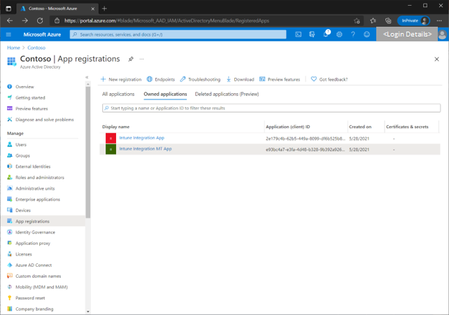
I'm trying to get Auth. code for OnlineMeetingsReadWrite.All scope. But it returns an error said: "The application 'HSR Teams Integration' asked for scope 'OnlineMeetings.ReadWrite.All' that doesn't exist on the resource '00000003-0000-0000-c000-000000000000'. Contact the app vendor.". I checked everthing triple times and I can't still figure out where is the problem. Here is my request: https://i.hizliresim.com/m3r21ek.png Here is my api permissions: https://i.hizliresim.com/gsa73fe.png We also have application access policy for this application. Why I'm getting this error ? I checked that client id is correctSolved3.8KViews0likes8Comments