User Profile

xoxidein
Iron Contributor
Joined May 12, 2022


User Widgets
Recent Discussions
Re: Dataverse lookup columns
If you are following these best practices, then using lookup fields in Dataverse should be a good way to improve the design and performance of your applications. I think they key word there is "applications". It makes an absolute mess of your solutions if you continue to use lookup columns and those solutions reference more and more tables. Now every solution you make has to have nearly all related tables from unrelated solutions.341Views0likes0CommentsAudit Limited Access Users
The permissions page for my SharePoint Site say: "There are limited access users on this site. Users may have limited access if an item or document under the site has been shared with them. Show users. This library has unique permissions." When I click on "Show users", it shows several AD Security Groups with "Limited Access". Clicking on any of those groups gives me a useless summary with the Name and Account GUID. How can I find what file/folders this Limited Access AD Security Group has access to?368Views0likes0CommentsHow to Disable Sharing
I am trying to disable the "Share this item with other people" feature. Microsoft shows this PowerShell function: https://learn.microsoft.com/en-us/microsoft-365/solutions/microsoft-365-limit-sharing?view=o365-worldwide#people-in-your-organization-sharing-links But I get an error message saying "Attempted to perform an unauthorized operation". I am a Global Administrator.748Views0likes2CommentsTeams Mobile on iPhone Transfer Screen Dissappears
Anyone have an issue where when you answer an incoming Teams Call from the lock screen, and then click the Teams icon to go to Teams, it shows you the screen to transfer for a second and then it disappears without a way to get back to it? That is happening with out of our team members and we need a resolution.Solved709Views0likes3CommentsEmail Signature Image Links Shows Brackets After Send
I created an HTML signature and for some reason when I reply to an email thread with it, image links are showing their URL in brackets next to the images. What it looks like when I send: What it looks like when they reply: I cannot figure out why this is happening.535Views0likes0CommentsNew Outlook - Emails Sent to Shared Mailbox Not Showing in User Inbox
When a Shared Mailbox receives an email, it should show up in a user's inbox so that they do not have to navigate to the "Shared with me" section - but it does not. Why is this happening? What setting needs to change to make this function like a Distribution List in that the message will appear in the user's inbox? I swear this used to work before Microsoft kept changing things with the "New" Outlook.1.3KViews0likes2CommentsMonitor which users are opted in/out from call queue?
I need a way for an admin to monitor which users are opted in/out from a specific queue (some users forget to opt back in every so often). I don't seem to find the information on the MS Teams Admin Center. The queue is set up as a list of users, not as a MS Teams channel. Even as a member of the Call Queue, there is no way to view the opted in/out status of any user within the Call QueueSolved5.2KViews0likes4CommentsDisplay Multiple Numbers for Users
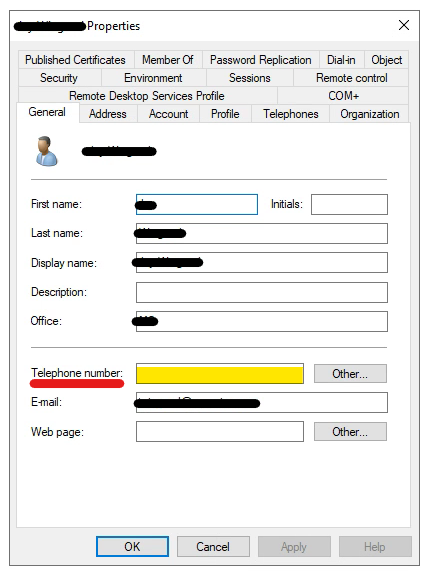
Active Directory has 6 fields available for Telephone Numbers in a user profile. One on the "General" tab: and 5 under the "Telephones" tab: But only the "Mobile" shows up: Is this something that can be configured? Why doesn't "IP Phone" display? Why don't all the numbers display?1.1KViews1like0CommentsList SharePoint Sites, their Libraries, their folders, and their Permissions for Given User
I need to run an audit on the permissions without our SharePoint instance. I'm trying to mix a bunch of code together to achieve this and I'm failing. I would like an output like this: Site 1 Title Permission ---------------------------------------- Library 1 Read Library 2 Full Control Library 3 Contribute Library 4 Read Library 5 Contribute Site 2 Title Permission ---------------------------------------- Library 1 Read Library 2 Full Control Library 3 Contribute Library 4 Read Library 5 Contribute The closest I've gotten is permissions looping through the Sites, but it keeps outputting the same libraries for each site, and it's not even accurate. #Set Parameter $TenantSiteURL="https://contoso.sharepoint.com" #Connect to the Tenant site Connect-PnPOnline -Url $TenantSiteURL -Credentials (Get-Credential) #Get All Site collections - Exclude: Seach Center, Redirect site, Mysite Host, App Catalog, Content Type Hub, eDiscovery and Bot Sites $SiteCollections = Get-PnPTenantSite | Where -Property Template -NotIn ("SRCHCEN#0", "REDIRECTSITE#0", "SPSMSITEHOST#0", "APPCATALOG#0", "POINTPUBLISHINGHUB#0", "EDISC#0", "STS#-1") #Loop through each site collection ForEach($Site in $SiteCollections) { Write-Host "" $Site.Title #Get all document libraries $DocLibs = Get-PnPList #Get ID and Title of the document library $DocLibs.Title }8KViews0likes2Comments


Recent Blog Articles
No content to show