User Profile

Ukiman1014
Brass Contributor
Joined Nov 26, 2021


User Widgets
Recent Discussions
Security & Compliance Command Not Recognized
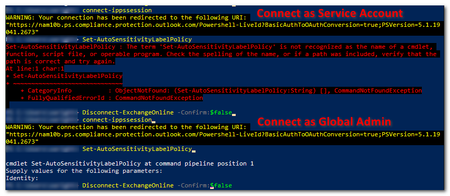
I need to use the Set-AutoSensitivityLabelPolicy command, and I have v3.1.0 of Exchange Online PowerShell installed. After successfully connecting with Connect-IPPSSession, I get an error that the Set-AutoSensitivityLabelPolicy isn't a command. When I https://learn.microsoft.com/en-us/powershell/module/exchange/set-autosensitivitylabelpolicy?view=exchange-ps, it's supposed to be a part of Exchange Online PowerShell, but when I use get-command -module ExchangeOnlineManagement, it's not listed. What am I missing? I have also tried loading the older 2.0.5 version of ExchangePowerShell, but that did not help either.Solved1.2KViews0likes2CommentsRe: Cannot Use Newer Version of PowerShellGet in PowerShell 5.1.
The issue was that the X86 path was before the 64-bit one when I looked at $env:PSModulePath. (There was actually another path in there pointing to my documents folder - no idea where that came from.) So I reset $env:PSModulePath, making sure the 64-bit path was first (I just removed the others), and I'm all set. So basically because I'm running 64-bit PowerShell, it was installing commands to the 64-bit path, but the environment variable was looking in the x86 folder first. I'm sure all of this had to do with old stuff I had done with PowerShell.4.9KViews0likes0CommentsRe: Cannot Use Newer Version of PowerShellGet in PowerShell 5.1.
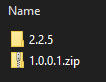
Hello everyone, and thanks for the responses! At the end of the day yesterday, at the prompting of a coworker, I just went into C:\Program Files\WindowsPowerShell\Modules\PowerShellGet and zipped up the 1.0.0.1 folder (instead of just deleting it). PowerShell now only has the 2.2.5 folder and it is now using the new version of PowerShellGet 🙂. Does anyone know if the 1.0.0.1 version is needed for anything at all?3.4KViews0likes0CommentsCannot Use Newer Version of PowerShellGet in PowerShell 5.1.
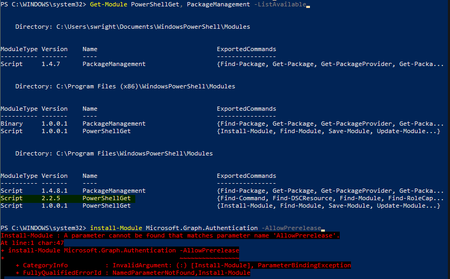
I need to install the prerelease commands for MgGraph. To do that I need to use the -allowprerelease parameter for Install-Module, which requires a newer version of PowerShellGet than 1.0.0.1, which comes with 5.1. There are plenty of articles on how to do this, but no matter what I try, I can't get it to use the newer version. I have followed the steps https://learn.microsoft.com/en-us/powershell/gallery/powershellget/update-powershell-51?view=powershellget-2.x and https://learn.microsoft.com/en-us/powershell/gallery/powershellget/install-powershellget?view=powershellget-2.x. I have .NET 4.8 installed. I am using TLS 1.2 I am running 64-bit PowerShell Used Install-Module PowerShellGet to install it side-by side with v1.0.0.1 Tried Update-Module PowerShellGet -force -allowclobber Uninstalled and reinstalled PowerShellGet Tried restarting PowerShell. Tried Rebooting You can see, for the 64-bit modules, the 2.2.5 version of PowerShellGet is listed before v1.0.0.1, which is supposed to mean it will use that version, but it's still not recognizing the -AllowPrerelease option, meaning it's still using v1.0.0.1. What can I do from here?Solved4.6KViews0likes5CommentsRe: Failed to upload your file MS Forms
I was getting "...not enough storage space available" error when trying to upload. The upload folder was there in OneDrive, but I think it didn't have the right permissions (long story). Just removing and re-adding the file upload question recreated the folder and allowed uploads. Also, the name of the folder seems to always be "Question", as that's what's in as default before you can set your own question text.4.4KViews0likes0CommentsCompany Communicator - Email if Chat Not Read?
We have a concern that some users may not check Teams for a while and were hoping that messages (cards) sent by Company Communicator, if unread for a time, would then generate an email from Teams stating that Company Communicator was trying to reach you. (This is the behavior if I don't read a regular chat message from another user.) Is there a way to get that to occur?1.2KViews1like1CommentLive Event Presenter Calling In, How to Un-Mute?
We regularly host live events for our all-team member meetings. One of our presenters is sometimes on the road and must use the dial-in number as a presenter (audio only of course). It works great, but if someone mutes him within the live event interface, there is no way for us to un-mute him. Is there a way that he can un-mute himself? Possibly by pressing the pound (#) key or something? To be clear, I am not talking about him muting or unmuting his own phone, I'm talking about un-muting in the teams live event interface. In this last meeting he was muted by someone and eventually had to dial back in so he could speak, which was frustrating.1KViews0likes0CommentsRe: Teams Meeting Recordings and Transcriptions - Retention Concerns
ChristianJBergstrom Understood. Good point that the meeting organizer is the only one that can delete the transcript, but unfortunately there is no way to prevent it being downloaded by another participant (before it's deleted). Even after deletion, it's stil retained in their Exchange mailbox and is therefore available in eDiscovery searches. I've been told that we only back up the journal, which is only sent and received emails, so we're trying to find out if meeting transcriptions are journaled or not. Even if they aren't, they'd still live in the user's mailbox, potentially for years. We were looking for a way to lock down the ability to transcribe and record to only certain individuals and then have those recordings and transcriptions auto-delete after a week or two. In effect, they would just be available to aid in the taking of official meeting notes or for someone to re-watch a portion of the meeting. As you've said, it seems like we'd need to rely on a fair amount of manual effort and training to achieve this. It's unfortunate the Microsoft hasn't built more controls into the policies for these features 😞.36KViews1like4CommentsRe: Teams Meeting Recordings and Transcriptions - Retention Concerns
I'm assuming OSFB is OneDrive for Business. I've done a number of tests and I've not yet seen a recording transcription stored there. I only have the .mp4 recording files and I've looked in "Microsoft Teams Chat Files", "Microsoft Teams Data" and "Recordings". 🤷🏻:male_sign:36KViews0likes6CommentsRe: Teams Meeting Recordings and Transcriptions - Retention Concerns
Thanks for the extra info ChristianJBergstrom. What do you mean by "ODFB"? If that copy and the one in Exchange expire at different times, which one is the one that's accessible in Teams? (Either via the original meeting invite in the calendar or in the original meeting chat.) When you say that the user could delete it from Exchange, how would they do this? My understanding is that it's in some sort of hidden folder, only accessible by admins.37KViews0likes7CommentsRe: Teams Meeting Recordings and Transcriptions - Retention Concerns
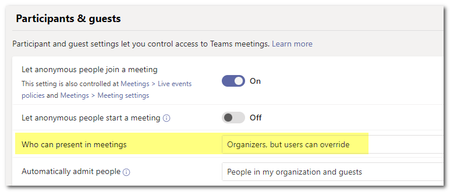
Two more things I learned: By default, meeting organizers and presenters can record meetings, and, by default, anyone can preset, therefore anyone can record. A Teams meeting policy can be used to only allow organizers to present in meetings. If anyone else needs to present after the meeting starts, the organizer can change their role to presenter. (The presenter could then record the meeting, but you'd assume that the organizer would have done so already.) Using Teams Premium, a meeting policy can be https://learn.microsoft.com/en-us/microsoftteams/configure-meetings-highly-sensitive-protection that will only allow organizers to record meetings (doesn't matter who can present). Just some options other than having to control who can record on a per-user (or group) basis.36KViews1like9CommentsRe: Teams Meeting Recordings and Transcriptions - Retention Concerns
StevenC365 Thanks for the response! There is a Teams Meeting Policy which can be assigned to users that determines if they are allowed to create a transcription, this should be your first choice in limiting transcription. Rather than having groups that can't download, have groups that can't create a transcription. Agreed. Since there isn't a way to view the transcription file without downloading it, the only protection is to not allow it to be created in the first place. I wish that meeting recordings and transcription expirations could be tied together though. I'm not really sure what 'search in Exchange' you mean, if you mean an eDiscovery search by a compliance officer then yes they would come up. I wasn't sure what I meant either! 🙂 Good to know - thanks. Teams chat messages can be retained and deleted using a Retention Policy just like email messages. It perhaps makes little sense to have a different retention policy for chat compared to email. I am not sure what upper management is doing to want to do, so it is good to know our options.36KViews0likes1CommentTeams Meeting Recordings and Transcriptions - Retention Concerns
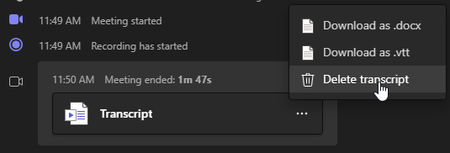
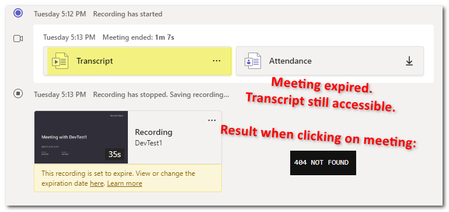
My company has concerns about meeting recordings and transcriptions sticking around for a long time and causing potential legal or audit issues down the road. I've been researching this, and transcriptions seem to be an issue. First, I understand that we can put policies in place to restrict which users can record and/or turn on transcriptions for a meeting. We can also pay for Teams Premium to only allow meeting organizers to record meetings. The question still remains about how long recordings and transcriptions stick around and how we can make sure they are only retained for a specified amount of time. All of our meetings are private (not channel) meetings, so recordings are stored in the OneDrive of the user who clicked the record button. As long as the recording stays there, other users can only view it and it will be deleted after the recording expires (I understand that users can extend the expiration). The transcription, on the other hand, is stored in some kind of special folder in that user's Exchange mailbox. The transcription is not deleted when the recording expires and any user who attended the meeting can download the transcription as a file and save it anywhere. The transcription is like an email as far as retention goes, so it would be covered under our email retention settings. Questions: I see there is a way to use retention labels to https://learn.microsoft.com/en-us/microsoftteams/cloud-recording#retention-policies, but what about downloaded transcription files? (I'm not very familiar with retention labels.) Is it possible to only allow certain users (or groups) to download transcription files? Would meeting transcription text come up in a search in Exchange? Meeting attendees can access recordings and transcriptions via Teams chat for the meeting or the meeting calendar invite. The calendar invite would fall under Exchange's retiention, but how can we control how long chat messages are kept? http://Microsoft%20Teams stores chat data in primary and secondary storage locations for compliance. The chat service stores its messages in Azure Cosmos DB. Compliance records for messages are stored in group and personal Exchange Online mailboxes under a hidden folder in the mailbox. specifies they're stored in two places but I am not sure how to set retention policies to cover both. Are there any other concerns or tips on controlling retiention for teams meeting artifacts? Thanks!42KViews2likes20CommentsAny way to tighten up spacing between web parts?
I need to insert two images side-by-side with text above and below them. The only way I can see to do this is to have the web parts in separate sections, which adds a lot of white space between everything. I've blurred out the text, but you can see what I mean below, along with the layout I'm using. Is there any way to tighten up the spacing between sections? There appear to be no options. This is SharePoint Online, BTW.Solved29KViews0likes4Comments
Recent Blog Articles
No content to show