Forum Widgets
Latest Discussions

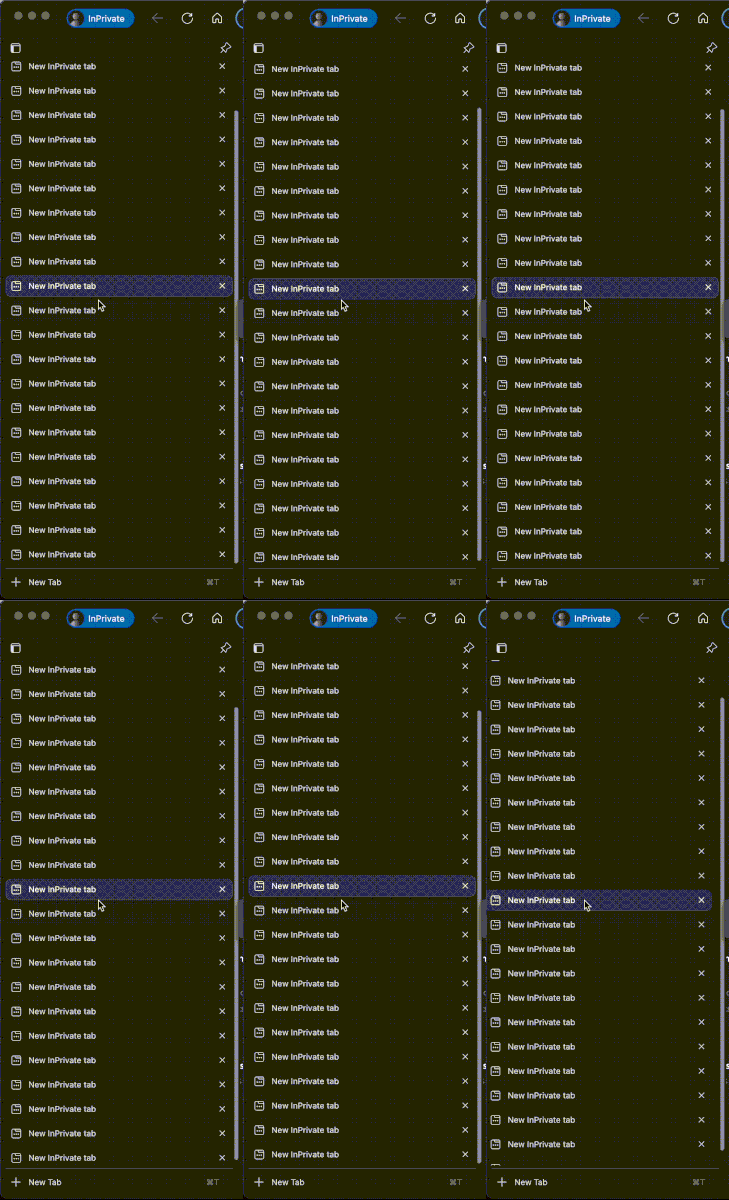
Horizontal scrolling on vertical tabs
When the number of tabs in the vertical mode is greater than the height of the window, it means that when the scrollbar appears, it can be moved to the left and right! While this bug does not exist in Windows, it exists in macOS.msdibaApr 09, 2026Copper Contributor802Views2likes1Comment
Android MS Edge Autofill verification and android/PWA apps.
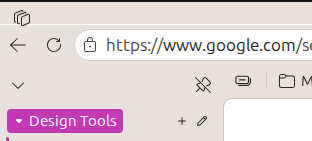
Hi guys, An issue I have with edge on android autofill is that when biometric checks are enabled for autofill and using non-edge or an installed PWA app, you are teleported from the PWA/android app to Microsoft edge and are not teleported back to the app being autofilled. This means that having biometric autofill checks and edge password manager as the primary autofill for android means that on some apps it is unfeasible to autofill as the log in request times out or resets after the app is no longer in view. This and the inability to save passkeys natively in the edge android browser is a big for drawback for me using edge password management over googles in built system. Happy Easter!HypersomniacApr 07, 2026Copper Contributor22Views0likes0CommentsThere is a dashed/black line over the search box when vertical tabs are in use.
I found in the latest update versions that there is a black/white line when I use vertical tabs. Sometimes it is dashed or blinking. The current version is 146.0.3856.97 (Official build) (64-bit)Robert24Apr 07, 2026Copper Contributor19Views0likes1Comment
Edge for Android No Longer Opens Google Calendar Links in External App
I'm reporting a regression in Microsoft Edge for Android that has disrupted my workflow on a Samsung Galaxy A9+ tablet running Android 15.0. Until recently, Edge correctly handed off supported links—such as “Add to Google Calendar” URLs—to the Google Calendar app, in accordance with Android’s intent routing and app defaults. Now, Edge traps these links inside its internal WebView, even when: - “Open supported links” is enabled for the Google Calendar app - “Block opening external apps” is disabled in Edge settings - No site-specific override exists for calendar.google.com When I tap a calendar link, Edge briefly flashes a system prompt asking whether to open in the external app or stay in Edge—but this prompt immediately disappears, and the calendar loads inside Edge. This contradicts Android’s expected behavior and breaks previously functional workflows. Notably, .ics files still open correctly in the Calendar app, confirming that system-level routing is intact. The issue appears to be with Edge’s handling of intent-based links, possibly introduced in a recent update. Device: Samsung Galaxy A9+ OS: Android 15.0, OneUI 7.0 Edge Version: 139.0.3405.111 I’m requesting that Microsoft investigate and restore proper external app handling for supported links. This is a serious usability regression, and users should not have to resort to alternate browsers or workarounds to maintain basic interoperability. Thanks for your attention. —Dan Hayden North Highlands, CASacGuy1362Apr 04, 2026Copper Contributor108Views3likes1Comment
Zoom with Scroll + Modifier Key Not Working in Edge on macOS
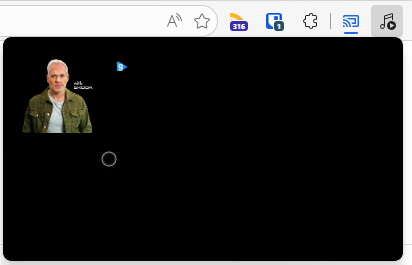
Hello, I am using Microsoft Edge on macOS and I would like to zoom in and out of web pages using a modifier key (Command, Option, or Control) together with scroll Currently, Command + Scroll does not zoom the page. I understand that macOS may override this behavior through accessibility settings, but I would like to enable this functionality specifically in Edge without affecting system-wide behavior. Could you please advise: Is it possible to enable zoom using Scroll + Modifier Key in Edge on macOS? If not, are there any recommended workarounds or planned features for this? Thank you for your help DanceLens!Media Player theme bugged
Noticed that the past couple of Dev builds have a broken media player where the theme is all black and it also looks like the layout is bugged, see screenshot below. I've also submitted feedback with a screen recording but wanted to see if anyone else was experiencing this.lexcynApr 01, 2026Steel Contributor53Views0likes1CommentAzure Tiles Not loading with MS Edge Beta v147.0.3912.16
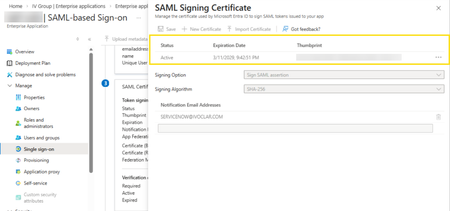
In the latest version of MS Edge, we cannot view or access the SAML Certificate data for Enterprise Applications hosted in Entra ID. Before: (v146.0.3856.62) After updating to v147.0.3912.16: As can be seen, the certificates cannot be displayed or accessed from this tile. This is affecting our test users who cannot rotate their SAML certificates but may have other impact for other Azure resources being accessed with MS Edge Beta.SolvedamaraschielloMar 30, 2026Copper Contributor58Views0likes2CommentsDesktop icons flicker for one second when closing Microsoft Edge
Hello, I would like to report a regression affecting Microsoft Edge on Windows 10. Starting with version 145.0.3800.70, and still present in the current stable version 145.0.3800.82, closing the Edge window causes the desktop icons to flicker for about one second, as if the desktop is being refreshed. This issue occurs only on Windows 10. On Windows 11, the same versions of Edge do not produce this behavior. The flicker happens consistently every time Edge is closed, and it does not occur with any other application.EDIMicrosoftMar 29, 2026Copper Contributor408Views1like6Comments
Unable to open any websites
Haven't been able to use Edge Canary for the past couple of days. Just get the message: This page is having a problem. Have tried repair, uninstall and reinstall, all to no avail. Works ok on my other PC. Edition Windows 11 Pro Version 25H2 Installed on 02/02/2025 OS build 26200.8039 Experience Windows Feature Experience Pack 1000.26100.300.0vienna10Mar 28, 2026Brass Contributor49Views0likes0Comments


Tags
- edge662 Topics
- canary224 Topics
- feature198 Topics
- Feedback187 Topics
- suggestion179 Topics
- BUG141 Topics
- macos107 Topics
- mac102 Topics
- request101 Topics
- suggestions101 Topics