Forum Widgets
Latest Discussions

Surface Pro 11 Keyboard Typing Issue
Hi, I have a Surface Pro 11 with the detachable keyboard. The keyboard also has the pen holder. I am having an issue with typing three of the letters. When I type a 'd', I get 'sd', when I type 'm', I het 'nm', and when I type 'o', I get 'uo'. This happens in all applications being used. I have done the following: 1. Drivers and Windows up to date 2. Diagnostics run with no issues 3. Detached and reattached keyboard 4. Shutdown and restarted numerous times 5. Deleted keyboard drivers 6. Checked keyboard settings, the layout is on US Qwerty 7. Cleaned connections 8. Can of air to blow out any dust, nothing seen though Not sure what else to do. It's only those three letters. The touchpad and all other letters and functions is working correctly. It takes forever for it to fix itself. Specifications below. Surface Pro Device information: Device name: SURFACE_TABLET Serial number: 0F379PF24383KV Surface model: Surface Pro 11th Edition Model 2076 SAM: 27.201.139 UEFI: 175.222.235 App version: 76.5120.174.0 BIOS Version/Date: Microsoft Corporation 175.222.235 02/23/2026 Wi-Fi driver: 1.0.4374.1300 Edition: Windows 11 Home OS build: 26200.9168 Processor: Snapdragon(R) X 10-core X1P64100 @ 3.40 GHz Installed RAM: 16 GB Storage size: 86 GB free of 236 GB GPU: Qualcomm(R) Adreno(TM) X1-85 GPU Screen resolution: 2880 x 1920 Keyboard Device information: Keyboard Firmware: 28.106.139 Language: English (US)doc_smrAug 14, 2026Copper Contributor20Views0likes0Comments
Surface Flex Keyboard (WATCH OUT!)
I've been trying to get a hold of Microsoft, but service or maintenance pages are way too complicated to navigate. I mean you really need hours of time to sit down and figure out how to make a claim on this thing. Anway, Surface Pro Flex Keyboard was delivered on August 19, 2024, it is out of its 1-year Microsoft manufacturer warranty by just about one year. That is a massive purchase price of $489.99 to have only last just out of the warranty time. The Surface Pro 6 keyboard that I gave to my father from my old device is still going strong; Microsoft, like everything else, are getting worse, never better. All the old stuff was 10x it's wieght in capability and use. I want the old stuff back. The new stuff is 20x the price, and just doens't last. I mean, no, I mean no one took better care of their keyboard, and used it as less as possible... I think it's a design flaw, it won't charge itself unless you hold it up on one side at a perfect angle. The only way to get power to it is to angle it and hold it up perfectly at a precise angle, and only on one side. I think the issue is a design fault, the area that flexes, maybe, wore out the internal wiring. THEN DON'T MAKE IT FLEX....Jesus. How hard is it to make a keybaord that barely gets used last longer than a year or two. I can't just be out $500 every other year. There's just gotta be a better company out there? Does anyone have any better reccomendations? Maybe Android? Or Samsung? This can't be it? It can't be. Who can afford that?derMonteurAug 13, 2026Copper Contributor8Views0likes0Comments
Surface Pro 9 Type Cover Not Working in WinPE
Dear Microsoft Surface Support Team, I have created a custom WinPE recovery environment for my Surface Pro 9 (Intel). After injecting the official Surface driver package, the touchscreen now works correctly, but the Type Cover keyboard and touchpad still do not function. The official Microsoft Recovery Drive supports all three devices correctly, so the hardware is not at fault. Could someone from the Surface engineering or deployment team advise: Which driver enables the Type Cover in WinPE? Are additional WinPE Optional Components required? Is there an official Microsoft procedure for creating a fully functional WinPE image for Surface devices? I can provide full technical details if required. Thank you. Ashok AroraviscweaverJul 26, 2026Copper Contributor9Views0likes0Comments
Network connection
I’ve three Surface Pros: two 7+ running Windows 11 Pro and an older Pro 5 running Windows 10 Pro. All fully up to date. All exhibit the same problem, even when placed next to each other and barely 2 metres from a wireless repeater that’s part of a TP-Link Deco mesh network. The problem is that randomly any one or two of them will claim there’s no internet connection while the other one or two are rock solid with a 90 plus score on my Orb app. Then a random time later the disconnected device will find the network. There’s no obvious pattern – sometimes the problem exhibits itself on a full cold start, sometimes on waking from sleep when the typecover had simply been closed. Other devices such as a phone or Android tablet never show this so I conclude it’s something to do with the Surface tablets – but what is it and how can I fix it? Grateful for any suggestions.AllmatMay 04, 2026Copper Contributor67Views0likes0Comments
A pen for Surface Pro 7 and 4.
Hi, Is there a pen for Surface Pro 7 or Pro 4 that doesn't need charging?mr_KFeb 23, 2026Copper Contributor99Views0likes0Comments
surface pro x for business needs constant graphics driver reset, how to fix?
I have a surface pro x for business that is up to date and has no company or IT restrictions, it is my device for home use and I have control of everything. I am noticing that whenever my device wakes up from sleep, restarts, or turn on after shutting down, I have to do ctrl+shift+windows key+B to get all the content to fit into the screen. For instance, if I have the microsoft store page open, and my windows are maximized (I even tried this on several browsers after minimizing and maximizing again) the bottom of the page at any given position does not fit the screen. Another example is ctrl+f, I cannot see that bar that searches and highlights the result or on word I cannot see the bootm row that has word count and language until I reset the graphics driver. I saw an optional update and it temporarily fixed it but the issue has returned. Any advice on how to fix this on windows 11 (I have the i7)?E_M_A_Jan 26, 2026Copper Contributor87Views0likes0Comments
Surface Pro 8 – Hardware-Liquid Damage
Device: Microsoft Surface Pro 8 Pre-incident condition: Fully functional, no known hardware faults Incident Details A small Coca-Cola spill occurred around the Type Cover (keyboard) connector area only Area exposed cleaned immediately No liquid exposure to USB-C ports, Surface Connect charging port, vents, or display Type Cover remained attached following the spill Device was left connected to the charger for approximately 3 hours after the spill, with the keyboard still attached Observed Behaviour (Following Morning) Device will not power on unless connected to AC power Investigated- Found liquid around type cover (nothing visible on the ports) When powered on: Boots normally Reaches Windows login After login and loading the desktop, the system shuts down abruptly without warning Shutdown occurs consistently after OS load No shutdown occurs during UEFI/POST Security / Firmware Event Device subsequently displayed a BitLocker recovery prompt Correct recovery key was entered System successfully decrypted and booted into Windows Device again shut down abruptly after reaching the desktop Current Status Device is currently powered off No factory reset, OS reinstall, or internal cleaning attempted Type Cover and charger have been disconnected No visible external corrosion or physical damage Assessment Context SSD, display, and CPU appear functional (successful OS load) Failure appears load-dependent and occurs post-login Behaviour suggests possible power delivery, embedded controller, or internal board-level instability No user-replaceable component has been identified as a definitive failure point Please advise on: Viability of the device for reliable continued use Whether the observed behaviour is consistent with recoverable hardware condition or non-economical repair Whether Microsoft recommends replacement vs. repair given the described failure patternaugustusleoJan 09, 2026Copper Contributor177Views0likes0Comments
Surface 8 pro - could‘t find a bootable operation system
Hi all, I have a problem with my surface 8 pro. This morning I got the error with the bootable operation system. After a research, I made a recovery stick with another pc. Evertning was working, I got the latest image from microsoft and also the instruction tomcreate the stick was working. the problem is, the surface 8 pro can not boot with this usb stick - I have every time the error. Next I made a normal Win 11 Bootstick with the official tool. This sticks works on my second Surface, but on the Surface 8 pro again the same problem. Also with the volume down push…it does not work. what can I do? Does the Surface 8 pro some special usb format option or does anyone have an idea (perhaps the ssd is the problem)? thx for the help. br benjaminBenjor84Dec 08, 2025Copper Contributor63Views0likes0CommentsSurface Pro X - SQ2 - sleep issues related to Qualcomm Location (ACPI\QCOM0472)
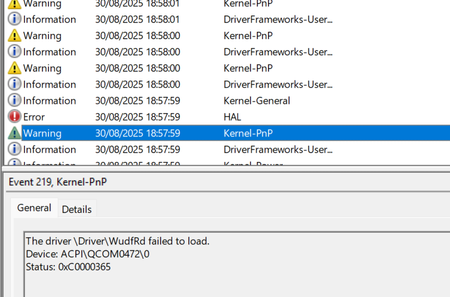
Hi there, Been having issues with sleep on Surface Pro X SQ2. Essentially, when the lid closes, or it goes to sleep, it sometimes didn't wake up (needing hard restart) or rebooted / crashed during sleep. This has been going on for six or so months. I did a clean install which made no difference. After reading through event viewer, I think I have isolated it to ACPI\QCOM0472\0 - which is Qualcomm Location services - and the driver doesn't seem to install / has error messages related to it in device manager event viewer. I've disabled it in device manager and it seems to be helping. Presume its hardware related? ThanksTigerSharkSep 01, 2025Copper Contributor108Views0likes0CommentsSurface Pro 6 running super slow
Haven't put anything new on it. Visit the same websites daily. Just outta nowhere this thing is super slow the past few days. No viruses or malware. Windows up to date. Ran "a program" ...everything is clean and up to date. Chromium was running in the background, stopped that. Nothing running at startup that shouldn't be. (only Logitech keyboard/mouse, Avast, RealTech audio, and SecurityHealthSysTray) Task manager says 3% CPU usage - 49% memory usage. Any ideas? Thanks!GNS1310Apr 11, 2025Copper Contributor102Views0likes0Comments
Tags
- Surface Pro 420 Topics
- Surface Pro 313 Topics
- Surface Pro 712 Topics
- Surface Pro 88 Topics
- Surface5 Topics
- Surface Pro 55 Topics
- Surface Pro 95 Topics
- Surface Pro 64 Topics
- Surface Pro X4 Topics
- Pen3 Topics