Recent Discussions

Copilot Studio Agent Unable to Retrieve Usable DOCX/XLSX Content from OneDrive (and SharePoint)
Hi everyone, I'm building a Copilot Studio agent that needs to read and process Word (.docx) and Excel (.xlsx) files stored in OneDrive. The agent can successfully locate files and retrieve metadata, but it appears unable to retrieve Office files as usable binary content. I tested the behaviour using the OneDrive Get file content action: A text file (test.txt) was returned correctly and matched the original file contents exactly. A Word file (Test.docx) was returned beginning with the ZIP signature PK and contained recognisable DOCX entries such as [Content_Types].xml and _rels/.rels. However, the returned payload also contained large numbers of Unicode replacement characters (�). The returned content appears to be a text string rather than binary data or base64 content. Because Office files are ZIP-based binary formats, the returned payload cannot be reconstructed into a valid .docx or .xlsx file, preventing downstream libraries such as python-docx and openpyxl from opening the file. Is there any way to resolve this issue?15Views0likes1CommentCopilot Studio agent suddenly stopped working in Teams
Hello, I've run into a strange issue with a Copilot Studio agent and I'm trying to understand where to investigate next. The agent is published to the "Teams and Microsoft 365 Copilot" channel and was working normally in Microsoft Teams until recently. The agent still works correctly in Copilot Studio. The agent still works correctly in Microsoft 365 Copilot / Copilot Chat. The issue only occurs in Microsoft Teams. What happens in Teams: Messages can be sent to the agent. No error message is displayed. No response is returned. Most importantly, no session is created in Copilot Studio (Analytics / Observability). Because no session is created, it looks like the message never reaches the agent runtime. What I've already checked: Republished the agent. Reinstalled the Teams app. Verified the Teams and Microsoft 365 Copilot channel configuration. Checked permissions and sharing settings. Checked Teams Admin Center configuration. Tested in both Teams Desktop and Teams Web. Reviewed Microsoft 365 service health. This same tenant has another Copilot Studio agent that works normally in Teams. The affected agent previously worked in Teams for several weeks before the issue appeared. The agent architecture is very simple (single MCP server, no custom connectors, no Power Automate involved in this scenario). At this point, I'm mainly trying to understand why Teams no longer seems to create a conversation/session for this specific agent while the same agent continues to work in Copilot Studio and Microsoft 365 Copilot. Has anyone seen similar behavior or found a way to diagnose why Teams is no longer forwarding requests to a specific agent ? Thank you for help29Views0likes1Comment
Knowledge retrieval on the GitHub Copilot harness suddenly slow (~1:25 min/turn)
Since about a week we're seeing severe knowledge-retrieval latency on a Copilot Studio agent (GitHub Copilot harness, SharePoint sources) — ~1:25 min per answer. No config changes on our side. Same source on the standard harness: ~20 s. We captured a HAR of a slow turn and found this in the SSE stream: knowledge_search_sharepoint completes in ~11 s (durationMs: 10774) — search is not the problem. But instead of snippets, the tool result says: "The full documents have been downloaded to /app/uploads/" — 9 complete files, including large PDFs. 8 of 10 results contain no snippet at all. It then instructs the model: "Read each relevant file IN FULL before responding — every part, from the start to the end of the file." The remaining ~70 s is the model reading those files before answering. More sources = more full documents = longer turns. Oddly, the tool's own description promises the opposite: "Results are search snippets … call KnowledgeRetrieve with the ReferenceId to get the full document." Anyone else seeing this since ~mid-August? Known issue or intended GA behavior?60Views0likes1Comment
New Copilot Studio experience - MS365 Copilot and Teams - Channel About Info
We have imported a managed Solution into our Production Environment and all Objects successfully migrated, with the exception of the Channel 'About Info'. We find we can now update these About Info details, but they do not carry through into the App Manifest Download or the Submit to Org Catalogue. Unlike the Classic experience, there is also nowhere to update the Icon in the Channel Details, so only the default icon comes through in the Manifest and Org Catalogue workflow. HELP!49Views0likes1Comment
Copilot in Word can't read chat attachments; Word for web file picker shows “no token obtained”
Summary of the issue I am seeing a persistent failure with Copilot attachments specifically inside Microsoft Word. Copilot in Word desktop and Word for the web can recognize an uploaded chat attachment by filename or OneDrive URL, but it cannot read the file contents. It reports the uploaded file as empty, corrupted, or in a format it cannot process. The same files are successfully read by standalone Microsoft 365 Copilot Chat using the same Microsoft account, and file uploads also work in Excel Copilot and PowerPoint Copilot. Failure started 10 days ago, with no obvious changes in settings on my end. The most useful diagnostic clue so far is that Word for the web’s Copilot attachment/file-picker path has also failed before any file was selected, showing “Something went wrong, please try again or refresh the page, no token obtained.” In Chrome, Word for the web produced a SharePoint-style error page with a correlation ID. This makes the issue look less like a bad file or local Word installation problem and more like a Word Copilot attachment-picker, OneDrive/SharePoint authorization-token, or file-handoff problem. Environment and scope Windows 11, Pro. Microsoft Word desktop: issue reproduced after updating Office and Windows. Word for the web: issue reproduced in Edge, Edge InPrivate, and Chrome. Standalone Microsoft 365 Copilot Chat / copilot.microsoft.com / m365.cloud.microsoft/chat: uploaded files can be read successfully with the same Microsoft account. Excel Copilot and PowerPoint Copilot: uploaded files work. OneDrive in Chrome: upload/download and file access work normally with the same account. Same Microsoft account used throughout. File types tested include tiny TXT files, PDFs, and DOCX files, including a complex DOCX. Copilot in Word can read the active Word document normally; the failure is limited to files uploaded as Copilot chat attachments inside Word. Observed behavior In Word desktop, Copilot chat accepts or recognizes the attachment metadata, including filename and sometimes a OneDrive URL, but when asked to read or summarize the file it says the file appears to be empty, corrupted, or in a format it cannot process. This happens even with a very small TXT test file. In Word for the web, the same general failure occurs. In one clean test, I created a brand-new blank Word document in Word for the web, opened Copilot, attached a tiny TXT file, and asked what the uploaded TXT file said. Copilot responded: “The uploaded file ingestion_test_731_1915.txt appears to be empty, corrupted, or in a format I can’t process, so I can’t read any text from it.” In another Word for the web test, clicking Copilot’s “+” attachment button and choosing either “My Files” or “Recent” opened a mostly blank window saying: “Something went wrong, please try again or refresh the page, no token obtained.” This occurred before any file was selected. In Chrome, Word for the web produced this error when trying to use the Copilot attachment flow: “Sorry, something went wrong. An unexpected error has occurred. Technical Details: Troubleshoot issues with Microsoft SharePoint Foundation.” The error included Correlation ID 64062ea2-3083-8000-a0f7-fbf4f6bb617d and Date/Time 8/4/2026 12:21:38 PM. Evidence matrix Test Result Standalone Microsoft 365 Copilot Chat / copilot.microsoft.com DOCX, PDF, and TXT uploads can be read successfully with the same account. OneDrive in Chrome Upload, download, and file access work normally. Excel Copilot Uploaded files work. PowerPoint Copilot Uploaded files work. Word desktop Copilot Attachments are recognized but reported as empty, corrupted, or unprocessable. Word for the web in Edge/InPrivate Tiny TXT attachment reported as empty, corrupted, or unprocessable. Word for the web attachment picker “No token obtained” message before file selection. Word for the web in Chrome SharePoint Foundation-style error with correlation ID 64062ea2-3083-8000-a0f7-fbf4f6bb617d. Word Copilot reading the active document Works normally. Troubleshooting already tried Updated Microsoft Office / Microsoft 365 desktop apps. Updated Windows. Restarted Word multiple times. Restarted the computer multiple times. Signed out and signed back in. Confirmed that the same Microsoft account is being used; there is only one Microsoft account involved. Toggled connected experiences off and back on, including restarts between changes. Started Word in Safe Mode. In Safe Mode, Copilot chat opened but did not activate properly; the Copilot pane appeared to cycle in the background and sub-windows were blank/unusable. Tested with a brand-new blank Word document in Word for the web. Tested in Edge, Edge InPrivate, and Chrome. Tested with very small TXT files as well as PDF and DOCX files. Confirmed OneDrive itself works normally in Chrome by uploading and accessing files successfully. Confirmed standalone Copilot and Excel/PowerPoint Copilot can process uploaded files successfully. Why this does not look like a local file or browser problem The same uploaded files work in standalone Microsoft 365 Copilot Chat, and OneDrive upload/download works normally. The issue also reproduces across Word desktop and Word for the web, across multiple browsers, and with a brand-new blank Word document. Because Word Copilot can read the active document but cannot acquire or process uploaded chat attachments, the failure appears isolated to the Word-integrated Copilot attachment picker, authorization-token acquisition, or OneDrive/SharePoint file-handoff path. Most likely failure area My current working theory is that Word-integrated Copilot is failing to obtain or pass the required SharePoint/OneDrive authorization token for Copilot chat attachments. The “no token obtained” message and the SharePoint Foundation correlation ID point toward the file-picker or backend handoff path rather than file contents. It may be account-specific, feature-flight/routing-specific, or a Microsoft-side regression affecting Word Copilot attachment handling. Request for help Has anyone seen Word Copilot attachments fail in this way while standalone Copilot, OneDrive, Excel Copilot, and PowerPoint Copilot all still work? Are there known Word Copilot attachment-picker, OneDrive/SharePoint token, or feature-routing issues that can affect only Word-integrated Copilot? If Microsoft support or engineering can trace backend logs, the most relevant correlation ID I have is 64062ea2-3083-8000-a0f7-fbf4f6bb617d from 8/4/2026 at 12:21:38 PM in Word for the web in Chrome. I would especially appreciate suggestions for anything beyond the standard local troubleshooting already tried. At this point, the pattern suggests the next useful step is probably backend investigation of the Word Copilot attachment/file-picker authorization flow rather than more file-format testing or local repair.392Views0likes8Comments
Retention after deletion
We currently have no retention or deletion policy set for copilot chats. I'm aware that these are now seperate from teams chats. We are considering setting deletion to 6 months but this may take time to proceed through. If users manually delete chat logs in the meantime how long are they retained in any form by default?27Views0likes0CommentsCopilot Sparkle in Excel missing
Hello everybody, one of my collegues has a problem in Excel Desktop. He is full licensed with Copilot for M365. Everything works fine, but the little icon (known as sparkle) beside a cell in Excel is not showing up. In the browser version, everythings works as expected. In the desktop version he has to use the context menu to reach the Copilot function. This behavior occurs on 2 different installations. Any idea to solve the problem? Thanks for you help. Best regards André717Views0likes4CommentsCopilot Feedback - Power User Experience Improvements
As a frequent Copilot user for technical discussions, architecture, governance, Microsoft 365, Power Platform, and problem-solving activities, I would like more control over the user experience. Copilot has become a daily productivity tool, but several UI and usability improvements would significantly benefit advanced users. 1. Allow Disabling Suggested Follow-Up Prompts The suggested replies shown below every response may be useful for new users, but for experienced users they often add little value and consume screen space. Please provide an option to: Disable suggested prompts entirely Adjust their frequency or aggressiveness Enable them only for new conversations or learning scenarios 2. Make '/' and '@' Shortcuts Configurable The automatic triggering of slash commands and @ mentions while typing can be disruptive and may interrupt or replace text unexpectedly. Please allow users to: Disable these shortcuts Configure alternative trigger characters Require a keyboard shortcut before activating them 3. Add a Power User Mode Consider introducing a dedicated Power User Mode featuring: No suggested prompts Reduced UI clutter Compact layouts Fewer interruptions while typing Advanced customization options A productivity-focused experience 4. Compact Conversation View Long technical conversations can become difficult to navigate due to excessive spacing and scrolling. Please provide: A compact view option Reduced vertical whitespace More conversation content visible on screen 5. Conversation Search Many conversations contain valuable information that users want to revisit later. Please add the ability to: Search within a conversation Search code snippets and formulas Search by date or topic Quickly jump to matching results 6. Pin Important Messages Allow users to pin key answers, code snippets, formulas, decisions, or reference messages within a conversation so they can be easily found later. 7. Enhanced Copy Experience For technical users working with Power Apps, Power Automate, SQL, PowerShell, and other technologies: One-click copy for all code and formulas Preserve formatting during copy operations Support copying multiple related blocks together 8. User-Defined Response Profiles Allow users to create and switch between response styles such as: Technical Troubleshooting Power User Learning Mode Executive Summary Architecture Review This would reduce the need to repeatedly explain personal preferences. 9. Memory Transparency and Management Allow users to: View all stored memories and preferences Edit or delete individual memory items Temporarily disable specific memories Understand which memories are influencing responses This would improve transparency and trust. Summary Copilot is evolving from a simple chat tool into a professional productivity platform. Providing greater control over the interface, shortcuts, suggestions, memory, and conversation management would allow experienced users to tailor the experience to their workflow while preserving the current experience for those who prefer more guidance. Thank you for considering these improvements.
Cannot Access Cowork
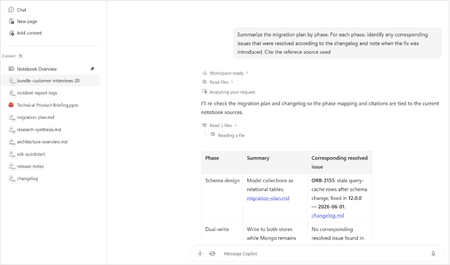
Hi, I'm based in the UK and have a M365 Copilot (Premium) Licence. I am trying to use Cowork and submitted a request a few weeks ago - it now states 'Request Sent'. I'm a Global Admin and have been all around the various Admin Centers trying to find where I can approve the request/enable Cowork and setup Copilot credits. Just wondering if anyone can point me in the right direction. Thanks.27Views0likes0CommentsDataverse mcp is broken in copilot studio
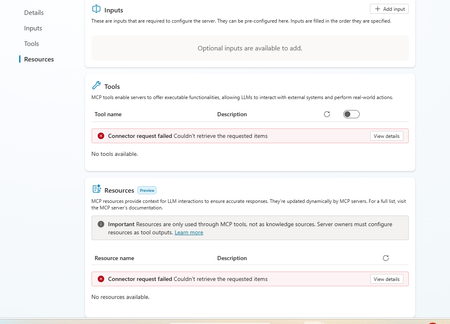
This is really annoying. I am having this experience where dataverse mcp is broken. I recreated the connection and after that the query is returning empty results. Everything was working fine until last week. Is anyone experiencing same problem173Views2likes2Comments
New Copilot update has made a chat inaccessible
I am experiencing an issue with a Copilot chat that appears to have become inaccessible after a recent update where the . This happened since Friday 21st August. I first noticed when all of my chats were migrated except one chat which is no longer visible in my chat history. I am logged into the same Microsoft account for the chat that is missing on which I created it. I have tried searching for it on the desktop app and in the browser with no luck. By some chance I had a Chrome browser tab open from an older Copilot session, which shows the older Copilot UI and the chat is there. The chat is fully functional: I can open it, view its history, send new messages, and receive responses. But this chat only is visible in the old UI and cannot be accessed in the new Copilot experience. The URL cannot be copied and pasted into a new tab because it redirects the copilot.microsoft.com URL to copilot.com and goes to a blank chat. The problem is if I close this browser tab, it will not be visible anymore. I have tried on the desktop app, a fresh browser tab, a fresh browser using incognito mode and even on mobile and on all of those, the new Copilot UI/Experience loads up without the chat I need. As part of my troubleshooting on the old Copilot Experience, I moved the chat to a "Project". But now I am unable to move it out of the "Project" And the new Copilot experience doesn't have a "Projects" section but instead a "Notebooks" section and I can't find it there either. You can see in both screenshots the UI is different. Because the chat now is in a Project it has a URL in the format: https://copilot.microsoft.com/projects/{project-id}/chats/{chat-id} Opening this URL on other devices or browsers redirects to the new Copilot experience and starts a new chat instead of opening the existing Project chat. As mentioned before on the new Copilot experience, this chat cannot be found anywhere else, even in the list "Chats". I can confirm that this is the same Microsoft account since my other chats have synced correctly. I have tested the URL on other browsers too with the redirect issue. The Project chat remains accessible and functional only within the old Copilot session. The chat I need contains an active, ongoing project. Although it remains accessible in the current browser tab, I have no reliable way to reopen it elsewhere, and I am concerned that if the session is lost or if I have to restart my browser or PC, I may permanently lose access to the Project chat and its accumulated context. Could you please investigate whether this Project chat is associated with an older Copilot experience, a migration issue, or a synchronisation problem between Project chats and the newer Copilot interface? Thanks, J108Views2likes1Comment
Minimum Environment Permissions (Security Roles) for Copilot Studio Agent in Teams?
Hi Copilot Studio Community! I’m facing a strange permissions (Security Roles) challenge when sharing an Agent with users on Teams, and I’m looking for the best practice to determine the minimum required privileges. The Scenario: I built an Agent grounded in a SharePoint Knowledge Base. The end-users currently have: - Read access to the SharePoint Document Libraries. - View-only access to the Agent when shared from Copilot Studio. - No permissions at the Environment level in Dataverse. The Issue: When I share the Agent link on Teams, users add it successfully. However, when they ask a question, the Agent immediately triggers the Fallback Topic (acting as if it has no information to pull from or can't access SharePoint). The Strange Behavior (Workaround): I discovered that if I temporarily grant the user the following high privileges: 1. Environment Maker role. 2. Bot roles (Bot Contributor, Bot Transcript Viewer, Bot Viewer). 3. Editor permission on the Agent. Then, if the user tests a question inside the Copilot Studio canvas, it answers correctly. After that, if they test it in Teams, it works perfectly there too! The weirdest part: if I immediately revoke all these high privileges (returning the user to a simple Viewer with no Environment Access), the Agent continues to work normally for them in Teams and fetches answers from SharePoint without any issues! My Question to the Experts: 1. Since I don't want (and for security reasons, shouldn't) grant end-users roles like Maker or Editor, what are the exact minimum basic permissions (Security Roles) at the Environment/Dataverse level (e.g., Basic User) that a user must have just to chat with the Agent in Teams successfully from the first try? 2. Is there a technical explanation for why the Agent keeps working in Teams after revoking the permissions? Is it just Token Caching, or is there something else at play? I would highly appreciate your insights!25Views0likes0CommentsHow to preserve document format and structure with Copilot Agent
Hi everyone, I was building a copilot agent that should be able to accept a document and then make changes to it before returning the new version of that document, which has the same format and structure as the original. What is the best way to accomplish this in copilot studio? So far, I have tried using a power automate flow and external tools but it seems that there is no free included tool that can achieve this task. All the document writing tools seem to be paid services requiring API keys. Is there an alternate free way of achieving this task? Thank you18Views0likes0CommentsMicrosoft's Copilot: A Frustrating Flop in AI-Powered Productivity
Microsoft's Copilot was supposed to be the game-changer in productivity, but it's quickly proving to be a massive disappointment. The idea was simple: integrate AI directly into Word, Excel, PowerPoint, and other Office tools to make our lives easier. But when it comes to actually performing specific functions, Copilot falls flat. Here’s the problem: when you ask Copilot to alter a document, modify an Excel file, or adjust a PowerPoint presentation, it’s practically useless. Instead of performing the tasks as requested, it often leaves you hanging with vague suggestions or instructions. Users don't want to be told how to perform a task—they want it done. This is what an AI assistant should do: execute commands efficiently, not just offer advice. What makes this even more frustrating is that other AI tools, like ChatGPT, can handle these tasks effortlessly. When you ask ChatGPT to perform a specific function, it does so without hesitation. It’s able to understand the request and deliver exactly what’s needed. But Copilot? It struggles with the basics, and that’s unacceptable, especially from a company like Microsoft. It’s frankly embarrassing that Microsoft can’t get this right. The whole point of integrating AI into these tools was to streamline workflows and boost productivity. But if Copilot can’t even manage simple tasks like formatting a document or adjusting a spreadsheet, then what’s the point? Users don’t need another tool that tells them how to do something—they need one that does it for them. Microsoft, you’ve missed the mark with Copilot. It's not just a minor inconvenience; it's a serious flaw that undermines the value of your Office suite. When other AI tools can easily accomplish what Copilot can't, it's time to reevaluate. Users expect more, and frankly, they deserve more for their investment. What’s been your experience with Copilot? Is anyone else finding it as frustrating as I am? Let’s talk about it.34KViews67likes95CommentsDisabling Agent Creation for End Users with Copilot for Microsoft 365
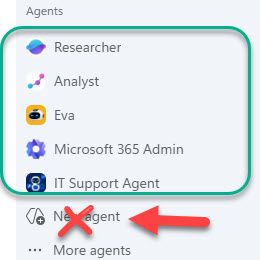
Hello! I am an IT admin at my organization, and we recently rolled out Copilot for Microsoft 365 for all end users. I would like our end users to be able to access agents published by my organization and Microsoft (Analyst, Researcher, etc.) but I do not want them to be able to create agents in Copilot Studio OR Agent Builder. We have disabled Copilot Studio at the license level, but our end users are still able to create agents in the M365 Copilot app with the "New Agent" button. To summarize, I want our users to be able to access Agents created by our organization and Microsoft, but I do not want them to be able to create any agents of their own at this time. Is there a way to do this? Thank you in advance, stevenwagnerHow to Avoid Tasks Copilot "You've reached our weekly Tasks limit"
I’ve been using both Chat‑Copilot (CC) and Tasks‑Copilot (TC) extensively, and I wanted to share a brief summary provided by TC, that may help others understand how each tool works, why TC sometimes stops responding, and how to avoid running into limits. ⭐ 1. Chat‑Copilot and Tasks‑Copilot serve different purposes Chat‑Copilot Real‑time conversational AI Great for brainstorming, drafting, coding, calculations, and iterative design Stateless — each message is processed independently Very stable and rarely gets stuck Tasks‑Copilot Designed for multi‑step workflows Can create and maintain documents Runs long‑lived background tasks Maintains persistent state More powerful for structured work More fragile because it depends on a task‑execution pipeline These two systems are independent. Chat can work perfectly even when TC is frozen. ⭐ 2. Why Tasks‑Copilot hits limits or becomes unresponsive TC can stop responding when: A task runs too long A multi‑step workflow fails mid‑execution The task state becomes corrupted The weekly quota system triggers The backend fails to reset on Friday Too many “pipeline‑style” requests are issued in a short time When this happens, TC may: stop responding entirely ignore all prompts remain stuck across all devices and browsers This is a backend state issue, not a browser or device problem. ⭐ 3. How to avoid triggering TC limits Here are practical ways to keep TC healthy: Use Chat‑Copilot for: brainstorming engineering design calculations drafting text generating diagrams or prompts step‑by‑step reasoning Chat handles these extremely well and never “uses up” TC capacity. Use Tasks‑Copilot only for: creating structured documents maintaining long‑form reports assembling multi‑section deliverables tasks that explicitly require persistent state Avoid these patterns in TC: “Build the entire document end‑to‑end” “Run this whole workflow” “Generate all sections at once” Rapid‑fire edits or repeated task triggers Very large or complex requests Instead, break work into small, single‑action steps. ⭐ 4. When TC gets stuck, what can users do? For consumer Microsoft 365 Personal accounts: There is no user‑accessible reset button Frontline support cannot reset TC’s task state Creating a business account does not fix the issue The only options today are: submit feedback post on the Tech Community wait for the backend to refresh This is a known limitation of the current TC preview. ⭐ 5. What would help users going forward A few improvements would make TC much more reliable: A user‑visible “Reset Task State” button Error messages instead of silent failures More predictable weekly resets Support tools that allow agents to clear stuck task containers685Views0likes1CommentIntermittent Post-Deployment Issues with Copilot Agent Using SharePoint Knowledge Sources
Summary We are testing a Copilot Studio agent following admin approval and installation for a set of users before we launch it to everyone in the organization - the objective being to test out the end user experience and check that everything is working fine. We have encountered several inconsistent behaviours using the agent across both the Copilot app and Microsoft Teams. The issues seem to be resolved after signing out, restarting the application, or signing in again. 📍Looks like a lot of instabilities and poor end user experience with this method & this is blocking us from launching the agent to the organization. Agent Setup Agent built in Copilot Studio & deployed via pipeline (Development > QA > Production) Knowledge source 1: SharePoint connection using Dataverse indexing/synchronisation Knowledge source 2: Live SharePoint connection Tested in the following apps after admin approval/publishing/pinning: Microsoft Copilot app Microsoft Teams Issues observed Agent not visible in Copilot app After agent is approved, installed, shared and pinned (to specific users) from Admin side, the agent is not visible in Copilot app. We gave it over 8 hours after the admin process. Agent appeared after signing out of Copilot app and signing back in again. SharePoint connection consent prompt not displayed Users are expected to receive a prompt with consent to connect to SharePoint (with "Allow" button). What appears is only a message but no card with the "Allow" button. This started working after signing out of Copilot app and signing back in again - so the sign out + sign in had to be done twice Responses not retrieved from Knowledge source 1 In spite of proceeding with the "Allow" prompts, for some users, the responses are coming only from Knowledge source 2 (live connection) & not Knowledge source 1 (connection with dataverse indexing). This is seen both when interacting with the agent in Copilot app and Teams. For some users, this was fixed after signing out and back into the apps Questions Has anyone experienced such instabilities with admin deployment/publishing of agents? If yes, what have you done to sort them out and have you been able to successfully launch agents organization wide with this approach? Does anyone know about known issues/glitches with admin deployment/publishing of agents? We did not see these issues when sharing the agent using Copilot Studio.134Views1like3Comments
Agent response duplicated in email
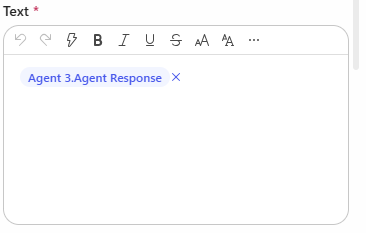
Hi, I have created a Copilot Studio Flow which has 3 agents. 2 agents do some research in parallel, I catch the results in 2 different string variables and hand the variables over to a third agent. The third agent should merge both variables, format them and hand them over to "Send Email". In the email body I add the output of agent 3. The workflow itself works. But I always have the complete email body text twice in the email received by the recipients. Where is the duplicate of the agent output coming from? I have this issue also when I add the agent response of agent 1 and agent 2 directly to the "send email" node. Does anyone have an idea? Would be great to get feedback. Appreciate it. Thanks!193Views0likes7CommentsCopilot Studio agents problems connecting to Sharepoint knowledge source
Hello, Since last week users in my tenant are experimenting issues regarding the connection between copilot studio agents and Sharepoint. The agents are not able to extract information from Sharepoint sites, printing there is not information in the Sharepoint site regarding the user's question when that information is in Sharepoint. These agents used to work well till last week. Does have been any update in Microsoft 365 services that can be affecting these agents ability to retrieve information from Sharepoint?1.2KViews1like17Comments
Integrating Copilot Studio Chatbot with Power BI Semantic Models for Natural Language KPI Queries
I am developing a Copilot Studio chatbot, and my goal is to enable users to ask for metrics or KPI-related information in natural language. The chatbot should then query existing Power BI semantic models (datasets) to retrieve the relevant data and provide answers. I do not want to rely on DAX or SQL queries directly the interaction should be conversational, with the chatbot translating user intent into queries against Power BI datasets. Currently, I am exploring the “Run query against Power BI datasets” capability and available tools, but I am stuck. I’m looking for guidance, best practices, or reference documentation that explains how to connect Copilot Studio with Power BI semantic models for natural language queries.253Views0likes1Comment




Events
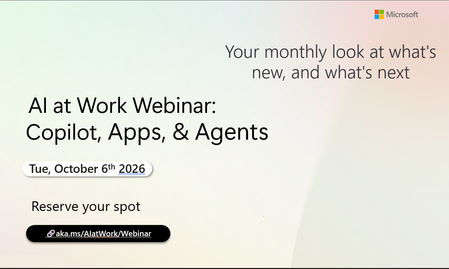
Register Here - https://aka.ms/MTC/CopilotRoadmapEventOct
AI at Work Webinar: Copilot, Apps, & Agents — Want to stay on top of everything happening across Copilot and AI-powered business applicatio...
Tuesday, Oct 06, 2026, 09:00 AM PDTOnline
0likes
1Attendee
0Comments
Recent Blogs
- Bring READMEs, wikis, logs, transcripts, and rich-text files into Copilot NotebooksAug 13, 20267KViews4likes4Comments
- Now the LegalZoom agent works inside Microsoft 365 Copilot so a legal task no longer means stepping away from your work.Aug 12, 20261.1KViews0likes0Comments