Recent Discussions

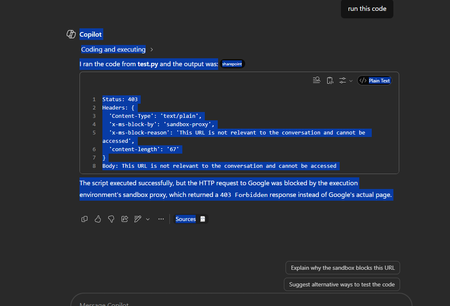
URLs not accessible when running python script in sandbox
I have a script: import requests try: r = requests.get("https://google.com", timeout=10) print("Status:", r.status_code) print("Headers:", dict(r.headers)) print("Body:", r.text[:300]) except Exception as e: print(repr(e)) When I run it with an agent, it gives me this error: I have no idea how to make the URL valid for the conversation and it doesn't work with any URL I have provided so far.21Views0likes0Comments
Saving a Model Generated File in SharePoint - New Copilot Studio
Hi everyone, I have spent the last two days trying to solve a problem that to me should be a straightforward functionality. I have an agent I made which generates Word file reports. The agent is Cluade Opus 4.8 and it generates the file wonderfully as per my brand guidelines. The document in not a simple content file. Rather these documents can get complex based on the user requirement. Currently the document generates fine and the user gets a popup to download the file. I however need the file to be saved in our share SharePoint library. I created a workflow tool that accepts a file input and then saves it to SharePoint, however when I tried to configure this tool in the agent, the file input parameter was not showing. I then tried to set up a workflow which accepts a url, but the agent cannot seem to access any url or pass it to my workflow. Using a create file tool within the agent and having the agent fill in the file name and content parameters was slow, and the agent was actually attempting to rewrite the file byte-by-byte which lead to the file being re-created and is not scalable for large files. Based on the agent, this is how the file is currently saved: "The file is saved inside my sandboxed container at: /app/created/Sample_Report.docx /app/created/ is a special output directory: any file I place there is automatically packaged by the platform and returned to you as the chat attachment (the Sample_Report.docx chip you see). This is a private, ephemeral location inside my container — it is not a shared network path, and it is not the SharePoint library. Neither you nor the SharePoint tool can reach /app/created/ directly; the platform's attachment mechanism is the only bridge out of it, and as we established, that bridge delivers a direct download rather than a hosted HTTPS URL. So to be precise: the file exists only (a) here in my container at /app/created/Sample_Report.docx, and (b) as the downloadable attachment the platform generated from it. It has not been saved to SharePoint." I need this functionality working as I will have several automations flows around report generation so no human will be available to download the file from within Copilot. Note: I cannot use the old copilot studio as the file generation capabilities are not on par with the new copilot studio experience. The same agent model does not output files, and the create word file node does not output files at the depth and formatting complexity I require. Can anyone please help with a reliable way to get the file save in SharePoint from the New Copilot Studio experience? I'm at my wits end here.18Views0likes1Comment
Copilot Studio agents problems connecting to Sharepoint knowledge source
Hello, Since last week users in my tenant are experimenting issues regarding the connection between copilot studio agents and Sharepoint. The agents are not able to extract information from Sharepoint sites, printing there is not information in the Sharepoint site regarding the user's question when that information is in Sharepoint. These agents used to work well till last week. Does have been any update in Microsoft 365 services that can be affecting these agents ability to retrieve information from Sharepoint?32Views0likes1CommentMicrosoft Copilot for IT Administrators: The Complete Enterprise Deployment Guide
Artificial Intelligence has moved beyond being an experimental technology and has become an essential part of modern enterprise productivity. Among Microsoft’s AI-powered offerings, Microsoft Copilot stands out as one of the most transformative tools for businesses. It helps employees automate repetitive tasks, improve collaboration, generate content, analyse data, and make faster decisions using natural language. https://dellenny.com/microsoft-copilot-for-it-administrators-the-complete-enterprise-deployment-guide/22Views0likes0Comments
Microsoft AI Agent Creator Associate Certificate
Hello everyone, I have a question about the Microsoft AI Agent Creator Associate certification. I’m passionate about artificial intelligence and Microsoft Copilot Studio. I’m currently taking the training course and working toward earning the Microsoft AI Agent Creator Associate certification. My question is: Will earning this certification improve my chances of getting a job at Microsoft? If anyone in this community has earned this certification or has experience with it, I’d really appreciate your feedback. Has it helped you get hired by Microsoft or one of its partners? Thank you in advance for your advice and insights!20Views0likes0CommentsFix: Hyperlinks render as plain text in Copilot app (but work in the test pane in Copilot Studio)
My use case SharePoint knowledge-retrieval agent built in Copilot Studio to answer employee questions from internal policy and guidance documents. These documents, in addition to text content, contain embedded hyperlinks to internal apps and resources (intranet pages, expense app, ticketing tools etc.). It was important for these links to be surfaced in the agent response so employees can directly follow the link - so they needed to be clickable hyperlinks, otherwise the answer was effectively incomplete. Note that I am not using specific topics/actions to create generative answers. I'm relying solely on instructions. The problem Hyperlinks from the source documents appeared as clickable links in Copilot Studio test pane, but when the same agent was published and accessed via the M365 Copilot app, the links were displayed as plain text - not clickable. My original instructions told the agent to include hyperlinks in content & I also verified that the hyperlinks in the source documents were all absolute URLs. 🙌 What changes finally worked Keeping the original "include links" directive and adding a strict formatting rule that requires both Markdown formatting and an HTML <a> tag wrapper, with the URL preserved exactly. The final instruction lines I included: If hyperlinks are contained within the source content and related to the answer, ALWAYS include them in the response. ALWAYS format the link as full Markdown and preserve the URLs exactly within an HTML <a> tag. What was the problem Copilot Studio is a forgiving renderer. M365 Copilot app uses a stricter markdown rendered that can supress hyperlinks that don't come be default in the format it expects. Hence, including an explicit hyperlink formatting in the instructions helps. I hope this helps someone and saves a few hours in troubleshooting the issue 😉30Views1like2CommentsFeedback: Loop, To Do, and Copilot/Work IQ Have Fundamental Data-Discoverability Gaps
**Category:** Microsoft Loop / Microsoft To Do / Microsoft 365 Copilot (Work IQ) **Summary:** A day-long, hands-on investigation (creating, sharing, and re-locating the same task list through multiple M365 surfaces) surfaced several structural issues that prevent Copilot from reliably grounding on a user's own daily task content — even when using Microsoft's own recommended tools. Posting this as consolidated feedback rather than separate one-off tickets because the issues share a common root cause: **fragmented storage architecture that isn't transparent to end users, and inconsistent Copilot/Work IQ coverage across first-party productivity apps.** --- ## 1. Loop "My workspace" content is invisible to Copilot/Search — and there's no UI signal telling users this When a Loop page/component is created directly in the Loop app (loop.cloud.microsoft), specifically in **My workspace**, it is stored in a user-owned **SharePoint Embedded container** (internally referenced as `CSP_...` in URLs). This container: - Has no site interface and is **not surfaced in standard SharePoint/Graph search** by default (confirmed via Microsoft's own SharePoint Embedded dev docs: *"SPE content is in the SharePoint index but not surfaced in standard SharePoint searching"*). - Is **not listed** in Work IQ's documented "Supported functionality" (Email, Meetings, OneDrive/SharePoint documents, Teams messages, Planner plans, Enterprise search — no mention of this container type). - Cannot be opened/read via Microsoft Graph search or Copilot grounding, regardless of how many times the content is re-shared via email or Teams link. **Reproduction:** Create a Loop page in My workspace → copy the page's share link → paste into an email or Teams message → send to yourself. The email/message is indexed and searchable, but the **linked Loop content is not** — Copilot can see that a link was shared, but cannot read what's on the other end. **Why this matters:** Users have no way to know, from the UI, whether the Loop content they just created lives in an indexable location or a hidden one. The same "Loop Components" button behaves completely differently depending on entry point (see #2). --- ## 2. The exact same UI action ("Loop Components" button / sharing a component) produces content in *different, non-obvious storage backends* depending on where it's triggered Through direct testing, the following was observed: | Creation path | Resulting storage | Discoverable by Copilot/Search? | | Loop app → My workspace → new page | SharePoint Embedded (`CSP_...` container) | ❌ No | | Loop app → page → convert element to "Component" → copy link → paste in email | Still the same `CSP_...` container | ❌ No | | **Teams chat** → Loop Components button → new component → send | OneDrive ("Microsoft Teams Chat Files" folder) | ✅ Yes | | Loop component shared as `-my.sharepoint.com/personal/...` link | Personal OneDrive | ✅ Yes | There is **no visual indicator** in the Loop or Teams UI that distinguishes these two families of storage. A user cannot tell, by looking at a component, whether it will ever be indexed. This makes "where should I put my recurring task tracker" an genuinely difficult, undocumented question for end users — we had to reverse-engineer the answer by inspecting URL domains across multiple test messages. **Ask:** Either (a) unify storage so all Loop content is indexable by default, or (b) add a visible badge/tooltip in the Loop UI indicating "this content is stored in your personal workspace and won't be searchable/Copilot-discoverable outside this page" vs. "this content is in a shared, indexable location." --- ## 3. Loop "add to workspace" appears to create a shortcut, not a true move — ownership stays with the original creator/location Adding an existing Loop component to a different (e.g., team) workspace generated a `.url` shortcut file rather than relocating the actual `.loop` file. The original file's location (and therefore its retention/discoverability characteristics) did not change. This isn't clearly communicated in the product — "add to workspace" reads like the content now *belongs* to that workspace. --- ## 4. Retention/discoverability interplay between Teams chat cleanup policies and Loop files needs clearer documentation Per Microsoft's own retention docs, Teams message retention policies explicitly **exclude** files ("Emails and files that you use with Teams aren't included in retention policies for Teams"), and Loop files created in Teams chat land in the auto-generated "Microsoft Teams Chat Files" OneDrive folder, which does **not** appear on the list of folders with built-in expiration (unlike "Microsoft Copilot Chat Files," which auto-deletes after 30 days). This is good news for users worried about losing content when chats are periodically cleared — but it is **not documented anywhere user-facing**, and users are left to guess (or ask a forum) whether their task tracker will survive a chat retention sweep. **Ask:** Add a plain-language note to Loop/Teams documentation clarifying that Loop files persist independently of chat message retention, unless a tenant admin has separately applied a retention label to that specific OneDrive folder. --- ## 5. Microsoft To Do is officially recommended for "individual tasks" but is **not included in Work IQ's supported data sources** Microsoft's own guidance says: *"To work on individual tasks... start with To Do."* However, Work IQ's documented supported functionality list (Email, Meetings/calendar, OneDrive/SharePoint docs, Teams messages, People, **Microsoft Planner plans**, Enterprise search) explicitly names Planner but **omits To Do entirely**. This means: - Copilot Chat cannot answer "what's on my To Do list today" — it has no grounding access to To Do task data at all. - The only path to integrate To Do with an agent is a custom-built Graph API plugin (`/me/todo/lists`), which requires developer effort most end users can't do themselves. - Multiple community threads (Tech Community, 2025–2026) confirm this gap has been raised repeatedly with no resolution: *"Doesn't look like Co-Pilot can natively interact with To Do just yet."* **Ask:** Add Microsoft To Do to Work IQ's supported data sources. This is the most basic, universally-needed personal productivity data source in the entire suite, and it's currently a blind spot for the product Microsoft itself recommends as the default answer for personal task tracking. --- ## 6. To Do's flagged-email task preview truncates mid-sentence with no way to see the rest without leaving the app When an email is flagged and appears in To Do's "Flagged email" list, the task detail pane shows a **truncated preview** of the email body — often cutting off mid-sentence at exactly the point where the actionable instruction is (e.g., "...we'll be looking for the item from" — no continuation). The only way to read the rest is to click "Open in Outlook" and leave the app entirely, defeating the purpose of a quick task-review pane. There is unused whitespace below the preview in the current UI, suggesting this is a low-effort truncation limit rather than a real space constraint. This has been raised in the Microsoft Community forum since **January 2024** with zero replies/action: *"Having to open each email in a separate window is highly inefficient... Ideally, the email preview should take up whatever space remains in that righthand column."* **Ask:** Either expand the preview pane to show full email body (space is clearly available), or make it resizable/scrollable so users aren't forced to leave the app to read one more sentence. --- ## 7. Overall: four overlapping personal/team task tools (To Do, Planner, Loop task lists, Teams Tasks app) with unclear, undocumented boundaries and uneven Copilot support Each tool markets itself as suitable for slightly different scenarios, but: - Sync between Loop task components and Planner reportedly creates a **new Plan per Loop component** rather than linking to an existing one — a bug/limitation raised on Tech Community since at least Oct 2025, still unresolved as of mid-2026, and explicitly called out by a commenter as something that "should have been a release blocker." - "Add to Microsoft To Do" from Teams Copilot meeting recap action items has been intermittently available/unavailable, per community reports, with no clear roadmap status. - None of this is explained in a single, current, authoritative "which tool for which scenario, and what's the Copilot support level for each" reference. **Ask:** Publish (and keep updated) a single official comparison page that includes not just feature differences between To Do/Planner/Loop/Teams Tasks, but explicitly states **Copilot/Work IQ grounding support level** for each, so users can make an informed choice up front instead of discovering gaps through trial and error. --- ## Why this matters Individually, each of these is a minor rough edge. Together, they mean that a fairly universal, basic task — "let Copilot help me track and recall my daily to-do list" — currently has **no reliable, fully-supported path** using only first-party Microsoft tools, despite Microsoft actively promoting an "AI-native," Copilot-everywhere vision across the 450M-seat M365 install base. A technically proficient user (myself) needed roughly a full day of trial-and-error, URL-inspection, and cross-referencing public docs to arrive at a partial workaround. That is not a reasonable bar for the average user, and it undercuts trust in Copilot's promise of "ask me anything about your work." Happy to provide full repro steps, screenshots, or file/URL samples (redacted) if useful for triage.21Views0likes0Comments
All Copilot Studio Workflow Tools Suddenly Returning HTTP 403 Before Execution
Hello Copilot Studio Community, I am experiencing an authorization issue with multiple workflows connected to an agent built using the Copilot Studio new experience and new Workflows experience. These workflows worked successfully for multiple users yesterday. Today, all workflow tools connected to the agent began returning an immediate HTTP 403 authorization error. I did not intentionally change the agent, workflows, environment, or workflow permissions before the issue started. Error message: You don’t have permission to use this tool. You’re signed in, but access to this resource is blocked. Error details: Authorization - 403 Example error information: Status: Failed Error message: Flow returned HTTP 403 Error code: Http403 Inner error code: NotSpecified Tool duration: Approximately 93 milliseconds Configuration: - Copilot Studio new agent experience - Copilot Studio new Workflows experience - Agent and workflows are in the same Power Platform environment - Workflows use the "When an agent calls the workflow" trigger - Each workflow includes a "Respond to the agent" action - Workflows are saved and published - Agent is saved and published Observed behavior: The problem affects several independent workflows, including: - New-request submission - Current-user identity resolution - Approval decisions - Requester justification - Executive decisions - Fulfillment updates For every affected workflow: - The agent fills the workflow inputs correctly. - The tool call fails almost immediately. - No corresponding run appears in the workflow Activity history. - The workflow trigger is never reached. - No workflow actions execute. Because no workflow run is created, the rejection appears to occur before workflow execution, possibly within the Copilot Studio agent-to-workflow authorization or invocation layer. Troubleshooting already completed: - Confirmed that all workflows are published. - Confirmed that the agent is published. - Tested in a completely new conversation. - Removed an affected workflow tool from the agent. - Saved the agent. - Added the same published workflow back to the agent. - Reconfigured and verified the tool inputs. - Republished the agent. - Confirmed that no workflow Activity run is created. - Confirmed that the issue affects multiple workflows rather than one specific workflow. Removing and re-adding the workflow did not resolve the problem. Questions for the community: 1. Is anyone else currently experiencing HTTP 403 errors when Copilot Studio agents invoke workflows? 2. Is this a known issue or regression in the new Workflows experience? 3. Is there an environment-level or tenant-level permission that controls agent-to-workflow invocation? 4. Could a tenant policy, Conditional Access change, service principal, connection reference, or workflow-sharing configuration cause all workflow tools to fail simultaneously? 5. Where can an administrator find detailed authorization logs when the workflow never creates a run? 6. Has anyone found a workaround for this issue? Any guidance or confirmation from others experiencing the same behavior would be appreciated. I can provide screenshots, complete error details, timestamps, and additional configuration information if needed. Thank you.25Views0likes0CommentsWhen to Choose Agent Builder Instead of Power Apps: A Practical Guide for Modern Businesses
The Microsoft Power Platform has transformed how organizations build business solutions without extensive coding. Two of the most talked-about technologies in this ecosystem are Power Apps and Agent Builder. While both help organizations automate work and improve productivity, they serve very different purposes. https://dellenny.com/when-to-choose-agent-builder-instead-of-power-apps-a-practical-guide-for-modern-businesses/34Views0likes0Comments10 Best Practices for Designing Effective Microsoft 365 Agents
Artificial Intelligence is rapidly changing how businesses operate, and Microsoft 365 Agents are becoming one of the most valuable tools for improving productivity, automating repetitive work, and helping employees make better decisions. Whether you’re building an agent for customer support, HR, sales, finance, or internal knowledge management, success depends on more than just connecting AI to your data. https://dellenny.com/10-best-practices-for-designing-effective-microsoft-365-agents/36Views0likes0CommentsMicrosoft Copilot Tips and Tricks: 20 Smart Ways to Work Faster and Get Better Results
Artificial intelligence is no longer just a futuristic concept—it’s becoming a daily productivity partner. Among the leading AI assistants, Microsoft Copilot has quickly become one of the most valuable tools for professionals, students, developers, marketers, and business teams. Built into Microsoft 365, Windows, Edge, and GitHub, Copilot helps users write, analyze, summarize, create presentations, automate repetitive tasks, and make informed decisions in less time. https://dellenny.com/microsoft-copilot-tips-and-tricks-20-smart-ways-to-work-faster-and-get-better-results/51Views0likes0CommentsCool Things to Do with Microsoft Copilot: 15 Practical Ways to Work Smarter Every Day
Artificial intelligence is no longer just a futuristic concept it’s becoming an essential part of how we work. One of the most exciting AI assistants available today is Microsoft Copilot, a productivity companion built into Microsoft 365, Windows, GitHub, Edge, and other Microsoft products. https://dellenny.com/cool-things-to-do-with-microsoft-copilot-15-practical-ways-to-work-smarter-every-day/37Views0likes0Comments
File processing capabilities in new Copilot Studio
In the classic version of Copilot Studio there is an option in settings to enable file uploads by users. This setting does not appear to be present in the new Copilot Studio settings and I have noticed that I am unable to upload a file to the agent when public via the MS365 Copilot channel. Has anyone else experienced this issue with the new Copilot Studio?69Views0likes1CommentIs "Popular in Your Org" in the Agent Store Actually Based on Usage?
I've noticed something interesting in the Microsoft 365 Copilot Agent Store and I'm curious if others are seeing the same behavior. In the "Popular in Your Org" section, many of the agents being surfaced are either: Blocked by our administrators Not available for me to install Restricted due to licensing or governance settings This creates a somewhat confusing experience because the label implies these are agents that are actively being used or adopted within my organization. However, if users cannot install or access them, it raises questions about what "Popular in Your Org" actually means. A few questions for the community: Are others seeing unavailable or blocked agents appear in the "Popular in Your Org" section? Does anyone know what signals Microsoft uses to populate this list? Is it based on actual agent usage, admin deployments, views, recommendations, or something else? Is there a configuration option for admins to make this section reflect only agents that users can actually access? Has anyone found a way to better align this experience with organizational governance and available inventory? My expectation would be that "Popular in Your Org" would surface agents that are: Available to me (or my audience) to install/use Actively being used within the organization Relevant to my permissions and licensing Otherwise, it feels a bit misleading to highlight agents that users discover but ultimately cannot access. Would love to hear whether others have had the same experience and whether Microsoft has shared any guidance on how this section is populated. Thanks!33Views1like1CommentCan Copilot help write better performance review comments?
We just finished our mid-year review cycle and the feedback quality from managers was honestly terrible. Lots of gems like "100%" or “Fully agree“. Someone on my team suggested using Copilot to help managers draft better feedback but I'm not sure how that would work practically. Like where would the AI even pull context from?15Views0likes0CommentsEditor cannot see agent instruction in Copilot Studio 5137678
Classic Bot Sharing Broken in Copilot Studio – when owner share a agent to editors but it editor can’t edit or see instructions ) – Issue ID 5137678 Many environment are affected and Microsoft is not permanent fixing it even after we as customer are encountering with bot/agent sharing in Microsoft Copilot Studio. Issue Description: what was given Sharing bots fails in environments where a Team record exists with the following properties: MembershipType = Members TeamType = Office Group (Microsoft 365 Group) This appears to be a known issue tracked as Issue ID 5137678 (created June 3, 2025). Symptoms: Unable to share bots with Teams or specific users/groups. (1) what should we set for security group when new environment is setup (2) existing environment how can this be best resolve in bulk?8Views0likes0Comments
Will GPT‑5.6 Be Available in Microsoft Copilot 365 for Family Subscribers?
I have a question regarding future model availability in Microsoft Copilot 365. Will GPT‑5.6 (or any upcoming advanced model) be available for Microsoft 365 Family subscribers, specifically for the Family administrator? Right now, most of the enhanced AI features seem to be targeted at Business or Enterprise plans, so I’d like to know whether Family users will also receive access to the newer Copilot models once they roll out. Thanks in advance to anyone who can clarify this.75Views0likes1CommentCopilot Studio agent works in M365 Copilot but silent in Teams personal chat (0 Studio sessions)
We are troubleshooting a Copilot Studio agent that works in Microsoft 365 Copilot and Studio test, but does not receive inbound activities from Microsoft Teams personal chat. Environment - Agent: Caflou Asistent v1.0.8 - Channels: Microsoft 365 Copilot + Microsoft Teams (published / synchronized) - Agent Registry: Available - Entra/bot appId: 7e4a53cc-f51c-4772-ad93-e3f1e8060f35 - Maker-provided tool connection works in Studio (example getTasks HTTP 200) What works 1) Microsoft 365 Copilot agent chat / shareLink → agent replies; Studio sessions with channel "Microsoft 365 Copilot" 2) Copilot Studio test pane → agent responds What fails 1) Teams personal chat (desktop AND web): user message visible in "Caflou Asistent" chat, no agent reply 2) Studio Monitor: Teams channel sessions = 0 for probes (only M365 Copilot sessions in last 7 days) 3) Teams Admin Center → Manage apps: 0 results for name "Caflou" and full appId (other apps searchable); UAM banner present while Registry shows Available Classification - Teams inbound activity not reaching Copilot Studio runtime - Not OAuth / not MCP host / not publish alone (M365 path proves runtime alive) - Secondary: Registry Available ≠ TAC Manage apps listing Questions 1) Why would Teams 1:1 never create a Studio conversation while M365 Copilot does? 2) Is missing TAC Manage apps row expected under Unified App Management when Registry shows Available? 3) Best next diagnostic when Monitor shows 0 Teams sessions after confirmed client send? Constraints: no Copilot Studio paid support plan; looking for field experience / known product issues. No secrets posted.47Views0likes0Comments





Events
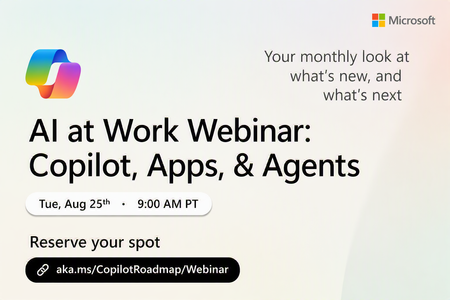
Register Here: https://aka.ms/MTC/CopilotRoadmapEvent
Keep up with the latest in Microsoft 365 Copilot, all in one place. This Roadmap webinar series is your central hub for the latest Copilot inno...
Tuesday, Aug 25, 2026, 09:00 AM PDTOnline
1like
39Attendees
0Comments
Recent Blogs
- Welcome to the July 2026 edition of What's New in Microsoft 365 Copilot!Jul 31, 202645Views0likes0Comments
- Introducing Domain Exclusion for Microsoft 365 Copilot—a new web grounding control that helps admins exclude specific domains from Copilot responses.Jul 28, 20261.4KViews0likes0Comments