Security and AI Essentials
Protect your organization with AI-powered, end-to-end security.
Defend Against Threats
Get ahead of threat actors with integrated solutions.
Secure All Your Clouds
Protection from code to runtime.
Secure All Access
Secure access for any identity, anywhere, to any resource.
Protect Your Data
Comprehensive data security across your entire estate.
Recent Blogs
How Microsoft Security is responsibly bringing agentic vulnerability discovery to customers with Defender class security, sovereignty, compliance, and operational governance.
Jul 30, 202642Views
0likes
0Comments
Why the platform around the model is the real enterprise differentiator
Enterprise AI has reached a turning point. Beyond answering questions, it can now reason over business context, retrieve know...
Jul 29, 2026242Views
0likes
0Comments
Beginning August 1, the final phase of Microsoft Defender Threat Intelligence (MDTI) convergence will be generally available in the Defender portal, giving customers real-time Microsoft threat intell...
Jul 29, 2026950Views
2likes
0Comments
3 MIN READ
Organizations are rapidly adopting AI agents to automate workflows, access enterprise data, invoke tools, and take actions on behalf of users. This autonomy creates a fundamentally new security chall...
Jul 27, 2026551Views
1like
0Comments
Recent Discussions
Purview SDK
I've been spending quite a bit of time working with Purview APIs, The APIs themselves are fine, but after a while I realized I was writing the same authentication, pagination and relationship handling code over and over again. So instead of construction the same code from project to project, I turned it into a python package, and now it's available on PyPI pip install purview-unified-sdk Right now, the SDK supports most of the common operations, such as creating, retrieving, updating and deleting business domains, data products, glossary terms, objectives, key results and etc., It also make it much easier to work with relationships, add group id as a owner, navigate resources and retrieve metadata across the unified catalog. https://niki9001.github.io/purview-unified-sdk/ https://github.com/purview-unified-sdk Feel free to fork the project, submit a pull request or open an issue if you have ideas or suggestionsUnified Catalog - Why I Think About Governance Domains Vertically and “Domains of Data” Horizontally
One of the more useful ways I have found to think about Microsoft Purview is to separate ownership from meaning. For me, that creates two different but connected structures: Vertical = Ownership Governance Domains tell us WHO owns and governs the data. They provide the organisational structure for accountability. A Governance Domain can contain: Data Products → Data Assets → Critical Data Elements → Columns and Attributes It also gives us the governance context around those objects: Ownership Stewardship Accountability Governance responsibilities Data quality Access Controls So when I look at a Governance Domain, I am really asking: Who is responsible for this data? That is the vertical view. Horizontal = Meaning Enterprise Glossary Terms give us a different perspective. Rather than focusing on who owns the data, they can represent what the data means across the organisation. This is what I think of as a “Domain of Data”. I use the phrase “Domain of Data” as a conceptual way of describing an enterprise business concept that can span multiple Governance Domains. Take Personally Identifiable Information (PII) as a simple example. PII is unlikely to fit neatly within a single Governance Domain. It may exist across: Customer information Complaints and incidents HR and work force data Case management Regulatory data Operational systems Contact information Financial and administrative processes Each Governance Domain may own and govern the PII within its own area. But the concept of PII itself spans all of them. That is where an Enterprise Glossary Term becomes particularly useful. It provides a common enterprise definition that cuts horizontally across multiple ownership boundaries. Why the two structures should not be the same It can be tempting to make the Enterprise Glossary hierarchy simply mirror the Governance Domain hierarchy. I think that misses an important opportunity. They answer different questions. Governance Domains WHO owns and governs the data? They represent: Ownership Accountability Organisational responsibility Enterprise Glossary Terms WHAT does the data represent? They represent: Business meaning Shared concepts Enterprise vocabulary The two structures should connect, but they should not simply duplicate each other. One Governance Domain can contain many Domains of Data A Governance Domain may contain many different business concepts. For example, one Governance Domain might contain: PII Customer Data Location Data Financial Data Operational Data The Governance Domain is therefore not necessarily a “type of data”. It is primarily an ownership and governance boundary. One Domain of Data can cross many Governance Domains The reverse is equally important. A single Domain of Data can exist across many Governance Domains. For example, PII might appear in: Governance Domain 01 – Customer and contact data Governance Domain 02 – Complaints and incident data Governance Domain 03 – Employee and work force data Governance Domain 04 – Regulatory and operational data This gives us a many-to-many relationship: One Governance Domain can contain many Domains of Data. One Domain of Data can exist across many Governance Domains. That is the part I think is especially powerful. Where the two structures intersect This is where the model becomes much more valuable. Think about it as: Governance Domain WHO owns it? Enterprise Glossary Term WHAT does it mean? Governed Business Context For example: HR Governance Domain PII Enterprise Glossary Term The result is: The HR-owned instance of an enterprise-wide PII concept. That intersection gives us both ownership and meaning. Why this matters for data consumers Most data consumers do not necessarily know: which Governance Domain owns the data; which platform contains it; which Data Product it belongs to; what the database table is called; or what the individual column names are. They may simply know the business question they are trying to answer. For example: Where do we hold PII? Which Data Products contain Customer information? Where is Location information used? Which Data Assets contain Financial information? This is where the Enterprise Glossary becomes much more than a list of definitions. It becomes a business discovery layer. From business concept to technical data If the relationships are created properly, a user can begin with a business concept and navigate towards the underlying data. For example: Enterprise Glossary Term → Data Products → Data Assets → Critical Data Elements → Columns and Attributes This creates a bridge between: Business meaning ↔ Technical implementation That is a much more useful experience than expecting users to understand the technical structure of the data estate before they can discover anything. Enterprise terms, local terms and CDEs There is also an important distinction between the different types of business metadata. Enterprise Glossary Terms These should represent concepts that have meaning across multiple Governance Domains. Examples might include: PII Customer Organisation Location Financial Information These provide the horizontal enterprise view. Local Glossary Terms These are better suited to terminology that is specific to: a Governance Domain; a business area; a Data Product; or a specialised process. They provide local business context without forcing every term into the enterprise vocabulary. Critical Data Elements CDEs are different again. A Domain of Data may represent a broad business concept such as PII, while CDEs represent individual important data elements such as: Email Address Date of Birth Customer Identifier Postcode That gives us another useful relationship: Enterprise Glossary Term: PII → Critical Data Element: Email Address → Physical Column: customer_email Now the business concept is connected directly to the technical implementation. The principle I keep coming back to The value is not in creating as many glossary terms as possible. It is in applying: The right term → at the right level → connected to the right data That means asking: Is this genuinely an enterprise-wide concept? Should this be local to one Governance Domain? Is this actually a Critical Data Element? What Data Products and Data Assets should it connect to? The quality of those relationships matters far more than the volume of metadata. The bigger picture This is ultimately why I think the horizontal and vertical model is useful. Vertical = Ownership Governance Domains tell us WHO owns and governs the data. Horizontal = Meaning Enterprise Glossary Terms tell us WHAT the data represents across the organisation. And where they intersect: Ownership + Meaning = Governed Business Context That is what allows Microsoft Purview to move beyond simply listing technical assets. Instead, it starts to create a connected view of: Ownership → Business Meaning → Discovery → Governance across the enterprise data estate. For me, that is where the real value of the catalogue starts to appear.29Views0likes0CommentsGraph API Endpoint for the Vulnerability Profile
I can use this endpoint to get threat reports via the graph api GET https://graph.microsoft.com/beta/security/threatIntelligence/article but threat Analytics reports that come in from defender that are category: vulnerability, aren't in there However they are written up in an article style. What endpoint do I need to hit to get these types of reports.Verifying domain name issue
We're trying to verify our custom domain in Entra ID, but it turns out the domain is already claimed on another tenant that we have no access to (unknown account, no admin credentials). Because of that, verification on our own tenant fails. Normally the fix for a claimed-domain conflict is to open a support request so Microsoft can help release it. The problem: doing that requires a support plan, and purchasing one doesn't work for us. "payment" always succeeds and we dont get an error, but we don't get charged and the account status doesn't change, we have nothing more to go on. So we're stuck in a loop: we need support to release the domain, but we can't buy the support plan needed to reach support. Has anyone dealt with a domain claimed on an inaccessible tenant? And is there another route to Microsoft support when the support plan purchase itself fails?47Views0likes1CommentMicrosoft Fabric metadata in Microsoft Purview
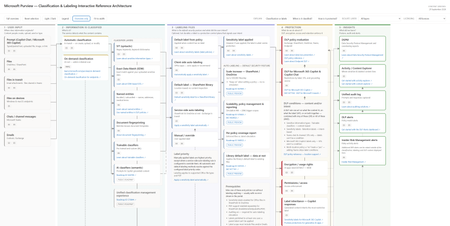
I’ve been mapping how Microsoft Fabric metadata is surfaced in Microsoft Purview through Data Map scanning, and I’ve created this visual to make the relationship easier to understand. The diagram separates: Documented mappings – such as Fabric items, Lakehouse tables, schema and item-level lineage. Metadata known to be scanned, but where the exact Purview UI location needs confirmation. ? Areas still needing validation – particularly Lakehouse table/column descriptions and tags. The principle I’m exploring is: Microsoft Fabric → Purview Data Map Scan → Purview Data Asset → Purview governance enrichment Importantly, a Fabric asset does not automatically become a Purview Data Product. It is first represented as a Data Asset, which can then be governed, enriched and associated with a Data Product. I’d really appreciate feedback from anyone working hands-on with Microsoft Fabric and Microsoft Purview: Does this mapping match what you are seeing in your environment? I’m particularly interested in confirming: Lakehouse table descriptions → Purview Asset Description? Lakehouse column descriptions → Purview Schema → Column Description? Lakehouse table/column tags → where exactly are these surfaced in Purview? Corrections, screenshots or practical experience would be very welcome.54Views1like3CommentsRescheduled Webinar: What's New in Azure Firewall
Hi everyone! The webinar "What's New in Azure Firewall" that was originally scheduled for August 6th, has been rescheduled to August 26th. You can find more details on our Community Home. We apologize for the inconvenience, and hope to see you there!15Views0likes0CommentsDoes this Unity Catalog → Purview guidance make sense?
I’ve been working through how Azure Databricks Unity Catalog metadata surfaces in Microsoft Purview after a scan, and I’ve created the attached visual to make the relationship easier to understand. The principle I’m trying to communicate is simple: Maintain Databricks-native technical metadata in Unity Catalog → scan supported metadata into Microsoft Purview → use Purview for the wider enterprise governance, discovery and business context. The short guidance accompanying the visual would be: In Azure Databricks: Navigate to Catalog Explorer → Catalogue → Schema → Table/View. From here, maintain metadata such as table comments, column comments and Unity Catalog tags. Some comments can also be AI-generated as a starting point and reviewed before saving. After the Microsoft Purview scan: Find the corresponding Data Asset in Purview and review the surfaced metadata: Table Comment → Data Asset → Description Column Comment → Data Asset → Schema → Column Description Table Tag → Data Asset → Properties → Tags Column Tag → Data Asset → Schema → Tags Column Name / Data Type → Data Asset → Schema Table/View and Column Lineage → Data Asset → Lineage, subject to the relevant prerequisites. The distinction I’m trying to reinforce is that this is not Purview vs Unity Catalog, and it is not about manually duplicating technical metadata. Unity Catalog remains the Databricks-native governance and technical metadata layer, while Purview can consume supported metadata through scanning and place it into the wider enterprise governance context. I’d be interested in feedback from people implementing Purview + Azure Databricks Unity Catalog: Does the visual and navigation guidance make the relationship clear? In particular, are the field mappings and terminology intuitive enough for Data Engineers, Data Stewards and Data Owners, or is there anything you would simplify, rename or clarify?13Views0likes0CommentsMicrosoft Purview, Databricks Unity Catalog and Medallion Architecture
Microsoft Purview, Databricks Unity Catalog and Medallion Architecture three different responsibilities, one governed data ecosystem. I created this visual because these concepts are often mixed together. 🔵 Microsoft Purview = Enterprise Data Governance & Discovery Purview provides the enterprise-wide governance layer across Databricks and other platforms — Governance Domains, Data Products, glossary, Critical Data Elements, ownership, stewardship, metadata, data quality and discovery. 🔴 Databricks Unity Catalog = Databricks Data & AI Governance + Access Control Unity Catalog is not simply an access-management tool. It governs Databricks data and AI assets, including catalogs, schemas, tables, permissions, technical metadata, lineage, auditing and discovery. 🥉🥈🥇 Medallion = Data Engineering Bronze → Silver → Gold describes how data is progressively refined. It is not a governance hierarchy. That distinction is important: Governance Domains answer: 👉 Who owns and governs the data? Bronze / Silver / Gold answer: 👉 What stage of engineering and refinement is the data in? And Gold does not automatically equal Data Product. My preferred enterprise model is therefore: Purview → Enterprise Governance & Discovery Unity Catalog → Databricks Governance & Access Medallion → Data Engineering & Refinement The goal isn't Purview vs Unity Catalog. It is clearly defining which platform is authoritative for which responsibility and connecting the metadata and lineage into a coherent governance model. The distinction between governance domains (who owns the data) and Medallion layers (what stage of refinement) is one that trips up many implementation teams. In practice, when Microsoft Fabric is the analytics platform, Purview becomes the authoritative governance layer across both Fabric OneLake and Databricks, with Unity Catalog handling Databricks-internal access. Connecting lineage metadata across both is what creates a truly coherent governance model.23Views0likes0CommentsWindows Forwarded Events connector with Windows Security Events NRT rules
Hello, We are testing Microsoft Sentinel using the official Windows Forwarded Events connector. Environment - Windows Server WEC - Windows Event Forwarding - Azure Arc - Azure Monitor Agent - Windows Forwarded Events connector Everything works correctly. Forwarded security events are successfully ingested into the WindowsEvent table. For example: - Event ID 1102 - Event ID 4732 However, the built-in Windows Security Events NRT Analytics Rules (Content Hub version 1.0.1) query only the SecurityEvent table. Example: NRT Security Event log cleared SecurityEvent | where EventID == 1102 As a result, forwarded events received through the Windows Forwarded Events connector never trigger these NRT rules. Question: Is this expected behavior? Should Windows Forwarded Events customers use a different set of analytics rules (ASIM or other templates), or should these built-in NRT rules also support WindowsEvent? Thank you.36Views0likes1CommentData Product Lineage not automatic
Hi all i am new in Purview and I am trying to create a lineage with a Report--> Dataset--> Tables in Data Products however after adding report only dataset is shown, how can I view all tables of this dataset. Only when I press open in fabric the Dataset the table list appears, how can I give permissions55Views0likes3CommentsRestrictedTrafficInstall.ps1 Fails on Windows 10 IoT Enterprise LTSC 2021 with SKU Detection Error
I am encountering an issue while deploying the Restricted Traffic Limited Functionality Baseline on a Windows 10 IoT Enterprise LTSC 2021 device and would like to confirm whether this OS edition is supported or if this is a known issue with the baseline script. Operating System: Windows 10 IoT Enterprise LTSC 2021 EditionID: IoTEnterpriseS DisplayVersion: 21H2 : ...\RestrictedTrafficInstall.ps1 : Could not get SKU of current running OS. CategoryInfo : NotSpecified: (:) [Write-Error], WriteErrorException FullyQualifiedErrorId : Microsoft.PowerShell.Commands.WriteErrorException,RestrictedTrafficInstall.ps1Best practices: Open OneDrive/SharePoint sharing but restrict Teams guest access by domain
Hi all, Since SharePoint Online and OneDrive moved fully to Microsoft Entra B2B for external sharing, we've run into a policy conflict and would like to hear how others are handling it. Our requirements Enable OneDrive and SharePoint file sharing with external users, regardless of their email domain. Restrict Microsoft Teams guest access to a predefined list of approved partner domains. Continue allowing Teams external access (federated chat and meetings) for all domains. The problem: Teams guests, SharePoint guests, and OneDrive guests are now governed by the same Microsoft Entra B2B invitation framework and the single Collaboration restrictions allow/deny list under: External Identities → External collaboration settings As a result, restricting guest invitations by domain also restricts OneDrive and SharePoint sharing for domains not on the allowlist. According to Microsoft's response in the following Q&A, this behavior is currently by design: https://learn.microsoft.com/en-us/answers/questions/5954975/onedrive-external-sharing-no-longer-working-with-a Questions to the community Has anyone implemented a solution where OneDrive/SharePoint sharing remains open to all domains while Teams guest access is restricted to approved domains only? Are there recommended approaches using Entitlement Management, Access Packages, Connected Organizations, or other Entra capabilities? Is there any roadmap item for workload-specific collaboration restrictions (e.g., separate policies for Teams guest invitations and SharePoint/OneDrive sharing)? Any real-world experience or best practices would be greatly appreciated. Thanks, BejhanWindows defender is having a lot of problems.
So I have a Microsoft 365 Family subscription, and Dark Web Monitoring shows 0 monitored items. SSN verification fails and advises you to contact support. I was also unable to delete the monitored information. I’m receive the error "Something went wrong, try again in a bit." The issue occurs in the Microsoft Defender app, web portal, and across devices. Is there anyway that I can get help with this?Best practices for maintaining emergency contact information
Hello everyone. Our organization is currently reviewing its emergency contact directory as part of our business continuity and operational processes. What best practices do you recommend for keeping emergency contact information updated and ensuring it remains available during incidents or emergencies? Thank you for your suggestions.New Blog | Microsoft Defender for Endpoint’s Safe Deployment Practices
By jweberMSFT For customers it is key to understand that software vendors use safe deployment practices that help them build resilient processes that maintain productivity. This blog addresses Microsoft Defender for Endpoint’s architectural design and its approach to delivering security updates, which is grounded in Safe Deployment Practices (SDP). Microsoft Defender for Endpoint helps protect organizations against sophisticated adversaries while optimizing for resiliency, performance, and compatibility, following best practices for managing security tools in Windows. Security tools running on Windows can balance security and reliability through careful product design, as described in this post by David Weston. Security vendors can use optimized sensors which operate within kernel mode for data collection and enforcement, limiting the risk of reliability issues. The remainder of the security solution, including managing updates, loading content, and user interaction, can occur isolated within user mode, where any reliability issues are less impactful. This architecture enables Defender for Endpoint to limit its reliance on kernel mode while protecting customers in real-time. Read the full post here: Microsoft Defender for Endpoint’s Safe Deployment PracticesHunting AI Agent Configuration Drift with Microsoft Sentinel
Four KQL patterns for detecting instruction changes, new MCP servers, ownership changes, and organization-wide sharing I recently authored and contributed four new Microsoft Sentinel hunting queries for detecting security-relevant configuration drift in AI agents. They have been reviewed, approved, and merged into Microsoft's public Azure-Sentinel repository. I built the queries around four changes that can materially affect an agent's behavior, access, or exposure: instructions being modified, MCP servers being connected, owners being added, and sharing being expanded to the entire organization. Each modification may be legitimate, but each deserves enough context for a security team to verify that it was expected and authorized. For a security operations team, the difficult question is often not what does this agent look like now? It is what changed since the last known state? Microsoft Sentinel's AgentsInfo table provides inventory-style snapshots of AI agents and their associated configuration. That makes it useful for more than posture reporting. By comparing a recent snapshot with an earlier baseline, we can hunt for configuration drift that deserves investigation. This post walks through four practical hunting scenarios: Instructions changed on a previously published agent A newly observed MCP server on an existing agent An owner added to an MCP-enabled agent Sharing expanded from a restricted scope to the entire organization The complete hunting queries are available in Microsoft's public https://github.com/Azure/Azure-Sentinel/tree/master/Hunting%20Queries/AI%20Agents. The focus here is the detection design behind them, the KQL patterns they share, and the investigation questions they help answer. What I contributed I wrote the four standalone hunting queries discussed in this article and submitted them to Azure/Azure-Sentinel in https://github.com/Azure/Azure-Sentinel/pull/14702: AI Agents - Instructions changed on previously published agent AI Agents - Newly observed MCP server on existing agent AI Agents - Owner added to MCP-enabled agent AI Agents - Sharing expanded to organization-wide The contribution went through several rounds of technical review. Across six commits, I aligned the queries with the unified AgentsInfo schema, added schema-tolerant IdentityInfo enrichment, improved entity mappings, bounded the identity lookback, expanded all owner values, and kept the ATT&CK mappings limited to scenarios where a precise technique could be defended. Repository collaborator v-atulyadav approved the final revision, and the four queries were merged into master on July 20, 2026. This article explains the detection logic and engineering decisions behind that contribution rather than simply reproducing the final YAML files. Why current-state queries are not enough A current-state query can answer questions such as: Which agents are published? Which agents have MCP servers configured? Which agents are shared with the organization? Who owns a particular agent? Those are important posture questions, but they do not tell us whether the state is new. An agent with an MCP server might have been reviewed and approved months ago. The same MCP server appearing for the first time today is a different security signal. Configuration-drift hunting adds the missing time dimension. Instead of treating a risky-looking property as an event, it compares two states of the same agent and reports only meaningful transitions. The common detection pattern I used the same basic time model across all four hunts: let lookback = 14d; let recent = 2d; The latest snapshot observed during the last two days becomes the current state. The latest snapshot from the preceding portion of the 14-day lookback becomes the baseline. Conceptually, the comparison looks like this: let CurrentState = AgentsInfo | where Timestamp > ago(recent) | summarize arg_max(Timestamp, *) by AgentId | where LifecycleStatus != "Deleted"; let BaselineState = AgentsInfo | where Timestamp between (ago(lookback) .. ago(recent)) | where LifecycleStatus != "Deleted" | summarize arg_max(Timestamp, *) by AgentId; CurrentState | join kind=inner BaselineState on AgentId Several details matter here: arg_max(Timestamp, *) by AgentId selects the latest available state for each agent in the relevant time range. The inner join restricts results to agents that exist in both periods. A newly created agent is therefore not automatically treated as configuration drift on an existing agent. Deleted lifecycle snapshots are excluded so that a deletion record does not become the effective baseline or current configuration. The two-day current window is operationally significant. To retain coverage, these hunts should run within two days of a change. The 14-day and two-day values are practical defaults, not universal constants. Environments with different ingestion cadence or retention requirements can adjust them, but the current and baseline windows must remain non-overlapping. Scenario 1: Instructions changed on a published agent An agent's instructions define its default behavior, persona, and operating boundaries. Changing them can be part of normal development, but it can also weaken restrictions, redirect the agent's behavior, or modify how it uses connected capabilities. The first hunt compares the current and previous instruction values only when the agent was published in both snapshots: CurrentState | join kind=inner BaselineState on AgentId | where CurrentInstructions != PreviousInstructions | extend PreviousInstructionsHash = hash_sha256(PreviousInstructions), CurrentInstructionsHash = hash_sha256(CurrentInstructions), InstructionsLengthDelta = strlen(CurrentInstructions) - strlen(PreviousInstructions) I deliberately chose to expose hashes and a length delta rather than returning both instruction bodies in plaintext. This confirms that a change occurred without unnecessarily spreading potentially sensitive prompts through query results, exports, or screenshots. Useful investigation questions include: Was the change associated with an approved development or release process? Did the agent remain published while the instructions changed? Were guardrails, declared tools, permissions, or sharing settings modified around the same time? Do audit records identify an expected actor and change path? The query maps well to an integrity-focused investigation. Its MITRE ATT&CK mapping is T1565.001 (Stored Data Manipulation), but the result is still a hunting lead rather than proof of malicious manipulation. https://github.com/Azure/Azure-Sentinel/blob/master/Hunting%20Queries/AI%20Agents/AgentsInfoInstructionsChangedOnPublishedAgent.yaml Scenario 2: A newly observed MCP server Model Context Protocol servers can extend an agent with external tools, data sources, or actions. From a defender's perspective, the important transition is not simply that an MCP server exists. It is that a server name appears in the current configuration but was absent from the baseline. The query expands the dynamic McpServers array and builds a set of server names for each agent: let CurrentMcp = CurrentRaw | mv-expand Mcp = McpServers | extend McpName = tostring(Mcp.name) | where isnotempty(McpName) | summarize CurrentMcpServers = make_set(McpName) by AgentI It performs the same normalization for the baseline, then calculates the difference: | extend AddedMcpServers = set_difference(CurrentMcpServers, BaselineMcpServers) | where array_length(AddedMcpServers) > 0 Using set_difference() avoids raising a result merely because the order of array elements changed. The hunt reports only MCP server names present in the current set and absent from the previous set. An analyst should validate more than the displayed name: Is the MCP integration part of the approved inventory? What endpoint, authentication method, and permissions are associated with it? Which tools or data can the server expose to the agent? Was the integration introduced through an expected deployment path? Did ownership, instructions, or sharing change in the same period? I did not assign an ATT&CK technique to this query. Adding an MCP server does not, by itself, prove command execution, persistence, or a specific attacker behavior. Avoiding an overly broad mapping keeps the signal honest. https://github.com/Azure/Azure-Sentinel/blob/master/Hunting%20Queries/AI%20Agents/AgentsInfoNewlyObservedMcpServer.yaml Scenario 3: An owner added to an MCP-enabled agent Ownership is a control-plane relationship. A newly added owner may be able to modify an agent's configuration, instructions, integrations, or publication state. The risk becomes more interesting when the agent already has MCP servers configured. The hunt first limits the current state to MCP-enabled agents: | where array_length(coalesce(McpServers, dynamic([]))) > 0 | project AgentId, Timestamp, Name, Platform, CreatedDateTime, CurrentOwners = coalesce(Owners, dynamic([])), McpServers It then compares the owner arrays as sets: | extend AddedOwners = set_difference(CurrentOwners, PreviousOwners) | where array_length(AddedOwners) > 0 | mv-expand AddedOwnerId = AddedOwners to typeof(string) Expanding AddedOwners produces one row per newly observed owner. This is more useful than returning one opaque dynamic array because every added identity can be enriched, mapped, and investigated independently. I kept the raw object identifier in the result even when identity enrichment fails: | extend AddedOwnerUpn = AccountUpn, UnresolvedAddedOwnerId = iff(isempty(AccountUpn), AddedOwnerId, "") That fallback matters. A missing UPN should not hide the underlying ownership change. Investigation should establish: Is the added owner an expected person, service identity, or administrative group? Does the identity's role and business function justify control of this agent? Was the owner added before other configuration changes? Does the identity appear in related sign-in, audit, or privileged-access activity? Should ownership be removed while the change is reviewed? This query maps to T1098 (Account Manipulation) under Persistence and Privilege Escalation. As with the instruction-change hunt, the mapping frames an investigation hypothesis; it does not label every ownership change as malicious. https://github.com/Azure/Azure-Sentinel/blob/master/Hunting%20Queries/AI%20Agents/AgentsInfoOwnerAddedToMcpAgent.yaml Scenario 4: Sharing expanded to the entire organization An agent can move from a limited audience to organization-wide availability without changing its underlying tools or instructions. That transition can materially increase exposure, especially when the agent has MCP integrations or declared tools. The hunt treats "*" in SharedWith as the organization-wide state. The current snapshot must contain it, while the baseline must not: // Current state | where set_has_element(coalesce(SharedWith, dynamic([])), "*") // Baseline state | where not(set_has_element(coalesce(SharedWith, dynamic([])), "*")) The result also counts MCP servers and declared tools: | extend McpServerCount = array_length(coalesce(McpServers, dynamic([]))), DeclaredToolCount = array_length(coalesce(DeclaredTools, dynamic([]))) | extend HasElevatedCapabilities = McpServerCount > 0 or DeclaredToolCount > 0 | sort by HasElevatedCapabilities desc, Timestamp desc I use HasElevatedCapabilities as a prioritization field, not a verdict. It brings agents with connected capabilities to the top of the result set so analysts can review the potentially larger blast radius first. Questions for triage include: Was organization-wide publication explicitly approved? Is the agent intended for every user, or was a group-based scope expected? What data sources, tools, and MCP servers can organization-wide users reach through it? Do the instructions contain assumptions that were safe only for a restricted audience? Were access reviews or user-acceptance tests completed before the expansion? No ATT&CK mapping is assigned because a broader sharing scope is a security-relevant exposure change, but not a sufficiently precise adversary technique on its own. https://github.com/Azure/Azure-Sentinel/blob/master/Hunting%20Queries/AI%20Agents/AgentsInfoSharingExpandedToOrgWide.yaml Resolving owners without making the hunt schema-fragile The Owners field contains identifiers. Human-readable identity context makes results easier to triage, and entity mappings make those identities more useful in Sentinel investigations. I built a small, materialized IdentityInfo lookup that is shared by the four hunts: let IdentityIdtoUPN = materialize( IdentityInfo | extend ResolvedAccountUpn = tostring( column_ifexists("AccountUpn", column_ifexists("AccountUPN", ""))), IdentityTimestamp = todatetime( column_ifexists("Timestamp", column_ifexists("TimeGenerated", datetime(null)))) | where IdentityTimestamp >= ago(lookback) | where isnotempty(AccountObjectId) and isnotempty(ResolvedAccountUpn) | summarize arg_max(IdentityTimestamp, ResolvedAccountUpn) by AccountObjectId | project AccountObjectId = tostring(AccountObjectId), AccountUpn = ResolvedAccountUpn); There are three design choices worth noting: column_ifexists() accommodates observed IdentityInfo naming variants without maintaining separate query versions. The lookup is bounded by the same lookback period instead of scanning unbounded identity history. arg_max() keeps the latest usable identity record for each object ID. After enrichment, the queries map the account using the UPN components and the Entra object ID: entityMappings: - entityType: Account fieldMappings: - identifier: Name columnName: OwnerAccountName - identifier: UPNSuffix columnName: OwnerAccountUPNSuffix - identifier: AadUserId columnName: OwnerId The strong AadUserId identifier remains valuable even when display information changes. Microsoft Sentinel can use mapped entities in bookmarks and investigation experiences, so mapping the changed owner is more than cosmetic enrichment. Turning a result into an investigation These queries intentionally stop at the configuration transition. AgentsInfo tells us that two snapshots differ; it does not necessarily tell us who performed the change, through which interface, or whether the action was authorized. A practical investigation workflow is: Confirm that the two snapshots represent the expected agent and time period. Review the exact changed property and the agent's current capabilities. Identify the owner or newly added owner through IdentityInfo and Entra ID context. Correlate the transition with the relevant audit source for actor attribution. Check for related changes to permissions, tools, data sources, publication state, and sharing. Validate the change against an approved request, release, or ownership process. Restrict, unpublish, or revert the agent if the exposure cannot be justified. Expected changes can still be useful findings. Repeated legitimate results may reveal that a deployment process lacks a stable change window, that ownership is managed through noisy automation, or that the hunt's timing needs to be aligned with release activity. Tuning the hunts for your environment Before operational use, consider the following adjustments: Run cadence: Execute within the two-day current window. A daily cadence provides overlap without blending current and baseline periods. Lookback: Increase the 14-day lookback only if snapshot history and query cost support it. A longer lookback does not compensate for missing the current window. Known change windows: Add watchlists or environment-specific suppression logic for well-controlled automated deployments, while retaining enough context to audit the change. Agent scope: Filter by platform, business unit, agent naming convention, or owner if different teams require separate triage queues. Risk prioritization: Raise agents with sensitive declared data sources, powerful tools, privileged owners, or broad availability to the top of the result set. Audit correlation: Keep attribution logic separate unless the audit source and join keys are stable in your environment. This makes the configuration-drift hunt reusable while allowing each organization to attach its own control-plane evidence. Test with representative snapshots before treating any hunt as an operational control. In particular, validate array shapes for Owners, McpServers, and SharedWith, confirm the identity fields present in your workspace, and exercise both changed and unchanged states. Using the queries The four YAML definitions have been merged into the Hunting Queries/AI Agents folder of Microsoft's Azure-Sentinel repository. Each file contains the complete KQL, description, entity mappings, and ATT&CK mappings where a precise technique applies. https://github.com/Azure/Azure-Sentinel/blob/master/Hunting%20Queries/AI%20Agents/AgentsInfoInstructionsChangedOnPublishedAgent.yaml https://github.com/Azure/Azure-Sentinel/blob/master/Hunting%20Queries/AI%20Agents/AgentsInfoNewlyObservedMcpServer.yaml https://github.com/Azure/Azure-Sentinel/blob/master/Hunting%20Queries/AI%20Agents/AgentsInfoOwnerAddedToMcpAgent.yaml https://github.com/Azure/Azure-Sentinel/blob/master/Hunting%20Queries/AI%20Agents/AgentsInfoSharingExpandedToOrgWide.yaml The broader pattern is reusable beyond these four scenarios: select a stable current snapshot, select a non-overlapping baseline, normalize dynamic properties into comparable sets, calculate the transition, and enrich only after the drift has been identified. That keeps the core detection explainable and gives the analyst the before-and-after context needed for a defensible investigation. References https://learn.microsoft.com/en-us/azure/azure-monitor/reference/tables/agentsinfo https://learn.microsoft.com/en-us/azure/azure-monitor/reference/queries/agentsinfo https://learn.microsoft.com/en-us/azure/azure-monitor/reference/tables/identityinfo https://learn.microsoft.com/en-us/azure/sentinel/entities-reference https://github.com/Azure/Azure-Sentinel/pull/14702 I authored the four hunting queries discussed in this article and contributed them to Microsoft's Azure-Sentinel repository as https://github.com/Azure/Azure-Sentinel/pull/14702. The complete implementations and review history are publicly available through the links above.Acessos pastas SharePoint / SharePoint folder access
É possível identificar somente acessos a pastas do SharePoint? Algumas informações internas da companhia foram vazadas e precisamos saber quem acessou a pastas do Sharepoint onde estavam essas informações. Outra situação, é que conseguimos identificar que nessa mesma pasta alguns arquivos foram baixados, mas no relatório o usuário aparece "app@sharepoint". Alguém saberia explicar? It is possible to identify access to SharePoint folders? Some of the company's international information was leaked, and we need to know who accessed the SharePoint folders containing that data. Another issue is that we identified files being downloaded from that same folder, but the user appears as "app@sharepoint". Could anyone explain this?35Views0likes1CommentHow to see which users only implement the pincode in Windows Hello?
We rolled out Windows Hello for Business in the whole organisation. All users see a Windows Hello for Business wizard where the at least need to implement the pincode. It is possible to implement also the fingerprint or face recognizing. How can I generate some report where I can see the implemented Windows Hello methods? We would like to contact everybody who only implemented the pincode to do some user adoption.Inconsistent Microsoft Defender Behaviour
Hi everyone, We have an issue whereby across several intune managed devices with identical defender AV policy, signature version, and platform version, we've found inconsistent detection/remediation behaviour. Some devices block malicious files instantly on download (expected and correct). Others only detect on open rather than on write, or log a successful detection/remediation action without the file actually being removed from disk, it remains fully accessible indefinitely. Since this occurs despite identical config, we're concerned this is a genuine gap in automatic remediation reliability that could affect real threats, not just our test files. Troubleshooting completed, issue persists: - Ruled out exclusions (path/extension/process) - Confirmed PUA protection, real-time protection, tamper protection, and all granular protection flags enabled/healthy - Removed orphaned third-party AV registrations from WSC (previously caused Defender to show as "snoozed") - Confirmed filter driver (WdFilter) loaded correctly, no conflicts - Cleared stuck "detected but not remediated" threat entries - Ruled out file locks preventing remediation - Cleared cached signature state, forced fresh signature pull - Attempted full platform reset - Confirmed cloud protection/MAPS enabled and reachable - Increased CloudBlockLevel to test enforcement aggressiveness Does anyone have any idea what could be happening here? ThanksSentinel - Defender XDR KQL Queries Library
Hello all, I’ve been building something over the past few weeks that I think the security community might find useful. https://goxdr.fyi is a searchable KQL query library for Microsoft Sentinel and Defender XDR. The name comes from a nickname my colleagues gave me (GoX) combined with XDR. I also picked up https://goxdr.fyi as a short and easy to remember domain for it. You can check it out here: https://goxdr.fyi The idea came from my own day to day work as someone working in IAM and SOC operations. I constantly find myself writing and refining KQL queries for threat hunting, detection engineering and incident investigation. Over time I realized I had a growing collection of queries that I kept going back to and I thought why not make these available to others? It currently has 117 queries covering identity security, BEC/AiTM detection, NTLM and LDAP attack hunting, OAuth governance, AI/Copilot security, Sentinel alert trending, SOC performance metrics and more. Some of these queries are ones I wrote from scratch based on real scenarios I encountered in production environments. Others are community queries I tested and validated in my own setup. Only the ones I found genuinely useful and that actually worked against real data made it in. Each query comes with a description explaining what it detects and why it matters, along with severity levels, platform tags (Sentinel, XDR or both) and a copy button so you can paste it directly into Advanced Hunting or use it as the basis for an Analytics Rule. The site is open source, hosted on GitHub Pages and licensed under CC BY 4.0. No sign-up, no paywall, no tracking. The source is available. I’ll keep adding queries as new scenarios come up. If there’s enough interest I’m also considering adding Cortex XQL queries for Palo Alto environments. Suggestions, feedback or ideas for new detections are always welcome. Feel free to reach out. Thanks