Forum Widgets
Latest Discussions
Is "uncertainty" the feedback signal Copilot Studio agents are actually missing?
At today's M365 Platform Weekly session, we were asked for our input on what feedback we wish we could pull beyond thumbs up/down and verbatims. Is it trends over time, sentiment themes, the response-to-triage loop, etc. Here's an angle: What if the primitive itself is wrong? Thumbs up/down measures satisfaction after the fact. What if we measured confidence instead? How often an agent actually knows it's on shaky ground, and whether the user's reaction matches that? If an agent flags its own uncertainty at the point of response instead of a static thumbs up/down, a feedback prompt gets generated from whatever's trending in that uncertainty instead of the same generic question every time, and "trends over time" becomes "did this agent get more confident or less confident since the last update" rather than a flat satisfaction line. It might also solve the silence problem that most users rarely click anything. A reaction that's actually specific ("you caught something the agent flagged as shaky") seems easier to engage with than a binary good or bad. To be clear, confidence signals already exist in adjacent forms. Copilot Studio and most conversational AI platforms already use a confidence score internally to decide whether to answer directly, ask a clarifying question, or escalate to a human. GitHub Copilot has used a confidence score since its earliest versions too, ranking code suggestions and defaulting to the highest-scoring one. None of that is new. So rather than "add a percentage next to the answer", what if there is a specific flag pointing at the exact claim or step the agent is unsure about, feeding into the feedback loop? Curious if anyone else building in Copilot Studio has run into this: Do you ever wish your agent had hedged when it didn't? What would you actually do with an uncertainty score if you had one? And would just love others thoughts on this :)ZuriSep 08, 2026Copper Contributor20Views0likes0CommentsRetention policy for only Microsoft Copilot Chat and Copilot Studio agent transcript?
Is it possible to create a retention policy for "Microsoft Copilot Experiences" location but targeting only Microsoft 365 Copilot and Copilot studio but not Security Copilot or Copilot in Fabric?akb1985Sep 07, 2026Brass Contributor14Views0likes0Comments
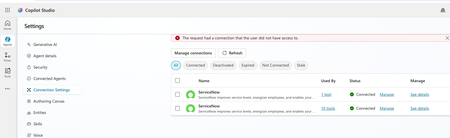
how to create a globally Shared ServiceNow Connector Connection in Copilot Studio
Hello, I have configured Microsoft entra ID oauth using certificate and shared this connection with everyone in my company since this is the only shared connection on the platform. https://learn.microsoft.com/en-us/connectors/service-now/#microsoft-entra-id-oauth-using-certificate. But, whey user's ( end users, agent maker, environment maker basically any user in copilot environment) are trying to use any servicenow tools ( e.g create record) which is using this shared connection in copilot studio/ teams, they are getting below error. https://learn.microsoft.com/en-us/connectors/service-now/ How to create a shared connection which can be shared across all enterprise users in my org for copilot AI agents which are using servicenow connector? Regards, SachinsnamjoshiSep 06, 2026Copper Contributor16Views0likes0CommentsError Connecting Whatsapp Number (Copilot Studio to Azure ACS)
Please help. I created an AI Agent in Copilot Studio for connecting to WhatsApp. I created an Azure Communication Services (ACS) and connected my personal Facebook page to it. I created a WhatsApp Business number, I got the code, and it connected. However, when I return to Copilot studio to connect using my Azure Subscription and Resource, it says- Error connecting to WhatsApp phone number. Please try again. How do I resolve this?Temitope_VictoriaSep 05, 2026Brass Contributor7Views0likes0Comments
How to Integrate Copilot Studio Agent with a Website Using API?
Hello Team, I have created a Copilot Agent using Copilot Studio and published it on our public website using an iframe. Currently, the agent does not have any authentication configured because we want it to be publicly accessible. However, our website development team has raised a security concern with this approach, as embedding the Copilot Agent directly using an iframe may not be the most secure or recommended approach. We are looking for an alternative integration approach. For example: Is it possible to expose the Copilot Studio Agent through an API or another secure endpoint? Can our website development team call the agent through an API, receive the response, and build their own custom UI instead of embedding the agent using an iframe? Is there any recommended architecture or Microsoft-supported approach for securely integrating a Copilot Studio Agent with a public-facing website? If anyone has implemented a similar solution or has any recommendations, I would appreciate your suggestions.AsutoshPatel27Sep 02, 2026Copper Contributor89Views0likes1Comment
Copilot+ laptop cannot access my local files or folders. No permission dialog to approve access.
First up - I'm not a tech expert! I have a new CoPilot+ laptop. Asked CoPilot to do a task in my folders and files that I downloaded from iCloud, but it cannot access my files or folders. Asks me to allow access through Microsoft prompt that never appears. Contacted Microsoft Support yesterday and after 2 hours and no progress, they told me to contact laptop manufacturer support. Which I did, and this resulted in a reset to factory setting of the laptop today. Problem still persists, its not hardware related. I contacted Microsoft Support again and have been directed her on the basis that this appears to be an ongoing Copilot+ issue that has already been through extensive troubleshooting, the Tech Community is currently the best channel to track updates and raise visibility with the teams investigating the problem." Any suggestions on what I need to try next? Bearing in mind, I am not an expert! Thank you in advance GailGail123Sep 01, 2026Copper Contributor98Views0likes1Comment
Copilot Studio Agent Shows Usage Limit Error Despite Low Credit Usage
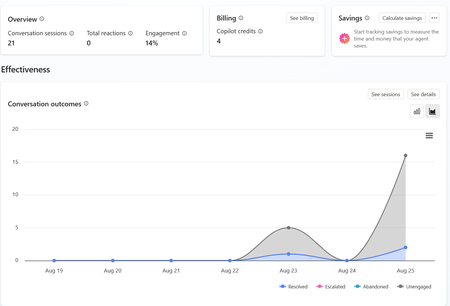
a { text-decoration: none; color: #464feb; } tr th, tr td { border: 1px solid #e6e6e6; } tr th { background-color: #f5f5f5; } Hi everyone, We are experiencing an issue with a Copilot Studio agent and would appreciate any guidance from the community. Scenario: The agent works correctly in the Copilot Studio test environment and responds as expected. However, after integrating the same agent into our web application, users receive the following error: "This agent is currently unavailable. It has reached its usage limit. Please try again later." Additional Information: In Copilot Studio Usage Monitoring, we can only see approximately 4 credits consumed. Based on the reported consumption, we would not expect a usage limit to have been reached. The issue occurs only when accessing the agent through the web application. The Copilot Studio test interface continues to work normally. Questions: Has anyone experienced a similar issue? Could this be related to licensing, capacity allocation, authentication, or channel configuration? Is there any difference in credit consumption or capacity enforcement between the Copilot Studio test environment and embedded web channels? Are there additional monitoring locations where we can verify the actual credit usage and capacity status? Any insights or recommendations would be greatly appreciated.nuwantheekshanaAug 29, 2026Copper Contributor124Views0likes1CommentCopilot Studio agent suddenly stopped working in Teams
Hello, I've run into a strange issue with a Copilot Studio agent and I'm trying to understand where to investigate next. The agent is published to the "Teams and Microsoft 365 Copilot" channel and was working normally in Microsoft Teams until recently. The agent still works correctly in Copilot Studio. The agent still works correctly in Microsoft 365 Copilot / Copilot Chat. The issue only occurs in Microsoft Teams. What happens in Teams: Messages can be sent to the agent. No error message is displayed. No response is returned. Most importantly, no session is created in Copilot Studio (Analytics / Observability). Because no session is created, it looks like the message never reaches the agent runtime. What I've already checked: Republished the agent. Reinstalled the Teams app. Verified the Teams and Microsoft 365 Copilot channel configuration. Checked permissions and sharing settings. Checked Teams Admin Center configuration. Tested in both Teams Desktop and Teams Web. Reviewed Microsoft 365 service health. This same tenant has another Copilot Studio agent that works normally in Teams. The affected agent previously worked in Teams for several weeks before the issue appeared. The agent architecture is very simple (single MCP server, no custom connectors, no Power Automate involved in this scenario). At this point, I'm mainly trying to understand why Teams no longer seems to create a conversation/session for this specific agent while the same agent continues to work in Copilot Studio and Microsoft 365 Copilot. Has anyone seen similar behavior or found a way to diagnose why Teams is no longer forwarding requests to a specific agent ? Thank you for help243Views1like1CommentNew Copilot Studio experience - MS365 Copilot and Teams - Channel About Info
We have imported a managed Solution into our Production Environment and all Objects successfully migrated, with the exception of the Channel 'About Info'. We find we can now update these About Info details, but they do not carry through into the App Manifest Download or the Submit to Org Catalogue. Unlike the Classic experience, there is also nowhere to update the Icon in the Channel Details, so only the default icon comes through in the Manifest and Org Catalogue workflow. HELP!NickKearnsAug 27, 2026Tin Contributor176Views0likes1Comment




Tags
- copilot studio68 Topics
- ai agents42 Topics
- microsoft copilot30 Topics
- Agent Builder26 Topics
- agent flows16 Topics
- generative orchestration14 Topics
- knowledge grounding13 Topics
- autonomous agents12 Topics
- governance9 Topics
- security9 Topics