Forum Widgets
Latest Discussions

Copilot Studio + SharePoint: Markdown (.md) Files in Doc Libraries Supported as Knowledge Sources?
Hi all, We’ve been doing some deeper testing with Copilot Studio agents grounded in SharePoint knowledge sources, and I’m hoping to clarify whether what we’re seeing is a known limitation or an undocumented gap. Scenario A Copilot Studio agent uses SharePoint document libraries as a knowledge source The library contains Markdown (.md) files that are intentionally used as canonical design references The same .md files: ✅ Work well when uploaded directly to the agent ❌ Are not retrievable or citable when stored in a SharePoint library and added as a SharePoint knowledge source To help with grounding, we created modern SharePoint index pages that: Explain what the markdown collections are (Patterns, ADRs, Guardrails) Link directly to the canonical folders and files Explicitly state that the .md files are the source of truth The agent can: Discover and summarize the index pages correctly Understand that .md artifacts exist and where they live But it cannot: Read the content of the individual .md files Apply a specific pattern or ADR from those files in a design conversation Cite them as sources, even when permissions and search indexing are confirmed What We’ve Checked Permissions (agent user has access) Folder depth (kept shallow) Search results (markdown files appear in SharePoint search) SharePoint indexing status Work IQ enabled Same content works when attached directly to the agent This behavior also seems consistent with what others have reported here: Markdown works when uploaded directly Markdown retrieval degrades when hosted in SharePoint libraries Questions for the Product Team / Community Are Markdown (.md) files in SharePoint document libraries officially supported as Copilot Studio knowledge sources today? If yes, are there specific constraints (file size, rendering, parsing, indexing) that differ from Word/PDF? If no (or “not yet”), is this a known limitation on the roadmap? Is the recommended pattern to: Convert important markdown files into .aspx pages, or Use thin “index / summary” pages and keep markdown canonical until retrieval improves? We’re happy to adapt our information architecture — just trying to align with the intended platform direction rather than work against it. Thanks in advance for any guidance or clarification. This capability is extremely powerful, and clearer expectations here would help a lot of teams make the right design tradeoffs.GullettBrianMay 06, 2026Iron Contributor3KViews14likes6Comments
Copilot Studio Knowledge Source Limitation When Iterating Over Multiple SharePoint Documents
Hi, I’m looking for clarification on a limitation we’re currently encountering in Copilot Studio that is blocking some of our use case. Example Scenario (Policy Agent) We have a SharePoint document library containing ~100 policy documents. A Copilot Studio agent is configured with this library as a knowledge source. The agent performs well for typical question-answering scenarios where responses can be derived from a subset of documents. For example: “How much annual leave can I take?” correctly returns answers sourced from multiple relevant policies. Issue When the question requires the agent to evaluate all documents individually, the results are incomplete. Example prompt: “Review each policy document and return the review date.” In this scenario: The agent only processes the first ~10 documents. It then stops, without indicating that the response is partial or that a limit has been reached. The remaining documents in the library are not evaluated. During a recent Microsoft-led course, we were advised that this behaviour is expected due to platform limitations. Specifically: While it will reside over all documents to genereate the most suitable response, the agent is not designed to self‑iterate across all items in a large knowledge source for individual document responses. Asking it to “review each document” effectively requires iteration, which is constrained. The suggested workaround was to: Create a trigger-based flow Implement a loop to process the documents in batches We were able to make this approach work, but it feels like a heavy and brittle workaround for what seems like a common enterprise requirement. We’ve Tried Both available SharePoint knowledge source connection methods Allowing sufficient time for indexing and refresh Rephrasing prompts to encourage broader coverage None of these approaches changed the outcome, the agent consistently returns results for only the first subset of documents. Is this behaviour a documented or known limitation of Copilot Studio knowledge sources? Are there recommended design patterns for scenarios that require document-by-document evaluation at scale? Is there a more native or supported approach planned to avoid custom looping logic for this kind of use case? Any guidance or confirmation would be appreciated. Thanks.leespringettApr 24, 2026Copper Contributor1.8KViews0likes4CommentsFile Uploads Not Passed to Custom Engine Agent in Microsoft 365 Copilot Chat
Hi all, I'm working with a custom agent built in Copilot Studio (full authoring experience — topics, knowledge sources, agent flows) published to both the Microsoft Teams channel and the Microsoft 365 channel. I've noticed a significant UX discrepancy when it comes to file and image attachments, and I want to confirm my understanding and check whether any workaround or roadmap item exists. What works: ✅ File/image uploads work as expected in the Copilot Studio test pane ✅ File/image uploads work in Teams chat when interacting with the agent What doesn't work: ❌ File/image uploads do not reach the agent when interacting via the Microsoft 365 Copilot app (both the desktop app and the web experience at microsoft365.com) The UX problem: The M365 Copilot app presents a "+" button in the chat input area with options including "Upload" and "Take screenshot." Users naturally assume these options work. The file even appears as an attachment in the sent message — but the agent never receives it. There's no warning, error, or indication to the user that the attachment was silently dropped. This creates a misleading experience, particularly for end users who have no visibility into the channel behavior differences. What I've found so far: I'm aware this is documented as a known issue for custom engine agents in the Microsoft 365 Copilot Extensibility Known Issues page: "File attachments — Users can't upload files in agent chats and the agent can't return files for download." I also found a related GitHub issue (OfficeDev/microsoft-365-agents-toolkit #15325) where a Microsoft team member confirmed this is a "Copilot platform shortage" — not an Agents Toolkit issue — with no published ETA. My questions for the community and any Microsoft product team members: Is there any currently supported workaround to enable file/image input for a Copilot Studio agent running in the M365 Copilot app (desktop or web)? For example, any manifest configuration, agent settings, or alternate approach? Is this limitation being actively worked on? Is there a roadmap item or Microsoft 365 feature ID that can be tracked for when file attachment support is extended to custom engine agents in the M365 Copilot chat experience? Is the UI behavior (showing upload options that don't work) being addressed separately? Even if full file processing isn't ready, a visible warning or disabled state in the UI would significantly reduce user confusion. Any insight from others who have hit this — or from Microsoft PMs — is appreciated. Happy to share more configuration details if helpful. Thanks! BrianGullettBrianJun 08, 2026Iron Contributor1.7KViews6likes1Comment
Copilot Studio agents problems connecting to Sharepoint knowledge source
Hello, Since last week users in my tenant are experimenting issues regarding the connection between copilot studio agents and Sharepoint. The agents are not able to extract information from Sharepoint sites, printing there is not information in the Sharepoint site regarding the user's question when that information is in Sharepoint. These agents used to work well till last week. Does have been any update in Microsoft 365 services that can be affecting these agents ability to retrieve information from Sharepoint?1.6KViews1like18Comments
SharePoint lists with Copilot Studio error
I’m seeing a persistent issue when integrating SharePoint lists with Copilot Studio agents. Any SharePoint list I add to an agent results in an error being shown in the Copilot Studio UI, but no error message, diagnostic detail, or failure reason is surfaced. I’ve removed and re-added the list connections multiple times and reproduced the issue across multiple agents, with the same outcome each time. Has anyone encountered this behaviour, or are there known issues or prerequisites (e.g. permissions, connector state, tenant configuration, or recent service changes) that could cause silent failures when integrating SharePoint lists?SolvedtroyhoApr 16, 2026Copper Contributor1.1KViews0likes2Comments📣 Microsoft Copilot Studio and Agent Roadmaps Have a New Home
Microsoft Copilot Studio and Agent Roadmaps Have a New Home Starting July 2, 2026, feature updates for Microsoft Copilot Studio, Sales Agent, Finance Agent, and Service Agent, will be published on the Microsoft 365 Roadmap. This creates a single destination to discover what capabilities are coming next across Microsoft 365 core apps, Copilot, agents, and more. As part of this transition, Release Planner will no longer be a source for feature information for these products. Future updates will be available through the Microsoft 365 Roadmap, making it easier to stay informed, plan ahead, and leverage AI-powered experiences that can discover and consume information more effectively. What you need to know No immediate action is required Update any saved Release Planner bookmarks to the Microsoft 365 Roadmap Begin using the Microsoft 365 Roadmap as your primary source for feature updates Share this change with stakeholders who currently rely on Release Planner Resources: Stay up to date on what’s new and what’s next: Microsoft 365 Roadmap Microsoft 365 Copilot release notes Microsoft 365 Copilot Roadmap Webinar - Register today Get started with AI-powered change insights: Microsoft MCP Server for Enterprise - Gives MCP-compatible AI tools secure, read-only access to your organization’s Message Center and Service Health data, enabling personalized summaries, impact analysis, and stakeholder communications based on your existing permissions and security controls. Microsoft Release Communications MCP Server - Provides free, natural-language access to official Microsoft 365 Roadmap and Azure Updates information, enabling AI agents to answer questions about upcoming features, rollout timelines, and product changes. We're excited to bring roadmap information together in one place to deliver a more consistent, accessible, and AI-ready experience for planning what's next.726Views2likes3Comments
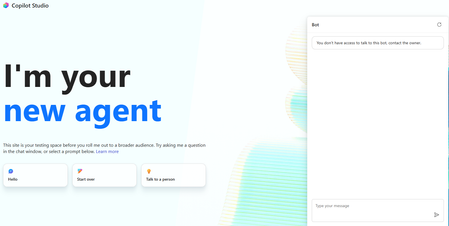
You don't have access to talk to this bot, contact the owner. copilot studio
I created a copilot studio agent and then embedded it inside a code app. It works fine but i am facing the below error. You don't have access to talk to this bot, contact the owner. copilot studio I have provided Microsoft based authentication and am an owner so will have access to the bot. Yet facing the above issue. Is there something i am missing583Views0likes2Comments
Giving AI Agent access to move files between folders
Hi Community, I have built a PDF to Excel reconcilliation AI Agent using Microsoft Copilot that reconciles supplier statements against payables data for our organisation. The agent works well. it reads PDF supplier statements and Excel reports from a SharePoint document library, performs the reconciliation, and produces a structured audit-ready report. However, I am hitting a limitation at the final step. Once the reconciliation is complete, I would like the agent to automatically move the processed supplier statement PDF from its current folder to a subfolder called "reconcilled" within the same SharePoint document library. My question is What is the recommended way to give a Copilot AI Agent the ability to move files between SharePoint folders? Any guidance, documentation links, or examples from others who have implemented similar workflows would be greatly appreciated. Thank you!kpashaApr 29, 2026Copper Contributor462Views0likes1CommentWhat is the best file format for an AI agent knowledge base?
This is a best practice sharing the best format for an agent and show you why you should convert your PPT, PDF, WORD into a TXT markdown. I had an issue with my agent, time taken to answer was too long, and usually we spend a lot of time asking: What is the best prompt? Why is my agent slow? Why does retrieval sometimes work and sometimes fail? How can I improve answer quality? But I realised I was asking another question much less often: What is actually the best file format for the knowledge base? PDF? Raw text? Markdown? Pre-chunked text? Semantic sections? Context-enriched text? And more importantly: How much does the format alone affect agent performance? I tried to find a quantified benchmark answering this specific question, with the same agent, same source knowledge and same questions, but different knowledge representations. I couldn't find one that really answered what I wanted to measure. So I decided to run the experiment myself on a real case. My first exploratory tests were already surprising: depending on the representation, the agent could be significantly faster and more accurate, despite working from the exact same source information. So I decided to push the test further. My objective I want to identify, without assumptions and based on actual evaluation data, how a long document should be prepared for an LLM knowledge base so that the agent can retrieve, understand, ground and answer from it as reliably as possible. I focused on five dimensions: Answer quality Retrieval reliability Source grounding / citations Execution time Robustness across single-turn and multi-turn questions The broader question I'm trying to answer is: How should we structure knowledge so that an LLM can retrieve and use it as reliably as possible? The test case I deliberately chose a document that isn't particularly friendly for RAG: a 46-page European regulation, https://eur-lex.europa.eu/eli/reg/2011/1169/oj?locale=fr, on the provision of food information to consumers. The information is distributed across articles, definitions, exceptions, annexes, tables, numerical thresholds and cross-references. That makes it useful for testing retrieval: answering correctly often requires finding a very specific piece of information while preserving enough context to understand how it applies. I used the native PDF as the baseline and created 6 additional knowledge-base representations of the same document: Raw TXT Markdown Chunk-ready TXT RAG-oriented units Semantic TXT Contextual TXT One rule: same knowledge, same agent, same instructions, same questions. Only the knowledge representation changes. The benchmark I used two evaluation sets: 42 single-turn questions testing broad coverage of the document: direct facts, thresholds, exceptions, annexes, lists and cross-references. 5 multi-turn conversations containing 13 questions, to see what happens when a user asks a question and then follows up with things like: "And in this case?" "What are the exceptions?" "And for dietary fibre?" This gave me: 47 evaluated test cases / 55 actual questions per format Across all 7 formats: 329 evaluated conversations 385 user questions executed First results Metric Native PDF Best structured representation Overall pass rate 66.0% 85.1% - Contextual TXT Best single-turn score 69.0% 88.1% - Chunk-ready TXT Multi-turn benchmark 40% 80% - Contextual TXT Multi-turn execution time 14m24 5m54 Total benchmark time 44m31 24m49 The quality gap was already substantial: 66.0% → 85.1% That's +19.1 percentage points while keeping the underlying knowledge unchanged. I also saw a major difference in execution time. On the multi-turn test: 14m24 → 5m54 That's approximately 2.4× faster. Across the complete benchmark: 44m31 → 24m49 Around 44% less execution time. These timings represent the complete agent evaluation pipeline, so they shouldn't be interpreted as pure LLM inference latency. But the difference under identical test conditions is large enough that I want to understand it better. Findings There wasn't one format dominating every benchmark. Chunk-ready TXT scored highest on independent questions: 88.1%, while Contextual TXT performed better across multi-turn conversations and finished with the highest overall score. That may suggest that the way we optimise a document for isolated retrieval isn't exactly the same as the way we should prepare it for conversational retrieval. In the contextual version, I tried to make every section understandable when retrieved independently by keeping useful information around it: Source references Section context Retrieval cues Relevant cross-references For regulatory documents, this seems particularly important. A numerical value retrieved alone can be meaningless without knowing which rule it belongs to, under which conditions it applies, and whether another article contains an exception. Where I am now This remains an exploratory benchmark: One document One domain One agent setup One evaluation framework One run per configuration There are plenty of things I still want to test: repeated runs, retrieval-level evaluation, token consumption, larger knowledge bases, other document types, chunk sizes, overlap, contextual headers, and more. But these first results already convinced me that the preparation of the knowledge base deserves much more attention when evaluating an agent. We often spend hours refining instructions while the same information may behave very differently depending on how it reaches the retrieval layer. Next step I'll share the prompts, knowledge-base formats and evaluation methodology on GitHub so the experiment can be reproduced and challenged. I'll keep enriching the repository as I test new formats, improve the evaluation set and add new results. If people here have ideas, edge cases or formats worth testing, I'd genuinely like to include some of them in the next iteration. What would you test next?446Views2likes3CommentsIssue: Cannot Share Agent to New Editor in Copilot Studio New Experience
In the new UX, sharing agents is restricted: I can share agents for viewing/testing (read-only). But I couldn’t find the editor rights when the agent is shared in the new experience. cam advice when this features be released? Is there a workaround to have editors for new user experienceKopigaoJul 19, 2026Copper Contributor382Views0likes1Comment


Tags
- copilot studio68 Topics
- ai agents42 Topics
- microsoft copilot30 Topics
- Agent Builder26 Topics
- agent flows16 Topics
- generative orchestration14 Topics
- knowledge grounding13 Topics
- autonomous agents12 Topics
- governance9 Topics
- security9 Topics