Forum Widgets
Latest Discussions

Copilot Studio agents problems connecting to Sharepoint knowledge source
Hello, Since last week users in my tenant are experimenting issues regarding the connection between copilot studio agents and Sharepoint. The agents are not able to extract information from Sharepoint sites, printing there is not information in the Sharepoint site regarding the user's question when that information is in Sharepoint. These agents used to work well till last week. Does have been any update in Microsoft 365 services that can be affecting these agents ability to retrieve information from Sharepoint?1.6KViews1like18Comments
Agent response duplicated in email
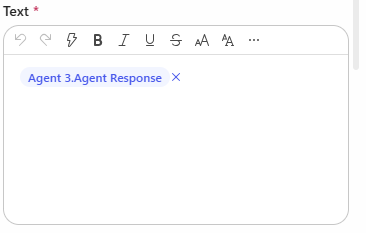
Hi, I have created a Copilot Studio Flow which has 3 agents. 2 agents do some research in parallel, I catch the results in 2 different string variables and hand the variables over to a third agent. The third agent should merge both variables, format them and hand them over to "Send Email". In the email body I add the output of agent 3. The workflow itself works. But I always have the complete email body text twice in the email received by the recipients. Where is the duplicate of the agent output coming from? I have this issue also when I add the agent response of agent 1 and agent 2 directly to the "send email" node. Does anyone have an idea? Would be great to get feedback. Appreciate it. Thanks!SpitzingerAug 05, 2026Copper Contributor273Views0likes7Comments
Copilot Studio + SharePoint: Markdown (.md) Files in Doc Libraries Supported as Knowledge Sources?
Hi all, We’ve been doing some deeper testing with Copilot Studio agents grounded in SharePoint knowledge sources, and I’m hoping to clarify whether what we’re seeing is a known limitation or an undocumented gap. Scenario A Copilot Studio agent uses SharePoint document libraries as a knowledge source The library contains Markdown (.md) files that are intentionally used as canonical design references The same .md files: ✅ Work well when uploaded directly to the agent ❌ Are not retrievable or citable when stored in a SharePoint library and added as a SharePoint knowledge source To help with grounding, we created modern SharePoint index pages that: Explain what the markdown collections are (Patterns, ADRs, Guardrails) Link directly to the canonical folders and files Explicitly state that the .md files are the source of truth The agent can: Discover and summarize the index pages correctly Understand that .md artifacts exist and where they live But it cannot: Read the content of the individual .md files Apply a specific pattern or ADR from those files in a design conversation Cite them as sources, even when permissions and search indexing are confirmed What We’ve Checked Permissions (agent user has access) Folder depth (kept shallow) Search results (markdown files appear in SharePoint search) SharePoint indexing status Work IQ enabled Same content works when attached directly to the agent This behavior also seems consistent with what others have reported here: Markdown works when uploaded directly Markdown retrieval degrades when hosted in SharePoint libraries Questions for the Product Team / Community Are Markdown (.md) files in SharePoint document libraries officially supported as Copilot Studio knowledge sources today? If yes, are there specific constraints (file size, rendering, parsing, indexing) that differ from Word/PDF? If no (or “not yet”), is this a known limitation on the roadmap? Is the recommended pattern to: Convert important markdown files into .aspx pages, or Use thin “index / summary” pages and keep markdown canonical until retrieval improves? We’re happy to adapt our information architecture — just trying to align with the intended platform direction rather than work against it. Thanks in advance for any guidance or clarification. This capability is extremely powerful, and clearer expectations here would help a lot of teams make the right design tradeoffs.GullettBrianMay 06, 2026Iron Contributor3KViews14likes6CommentsPower Automate Flows Created Outside Copilot Studio Not Appearing in Tools
Hello everyone, I'm facing an issue with Copilot Studio and would appreciate your advice. Context I have several Power Automate flows that I created directly from: https://make.powerautomate.com My goal is to use these flows as tools within a Copilot Studio agent. All components are in the same Power Platform environment. What I've verified The flows use the "When an agent calls a flow" trigger. The flows end with "Respond to the agent". The flows are saved and published. The agent and flows are added to the same Solution. The solution has been published. I am using the same account and environment for both Power Automate and Copilot Studio. The Issue Flows that are created directly from Copilot Studio appear correctly under: Tools → Add Tool However, flows created from Power Automate (make.powerautomate.com) do not appear in the Tools list, even though they have the same trigger and response configuration. Question Are there additional requirements for a Power Automate flow to be discoverable by Copilot Studio? For example: Does the flow need to be an Agent Flow rather than a standard Cloud Flow? Are there known synchronization or caching issues between Power Automate and Copilot Studio? Is there a specific setting, solution configuration, or publishing step that I may have missed? Any guidance or experience with a similar issue would be greatly appreciated. Thank you!Adhonai_KOUKAAug 14, 2026Tin Contributor331Views0likes5Comments
Copilot Studio Agent Unable to Retrieve Usable DOCX/XLSX Content from OneDrive (and SharePoint)
Hi everyone, I'm building a Copilot Studio agent that needs to read and process Word (.docx) and Excel (.xlsx) files stored in OneDrive. The agent can successfully locate files and retrieve metadata, but it appears unable to retrieve Office files as usable binary content. I tested the behaviour using the OneDrive Get file content action: A text file (test.txt) was returned correctly and matched the original file contents exactly. A Word file (Test.docx) was returned beginning with the ZIP signature PK and contained recognisable DOCX entries such as [Content_Types].xml and _rels/.rels. However, the returned payload also contained large numbers of Unicode replacement characters (�). The returned content appears to be a text string rather than binary data or base64 content. Because Office files are ZIP-based binary formats, the returned payload cannot be reconstructed into a valid .docx or .xlsx file, preventing downstream libraries such as python-docx and openpyxl from opening the file. Is there any way to resolve this issue?edfencerAug 27, 2026Copper Contributor255Views0likes4Comments
Copilot Studio agent not visible in M365 mobile app without desktop access
Hi, I'm having an issue with a Copilot Studio agent not being discoverable in the Microsoft 365 mobile app for users without desktop access. **Setup:** - Agent created in Copilot Studio, published and shared with specific users - All users have the same Microsoft 365 Copilot license - Target channel is the Microsoft 365 app (not Teams) - The agent has been published to both the Teams and Microsoft 365 channels in Copilot Studio **The problem:** Users who have access to a desktop/browser can open the agent via a direct link, add it, and after that it appears correctly in the M365 mobile app. However, users who only have access to the M365 mobile app cannot find the agent there — even though it has been shared with them. **What I've tried:** - Verified the agent is published and shared directly with the affected users in Copilot Studio - Confirmed all users have the same license - Published the agent to both Teams and Microsoft 365 channels - Sending a direct link to the agent — works on desktop/browser but not actionable in the mobile app in a way that adds the agent - Logging out and back in to the M365 mobile app **What I'm looking for:** Is there a way for users to discover and add a shared Copilot Studio agent directly from the M365 mobile app, without needing desktop or browser access first? Any help or workarounds are appreciated!SolvedSebastianLinderothJun 01, 2026Copper Contributor383Views0likes4Comments
Copilot Studio Knowledge Source Limitation When Iterating Over Multiple SharePoint Documents
Hi, I’m looking for clarification on a limitation we’re currently encountering in Copilot Studio that is blocking some of our use case. Example Scenario (Policy Agent) We have a SharePoint document library containing ~100 policy documents. A Copilot Studio agent is configured with this library as a knowledge source. The agent performs well for typical question-answering scenarios where responses can be derived from a subset of documents. For example: “How much annual leave can I take?” correctly returns answers sourced from multiple relevant policies. Issue When the question requires the agent to evaluate all documents individually, the results are incomplete. Example prompt: “Review each policy document and return the review date.” In this scenario: The agent only processes the first ~10 documents. It then stops, without indicating that the response is partial or that a limit has been reached. The remaining documents in the library are not evaluated. During a recent Microsoft-led course, we were advised that this behaviour is expected due to platform limitations. Specifically: While it will reside over all documents to genereate the most suitable response, the agent is not designed to self‑iterate across all items in a large knowledge source for individual document responses. Asking it to “review each document” effectively requires iteration, which is constrained. The suggested workaround was to: Create a trigger-based flow Implement a loop to process the documents in batches We were able to make this approach work, but it feels like a heavy and brittle workaround for what seems like a common enterprise requirement. We’ve Tried Both available SharePoint knowledge source connection methods Allowing sufficient time for indexing and refresh Rephrasing prompts to encourage broader coverage None of these approaches changed the outcome, the agent consistently returns results for only the first subset of documents. Is this behaviour a documented or known limitation of Copilot Studio knowledge sources? Are there recommended design patterns for scenarios that require document-by-document evaluation at scale? Is there a more native or supported approach planned to avoid custom looping logic for this kind of use case? Any guidance or confirmation would be appreciated. Thanks.leespringettApr 24, 2026Copper Contributor1.8KViews0likes4CommentsIntermittent Post-Deployment Issues with Copilot Agent Using SharePoint Knowledge Sources
Summary We are testing a Copilot Studio agent following admin approval and installation for a set of users before we launch it to everyone in the organization - the objective being to test out the end user experience and check that everything is working fine. We have encountered several inconsistent behaviours using the agent across both the Copilot app and Microsoft Teams. The issues seem to be resolved after signing out, restarting the application, or signing in again. 📍Looks like a lot of instabilities and poor end user experience with this method & this is blocking us from launching the agent to the organization. Agent Setup Agent built in Copilot Studio & deployed via pipeline (Development > QA > Production) Knowledge source 1: SharePoint connection using Dataverse indexing/synchronisation Knowledge source 2: Live SharePoint connection Tested in the following apps after admin approval/publishing/pinning: Microsoft Copilot app Microsoft Teams Issues observed Agent not visible in Copilot app After agent is approved, installed, shared and pinned (to specific users) from Admin side, the agent is not visible in Copilot app. We gave it over 8 hours after the admin process. Agent appeared after signing out of Copilot app and signing back in again. SharePoint connection consent prompt not displayed Users are expected to receive a prompt with consent to connect to SharePoint (with "Allow" button). What appears is only a message but no card with the "Allow" button. This started working after signing out of Copilot app and signing back in again - so the sign out + sign in had to be done twice Responses not retrieved from Knowledge source 1 In spite of proceeding with the "Allow" prompts, for some users, the responses are coming only from Knowledge source 2 (live connection) & not Knowledge source 1 (connection with dataverse indexing). This is seen both when interacting with the agent in Copilot app and Teams. For some users, this was fixed after signing out and back into the apps Questions Has anyone experienced such instabilities with admin deployment/publishing of agents? If yes, what have you done to sort them out and have you been able to successfully launch agents organization wide with this approach? Does anyone know about known issues/glitches with admin deployment/publishing of agents? We did not see these issues when sharing the agent using Copilot Studio.sohnashAug 25, 2026Iron Contributor238Views1like3CommentsWhat is the best file format for an AI agent knowledge base?
This is a best practice sharing the best format for an agent and show you why you should convert your PPT, PDF, WORD into a TXT markdown. I had an issue with my agent, time taken to answer was too long, and usually we spend a lot of time asking: What is the best prompt? Why is my agent slow? Why does retrieval sometimes work and sometimes fail? How can I improve answer quality? But I realised I was asking another question much less often: What is actually the best file format for the knowledge base? PDF? Raw text? Markdown? Pre-chunked text? Semantic sections? Context-enriched text? And more importantly: How much does the format alone affect agent performance? I tried to find a quantified benchmark answering this specific question, with the same agent, same source knowledge and same questions, but different knowledge representations. I couldn't find one that really answered what I wanted to measure. So I decided to run the experiment myself on a real case. My first exploratory tests were already surprising: depending on the representation, the agent could be significantly faster and more accurate, despite working from the exact same source information. So I decided to push the test further. My objective I want to identify, without assumptions and based on actual evaluation data, how a long document should be prepared for an LLM knowledge base so that the agent can retrieve, understand, ground and answer from it as reliably as possible. I focused on five dimensions: Answer quality Retrieval reliability Source grounding / citations Execution time Robustness across single-turn and multi-turn questions The broader question I'm trying to answer is: How should we structure knowledge so that an LLM can retrieve and use it as reliably as possible? The test case I deliberately chose a document that isn't particularly friendly for RAG: a 46-page European regulation, https://eur-lex.europa.eu/eli/reg/2011/1169/oj?locale=fr, on the provision of food information to consumers. The information is distributed across articles, definitions, exceptions, annexes, tables, numerical thresholds and cross-references. That makes it useful for testing retrieval: answering correctly often requires finding a very specific piece of information while preserving enough context to understand how it applies. I used the native PDF as the baseline and created 6 additional knowledge-base representations of the same document: Raw TXT Markdown Chunk-ready TXT RAG-oriented units Semantic TXT Contextual TXT One rule: same knowledge, same agent, same instructions, same questions. Only the knowledge representation changes. The benchmark I used two evaluation sets: 42 single-turn questions testing broad coverage of the document: direct facts, thresholds, exceptions, annexes, lists and cross-references. 5 multi-turn conversations containing 13 questions, to see what happens when a user asks a question and then follows up with things like: "And in this case?" "What are the exceptions?" "And for dietary fibre?" This gave me: 47 evaluated test cases / 55 actual questions per format Across all 7 formats: 329 evaluated conversations 385 user questions executed First results Metric Native PDF Best structured representation Overall pass rate 66.0% 85.1% - Contextual TXT Best single-turn score 69.0% 88.1% - Chunk-ready TXT Multi-turn benchmark 40% 80% - Contextual TXT Multi-turn execution time 14m24 5m54 Total benchmark time 44m31 24m49 The quality gap was already substantial: 66.0% → 85.1% That's +19.1 percentage points while keeping the underlying knowledge unchanged. I also saw a major difference in execution time. On the multi-turn test: 14m24 → 5m54 That's approximately 2.4× faster. Across the complete benchmark: 44m31 → 24m49 Around 44% less execution time. These timings represent the complete agent evaluation pipeline, so they shouldn't be interpreted as pure LLM inference latency. But the difference under identical test conditions is large enough that I want to understand it better. Findings There wasn't one format dominating every benchmark. Chunk-ready TXT scored highest on independent questions: 88.1%, while Contextual TXT performed better across multi-turn conversations and finished with the highest overall score. That may suggest that the way we optimise a document for isolated retrieval isn't exactly the same as the way we should prepare it for conversational retrieval. In the contextual version, I tried to make every section understandable when retrieved independently by keeping useful information around it: Source references Section context Retrieval cues Relevant cross-references For regulatory documents, this seems particularly important. A numerical value retrieved alone can be meaningless without knowing which rule it belongs to, under which conditions it applies, and whether another article contains an exception. Where I am now This remains an exploratory benchmark: One document One domain One agent setup One evaluation framework One run per configuration There are plenty of things I still want to test: repeated runs, retrieval-level evaluation, token consumption, larger knowledge bases, other document types, chunk sizes, overlap, contextual headers, and more. But these first results already convinced me that the preparation of the knowledge base deserves much more attention when evaluating an agent. We often spend hours refining instructions while the same information may behave very differently depending on how it reaches the retrieval layer. Next step I'll share the prompts, knowledge-base formats and evaluation methodology on GitHub so the experiment can be reproduced and challenged. I'll keep enriching the repository as I test new formats, improve the evaluation set and add new results. If people here have ideas, edge cases or formats worth testing, I'd genuinely like to include some of them in the next iteration. What would you test next?447Views2likes3Comments


Tags
- copilot studio68 Topics
- ai agents42 Topics
- microsoft copilot30 Topics
- Agent Builder26 Topics
- agent flows16 Topics
- generative orchestration14 Topics
- knowledge grounding13 Topics
- autonomous agents12 Topics
- governance9 Topics
- security9 Topics