governance
13 Topics
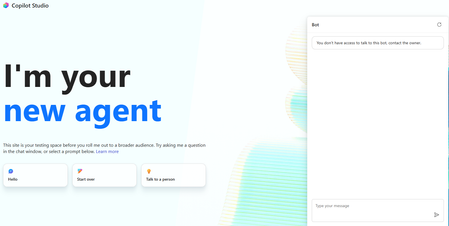
You don't have access to talk to this bot, contact the owner. copilot studio
I created a copilot studio agent and then embedded it inside a code app. It works fine but i am facing the below error. You don't have access to talk to this bot, contact the owner. copilot studio I have provided Microsoft based authentication and am an owner so will have access to the bot. Yet facing the above issue. Is there something i am missing950Views0likes4Comments
Agent Credit Limits and Alerts - Copilot Studio
Hi everyone, We're evaluating the use of Agent Credit Limits and alert notifications in the Power Platform Admin Center as a way to control unexpected Copilot Credit consumption. Recently, we had an agent consume 668k Copilot Credits in just 3 days, which raised concerns about how quickly usage can grow before administrators become aware of it. My questions are: How frequently is Copilot Credit consumption evaluated against an agent's credit limit? Are alert notifications generated in near real-time, or are they dependent on the same reporting pipeline used by the consumption reports? If an agent reaches its configured credit limit, is it automatically turned off or blocked from further consumption? Given that consumption reports often appear to refresh hours later (or even the next day), can alerts also be delayed? If there is a reporting delay, is there a risk that an agent could significantly exceed the intended limit before administrators receive a notification? What is the recommended approach for preventing large unexpected consumption spikes in production? Has anyone successfully implemented a governance model that provides more immediate protection against runaway usage, or are the current credit limits and alerts primarily intended for retrospective monitoring? Thanks in advance for any guidance.338Views0likes4CommentsMCP action approvals after expiry: review and replay tests from a Copilot Studio pilot
I am testing an approval and recovery pattern for a Copilot Studio agent calling a custom MCP endpoint on Azure. I would appreciate feedback on the failure cases to add before qualifying the approved execution and replay path. Context I built PALO, an independent governance project. This private pilot uses a synthetic catalogue with one price and resource version. Microsoft Entra supplies delegated identity; the runtime checks the admitted caller, delegated scope, time-bound mandate and exact proposed action. The connector uses federated authentication without a client secret. A separate reviewer interface records decisions; approval itself does not write the catalogue. Observed cases • The actual Copilot test agent invoked a catalogue read and returned price 100/version 1. • Proposal 151/version 1 was denied, with zero target writes confirmed independently in persistent records. • Proposal 120/version 1 required review and expired without execution. • We reproduced a withdrawal defect for the expired-approval state. The correction permits withdrawal in that state only when the action claim has also expired, while preserving the authorization, version and unresolved-effect checks. The same 89-test suite passed locally and on Azure Linux, followed by a reviewer withdrawal confirmed in UI and persistent records. Lessons so far 1. A connection shown as configured did not qualify the consuming-agent path. We retained the actual tool-call trace and checked target state separately. 2. MCP media negotiation mattered: the connector request Accept policy needed application/json and text/event-stream. 3. The five-minute action-claim validity, approval record lifetime and authentication freshness are different clocks. An expired request must not be silently renewed or automatically resubmitted. Next qualification gate We still need one fresh linked successor, a new reviewer decision, execution of that exact request, independent verification of one target effect, and a replay with no second effect. Two identities are operated by the same person in this pilot, so this only tests technical role separation. Incremental benefit over native identity, workflow and logging controls has not yet been measured. Questions for builders • Which expiry, revocation, concurrent-update or ambiguous-outcome cases would you prioritize before approving the live execution and replay test? • What native-control baseline would make an incremental-value comparison credible? Configuration record and dated evidence: https://paloframework.org/docs/palo-azure-copilot-pilot.html Two-minute report, narrated with my own voice: https://youtu.be/cfkms-cWp-I Disclosure: I built PALO. This is a private synthetic-data pilot, without a Marketplace listing or Microsoft certification. AI assisted the drafting and technical review; claims were checked against retained pilot records. The post requests engineering feedback rather than announcing production readiness.45Views0likes2CommentsBest practice for Copilot Studio agents and SharePoint libraries with unique permissions?
We recently ran into an issue where a Copilot Studio agent was unable to retrieve content from SharePoint libraries that have unique permissions and nested folder structures. Users with elevated permissions were able to retrieve results, while users with read-only/visitor access could not, even though they had access to the underlying documents. We've observed similar behavior across multiple agents and suspect the library's unique permission structure is impacting indexing or content retrieval. For organizations that use SharePoint libraries with extensive unique permissions, nested folders, and restricted access models: What is the recommended approach when using these libraries as knowledge sources for Copilot Studio agents? Are there known limitations or best practices regarding unique permissions and nested folders? Is it better to simplify permissions, create dedicated access groups, flatten the folder structure, or maintain separate agent-specific content locations? How are others balancing security requirements with reliable agent retrieval? We'd appreciate any guidance, best practices, or lessons learned from similar implementations.333Views0likes2Comments
Using Dynamics 365 ERP MCP Server from a Standalone Copilot Studio Environment
We have a Copilot Studio environment that is not connected to Dataverse and is not linked to any Dynamics 365 Finance & Operations environment. We would like to use the Dynamics 365 ERP MCP Server from an agent in this Copilot Studio environment to retrieve data from F&O. Is this configuration supported? If so: What connection and authentication setup is required between Copilot Studio and the Dynamics 365 ERP MCP Server? Does the Copilot Studio environment need to be linked to the target F&O environment or Dataverse environment? Can the ERP MCP Server connect directly to F&O independently of the Copilot Studio environment? How is user authentication handled when the agent invokes MCP tools? Does the MCP connection use the authenticated user's F&O permissions, a service principal, or the connection owner's credentials? Are there any prerequisites, limitations, or recommended architectures for using the ERP MCP Server from a standalone Copilot Studio environment?126Views0likes0Comments
How to Integrate Copilot Studio Agent with a Website Using API?
Hello Team, I have created a Copilot Agent using Copilot Studio and published it on our public website using an iframe. Currently, the agent does not have any authentication configured because we want it to be publicly accessible. However, our website development team has raised a security concern with this approach, as embedding the Copilot Agent directly using an iframe may not be the most secure or recommended approach. We are looking for an alternative integration approach. For example: Is it possible to expose the Copilot Studio Agent through an API or another secure endpoint? Can our website development team call the agent through an API, receive the response, and build their own custom UI instead of embedding the agent using an iframe? Is there any recommended architecture or Microsoft-supported approach for securely integrating a Copilot Studio Agent with a public-facing website? If anyone has implemented a similar solution or has any recommendations, I would appreciate your suggestions.660Views0likes1CommentUnanswered Questions on GitHub Copilot Harness in Copilot Studio
We're piloting the GitHub Copilot harness in Copilot Studio (GA August 2026) and several operational and architectural details remain undocumented in the GA FAQ, Microsoft Learn, or licensing guides. Looking for official answers or PM contacts on: Architecture & Execution – When the harness breaks tasks into subtasks, does it use internal sub-agents or only skills/connected agents, what are the exact timeout/retry/max-execution-duration limits for long-running workflows, and are planning/context-retrieval/orchestration internals documented anywhere or is the orchestrator a black box? Model Selection – Can individual skills within one agent use different models or is selection strictly agent-level, how are models chosen internally when multiple skills execute, are any internal models developer-configurable, and what's the roadmap for models being added/retired/deprecated plus the lag between public release and Copilot Studio availability? Cost & Token Optimization – How exactly is the ~45% token reduction achieved, how much control do makers have over context/caching/retrieval/tool calls, what are per-model credit consumption characteristics, which models are most cost-effective for specific workloads, and what's the minimum credit cost for trivial interactions? Memory Management – What are retention periods for session/working/agent memory beyond the documented 28-day user-memory expiry, is true long-term memory supported, and what changed versus earlier implementations? Knowledge Retrieval – Can skills or system instructions influence retrieval strategy/document selection/prioritization/filtering, can planning stages perform conflict/duplicate/version detection before retrieval, and how does the harness decide which sources to search? Apps Feature – What is the "Apps (preview)" capability for, when does it GA, and how does it differ from workflows/skills/adaptive cards/agents? Billing & Credit Sizing – Is there a framework to classify users/agents by expected consumption and size credit allocation per group (citizen vs pro developers), and what's the minimum/typical consumption for simple/medium/heavy interactions? Governance & Admin – Can usage limits be set at user level (not just environment/agent), is there an API/IaC path for large-scale credit assignment, can non-admins view their own consumption/remaining allocation, and is there a self-service request-more-credits dashboard? ALM & Environments – What's the recommended path to move harness agents across Dev/Test/UAT/Prod (Solutions/ALM "setup differs" per parity chart—how?), does GitHub integration replace or complement solution-based deployment, are there recommended AgentOps practices for source control/releases/versioning, and what baseline credits and onboarding model are suggested for citizen developers under usage billing—any enterprise reference implementations?662Views2likes1Comment
Copilot Studio Agent Shows Usage Limit Error Despite Low Credit Usage
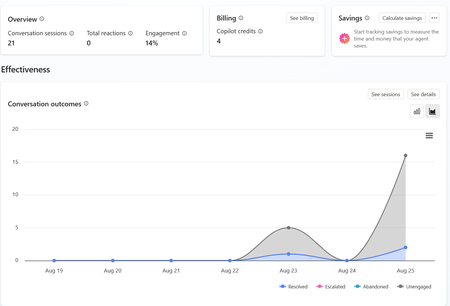
a { text-decoration: none; color: #464feb; } tr th, tr td { border: 1px solid #e6e6e6; } tr th { background-color: #f5f5f5; } Hi everyone, We are experiencing an issue with a Copilot Studio agent and would appreciate any guidance from the community. Scenario: The agent works correctly in the Copilot Studio test environment and responds as expected. However, after integrating the same agent into our web application, users receive the following error: "This agent is currently unavailable. It has reached its usage limit. Please try again later." Additional Information: In Copilot Studio Usage Monitoring, we can only see approximately 4 credits consumed. Based on the reported consumption, we would not expect a usage limit to have been reached. The issue occurs only when accessing the agent through the web application. The Copilot Studio test interface continues to work normally. Questions: Has anyone experienced a similar issue? Could this be related to licensing, capacity allocation, authentication, or channel configuration? Is there any difference in credit consumption or capacity enforcement between the Copilot Studio test environment and embedded web channels? Are there additional monitoring locations where we can verify the actual credit usage and capacity status? Any insights or recommendations would be greatly appreciated.466Views0likes1Comment
Microsoft AI Agent Creator Associate Certificate
Hello everyone, I have a question about the Microsoft AI Agent Creator Associate certification. I’m passionate about artificial intelligence and Microsoft Copilot Studio. I’m currently taking the training course and working toward earning the Microsoft AI Agent Creator Associate certification. My question is: Will earning this certification improve my chances of getting a job at Microsoft? If anyone in this community has earned this certification or has experience with it, I’d really appreciate your feedback. Has it helped you get hired by Microsoft or one of its partners? Thank you in advance for your advice and insights!177Views0likes0Comments
Copilot Studio agent works in M365 Copilot but silent in Teams personal chat (0 Studio sessions)
We are troubleshooting a Copilot Studio agent that works in Microsoft 365 Copilot and Studio test, but does not receive inbound activities from Microsoft Teams personal chat. Environment - Agent: Caflou Asistent v1.0.8 - Channels: Microsoft 365 Copilot + Microsoft Teams (published / synchronized) - Agent Registry: Available - Entra/bot appId: 7e4a53cc-f51c-4772-ad93-e3f1e8060f35 - Maker-provided tool connection works in Studio (example getTasks HTTP 200) What works 1) Microsoft 365 Copilot agent chat / shareLink → agent replies; Studio sessions with channel "Microsoft 365 Copilot" 2) Copilot Studio test pane → agent responds What fails 1) Teams personal chat (desktop AND web): user message visible in "Caflou Asistent" chat, no agent reply 2) Studio Monitor: Teams channel sessions = 0 for probes (only M365 Copilot sessions in last 7 days) 3) Teams Admin Center → Manage apps: 0 results for name "Caflou" and full appId (other apps searchable); UAM banner present while Registry shows Available Classification - Teams inbound activity not reaching Copilot Studio runtime - Not OAuth / not MCP host / not publish alone (M365 path proves runtime alive) - Secondary: Registry Available ≠ TAC Manage apps listing Questions 1) Why would Teams 1:1 never create a Studio conversation while M365 Copilot does? 2) Is missing TAC Manage apps row expected under Unified App Management when Registry shows Available? 3) Best next diagnostic when Monitor shows 0 Teams sessions after confirmed client send? Constraints: no Copilot Studio paid support plan; looking for field experience / known product issues. No secrets posted.192Views0likes0Comments