copilot studio
84 Topics
Agent Credit Limits and Alerts - Copilot Studio
Hi everyone, We're evaluating the use of Agent Credit Limits and alert notifications in the Power Platform Admin Center as a way to control unexpected Copilot Credit consumption. Recently, we had an agent consume 668k Copilot Credits in just 3 days, which raised concerns about how quickly usage can grow before administrators become aware of it. My questions are: How frequently is Copilot Credit consumption evaluated against an agent's credit limit? Are alert notifications generated in near real-time, or are they dependent on the same reporting pipeline used by the consumption reports? If an agent reaches its configured credit limit, is it automatically turned off or blocked from further consumption? Given that consumption reports often appear to refresh hours later (or even the next day), can alerts also be delayed? If there is a reporting delay, is there a risk that an agent could significantly exceed the intended limit before administrators receive a notification? What is the recommended approach for preventing large unexpected consumption spikes in production? Has anyone successfully implemented a governance model that provides more immediate protection against runaway usage, or are the current credit limits and alerts primarily intended for retrospective monitoring? Thanks in advance for any guidance.68Views0likes1CommentCopilot Studio agent suddenly stopped working in Teams
Hello, I've run into a strange issue with a Copilot Studio agent and I'm trying to understand where to investigate next. The agent is published to the "Teams and Microsoft 365 Copilot" channel and was working normally in Microsoft Teams until recently. The agent still works correctly in Copilot Studio. The agent still works correctly in Microsoft 365 Copilot / Copilot Chat. The issue only occurs in Microsoft Teams. What happens in Teams: Messages can be sent to the agent. No error message is displayed. No response is returned. Most importantly, no session is created in Copilot Studio (Analytics / Observability). Because no session is created, it looks like the message never reaches the agent runtime. What I've already checked: Republished the agent. Reinstalled the Teams app. Verified the Teams and Microsoft 365 Copilot channel configuration. Checked permissions and sharing settings. Checked Teams Admin Center configuration. Tested in both Teams Desktop and Teams Web. Reviewed Microsoft 365 service health. This same tenant has another Copilot Studio agent that works normally in Teams. The affected agent previously worked in Teams for several weeks before the issue appeared. The agent architecture is very simple (single MCP server, no custom connectors, no Power Automate involved in this scenario). At this point, I'm mainly trying to understand why Teams no longer seems to create a conversation/session for this specific agent while the same agent continues to work in Copilot Studio and Microsoft 365 Copilot. Has anyone seen similar behavior or found a way to diagnose why Teams is no longer forwarding requests to a specific agent ? Thank you for help672Views3likes3Comments
Credits usage for Copilot Studio Workflow with agents
If I add an agent(for research and analyze from the JSON provided) in Copilot studio recurring workflow, whose and which credits will be used whenever it runs? Hi Team, I have a question regarding licensing and credit consumption in Copilot Studio. I have created a Copilot Studio agent that performs research and analysis based on a JSON payload. I am planning to invoke this agent from within a Copilot Studio recurring workflow that runs on a schedule. Could you please clarify the following: When the recurring workflow executes and calls the agent, whose credits are consumed? The user who created the workflow? The owner of the agent? The account under which the workflow runs? The environment's pooled credits? Are there separate credit charges for: Workflow execution Agent invocation Generative AI/research actions performed by the agent Any guidance or documentation links explaining the credit consumption model for this scenario would be greatly appreciated. Thank you!61Views0likes0CommentsBest practice for Copilot Studio agents and SharePoint libraries with unique permissions?
We recently ran into an issue where a Copilot Studio agent was unable to retrieve content from SharePoint libraries that have unique permissions and nested folder structures. Users with elevated permissions were able to retrieve results, while users with read-only/visitor access could not, even though they had access to the underlying documents. We've observed similar behavior across multiple agents and suspect the library's unique permission structure is impacting indexing or content retrieval. For organizations that use SharePoint libraries with extensive unique permissions, nested folders, and restricted access models: What is the recommended approach when using these libraries as knowledge sources for Copilot Studio agents? Are there known limitations or best practices regarding unique permissions and nested folders? Is it better to simplify permissions, create dedicated access groups, flatten the folder structure, or maintain separate agent-specific content locations? How are others balancing security requirements with reliable agent retrieval? We'd appreciate any guidance, best practices, or lessons learned from similar implementations.182Views0likes2Comments
Confidential messages in Copilot Studio
Hello everyone, I have an agent built in Copilot Studio that uses SharePoint Lists as knowledge sources. When I access the "Monitor" section, I can view the engagement metrics. Under "User questions", I noticed that some questions were not answered by the agent. When I try to view more details about these interactions, I encounter the situation shown in the attached image. Copilot Studio does not allow me to view the response provided by the agent to the user. Instead, the response is displayed as "The agent's response is hidden due to sensitive content." Why is the agent's response displayed as "Confidential"? Is there any configuration or permission that I need to change in order to view these responses? Is there another way to access the complete interaction history, including the user's question and the response generated by the agent? I need to analyze the responses provided by the agent to users in order to understand why some questions are not being answered correctly. Has anyone experienced this issue or knows how to resolve it? Thank you in advance for your help!26Views0likes0CommentsConfidential messages in Copilot Studio
Hello everyone, I have an agent built in Copilot Studio that uses SharePoint Lists as knowledge sources. When I access the "Monitor" section, I can view engagement metrics. Under "User questions", I noticed that some questions were not answered by the agent. When I try to view more details about these interactions, I see the situation shown in the attached image. Copilot Studio does not allow me to view the response provided by the agent to the user. Instead, the response is displayed as "Confidential". Why is the agent's response displayed as "Confidential"? Is there any configuration or permission that I need to change in order to view these responses? Is there another way to access the complete interaction history, including the user's question and the response generated by the agent? I need to review what the agent actually responded to users so that I can understand why some questions are not being answered correctly. Has anyone experienced this issue or knows how to resolve it? Thank you in advance for your help!16Views0likes0Comments
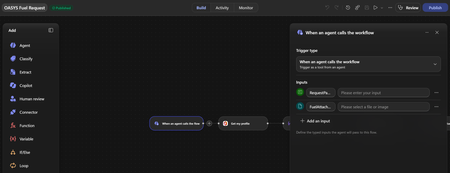
Copilot Studio Agent Tool Not Detecting File Input from Power Automate Flow
Hi everyone, I'm facing an issue with Copilot Studio and Power Automate Agent Flows. I created a flow using "When an agent calls the workflow" with the following inputs: RequestPayload (Text) AttachmentFiles (File) The flow saves successfully and the File input is visible in Power Automate. However, when I add the flow as a Tool in Copilot Studio, only the text input is detected: RequestPayload The File input (AttachmentFiles) does not appear in the Tool Inputs section. What I've tried: - Removed and re-added the tool - Refreshed the tool schema - Created a brand-new V2 flow - Changed the File input name multiple times (AttachmentFiles, UploadedFiles, FuelAttachments, etc.) - Saved and republished the agent - Removed and re-added the flow multiple times The result is always the same. Only the Text input is exposed in Copilot Studio. Additionally, if I manually try to add an input named "AttachmentFiles" in the Tool configuration, Copilot Studio returns: "There is an error: 'DuplicateItem'" This makes it seem like Copilot Studio recognizes the input internally, but it is not rendering or exposing it in the Tool UI. Questions: Are File/File Collection inputs currently supported for Agent Tools in Copilot Studio? Has anyone successfully passed uploaded files from an Agent to a Power Automate flow using Tool inputs? Is this a known limitation or a bug? Is there a recommended workaround for sending PDF/JPG attachments to a flow from an Agent? Any guidance would be greatly appreciated. Thank you.22Views0likes0Comments
Copilot Studio + SharePoint: Markdown (.md) Files in Doc Libraries Supported as Knowledge Sources?
Hi all, We’ve been doing some deeper testing with Copilot Studio agents grounded in SharePoint knowledge sources, and I’m hoping to clarify whether what we’re seeing is a known limitation or an undocumented gap. Scenario A Copilot Studio agent uses SharePoint document libraries as a knowledge source The library contains Markdown (.md) files that are intentionally used as canonical design references The same .md files: ✅ Work well when uploaded directly to the agent ❌ Are not retrievable or citable when stored in a SharePoint library and added as a SharePoint knowledge source To help with grounding, we created modern SharePoint index pages that: Explain what the markdown collections are (Patterns, ADRs, Guardrails) Link directly to the canonical folders and files Explicitly state that the .md files are the source of truth The agent can: Discover and summarize the index pages correctly Understand that .md artifacts exist and where they live But it cannot: Read the content of the individual .md files Apply a specific pattern or ADR from those files in a design conversation Cite them as sources, even when permissions and search indexing are confirmed What We’ve Checked Permissions (agent user has access) Folder depth (kept shallow) Search results (markdown files appear in SharePoint search) SharePoint indexing status Work IQ enabled Same content works when attached directly to the agent This behavior also seems consistent with what others have reported here: Markdown works when uploaded directly Markdown retrieval degrades when hosted in SharePoint libraries Questions for the Product Team / Community Are Markdown (.md) files in SharePoint document libraries officially supported as Copilot Studio knowledge sources today? If yes, are there specific constraints (file size, rendering, parsing, indexing) that differ from Word/PDF? If no (or “not yet”), is this a known limitation on the roadmap? Is the recommended pattern to: Convert important markdown files into .aspx pages, or Use thin “index / summary” pages and keep markdown canonical until retrieval improves? We’re happy to adapt our information architecture — just trying to align with the intended platform direction rather than work against it. Thanks in advance for any guidance or clarification. This capability is extremely powerful, and clearer expectations here would help a lot of teams make the right design tradeoffs.3.9KViews15likes9CommentsCopilot Studio Agent Unable to Retrieve Usable DOCX/XLSX Content from OneDrive (and SharePoint)
Hi everyone, I'm building a Copilot Studio agent that needs to read and process Word (.docx) and Excel (.xlsx) files stored in OneDrive. The agent can successfully locate files and retrieve metadata, but it appears unable to retrieve Office files as usable binary content. I tested the behaviour using the OneDrive Get file content action: A text file (test.txt) was returned correctly and matched the original file contents exactly. A Word file (Test.docx) was returned beginning with the ZIP signature PK and contained recognisable DOCX entries such as [Content_Types].xml and _rels/.rels. However, the returned payload also contained large numbers of Unicode replacement characters (�). The returned content appears to be a text string rather than binary data or base64 content. Because Office files are ZIP-based binary formats, the returned payload cannot be reconstructed into a valid .docx or .xlsx file, preventing downstream libraries such as python-docx and openpyxl from opening the file. Is there any way to resolve this issue?601Views1like6Comments
Issue on Copilot studio Credit Consumption
Hello Community, We are currently using a Copilot Studio license (€10/month plan) and have encountered an issue when using our agent. Although our organization still has a significant number of Copilot credits available, the agent displays the following error message: "You are out of credits." To verify the credit status, we checked the Power Platform Admin Center, where Copilot credit consumption is monitored. The current usage details are: Total credits purchased: 1,281,000 Credits consumed: 427,737 Remaining credits: Approximately 853,263 Based on these figures, we still have around 800,000+ credits remaining, yet the agent is unavailable due to the "out of credits" error. We would appreciate any guidance on the following: Why is the agent reporting that we are out of credits when a large credit balance remains? Are there any known limitations, allocation settings, or licensing requirements that could cause this behavior? Are there any troubleshooting steps we can perform to verify whether the credits are correctly assigned and available for use? Has anyone else experienced a similar issue, and if so, how was it resolved? Any guidance or recommendations would be greatly appreciated. Thank you.287Views0likes4Comments