copilot studio
45 TopicsThe Employee Self-Service agent - how to find it
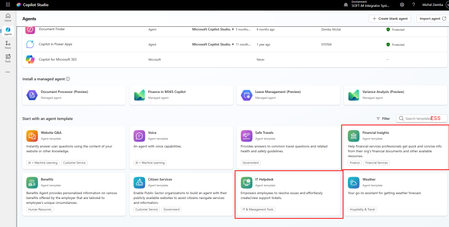
I see that Microsoft has put a lot of efforts to marketing the Copilot Employee Self-Service Agent but it seems it is not available for every tenant. I have already checked on several small and mid ones (5-2k users) and cannot find it in templates. As I understand from what I already red and saw, this is a template that should be available to you when you start building agents. Unfortunately when I enter Copilot Studio and enter in the search ESS (abbreviation from Employee Self-Service) I got only those two agents marked red filtered (see screenshot below). When I installed IT Helpdesk agent, I do not see topics related to HRSD in ServiceNow which I need. I found the Employee-Self-Service-Agent-Developer-Kit that contains same examples of the ServiceNow HRSD topics, but when I copy the YAML code of those topics to my agent I got some references to topics that I do not exists in my agents. Anyone has struggled with the same? Or maybe you have access to the Employee Self-Service agent and can share the basic solution/topics with me? Michal10Views0likes0Comments
New Agent experience - how to add Fabric data agent
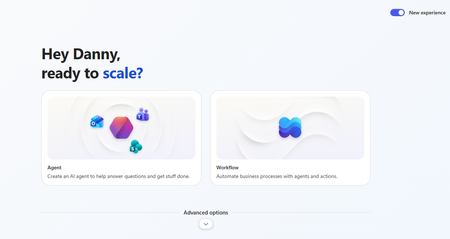
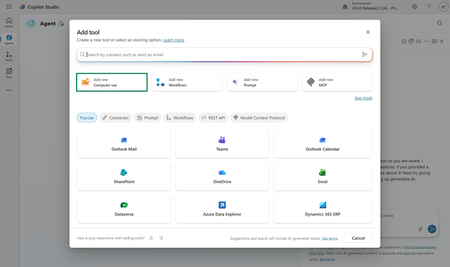
When using the new (Agent) experience in Copilot studio how can you add Fabric Data agent as connected agent ? There does not seem to be an option. Also should adding it as an MCP server be supported (under Tools) ? https://learn.microsoft.com/en-us/fabric/data-science/data-agent-mcp-server says the following: Currently, you can use the Fabric data agent MCP server only in VS Code. If you're using your own MCP client, it can also work, as long as you set up authentication Has anyone tried this? If yes, by using with authentication? OAuth2? Thanks45Views1like1CommentMicrosoft Power Platform community call - June 2026
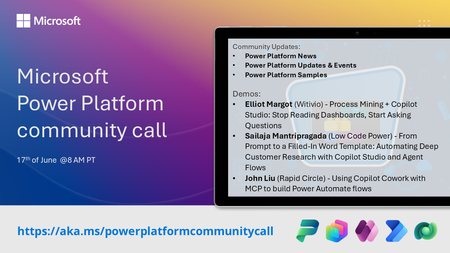
💡 Power Platform monthly community call focuses on different extensibility options for builders, makers and developers within the Power Platform. Typically demos are from our awesome community members who showcase the art of possible within the Power Platform capabilities. 👏 Looking to catch up on the latest news and updates, including cool community demos, this call is for you! 📅 On 17th of June we'll have following agenda: Power Platform Updates & Events Latest on Power Platform samples Elliot Margot (Witivio) - Process Mining + Copilot Studio: Stop Reading Dashboards, Start Asking Questions Sailaja Mantripragada (Low Code Power) - From Prompt to a Filled-In Word Template: Automating Deep Customer Research with Copilot Studio and Agent Flows John Liu (Rapid Circle) - Using Copilot Cowork with MCP to build Power Automate flows 📅 Download recurrent invite from https://aka.ms/powerplatformcommunitycall 📞 & 📺 Join the Microsoft Teams meeting live at https://aka.ms/PowerPlatformMonthlyCall 💡 Building something cool for Microsoft 365 or Power Platform (Copilot, SharePoint, Power Apps, etc)? We are always looking for presenters - Volunteer for a community call demo at https://aka.ms/community/request/demo 👋 See you in the call! 📖 Resources: Previous community call recordings and demos from the Microsoft 365 & Power Platform community YouTube channel at https://aka.ms/community/videos Microsoft 365 & Power Platform samples from Microsoft and community - https://aka.ms/community/samples Microsoft 365 & Power Platform community details - https://aka.ms/community/home93Views0likes1Comment
Copilot Studio + SharePoint: Markdown (.md) Files in Doc Libraries Supported as Knowledge Sources?
Hi all, We’ve been doing some deeper testing with Copilot Studio agents grounded in SharePoint knowledge sources, and I’m hoping to clarify whether what we’re seeing is a known limitation or an undocumented gap. Scenario A Copilot Studio agent uses SharePoint document libraries as a knowledge source The library contains Markdown (.md) files that are intentionally used as canonical design references The same .md files: ✅ Work well when uploaded directly to the agent ❌ Are not retrievable or citable when stored in a SharePoint library and added as a SharePoint knowledge source To help with grounding, we created modern SharePoint index pages that: Explain what the markdown collections are (Patterns, ADRs, Guardrails) Link directly to the canonical folders and files Explicitly state that the .md files are the source of truth The agent can: Discover and summarize the index pages correctly Understand that .md artifacts exist and where they live But it cannot: Read the content of the individual .md files Apply a specific pattern or ADR from those files in a design conversation Cite them as sources, even when permissions and search indexing are confirmed What We’ve Checked Permissions (agent user has access) Folder depth (kept shallow) Search results (markdown files appear in SharePoint search) SharePoint indexing status Work IQ enabled Same content works when attached directly to the agent This behavior also seems consistent with what others have reported here: Markdown works when uploaded directly Markdown retrieval degrades when hosted in SharePoint libraries Questions for the Product Team / Community Are Markdown (.md) files in SharePoint document libraries officially supported as Copilot Studio knowledge sources today? If yes, are there specific constraints (file size, rendering, parsing, indexing) that differ from Word/PDF? If no (or “not yet”), is this a known limitation on the roadmap? Is the recommended pattern to: Convert important markdown files into .aspx pages, or Use thin “index / summary” pages and keep markdown canonical until retrieval improves? We’re happy to adapt our information architecture — just trying to align with the intended platform direction rather than work against it. Thanks in advance for any guidance or clarification. This capability is extremely powerful, and clearer expectations here would help a lot of teams make the right design tradeoffs.766Views7likes3CommentsCopilot, Microsoft 365 & Power Platform Community call
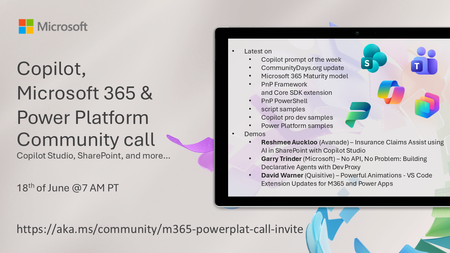
💡 Copilot, Microsoft 365 & Power Platform weekly community call focuses on different use cases and features within the Copilot, Microsoft 365 and Power Platform - across Microsoft 365 Copilot, Copilot Studio, SharePoint, Power Apps and more. 👏 Looking to catch up on the latest news and updates, including cool community demos, this call is for you! 📅 On 18th of June we'll have following agenda: Copilot prompt of the week CommunityDays.org update Microsoft 365 Maturity model Latest on PnP Framework and Core SDK extension Latest on PnP PowerShell Latest on script samples Latest Copilot pro dev samples Latest on Power Platform samples Picture time with the Together Mode! Reshmee Auckloo (Avanade) – Insurance Claims Assist using AI in SharePoint with Copilot Studio Garry Trinder (Microsoft) – No API, No Problem: Building Declarative Agents with Dev Proxy David Warner (Quisitive) – Powerful Animations - VS Code Extension Updates for M365 and Power Apps 📅 Download recurrent invite from https://aka.ms/community/m365-powerplat-dev-call-invite 📞 & 📺 Join the Microsoft Teams meeting live at https://aka.ms/community/m365-powerplat-dev-call-join 👋 See you in the call! 💡 Building something cool for Microsoft 365 or Power Platform (Copilot, SharePoint, Power Apps, etc)? We are always looking for presenters - Volunteer for a community call demo at https://aka.ms/community/request/demo 📖 Resources: Previous community call recordings and demos from the Microsoft Community Learning YouTube channel at https://aka.ms/community/youtube Microsoft 365 & Power Platform samples from Microsoft and community - https://aka.ms/community/samples Microsoft 365 & Power Platform community details - https://aka.ms/community/home 🧡 Sharing is caring!92Views1like0CommentsFile Uploads Not Passed to Custom Engine Agent in Microsoft 365 Copilot Chat
Hi all, I'm working with a custom agent built in Copilot Studio (full authoring experience — topics, knowledge sources, agent flows) published to both the Microsoft Teams channel and the Microsoft 365 channel. I've noticed a significant UX discrepancy when it comes to file and image attachments, and I want to confirm my understanding and check whether any workaround or roadmap item exists. What works: ✅ File/image uploads work as expected in the Copilot Studio test pane ✅ File/image uploads work in Teams chat when interacting with the agent What doesn't work: ❌ File/image uploads do not reach the agent when interacting via the Microsoft 365 Copilot app (both the desktop app and the web experience at microsoft365.com) The UX problem: The M365 Copilot app presents a "+" button in the chat input area with options including "Upload" and "Take screenshot." Users naturally assume these options work. The file even appears as an attachment in the sent message — but the agent never receives it. There's no warning, error, or indication to the user that the attachment was silently dropped. This creates a misleading experience, particularly for end users who have no visibility into the channel behavior differences. What I've found so far: I'm aware this is documented as a known issue for custom engine agents in the Microsoft 365 Copilot Extensibility Known Issues page: "File attachments — Users can't upload files in agent chats and the agent can't return files for download." I also found a related GitHub issue (OfficeDev/microsoft-365-agents-toolkit #15325) where a Microsoft team member confirmed this is a "Copilot platform shortage" — not an Agents Toolkit issue — with no published ETA. My questions for the community and any Microsoft product team members: Is there any currently supported workaround to enable file/image input for a Copilot Studio agent running in the M365 Copilot app (desktop or web)? For example, any manifest configuration, agent settings, or alternate approach? Is this limitation being actively worked on? Is there a roadmap item or Microsoft 365 feature ID that can be tracked for when file attachment support is extended to custom engine agents in the M365 Copilot chat experience? Is the UI behavior (showing upload options that don't work) being addressed separately? Even if full file processing isn't ready, a visible warning or disabled state in the UI would significantly reduce user confusion. Any insight from others who have hit this — or from Microsoft PMs — is appreciated. Happy to share more configuration details if helpful. Thanks! Brian122Views0likes0Comments
Copilot Studio Agent resetting when processing PDF drawings (300MB+) via Claude 4.6 Sonnet
Hello everyone, I am building an automated drawing review verification agent inside Copilot Studio using the Claude 4.6 Sonnet model. The goal of the agent is to read a comments package (20-40MB) and verify if those design comments were successfully incorporated into a milestone drawing set (300MB–400MB). When testing this workflow natively within Claude, the model handles the token load perfectly and returns an accurate compliance/incorporation summary within approximately 20 minutes. However, when running the exact same agent setup within Copilot Studio, the conversational canvas repeatedly crashes and resets the session. I suspect I am hitting the 100-second synchronous conversational timeout or overloading the chat runtime payload limits due to the massive file sizes. Because of corporate compliance policies, this agent must live within our Microsoft tenant so it can be scaled across our operations team via Microsoft 365. How can I fix Copilot Studio to have its performance match Claude's, as it is utilizing the same agent model. I am fairly new to working with AI but am willing explore any avenue as if I can figure out a solution this will help save a lot of time for colleagues. Thanks in advance for any insights!132Views0likes2Comments
Copilot Studio agent not visible in M365 mobile app without desktop access
Hi, I'm having an issue with a Copilot Studio agent not being discoverable in the Microsoft 365 mobile app for users without desktop access. **Setup:** - Agent created in Copilot Studio, published and shared with specific users - All users have the same Microsoft 365 Copilot license - Target channel is the Microsoft 365 app (not Teams) - The agent has been published to both the Teams and Microsoft 365 channels in Copilot Studio **The problem:** Users who have access to a desktop/browser can open the agent via a direct link, add it, and after that it appears correctly in the M365 mobile app. However, users who only have access to the M365 mobile app cannot find the agent there — even though it has been shared with them. **What I've tried:** - Verified the agent is published and shared directly with the affected users in Copilot Studio - Confirmed all users have the same license - Published the agent to both Teams and Microsoft 365 channels - Sending a direct link to the agent — works on desktop/browser but not actionable in the mobile app in a way that adds the agent - Logging out and back in to the M365 mobile app **What I'm looking for:** Is there a way for users to discover and add a shared Copilot Studio agent directly from the M365 mobile app, without needing desktop or browser access first? Any help or workarounds are appreciated!Solved90Views0likes3Comments