copilot studio
157 TopicsAre bigger agents better? How to design agents that scale
There is a moment every maker hits. An agent works, so you add another tool. Then another knowledge source. Then instructions for an exception that appeared last week or an entirely new use case you want your agent to be able to tackle. Each addition is useful on its own, and the agent can now do more. But "can do more" and "reliably does the right thing" are different properties. As an agent’s scope increases, the model has more choices to distinguish, more context to process, and more possible execution paths to manage. That doesn’t mean large agents are bad. It means that as capability grows, the challenge increasingly becomes a design problem. The key to scaling an agent isn't giving it more. It's being deliberate about what it sees, what it decides, and what it delegates. What changes as an agent grows The agent scaling challenge Consider a supplier-onboarding agent. The first version collects supplier details, checks that the request is complete, and starts an approval. Over time, makers add tools for ERP records, tax validation, sanctions screening, bank verification, contract storage, service tickets, email, and reporting. They add knowledge for regional policies and instructions for exceptions. Eventually, a request such as "Onboard our newest supplier" might present the agent with several supplier-search tools, multiple ways to create or update a record, and overlapping policy sources. The agent still has all the required capabilities, but choosing the right path is harder. The agent scaling challenge tends to show up in four places: Selection: Similar tool names and descriptions make the correct action harder to identify. Context: Tool definitions, instructions, knowledge, conversation history, and tool outputs all compete for a finite context window. Execution: More possible paths create more opportunities for unnecessary calls, retries, and inconsistent outcomes. Operations: A larger capability surface is harder to evaluate, secure, govern, and maintain. A recent post from Microsoft Research discusses one part of this problem: Tools that work well independently can reduce end-to-end performance when they compete in a large or overlapping set. Often, the problem isn’t one bad tool. It is the ambiguity between several reasonable ones. Figure 1: As a supplier-onboarding agent grows, overlapping tools, instructions, and knowledge compete for attention before the agent begins the task. More context comes with a cost There is also a direct cost associated with an expanding toolset. A tool consumes tokens even when it is never called because its name, description, and parameter schema are included in the context presented to the model. When it is called, its output becomes part of the agent's ongoing context. More context can mean more spend, as well as less reliable selection. The goal isn’t a smaller agent. It is a system where each decision sees only the context, authority, and capabilities it needs. Success is measured by business outcomes, reliability, cost, and control. What our harness can handle for you Good agent architecture doesn't mean solving every scaling challenge yourself. The GitHub Copilot harness in Copilot Studio is built to manage some of the complexity as an agent grows. Model improvements that don’t require agent redesign New models are made available through the GitHub Copilot harness as they release. As more advanced frontier models become available, teams can evaluate them against their scenarios and adopt improvements without redesigning the overall solution architecture. Model choice can also be an important factor in agent cost optimization, helping makers balance the number of tokens used against the capability needed to achieve a goal. Manage complexity natively with tool search The GitHub Copilot harness includes runtime capabilities designed for reasoning-heavy, multistep work. One example is tool search. When the available tool set becomes large, tool search can hold external tool definitions back and load the relevant ones on demand instead of placing every full schema in the model's context. For the supplier-onboarding request, this can narrow a large catalog to the tools associated with finding a supplier, validating its details, and starting onboarding. The model works with a smaller, better-matched set of choices while unrelated tool definitions remain out of the way. The harness can also plan across tools, skills, workflows, MCP servers, files, and connected agents, and adjust its path as work progresses. This all makes large, reasoning-heavy automations more practical. But runtime capabilities only solve part of the scaling challenge. How you divide responsibilities across tools, workflows, skills, and connected agents still matters. How to design agents that scale in Copilot Studio A scalable design starts by deciding which part of the system should own each responsibility. For instance: Use a tool for a bounded action or lookup with a clear input and output. Use a workflow when a sequence, approval, or business rule should execute consistently. Use a skill for specialized instructions that are only needed for a particular task. Use a connected agent when a domain has distinct context, ownership, or requirements. Use the main agent to coordinate outcomes, gather information, make judgments, and handle exceptions. These are not interchangeable building blocks. Each introduces different tradeoffs in context, flexibility, latency, cost, security, and maintenance. The goal is to use the simplest component that gives each responsibility a clear owner. 1. Make choices distinct Start with the choices already available to the agent. Give tools, knowledge sources, and connected agents specific names and descriptions that explain both what they do and when they should be used. Merge or remove duplicate capabilities. Avoid several general-purpose tools that all appear to answer the same intent. In the supplier example, "Search suppliers in ERP by legal name or tax ID" is easier to select correctly than a generic tool named "Search." If two tools search the same supplier records, expose one clear route rather than asking the model to choose between implementations. Tool search itself relies on names, descriptions, and parameter metadata to find relevant tools, so good metadata improves both discovery and final selection. 2. Load specialist guidance only when it is needed Some instructions are only relevant when an agent performs a particular task. Keeping all of them in the main agent instructions means they occupy context on every turn, even when they do not apply. Skills let makers package specialized instructions separately so the agent can load them when the task requires them. For example, regional supplier due-diligence guidance can be packaged as a skill and loaded for suppliers in that region, rather than remaining in the main instructions for every supplier request. The principle is the same as tool search: keep relevant context close and leave unrelated context out of the current decision. 3. Split on real boundaries When one agent contains several distinct domains, consider separating them. To clarify: Don't split an agent simply because it has grown large. Split where there is a meaningful boundary in context, ownership, security, or requirements. In the GitHub Copilot harness, connected agents let a primary agent delegate a bounded task to another Copilot Studio agent with its own instructions, knowledge, tools, and orchestration context. The supplier-onboarding agent could remain the front door while delegating: Compliance assessment to a compliance agent owned by the risk team. Supplier record creation to a finance operations agent with access to the ERP. Contract preparation to a legal operations agent with its own templates and policies. The primary agent now chooses between a few clearly described business capabilities instead of dozens of lower-level tools. Each specialist can be evaluated, secured, deployed, and improved independently. Copilot Studio also supports open agent architectures. Depending on the runtime and scenario, solutions can compose Copilot Studio agents or connect supported external agents through the Agent2Agent protocol. In the supplier scenario, a specialist due-diligence agent hosted outside Copilot Studio could sit behind the same clear boundary, rather than being rebuilt as a collection of tools. 4. Put fixed sequences in workflows Use the agent where the next step requires judgment. Use a workflow where the sequence, approval, or control must remain consistent. This helps preserve adaptability without making every part of the process probabilistic. For example, supplier onboarding might always require the same core sequence: validate required fields, check for an existing supplier, run mandated compliance checks, create the record, and route it for approval. A workflow can own that sequence. The agent can still decide when to start it, gather missing information, and handle exceptions. This reduces the number of low-level decisions the model must make and gives makers one place to enforce approvals, retries, and audit requirements. The supplier-onboarding agent, redesigned So let’s go back to the original agent in our example. It had one long instruction set, several knowledge sources, and dozens of tools. The redesigned system doesn’t eliminate that agent. It gives it a clearer job: coordinating the overall outcome while other components take on more specialized responsibilities. That gives us a system: The main supplier-onboarding agent understands the request, collects any needed details, delegates as needed, handles exceptions, and responds. Tool search limits the external tools loaded for the current request. Clear metadata separates supplier lookup, compliance, finance operations, and contract tasks. A workflow owns the fixed onboarding and approval sequence. Skills provide regional guidance only when the supplier's location requires it. Connected agents own compliance, ERP, and legal domains where those boundaries justify separate agents. The result is the same overall capability, but as a composed system with clearer responsibilities and less for any one decision to reason over. Evaluate for the outcome Each approach discussed above has limits. A stronger model cannot compensate for unclear instructions or overlapping tools. Tool search reduces what the model sees, but it does not create boundaries that have not been designed. Workflows and skills reduce what the main agent must reason over, but they add components to maintain. And connected agents can provide clearer ownership and security boundaries, but each handoff adds token use, another failure point, and more to govern. Designing agents that scale means managing all four components of the agent scaling challenge together: making selection easier with distinct choices and clear boundaries, controlling context with tool search and skills, making execution more predictable with workflows and deliberate delegation, and strengthening operations through components that can be evaluated, secured, governed, and improved independently. Agent scale is not a tool-count contest. Models, requirements, and available tools will keep changing, but these principles give you a more durable way to evolve an agent without letting added capability become added confusion. The goal is not the biggest agent; it is a composed system that reliably does the right work, at the right cost, with clear ownership.52Views0likes0Comments
Agent Credit Limits and Alerts - Copilot Studio
Hi everyone, We're evaluating the use of Agent Credit Limits and alert notifications in the Power Platform Admin Center as a way to control unexpected Copilot Credit consumption. Recently, we had an agent consume 668k Copilot Credits in just 3 days, which raised concerns about how quickly usage can grow before administrators become aware of it. My questions are: How frequently is Copilot Credit consumption evaluated against an agent's credit limit? Are alert notifications generated in near real-time, or are they dependent on the same reporting pipeline used by the consumption reports? If an agent reaches its configured credit limit, is it automatically turned off or blocked from further consumption? Given that consumption reports often appear to refresh hours later (or even the next day), can alerts also be delayed? If there is a reporting delay, is there a risk that an agent could significantly exceed the intended limit before administrators receive a notification? What is the recommended approach for preventing large unexpected consumption spikes in production? Has anyone successfully implemented a governance model that provides more immediate protection against runaway usage, or are the current credit limits and alerts primarily intended for retrospective monitoring? Thanks in advance for any guidance.61Views0likes1CommentCopilot Studio agent suddenly stopped working in Teams
Hello, I've run into a strange issue with a Copilot Studio agent and I'm trying to understand where to investigate next. The agent is published to the "Teams and Microsoft 365 Copilot" channel and was working normally in Microsoft Teams until recently. The agent still works correctly in Copilot Studio. The agent still works correctly in Microsoft 365 Copilot / Copilot Chat. The issue only occurs in Microsoft Teams. What happens in Teams: Messages can be sent to the agent. No error message is displayed. No response is returned. Most importantly, no session is created in Copilot Studio (Analytics / Observability). Because no session is created, it looks like the message never reaches the agent runtime. What I've already checked: Republished the agent. Reinstalled the Teams app. Verified the Teams and Microsoft 365 Copilot channel configuration. Checked permissions and sharing settings. Checked Teams Admin Center configuration. Tested in both Teams Desktop and Teams Web. Reviewed Microsoft 365 service health. This same tenant has another Copilot Studio agent that works normally in Teams. The affected agent previously worked in Teams for several weeks before the issue appeared. The agent architecture is very simple (single MCP server, no custom connectors, no Power Automate involved in this scenario). At this point, I'm mainly trying to understand why Teams no longer seems to create a conversation/session for this specific agent while the same agent continues to work in Copilot Studio and Microsoft 365 Copilot. Has anyone seen similar behavior or found a way to diagnose why Teams is no longer forwarding requests to a specific agent ? Thank you for help670Views3likes3CommentsBuild Automated Agents, Workflows, and Apps - New in Copilot Studio
Describe the agent you need and generate its instructions and reusable skills, choose the model, connect MCP tools and specialist agents, then test its quality at scale with Evaluations. Trigger workflows from incoming email, classify submissions, hand work to your agents, and pause for human review on the decisions that need it. Track timing and paths for every step in the Activity tab. Then generate a full stack app on your Dataverse data so your team can filter, review, and approve every bid from one shared view. Jack Rowbotham, Copilot Studio Senior Product Manager, shares how to automate a procurement process for bids from multiple vendors, using agents that reason, route, and recommend. Describe the agent you need. Copilot Studio helps build it. See how it turns the requirements you provide into an agent, mapping out the instructions and creating reusable skills along the way. Start here. Test, refine, repeat. Run structured test sets with Evaluations in Copilot Studio, import your own test cases or generate them with AI, and compare results as you improve your agent. See how it works. Agents provide reasoning. Workflows provide consistency. Apps provide structure. Bring all three together in Copilot Studio to build end-to-end business solutions. Check it out. 👥 Who it’s for: IT admins, Power Platform makers, solution architects, and developers building agentic solutions, plus operations and procurement teams automating reviews and approvals. ⏱️ Chapters: 00:00 Build agents, workflows, and apps in one place 01:04 Automate a multi-vendor bid review end to end 02:18 Build an agent from a prompt 03:28 Add models, MCP tools, and specialist agents 04:13 Test the bid agent in Preview 05:05 Evaluations 05:59 Automated workflows 07:42 Track every run in the Activity tab 08:13 Build an app from a prompt 09:10 Approve bids from the team app 09:37 Get started with Copilot Studio Copilot Studio brings agents, workflows, and apps together in one place, all running on the GitHub Copilot harness. In this video, a supplier email triggers a workflow, a bid evaluation agent checks the bid against tender requirements, and the procurement team makes the final call in a shared app. Describe the agent you want, including the requirements to assess, the logic to apply, and the live data source to connect to. Copilot Studio reasons over your prompt, maps out its build steps, and generates the agent’s name, instructions, and skills for requirement coverage and evidence verification. Connect Work IQ for supplier emails and the Dataverse MCP server for bid data, keep Claude Sonnet as the reasoning model, ground the agent in an RFP example PDF, and add a Supplier Risk specialist agent. Test the agent in the Preview tab and watch its chain of thought as it flags gaps in certification, cold-chain handling, and insurance minimums. Then run Evaluations with your own conversations, auto-generated tests, or a CSV file. Here, 18 test cases met the evaluation criteria 89% of the time. In the Workflows tab, drag in an Outlook “When a new email arrives” trigger, a Classify step for RFP submissions, a Get Attachment connector, and an Agent step running the Bid Evaluation Agent. An if/else Human Review step brings in a person on flagged bids, and the Researcher agent and a recommendation agent finish the job before results land in Dataverse. Finish in Apps by describing a Bid Management App connected to your Dataverse table, or to sources like SharePoint through connectors. Apply company branding with a follow-up prompt, then filter bids that need human review and approve decisions from the app. Try it for yourself at copilotstudio.microsoft.com. Subscribe to Microsoft Mechanics for more videos like this. 🔗 Related links: — Get started with Copilot Studio: https://copilotstudio.microsoft.com Unfamiliar with Microsoft Mechanics? Microsoft’s Official Video Series for IT — Subscribe: https://www.youtube.com/c/MicrosoftMechanicsSeries — Microsoft Tech Community: https://techcommunity.microsoft.com/t5/microsoft-mechanics-blog/bg-p/MicrosoftMechanicsBlog — Podcast: https://microsoftmechanics.libsyn.com/podcast Join us on social: — https://twitter.com/MSFTMechanics — https://www.linkedin.com/company/microsoft-mechanics/ — https://www.instagram.com/msftmechanics/ — https://www.tiktok.com/@msftmechanics Video Transcript: -If you want to build agents that go beyond the standard chat interface that can work autonomously following your defined workflows, connecting to other agents and tools, and presenting information with new interactive app experiences, today, I’ll show you how Copilot Studio helps you do just that and more, and it’s even easier than you may think. Copilot Studio gives you what you need to build end-to-end solutions with agents, workflows, and apps in one place, without having to write a single line of code. You can build individual agents with your chosen model, expert skills, tools, including prebuilt connectors, APIs, and MCPs to your existing systems, as well as incorporating specialized knowledge, other agents, and memory, all now using the powerful GitHub Copilot harness under the covers. -You can integrate them with your defined multi-step workflows, which provide the correct path for consistency, and bring in other skilled agents or people as needed. And finally, build full-stack app experiences using natural language, so you can describe what you want and let AI generate the app for you. Now, to make this real, I’ll walk you through an agentic solution that accepts and reviews work bids from multiple vendors and then routes them for human approval. -Here’s what the process looks like in Copilot Studio. First, a supplier email arrives and automatically triggers a workflow. The workflow classifies the submission, retrieves the supporting documents, and passes everything to the bid evaluation agent. That agent then reviews the bid against the tender requirements, validates the evidence, and identifies any potential issues. If a decision requires human judgment, the workflow pauses and brings in the appropriate reviewer. A Microsoft Copilot Researcher agent can then gather the additional context and the recommendation agent then combines the findings into a final recommendation. It then passes status information to a data source connected to our app frontend, and this app will give the procurement team a shared place to track every bid, review those exceptions, and make decisions to move work forward. So, the workflow lays out all of the steps, the decisions, agent handoffs, and outcomes. -And in the next few minutes, I’ll retrace the simple steps to creating this agentic solution. We have multiple agents working together, so I’ll start by building our bid evaluation agent, which is our primary reasoning engine for this process. I’m in Copilot Studio, and all I need to do is describe the agent I want to build. -So here, I’ll tell it to create a Bid Evaluation Agent for the procurement team. Then I’ll tell it how to assess the bidding requirements, the logic it needs to incorporate, and even the live data source it needs to connect to. It needs to evaluate the request for proposal sent via email and then compare supplier responses against the requirements, and even provide a pass or fail verdict and a final recommendation. -So I’ll submit my detailed prompt and let it get to work. And you can see that it’s reasoning over everything I’ve asked it to do. It then maps out the process it will take through the steps you can see in the upper right. It looks over the information I pointed it to, and starts building out the agent. It’s also automatically creating skills as reusable instructions in this case so that the requirement coverage and the evidence verification will stay consistent. And these skills can also be reused across other agents or your teams in the future. -Now, with this agent complete, let’s look at what it’s created. We can see that it’s generated an agent name and detailed instructions automatically. And here, you can see the two skills that were added, where you can also upload your own skills or even create more with AI by simply describing what you want. It’s connected to tools already like Work IQ in this case for the Supplier Submission Emails and the Dataverse MCP with our Procurement and Bid Data to take action. -Here, too, you can also add more tools, like MCPs for both Microsoft and non-Microsoft data and services. And I can choose the model that best fits the task. In this case, I’ll keep Claude Sonnet as a good reasoning model. I can ground it in the knowledge across different online services. For this agent, I want to give it an RFP example, and I can even drag in the files from my local device like this PDF and attach that to the agent. -Additionally, I can bring in specialist agents for additional expertise, like this one for assessing Supplier Risk, which I’ll connect to now. I also have the option to maintain memory throughout an interaction and use that in future sessions. So, now, I’ve created my main agent. I’m ready to test it out in Copilot Studio. This time, starting from the agent’s Preview tab, I have an example email in my clipboard that I’m going to paste in and manually attach the work bid. -From there, I just need to submit it to trigger the evaluation process. We can see that the agent evaluates each requirement, reviews the supporting evidence, and identifies the gaps. We can even watch the chain-of-thought, and in this case, it flags that the supplier does not have the sufficient certification for medicine manufacturing. It also doesn’t meet the requirements for cold-chain handling. And its insurance does not meet the minimum requirements. Agentic processes like this one can take several minutes to complete, so to save a little time, I’ll skip ahead to the Final Recommendation. You’ll see that it recommends a human review and not to shortlist the supplier until it addresses the issues that I mentioned before, and it provides the specific details about this recommendation in the summary. -So, that was the result of a single preview run, and we can also test the agent quality at scale using Evaluations in Copilot Studio. Instead of spot-checking, I can now run structured tests against the agent and measure the performance over time. You can bring in your own conversations as test cases or use Copilot Studio to automatically generate 10 tests based on how you’ve built the agent. In this case, I’ve got the test cases ready, and I’ll simply pull them in as a CSV file. You see that this one contains 18 test cases containing sample requests. -Now, I’ll just give this evaluation a name, and then start it. Then it will run those and evaluate the general quality of the responses. They run sequentially, and you can click into each of them for details after they run. In reality, these 18 tests took just over 22 minutes to run, so I’ll jump straight into the results. You’ll see that these evaluations met our criteria 89% of the time. And scrolling down the individual test results, you can also see the outcome for each. -Now, with our agent working, I’ll create the automated workflow that does the work before and after the agent. I’m back in Copilot Studio in the Workflows tab, and adding steps is as easy as dragging in and dropping what you want onto the canvas. By default, the start trigger is set to Manual, but I want to change this process to trigger off an incoming email instead, so I’ll change the trigger type to Connector, then choose Outlook, and then When a new email arrives. This is set to an individual email account, but it could be a dedicated RFP intake account along with other parameters. -Then I’ll add a Classify step to evaluate the nature of the email using its subject and message body. I’ll just enter one here for RFP, but I can define multiple categories as well. At that point for the RFP path, I’ll add another step to get the attachment itself, where I’ll use the Connector again as the type and search for Get Attachment, and there it is. The attachment will be used as it processes the subsequent steps. That’s where our Bidding Evaluation Agent comes in to analyze the email attachment with the bid. -And so I’ll add an Agent step, then using the dropdown, I’ll choose the Bid Evaluation Agent that we just built. And from there, you’ll continue this process for all the branches of the workflow until it’s complete. I’ve added the rest of the steps to save a little bit of time. And you can see that I have a Human Review step added with an if/else decision. The agent can request human review when it flags that a bid needs attention from a person on the team before moving forward. Otherwise, it will proceed directly to the Researcher agent to gather additional information on the bid and bidder. -From there, it goes to the last agent in our workflow, which consumes all of the information from the previous steps, then assesses the bid and makes that final recommendation. It then creates a record as a new row in Dataverse, our backend data source for the process. Each step can be tested independently, making it easy to troubleshoot and iterate. -Now, to test this out, I’ve already started sending emails with attached bids, and we can see the results for each run. From the Activity tab in my workflow, you can see the timing per step and the path taken for an incoming RFP email. Clicking into any step will show its details, and here for our agent, we can see what it did along with its structured output. Looks like this one needed a human review. And once the reviewer took action, the process continued until the final recommendation was posted in Dataverse. Everything we’ve looked at so far runs as an automated process behind the scenes. That said, an app is where the people can view and find the details for each bid. Let’s build that. This time from Copilot Studio, I’ll start in Apps. Using natural language, I just need to describe the experience I want. -In this case, I want a Bid Management App to oversee multiple bids as they’re processed so that the team can track each bid with its details. I’m asking it to connect to my Dataverse table, and I could connect it to other data locations and types like SharePoint using connectors. Below that, you’ll see that I’ve described the app screens I wanted to make. And I’ll kick this off. This is another long-running process that can take several minutes, so I’ll skip ahead to the first iteration of my app. It’s already looking pretty good, a nice summary tiles at the top and the details per bid. I can use the additional prompts to refine the app, for example, updating it to my company branding. And in just a few moments, it applies the visual branding to match our company apps, and it’s ready to be tested. -In fact, I can switch over to the experience that the other people on the procurement team would see and use. I have a complete view of the Bid Queue, like we saw in the preview with the suppliers, the status, and the recommendation. I can easily filter down to the bids that need human review. And clicking into any one of these bids shows additional details and the actions I can take. From here, I can make a decision and decide whether to Approve, which I’ll do in this case. And then save to confirm. And everything is working end to end. -So, that’s agents, workflows, and apps working together in Copilot Studio. To get started, head to copilotstudio.microsoft.com and keep watching Microsoft Mechanics for the latest tech updates. Thanks for watching.413Views0likes0Comments
Credits usage for Copilot Studio Workflow with agents
If I add an agent(for research and analyze from the JSON provided) in Copilot studio recurring workflow, whose and which credits will be used whenever it runs? Hi Team, I have a question regarding licensing and credit consumption in Copilot Studio. I have created a Copilot Studio agent that performs research and analysis based on a JSON payload. I am planning to invoke this agent from within a Copilot Studio recurring workflow that runs on a schedule. Could you please clarify the following: When the recurring workflow executes and calls the agent, whose credits are consumed? The user who created the workflow? The owner of the agent? The account under which the workflow runs? The environment's pooled credits? Are there separate credit charges for: Workflow execution Agent invocation Generative AI/research actions performed by the agent Any guidance or documentation links explaining the credit consumption model for this scenario would be greatly appreciated. Thank you!54Views0likes0CommentsBest practice for Copilot Studio agents and SharePoint libraries with unique permissions?
We recently ran into an issue where a Copilot Studio agent was unable to retrieve content from SharePoint libraries that have unique permissions and nested folder structures. Users with elevated permissions were able to retrieve results, while users with read-only/visitor access could not, even though they had access to the underlying documents. We've observed similar behavior across multiple agents and suspect the library's unique permission structure is impacting indexing or content retrieval. For organizations that use SharePoint libraries with extensive unique permissions, nested folders, and restricted access models: What is the recommended approach when using these libraries as knowledge sources for Copilot Studio agents? Are there known limitations or best practices regarding unique permissions and nested folders? Is it better to simplify permissions, create dedicated access groups, flatten the folder structure, or maintain separate agent-specific content locations? How are others balancing security requirements with reliable agent retrieval? We'd appreciate any guidance, best practices, or lessons learned from similar implementations.181Views0likes2Comments
Confidential messages in Copilot Studio
Hello everyone, I have an agent built in Copilot Studio that uses SharePoint Lists as knowledge sources. When I access the "Monitor" section, I can view the engagement metrics. Under "User questions", I noticed that some questions were not answered by the agent. When I try to view more details about these interactions, I encounter the situation shown in the attached image. Copilot Studio does not allow me to view the response provided by the agent to the user. Instead, the response is displayed as "The agent's response is hidden due to sensitive content." Why is the agent's response displayed as "Confidential"? Is there any configuration or permission that I need to change in order to view these responses? Is there another way to access the complete interaction history, including the user's question and the response generated by the agent? I need to analyze the responses provided by the agent to users in order to understand why some questions are not being answered correctly. Has anyone experienced this issue or knows how to resolve it? Thank you in advance for your help!20Views0likes0CommentsConfidential messages in Copilot Studio
Hello everyone, I have an agent built in Copilot Studio that uses SharePoint Lists as knowledge sources. When I access the "Monitor" section, I can view engagement metrics. Under "User questions", I noticed that some questions were not answered by the agent. When I try to view more details about these interactions, I see the situation shown in the attached image. Copilot Studio does not allow me to view the response provided by the agent to the user. Instead, the response is displayed as "Confidential". Why is the agent's response displayed as "Confidential"? Is there any configuration or permission that I need to change in order to view these responses? Is there another way to access the complete interaction history, including the user's question and the response generated by the agent? I need to review what the agent actually responded to users so that I can understand why some questions are not being answered correctly. Has anyone experienced this issue or knows how to resolve it? Thank you in advance for your help!16Views0likes0Comments
Copilot Studio Agent Tool Not Detecting File Input from Power Automate Flow
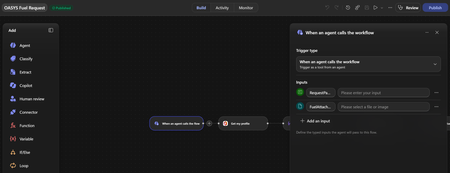
Hi everyone, I'm facing an issue with Copilot Studio and Power Automate Agent Flows. I created a flow using "When an agent calls the workflow" with the following inputs: RequestPayload (Text) AttachmentFiles (File) The flow saves successfully and the File input is visible in Power Automate. However, when I add the flow as a Tool in Copilot Studio, only the text input is detected: RequestPayload The File input (AttachmentFiles) does not appear in the Tool Inputs section. What I've tried: - Removed and re-added the tool - Refreshed the tool schema - Created a brand-new V2 flow - Changed the File input name multiple times (AttachmentFiles, UploadedFiles, FuelAttachments, etc.) - Saved and republished the agent - Removed and re-added the flow multiple times The result is always the same. Only the Text input is exposed in Copilot Studio. Additionally, if I manually try to add an input named "AttachmentFiles" in the Tool configuration, Copilot Studio returns: "There is an error: 'DuplicateItem'" This makes it seem like Copilot Studio recognizes the input internally, but it is not rendering or exposing it in the Tool UI. Questions: Are File/File Collection inputs currently supported for Agent Tools in Copilot Studio? Has anyone successfully passed uploaded files from an Agent to a Power Automate flow using Tool inputs? Is this a known limitation or a bug? Is there a recommended workaround for sending PDF/JPG attachments to a flow from an Agent? Any guidance would be greatly appreciated. Thank you.22Views0likes0Comments