security
11 Topics
Agent Credit Limits and Alerts - Copilot Studio
Hi everyone, We're evaluating the use of Agent Credit Limits and alert notifications in the Power Platform Admin Center as a way to control unexpected Copilot Credit consumption. Recently, we had an agent consume 668k Copilot Credits in just 3 days, which raised concerns about how quickly usage can grow before administrators become aware of it. My questions are: How frequently is Copilot Credit consumption evaluated against an agent's credit limit? Are alert notifications generated in near real-time, or are they dependent on the same reporting pipeline used by the consumption reports? If an agent reaches its configured credit limit, is it automatically turned off or blocked from further consumption? Given that consumption reports often appear to refresh hours later (or even the next day), can alerts also be delayed? If there is a reporting delay, is there a risk that an agent could significantly exceed the intended limit before administrators receive a notification? What is the recommended approach for preventing large unexpected consumption spikes in production? Has anyone successfully implemented a governance model that provides more immediate protection against runaway usage, or are the current credit limits and alerts primarily intended for retrospective monitoring? Thanks in advance for any guidance.20Views0likes0CommentsBest practice for Copilot Studio agents and SharePoint libraries with unique permissions?
We recently ran into an issue where a Copilot Studio agent was unable to retrieve content from SharePoint libraries that have unique permissions and nested folder structures. Users with elevated permissions were able to retrieve results, while users with read-only/visitor access could not, even though they had access to the underlying documents. We've observed similar behavior across multiple agents and suspect the library's unique permission structure is impacting indexing or content retrieval. For organizations that use SharePoint libraries with extensive unique permissions, nested folders, and restricted access models: What is the recommended approach when using these libraries as knowledge sources for Copilot Studio agents? Are there known limitations or best practices regarding unique permissions and nested folders? Is it better to simplify permissions, create dedicated access groups, flatten the folder structure, or maintain separate agent-specific content locations? How are others balancing security requirements with reliable agent retrieval? We'd appreciate any guidance, best practices, or lessons learned from similar implementations.156Views0likes2Commentshow to create a globally Shared ServiceNow Connector Connection in Copilot Studio
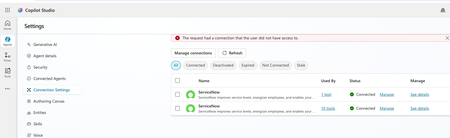
Hello, I have configured Microsoft entra ID oauth using certificate and shared this connection with everyone in my company since this is the only shared connection on the platform. https://learn.microsoft.com/en-us/connectors/service-now/#microsoft-entra-id-oauth-using-certificate. But, whey user's ( end users, agent maker, environment maker basically any user in copilot environment) are trying to use any servicenow tools ( e.g create record) which is using this shared connection in copilot studio/ teams, they are getting below error. https://learn.microsoft.com/en-us/connectors/service-now/ How to create a shared connection which can be shared across all enterprise users in my org for copilot AI agents which are using servicenow connector? Regards, Sachin89Views0likes0Comments
How to Integrate Copilot Studio Agent with a Website Using API?
Hello Team, I have created a Copilot Agent using Copilot Studio and published it on our public website using an iframe. Currently, the agent does not have any authentication configured because we want it to be publicly accessible. However, our website development team has raised a security concern with this approach, as embedding the Copilot Agent directly using an iframe may not be the most secure or recommended approach. We are looking for an alternative integration approach. For example: Is it possible to expose the Copilot Studio Agent through an API or another secure endpoint? Can our website development team call the agent through an API, receive the response, and build their own custom UI instead of embedding the agent using an iframe? Is there any recommended architecture or Microsoft-supported approach for securely integrating a Copilot Studio Agent with a public-facing website? If anyone has implemented a similar solution or has any recommendations, I would appreciate your suggestions.425Views0likes1Comment
Copilot Studio Agent Shows Usage Limit Error Despite Low Credit Usage
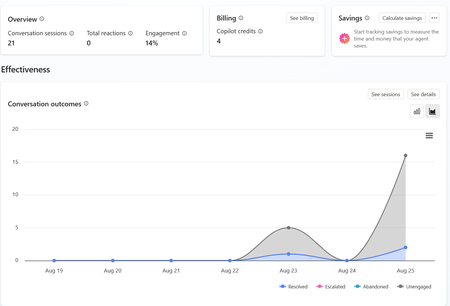
a { text-decoration: none; color: #464feb; } tr th, tr td { border: 1px solid #e6e6e6; } tr th { background-color: #f5f5f5; } Hi everyone, We are experiencing an issue with a Copilot Studio agent and would appreciate any guidance from the community. Scenario: The agent works correctly in the Copilot Studio test environment and responds as expected. However, after integrating the same agent into our web application, users receive the following error: "This agent is currently unavailable. It has reached its usage limit. Please try again later." Additional Information: In Copilot Studio Usage Monitoring, we can only see approximately 4 credits consumed. Based on the reported consumption, we would not expect a usage limit to have been reached. The issue occurs only when accessing the agent through the web application. The Copilot Studio test interface continues to work normally. Questions: Has anyone experienced a similar issue? Could this be related to licensing, capacity allocation, authentication, or channel configuration? Is there any difference in credit consumption or capacity enforcement between the Copilot Studio test environment and embedded web channels? Are there additional monitoring locations where we can verify the actual credit usage and capacity status? Any insights or recommendations would be greatly appreciated.372Views0likes1Comment
Minimum Environment Permissions (Security Roles) for Copilot Studio Agent in Teams?
Hi Copilot Studio Community! I’m facing a strange permissions (Security Roles) challenge when sharing an Agent with users on Teams, and I’m looking for the best practice to determine the minimum required privileges. The Scenario: I built an Agent grounded in a SharePoint Knowledge Base. The end-users currently have: - Read access to the SharePoint Document Libraries. - View-only access to the Agent when shared from Copilot Studio. - No permissions at the Environment level in Dataverse. The Issue: When I share the Agent link on Teams, users add it successfully. However, when they ask a question, the Agent immediately triggers the Fallback Topic (acting as if it has no information to pull from or can't access SharePoint). The Strange Behavior (Workaround): I discovered that if I temporarily grant the user the following high privileges: 1. Environment Maker role. 2. Bot roles (Bot Contributor, Bot Transcript Viewer, Bot Viewer). 3. Editor permission on the Agent. Then, if the user tests a question inside the Copilot Studio canvas, it answers correctly. After that, if they test it in Teams, it works perfectly there too! The weirdest part: if I immediately revoke all these high privileges (returning the user to a simple Viewer with no Environment Access), the Agent continues to work normally for them in Teams and fetches answers from SharePoint without any issues! My Question to the Experts: 1. Since I don't want (and for security reasons, shouldn't) grant end-users roles like Maker or Editor, what are the exact minimum basic permissions (Security Roles) at the Environment/Dataverse level (e.g., Basic User) that a user must have just to chat with the Agent in Teams successfully from the first try? 2. Is there a technical explanation for why the Agent keeps working in Teams after revoking the permissions? Is it just Token Caching, or is there something else at play? I would highly appreciate your insights!396Views0likes1CommentUpdate: Root Cause Identified
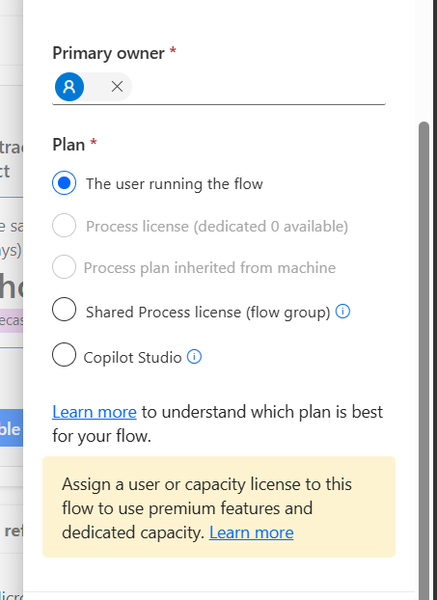
Hi everyone, I would like to share the root cause and solution in case someone else encounters the same issue. The Problem I created several agent flows directly in Power Automate using: https://make.powerautomate.com The flows were configured correctly: The flow starts with When an agent calls the flow The flow ends with Respond to the agent The flow and agent are in the same environment The flow is included in a solution The flow is published and fully functional The flows could be added to an agent and executed successfully. However, unlike flows created directly from Copilot Studio, they did not appear in the Global Tools directory. What I Investigated I verified: Trigger configuration Respond to the agent action Environment consistency Solution membership Publish all customizations Asynchronous response settings Synchronization delays between Power Automate and Copilot Studio None of these were the root cause. Root Cause The issue was related to the workflow Plan. I discovered that: Flows created directly in Power Automate were assigned: Plan = The user running the flow Flows created directly in Copilot Studio were assigned: Plan = Copilot Studio Although the Power Automate flow was fully functional and could be used by the agent, it was not visible in the Global Tools directory. Solution After changing the workflow Plan to: Plan = Copilot Studio the flow immediately appeared in the Global Tools directory. Configuration Location The setting can be found in the workflow properties under: Primary owner → Plan Important Note Based on my testing, changing the Plan to Copilot Studio appears to be a one-way operation and may not be reversible. It may be a good idea to export or save the flow before making the change. Acknowledgements Special thanks to sohnash for reproducing the scenario and providing troubleshooting suggestions, and to Patty_Velasquez for sharing similar observations that helped confirm the behavior. Hopefully this helps others who encounter the same issue. Best regards, Adhonaï KOUKA166Views1like0Comments
Deterministic way to mark generative answer output as AI-generated - AI Act
Hi all, We have a text-based RAG agent in Copilot Studio using the Azure AI Search connector as the knowledge source. It's customer-facing. We need every generated turn to carry a machine-readable marker identifying it as AI-generated, not just a visible disclaimer line. Instructing the model to append something isn't acceptable for us, because it's non-deterministic and can be prompt-injected away. Has anyone found a cleaner pattern? Like how to do it?45Views0likes0CommentsToken Limit Exceeded? What's Actually Going On and What to Do About It ?
Hi All, Please check out my latest blog on “Token Limit Exceeded” would love to hear your thoughts https://techcommunity.microsoft.com/blog/1c769f9e-c0b0-45a7-af52-fecceca10bb2/token-limit-exceeded-whats-actually-going-on-and-what-to-do-about-it-/4536271284Views0likes0CommentsYou don't have access to talk to this bot, contact the owner. copilot studio
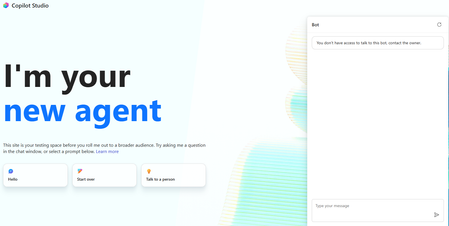
I created a copilot studio agent and then embedded it inside a code app. It works fine but i am facing the below error. You don't have access to talk to this bot, contact the owner. copilot studio I have provided Microsoft based authentication and am an owner so will have access to the bot. Yet facing the above issue. Is there something i am missing797Views0likes2Comments