Forum Widgets
Latest Discussions

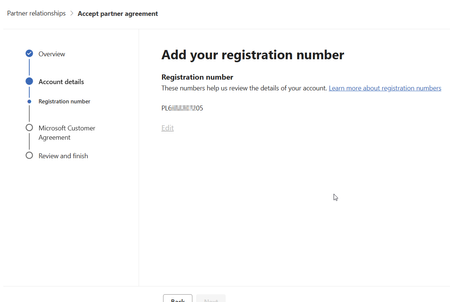
Cannot finish registration. Stuck on adding registration number.
Hello, I got stuck, when I added the registration number. It's there, but the "next" button is greyed out as well as the "edit" link. Using this url to start: https://admin.cloud.microsoft/?invType=ResellerRelationship&partnerId=xxxxxxxx&msppId=0#/partners/invitation. Please help :)SolvedMarcinMusiolJun 26, 2026Copper Contributor125Views0likes2Comments
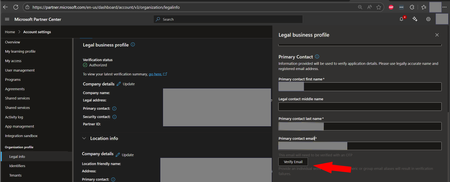
Trouble receiving OTP emails from Microsoft Partner Center
Hello! When clicking the Verify Email button in the location below, the primary contact email is not receiving the OTP verification email. I'm on my 6th Partner Center support ticket attempting to determine out why I am not receiving these emails. Partner center support is quick to help me verify the account manually, but I would really like to see the automated system working as intended to help future partners avoid running into this same issue. Could someone help me track down the email address these messages are coming from? Thanks! -jon For reference, the first few tickets I opened under the following workspace/topic, but the assigned engineers say "you picked the wrong topic try again." Workspace: Account Settings Topic: Account verification > E-mail ownership I ask what set of options I should pick to get my ticket routed to the right team, but I haven't located someone that can answer that question either. I've started choosing a random workspace and topic in the hopes that I get lucky. I don't think this strategy is going to work very well, but the partner center support team haven't suggested a better approach and I'm out of ideas. Maybe if I open enough tickets, someone on the partner center support team will notice and help me out.Solvedjonwbstr24Apr 21, 2026Iron Contributor591Views1like18CommentsRenewals process - issues
Hi Is it only me? I have tried to let Microsoft be aware of this for the last 7 years now.... Upon renewal of the partnership, the partner temporarily loses its Solution Partner status! A status always used by customers in tenders and RFPs (the responding partner must hold x,x and x Solution Partner) How the renewal process still affects partners +2 weeks after renewal: We get information on how to pay on the anniversary date - for us Saturday March 7 (payment term = 1 month) One can´t pay in advance before this date! With the information provided we initiate the payment Monday March 9, and get the verification proof from the bank on March 10. March 10 we then provide the POE in Partner Center Already at the anniversary day (the 9th), the "Customer Letter" we can create in Partner Center AND our Business Profile has the Solution Partner "taken away" for us, and we "don´t have the programs" that we need to provide to clients. The business profile in Partner Locator is crucial - we link it to clients and prospects! Microsoft then takes until Friday March 13 to verify the payment and "enroll" us again So we have not had the programs for a week, and partner CAN`T hold the programs in a rolling 12M? There´s always a glitch in the timeframe - much more problematic then Microsoft Support in India "understands". I have pinpointed this every year for the last 7 years - nothing happens And - our business profile is STILL empty! +2 weeks after the renewal window started and we did the payment. This has happened every year now - no change! Support ticket 2603180040005878!SolvedGabbe_YttermalmMar 23, 2026Brass Contributor132Views0likes3CommentsWhere is the MEMBERSHIP tab in Partner Center
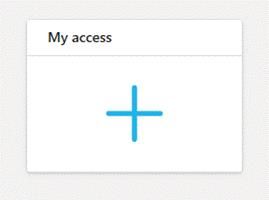
I was on a call with a partner and noticed they didn't have the MEMBERSHIP tab in their partner center. After looking around and not seeing why, I checked my org PC and didn't see it in ours either. Fast forward 2 additional partner calls and no MEMBERSHIP tab on theirs either. Can someone at Microsoft advise why it's not visible? I was able to troubleshoot and find a workaround, but other partners may be having issues as well. This is happening with my partners in the U.S. and U.K. as well. If anyone wants a workaround to get to the MEMBERSHIP menu items, below is what I've been sharing with partners. The MEMBERSHIP TAB in the Microsoft Partner Center has gone missing. However, if you need to access the MEMBERSHIP TAB, I was able to figure out a workaround until Microsoft fixes that bug. To get to the MEMBERSHIP menu items, click on the “My Access” Tab. Click on the “My Learning Profile” from the left menu. You should now have the MEMBERSHIP menu available. This is a work around until Microsoft fixes that bug. Screenshots below😊SolvedLiz_Nunez1030Mar 11, 2026Copper Contributor229Views0likes3Comments
Partnership Application Process
I have submitted my application to become a Partner. I have been in a status - pending for 6 days now and it seems that the process is stalled. Are there any other users experiencing this situation? Any feedback would be appreciated.SolveddsteveFeb 20, 2026Copper Contributor230Views0likes6Comments715-xxxxxx code when assigning SPD Developer and Azure benefits
Hi all! We recently renewed our Solutions Partner Designation which includes some cloud licenses, developer (visual studio) licenses and azure credits. From the partner center we did not have any issues adding the cloud licenses. However, both the developer and azure benefits are giving us the following error when attempting to assign them. Some users, entities, and locations are restricted from using certain Microsoft services. For this reason, leveraging anonymizing or location hiding technologies (such as VPN, virtual machine, Internet tracking blocking, etc.) when connecting to these services is not allowed. If you are using one of these technologies, you'll need to disable/change your settings to gain access. If you believe you encountered this problem without one of those causes, please wait 24 hours and try again. If the issue persists, contact our support team and reference the below message code and transaction ID. We will engage a team of ex-perts that will help verify your account. Code: 715-123160 NOTE: Hyphen added because that phrase is not permitted in the forum I opened a support ticket and after about 24h I received the following response from partner support as my ticket was closed: I am writing to formally inform you that, following the escalation of your case and a comprehensive review conducted by a higher‑tier security team, a final determination has been issued. The official statement is as follows: “Thank you for your interest in the Microsoft partner program. We are committed to ethical and responsible business practices, as noted in the Partner Code of Conduct. Following an in-depth review of your case, we are unable to unblock your account” This resolution is definite and irrevocable. Accordingly, no further actions, reviews or exceptions are available in relation to this case. We understand that this determination may have operational or business implications, and we sincerely acknowledge the impact this may have. Please note that the decision was made in full adherence to established security policies and applicable procedures. At this stage, our role is to keep you informed of the results of the investigation. Based on the final determination, no additional actions can be taken, so this case will now be closed. If you re-open the case it will give you the same answer. We truly appreciate your understanding and cooperation throughout this process. I reached out to another member of the Partner Support team and learned it is normal for this canned response to be sent out, and a few days later for the block to be removed. I also got the impression that opening another ticket and requesting re-escalation could be helpful to us... The response we received does not provide us with any details on how Microsoft determined our accounts are not permitted to activate these benefits or how to correct the issue. It suggests we are in violation of... something. But we aren't permitted to know what we did wrong and there is no way to clear up the misunderstanding. This is not the kind of language I would expect to receive from Microsoft as a valued partner. Especially not when they are looking for my understanding and cooperation through this process. I'm sure it's all a big misunderstanding and we could find a mutually satisfactory resolution if given a chance! While I felt bad giving the partner support ticket a 1 star survey response, because I know they have no control over how the security team handles this type of issue. On the other hand, the ticket survey is intended to collect feedback about my experience, and that experience had a lot of room for improvement! Does anyone know what may have caused our partner accounts to be blocked by the partner security team? We work all over the US and we also use cloud PCs to login to various Microsoft platforms. We don't use any VPNs or location blocking features, so my best guess the azure VMs might be the underlying issue.Solvedjonwbstr24Jan 07, 2026Iron Contributor6KViews0likes2CommentsCreating a new referral - is 'estimated deal value' the ACV or TCV?
When creating a referral in Partner Centre, there is a 'Estimated value' to add in the deal details section. It is not clear is this is supposed to be the annualised contract value, or the total contract value of the full term and including one-off charges. I have looked here https://learn.microsoft.com/en-gb/partner-center/referrals/manage-co-sell-opportunities#add-deal-details and at various other pages and searched, and it is not clearly stated. Please advise, and ideally please update the docs and maybe put a small 'info' icon next to 'Estimated value' to help others and so that it is clear what is expected here, not left to guess and peoples opinions about what should or shouldn't go in there.Solvedph_richardsonDec 19, 2025Brass Contributor120Views0likes2Comments
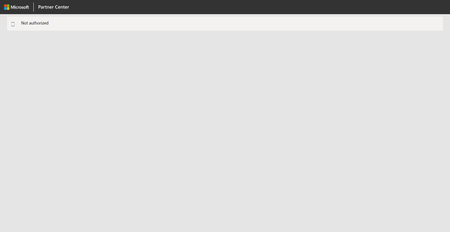
'Not Authorized' message when enrolling in Partner Program
I'm in the Partner Center --> Programs and when I click on a program to enroll in such as Microsoft 365 and Copilot or Commercial Marketplace, I'm presented with a screen which only displays 'Not Authorized'. I'm a global admin for my org, so I'm not sure what permissions I may be missing. It may/may not be related but the Legal Info and Identifiers sections in the Partner Center --> Account Settings are totally blank. Another clue might be (just guessing) that I cannot raise a support ticket because the required Workspace dropdown has no options available. JillArmourMicrosoft thanks!SolvedFlomatixNov 30, 2025Copper Contributor747Views0likes2Comments
Partner lockout of Microsoft 365 tenant – looking for advice on next steps
Hello all, I’d appreciate some guidance from the community on a serious situation we are facing. On 12 September 2025, our Microsoft partner unilaterally locked us out of our Microsoft 365 tenant. They retained exclusive Global Administrator / Partner Delegated Admin rights, which means: All staff and directors are unable to access email, Teams, SharePoint/OneDrive, or even log into their Azure AD-authenticated workstations. Our corporate and staff personal data is now inaccessible to us as the controller. Access restoration has been explicitly conditioned on payment of a disputed invoice (not related to Microsoft licence pass-through). This raises several concerns: Operational: we are effectively paralysed. Security/IP: the partner still has exclusive access to proprietary source code and other confidential business data. Compliance: we cannot meet our GDPR/UK DPA obligations on availability of personal data while locked out. We contacted Microsoft Business Conduct on Friday evening with full details of the incident, but so far no human response has been received to those emails. Questions for the community From a Microsoft tenancy perspective – what’s the fastest/most effective way to remove a partner’s delegated admin access if they refuse to release it voluntarily? Has anyone experienced or seen a similar scenario where access was conditioned on disputed payments? Are there formal Microsoft Partner Code of Conduct provisions that directly address this type of misuse of delegated admin rights? Any practical lessons on balancing the technical fix (regaining control of the tenant) with the legal approach (injunction, regulatory notifications)? My focus is on regaining secure access, protecting data/IP, and ensuring compliance. Any experience, insight, or links to Microsoft policy/resources would be greatly appreciated.Solved432Views2likes9Comments
Customer success story is not available
Hello, I would like to reach the team responsible for Microsoft.com “Customer Stories” I would like to receive a full version of story if available, or updrepublishing if the content has been archived or removed. Could you please redirect me to the marketing or editorial team responsible for these publications? Thank you in advance, KKSolvedviniciuscAug 10, 2025Copper Contributor231Views0likes3Comments


Tags
- tech question or issue96 Topics
- Partner Center Security46 Topics
- APIs and Services27 Topics
- Azure AD9 Topics
- GDAP7 Topics
- azure vm6 Topics
- Secure App Model6 Topics
- azure3 Topics
- Partner question3 Topics
- sharepoint3 Topics