Forum Widgets
Latest Discussions

GDAP and the 'Printer Administrator' role
Hello everyone! I see that the 'Printer Administrator' role is available in GDAP. However, we get "401 Error loading your content" messages when trying to access Universal Print in Azure. I checked the Workloads supported by granular delegated admin privileges - Partner Center | Microsoft Learn page but wasn't able to find a section for Universal Print at the moment. I believe a license is required to access this feature, which can't be assigned to an external identity, so I suspect that's our issue. A local tenant admin is able to access the universal print things without any issues. Are we doing something wrong? Can we look forward to seeing broader support for GDAP in the future? Thanks! -jonjonwbstr24Aug 05, 2026Iron Contributor39Views1like3Comments
Hardware Program registration deactivated and unable to create support case
Our organization completed Partner Verification successfully. However, the Hardware Program still shows "program registration is deactivated". We also cannot access Hardware Dashboard and cannot create a support case because Engage Center returns "No Access". Has anyone experienced this issue or can a Microsoft moderator help route this to the Hardware Program team? Thank you.WadeAnAug 02, 2026Copper Contributor40Views0likes1CommentFeature Request — Programmatic (API) access to Eligible/Ineligible Revenue data
Hi Product Team, We're building an automated backend pipeline to ingest and reconcile our incentive and revenue data across multiple Microsoft programs (MCI/Co-Op), and we've hit a gap we'd like to flag for future roadmap consideration. **Current situation** The Partner Payout API (api.partner.microsoft.com/v1.0/payouts) already gives us solid programmatic access to Earnings and Payments exports, which we use successfully today. However, the Eligible/Ineligible Revenue data available on the Earnings > Revenue page in Partner Center has no equivalent API endpoint — it's currently only accessible via manual UI download. We confirmed this with Commercial Marketplace Support (Service Request #2607220040003782), who kindly clarified that this is a known product limitation rather than a support/configuration issue, and suggested we raise it here directly with the Product Team. **Business impact** Without API access to this dataset, we're forced to rely on a manual, human-driven download step in an otherwise fully automated ingestion pipeline. This creates: - A recurring operational dependency on a person manually exporting and uploading the file on a schedule - A gap in our audit trail, since manual downloads are harder to log and timestamp consistently than API-driven exports - Reconciliation delays between Eligible/Ineligible Revenue and the Earnings/Payments data we already pull automatically via API **Request** We'd like to ask the Product Team to consider extending the existing Payout API (or a comparable endpoint) to support an asynchronous export request for Eligible/Ineligible Revenue data, following the same pattern already used for Earnings and Payments (create export request → poll status → download via secure blob link). Happy to share more detail on our use case if it's helpful for prioritization. Thank you for considering this. Regards, Carlos Rodriguescmjr86Jul 22, 2026Copper Contributor32Views3likes2Comments
Microsoft Hardware Dev Center / Partner Center – Four Months Later, I Still Can't Publish a Driver
I'm hoping someone from the Microsoft Hardware Dev Center or Partner Center team sees this. I've been trying since April 2026 to get my account into a working state so I can publish and sign a Windows driver. Instead, I've spent the last four months fighting backend account issues between Entra ID, Partner Center, and the Hardware Dev Center. Current support case: Hardware | Onsite Dental Systems | Incomplete... Tracking ID: #2606060010000492 Over the past several months I have: Worked with multiple Microsoft support engineers. Opened numerous support cases. Followed every instruction provided by Microsoft. Recreated my Entra tenant when instructed. Waited through backend synchronizations and escalations. Re-verified my organization. Recreated applications, permissions, and identities multiple times. Every time one issue appears to be resolved, another backend issue surfaces. At this point, I've spent more time trying to become an approved Microsoft developer than actually developing software. The situation became so drawn out that my original EV code signing certificate expired before Microsoft could get my account working. I had no choice but to purchase another EV code signing certificate, adding hundreds of dollars in unnecessary expense because my account was still blocked by backend provisioning issues. This isn't simply frustrating—it's impacting my business. I'm a small software developer. My customers rely on my software every day, and I cannot complete Microsoft's required driver-signing process because my account remains stuck in a state that only Microsoft appears able to fix. I want to be clear that the support engineers themselves have been courteous and have genuinely tried to help. My frustration is with the platform and the apparent lack of tools available to support when these backend account issues occur. I believe Microsoft should consider: Providing a complete reset option for Hardware Dev Center registrations tied to broken tenants. Better diagnostics instead of generic backend errors. Improving synchronization between Entra ID, Partner Center, and Hardware Dev Center. Giving support engineers the ability to repair account provisioning without weeks of escalation. Publishing documentation for developers who must migrate to a new Entra tenant. If anyone from the Hardware Dev Center or Partner Center team is reading this, I would greatly appreciate someone reviewing Tracking ID #2606060010000492. I've been trying to accomplish what should be a basic task—publish and sign a Windows driver—since April 2026. Four months later, after countless hours, multiple support cases, and even purchasing a replacement EV code signing certificate because the first one expired during this process, I'm still unable to complete it. I truly hope this feedback reaches the appropriate engineering team, because I can't imagine I'm the only developer who has experienced this. Hopefully this process can be improved so other developers don't spend months trying to overcome backend account issues instead of building software.J_ShaferJul 17, 2026Copper Contributor32Views0likes0Comments
Partner Center Developer Identity Verification Stuck
My Microsoft Partner Center account is stuck at Legal > Developer > Identity Verification, with the Verification Status consistently showing "Rejected". I have two key questions regarding the identity information submission for AU10TIX verification: 1. Does the contact person name filled in the account need to exactly match the legal name of the account holder? 2. What standard information must be provided to prove the submitter is the legitimate account owner and successfully trigger AU10TIX identity authentication? I have already submitted a support ticket for this issue, but the only reply I received via email simply stated that my submitted information was incorrect, without specifying which fields or content failed the review. I am still unable to identify the exact error in my submission and cannot complete the identity verification process. Could anyone share the correct filling standards for identity verification materials, or advise on how to resolve this persistent rejected status?MEDELI2026Jul 02, 2026Copper Contributor56Views0likes1Comment
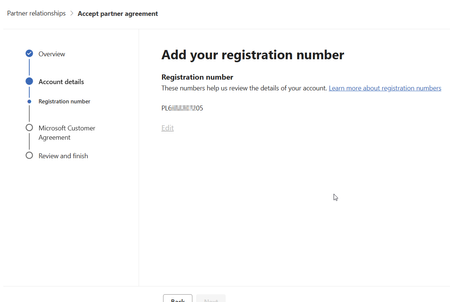
Cannot finish registration. Stuck on adding registration number.
Hello, I got stuck, when I added the registration number. It's there, but the "next" button is greyed out as well as the "edit" link. Using this url to start: https://admin.cloud.microsoft/?invType=ResellerRelationship&partnerId=xxxxxxxx&msppId=0#/partners/invitation. Please help :)SolvedMarcinMusiolJun 26, 2026Copper Contributor71Views0likes2Comments
Membership card not showing in the Partner Center
I recently got my partner center account authorized, but I cannot enroll in any program yet because the membership card is not showing on the home page. I have the correct admin roles and everything, not sure why?IreshJun 16, 2026Copper Contributor37Views0likes1CommentPartner Center Registration Issues - Loop - Urgent
Hello Microsoft Support, We are trying to register our company for Microsoft Partner Center / Microsoft AI Cloud Partner Program, but the enrollment is blocked during the trust verification step. Error message: “Microsoft runs on trust. We engage in a rigorous set of evaluation and certification processes; as a result your request was blocked.” Details: Reference number: 715-123160 Transaction ID: d07f6738-42d1-47c6-ae43-dd4dadd06db9 Correlation ID: 964639c5-58a7-49a5-9f14-12585f5c2a27 Country: UAE The purpose is that we want to develop App Visuals on Power BI AppSource Marketplace, please let us know what is required from our side and review the blocked enrollment manually and advise what document or company verification step is required to unblock the registration.johnelmasryMay 27, 2026Copper Contributor92Views0likes2Comments
Free > Paid licensing question
Hi, I am doing a big overhaul to my app and in the process I plan to also switch from external licensing to using Microsoft for licensing. Will the user who have my app already downloaded when I update will they now own the new paid license? Thanks,XaliesMay 23, 2026Copper Contributor15Views0likes0CommentsASfP policy for non-decrementing tickets
Hello Community! We recently found our ASfP support access disabled. According to the ASfP PSAM team, it's because we have exceeded the case creation allotment. It also appears that there is a discrepancy between the number of non-decremented tickets the PSAM team sees, vs the number of tickets the system says we have associated with the contract adding some additional challenges. We requested a report of the tickets that are counting against the agreement from the PSAM team several months ago, shortly after the ASfP agreement renewed, and are still in the process of locating someone from the PSAM team that can help us with this information. Last year we also identified an issue with the case report provided by our PSAM where the "company name" was things like "AppRiver" which is another partner, not the name of one of our clients, and we ended up generating a report ourselves. My question is this, Is there a way for us to identify the non-technical (Ibiza cases) that are counting against our allotment via APIs or another channel that doesn't involve going through the ASfP PSAM team? Thanks! -jonjonwbstr24Apr 22, 2026Iron Contributor45Views0likes0Comments
Tags
- tech question or issue93 Topics
- Partner Center Security43 Topics
- APIs and Services27 Topics
- Azure AD9 Topics
- GDAP7 Topics
- azure vm6 Topics
- Secure App Model5 Topics
- azure3 Topics
- Partner question3 Topics
- intune3 Topics