Recent Discussions
Region-access support requests for PostgreSQL Flexible Server are stuck in an AI triage loop
As an Azure MVP, I want to flag a real gap I just hit firsthand. I opened a support ticket (Issue type: Service and subscription limits (quotas), Quota type: Region access) because a subscription of ours couldn't provision Azure Database for PostgreSQL Flexible Server in East US — az postgres flexible-server list-skus --location eastus returns "Provisioning is restricted in this region... open a support request with Issue type of 'Service and subscription limits'", exactly as documented. Over 9 days, I got three AI-generated responses (case #2608260040010469), all repeating the exact same generic instructions I had already followed and explicitly confirmed I'd followed — twice. No human engineer was ever assigned (confirmed via the Support API: supportEngineer: {} the entire time). The case was even auto-flagged for closure citing "no response," despite an active reply from me on record before that message was sent. This isn't a one-off complaint about response speed — it's a structural problem: region-access requests for this service appear to route through an automation loop that can't recognize "I already did what you're asking" and doesn't have a reliable escalation path to a human, even after an explicit "I'm still having an issue" signal. Has anyone else hit this on region-access requests specifically? And is there a known way to get these routed to an actual engineer instead of restarting the same script every 24-48h?
Architectural Feedback: Is SPFx + Azure Database a viable choice for an internal ticketing system?
Hi everyone, I am currently evaluating the architecture for a new interdepartmental ticketing system and would love to get your feedback, real-world experiences, or best practices regarding our proposed approach. Our goal is to centralize and streamline requests, tracking, and communication across various departments within the organization. We want to provide an intuitive interface that integrates seamlessly into our existing workplace (SharePoint Online / Microsoft Teams). Proposed Architecture Frontend / UI: Custom web parts developed using SPFx (SharePoint Framework), embedded into SharePoint pages and surfaced in Microsoft Teams. Backend / Database: Azure Database for PostgreSQL for managing relational data, audit logs, complex ticket statuses, and SLA metrics. Integration Layer: Custom REST APIs (hosted via Azure Functions / App Service) to handle transactions securely between SPFx and PostgreSQL Rationale Behind This Choice User Experience: SPFx provides a native look and feel within Microsoft 365, minimizing user onboarding friction. Relational Data Complexity: We prefer PostgreSQL over standard SharePoint Lists due to data volume projections, complex relational data models, granular access control requirements per department, and advanced analytics needs. Questions Architecture Viability: Do you consider using SPFx purely as a frontend consumer for external REST APIs connected to PostgreSQL a clean and sustainable pattern long-term? SharePoint Lists / Dataverse vs. External DB: Is the added overhead of maintaining a custom API + PostgreSQL in Azure justified, or would you strongly favor Dataverse or native SharePoint Lists for this specific use case? Authentication & Security: Any specific tips when securing SPFx calls to Azure API/Functions using Microsoft Entra ID (Azure AD) to ensure proper department-level data segregation? Maintenance & Governance: Are there any major maintenance, lifecycle, or performance bottlenecks we should prepare for when maintaining a hybrid SPFx + external DB solution? Thanks in advance for any insights, lessons learned, or potential red flags!182Views0likes2Comments
Microsoft Integration Runtime Download 5.68.9705.1
There is a new Runtime version, 5.68.9705, released today, however it looks like the release notes are protected and can not be opened once downloaded: https://www.microsoft.com/en-gb/download/details.aspx?id=39717&msockid=3edfc848eac467411552dd76ebf56680200Views0likes4Comments
Migrating ~100 SSIS Packages to Azure: Acceleration Strategies & ADF vs. Fabric Guidance
Hi everyone, Our team is currently planning to migrate approximately 100 SSIS packages (including several large and highly complex workflows) to Azure. We are evaluating two primary paths: a lift-and-shift using Azure Data Factory (ADF) SSIS Integration Runtime (SSIS-IR) vs. a full rewrite. Current Architecture / Tech Stack: Azure, VMs, Azure SQL Managed Instance (SQL MI) We would appreciate insights on the following: Accelerated Rewrite Options: If we decide to rewrite, are there automation tools, frameworks, or best practices to expedite the transition rather than manually rebuilding every activity in ADF? ADF vs. Microsoft Fabric: Given Microsoft’s strategic push toward Fabric, is ADF still the ideal migration target, or should we consider targeting Fabric Data Pipelines directly? Thank you in advance for any inputs, advice, or shared experiences!151Views0likes1Comment
ADF - Support for Federated Identity Credentials
Our team is working on migrating existing pipelines to Azure Data Factory (ADF). As part of this effort, we are evaluating ADF for executing Kusto commands and would like to use an existing Microsoft Entra application registration authenticated through Federated Identity Credentials (OIDC workload identity federation). Today, ADF appears to primarily support Managed Identity-based authentication patterns. Is there any planned support for using a customer-owned App Registration with Federated Identity Credentials (FIC)? If so, is there any public roadmap or timeline that can be shared? We are actively moving away from secret- and certificate-based authentication. Supporting FIC would allow us to continue using our existing application identities, which already have the required permissions on source and destination datasets, and would avoid the need to introduce additional User Assigned Managed Identities and request new permission grants from dataset owners as part of the migration.173Views0likes2Comments
Number of concurrent transactions supported for an Azure SQL 4 vCores
I have an Azure SQL: Parameters Specifications Deployment Model General Purpose – Serverless SKU / Performance Tier Standard Series Database Size 128 GB Max vCores 4 vCores (scalable within Serverless range) How many concurrent transactions are supported for an Azure SQL db with the above specifications. Thanks105Views0likes1CommentADF - REST API Copy Data Activity - Best Practices
Hey everyone, I'm relatively new to Azure and am using Azure Data Factory (ADF) to extract data from Vonigo via their API. Everything is working, but I'm looking for ways to improve efficiency. Right now it takes 30+ minutes to pull all franchise data for a given report. The challenge is that Vonigo only allows reports to be run for one franchise at a time, and switching franchises requires a separate API call. My current process is: Select a franchise from a list Run all required reports for that franchise Save the results to Blob Storage Move to the next franchise and repeat (We'll eventually ingest the files into our silver layer for transformation.) Speed Issue One thing that significantly slows the pipeline down is that many activities are running sequentially. If I disable sequential execution, I've seen cases where data gets written to the wrong destination or associated with the wrong franchise. Has anyone successfully parallelized a similar process while maintaining data integrity? Are there specific points in the workflow where parallel execution would be safe? Pagination / Loop Issue Originally, I used a Lookup activity to inspect the most recently created file. An If activity would then determine whether the file contained any records: If records existed, increment the page number and continue. If no records existed, end the loop. This worked, but the Lookup activity added noticeable overhead. To improve performance, I changed the logic to use the Copy Activity output instead. Specifically, I'm checking the amount of data read from the last API call. Pages with no records appear to consistently return the same data-read value, so I use that to determine when to stop paging. This approach is much faster, but it feels more fragile since it's relying on an indirect indicator rather than the actual record count. Would you trust the Copy Activity output in this scenario, stick with the Lookup approach, or recommend a different pattern altogether? Thanks for any suggestions.315Views0likes6Comments
My Azure DevOps Git configuration failed to load in Azure Data Factory
I have an Azure Data Factory that have been running for years and have been hooked up with DevOps Git configuration with no real automation, its just a place to store changes. Im using it for a monthly data transformation, so im not into it on a daily basis. Suddenly yesterday the Github repository failed to load and i cant figure out why. I have been into the app registration to see if any secrets have expired, and i have one that expires in 25 days, but that shouldnt be a problem yet. I can also open my Github project through devops and navigate to the service connections, so i still have access to the repository, i just cant get ADF to load it properly. Any ideas about what to do from here?117Views0likes1Comment
Copy data using ODBC fails: "Format of the initialization string [...] starting at index 0"
We ran into a frustrating issue in ADF where a Copy activity using an ODBC source (Databricks) consistently failed with the same error, despite the connection test and data preview working perfectly fine. This post describes the issue and we hope to get some help from the community :) Our Setup: - Source: Databricks (via ODBC linked service, self-hosted IR) - Sink: Azure SQL Database - ADF Component: Copy Activity - Integration Runtime: Self-hosted IR The goal is to simply copy a table from Databricks into Azure SQL. We also tried to copy only a couple rows but same error. What works: - Test Connection on the ODBC linked service → passes - Data Preview on the ODBC dataset → returns correct data - Azure SQL sink linked service connection test → passes And here is what goes wrong: Running the Copy Activity in the pipeline gives: ``` ErrorCode=InvalidParameter, 'Type=Microsoft.DataTransfer.Common.Shared.HybridDeliveryException, Message=The value of the property '' is invalid: 'Format of the initialization string does not conform to specification starting at index 0.', Source=, ''Type=System.ArgumentException, Message=Format of the initialization string does not conform to specification starting at index 0., Source=System.Data,' ``` This is the source config: ODBC Dataset: ```json { "type": "OdbcTable", "typeProperties": { "tableName": { "value": "@concat(dataset().catalog, '.', dataset().schema, '.', dataset().table)", "type": "Expression" } }, "parameters": { "catalog": { "type": "string" }, "schema": { "type": "string" }, "table": { "type": "string" } } } ``` Copy Activity Source: ```json "source": { "type": "OdbcSource", "queryTimeout": "02:00:00" } ``` ODBC Connection String (sanitized): ``` Driver={Databricks ODBC Driver}; Host=<databricks-host>; Port=443; HTTPPath=/sql/1.0/warehouses/<warehouse-id>; AuthMech=11; Auth_Flow=1; Auth_Client_ID=<client-id>; Auth_Client_Secret=<client-secret>; Auth_Scope=<scope>/.default; OIDCDiscoveryEndpoint=https://login.microsoftonline.com/<tenant>/v2.0/.well-known/openid-configuration; SSL=1; ThriftTransport=2 ``` - AuthMech=11 = Azure Active Directory authentication - Auth_Flow=1 = Service Principal / Client Credentials via OIDC - Self-hosted IR is used What we tried: 1. Hardcoding catalog parameter instead of using the global parameter --> Same error 2. With and without column mappings from Copy activity --> Same error 3. Removing double curly braces around client secret in Terraform (i.e. from Auth_Client_Secret={${pwd}} to Auth_Client_Secret=${pwd}) --> Same error 4. Using a query (top 10 rows) instead of table config in the source of copy activity --> Same error 5. Verifying all linked services and datasets work in preview --> All work fine We find the error confusing and are unsure how to continue. It suggests the issue is specific to how ADF handles the ODBC connection string during pipeline execution on the Self-hosted IR, as opposed to interactive operations (like preview data). Any help is appreciated. Thanks in advance!134Views0likes1CommentCounting distinct values
I’m trying to create a view but I’m struggling to find a solution to this issue. I need a method that counts multiple visits to the same location as one if they occur within 14 days of each other. If there are multiple visits to the same location and the gap between them is more than 14 days, then each should be counted separately. For example, in the attached screenshot: Brussels had visits on 08/05 and 15/05, which are less than 14 days apart, so this should be counted as one visit. Dublin had visits more than a month apart, so these should be counted as two separate visits. Could someone please guide me on how to achieve this? Thanks.187Views0likes3Comments
Web activity failure due to Invoking endpoint failed with HttpStatusCode - 403 -- help?
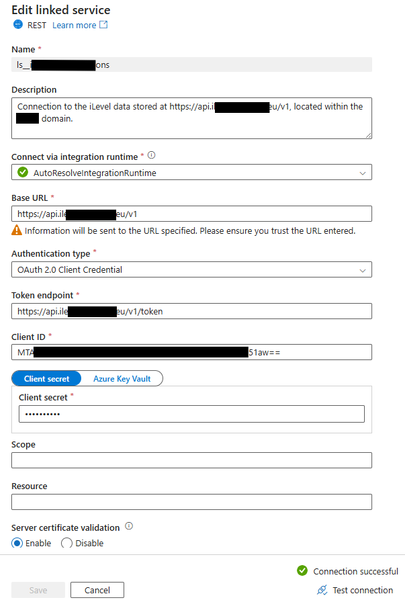
Hi, I have an Azure Data Factory (ADF) instance that I am using to create a Pipeline to ingest external (cloud based) 3rd party data into my Azure SQL Server database. I am a novice with ADF and have only used it to ingest some external SQL data into my SQL database - it did work. The external source I'm attempting to extract from uses an OAuth 2.0 API and an API is something I've not used before. Using Postman (never used this software before this attempt), I have passed the external source's base_url, client_id, and client_secret, and in return successfully received an access token. This tells me that the base_url, client_id, and client_secret values I passed are correct and accepted by the target source/application. Feeling encourage to implement the same values into ADF, I first created a Linked Service which with a successful test connection returned - see below. This Linked Service uses the same values as the Postman entry which granted an access token. I then created a Pipeline with a Web activity object within it. The General and User Properties don't have any configuration, only the Settings tab does which shown below. Again, the URL, Client ID and Client Secret configured here are the same as those used in Postman (and the Linked Service). I execute the Web object and it returns with a failure - see below. The error states the endpoint refused the request (for an access token). Is this accurate as I was able to receive an access token via Postman when using the same credentials? I don't understand why via Postman I can received an access token but via ADF it errors. I'm wondering if I've completed the ADF parts incorrectly, or if there is more needed just to received an access token, or if it's something else? Are you able to advise what's taking place here? Thanks.292Views0likes1CommentUnable to INSERT rec into Table.
I am using the ADF . Execute Pipeline activity. My PL is parametrized. My stage table have the below rec: network_org_name partner_name parent_partner_name CorPart_number pipeline_run_id activity_run_id Se Network Producing UB SA S Reine Company Ltd 1226133 ebf961f9-3afc-4abc-9ee0-111330c9f1eb 858c1b5c-a699-4e73-84d8-3a42cab115d2 WITH CodeSourceTableCTE AS ( SELECT DISTINCT p.[partner_number] ,n.[network_org_number] FROM [utl].[stg_partner_network_org] stg LEFT JOIN [utl].[partner] p1 ON stg.[parent_partner_name] = p1.[partner_name] INNER JOIN [utl].[partner] p ON stg.[partner_name] = p.[partner_name] AND ISNULL(p.[delete_ind], '') <> 'Y' AND ISNULL(p.[parent_partner_number], '') = ISNULL(p1.[partner_number], '') AND ISNULL(p1.[delete_ind], '') <> 'Y' AND ISNULL(stg.[corpart_number], '') = ISNULL(p.[external_id], '') INNER JOIN [utl].[network_org] n ON stg.[network_org_name] = n.[network_org_name] WHERE stg.[partner_name] IS NOT NULL ) MERGE [utl].[partner_network_org] T USING CodeSourceTableCTE S ON T.[partner_number] = S.[partner_number] AND T.[network_org_number] = S.[network_org_number] WHEN MATCHED AND (ISNULL(T.[delete_ind], '') <> 'N') THEN UPDATE SET T.[delete_ind] = 'N', T.[last_modified_date] = GETUTCDATE(), T.[last_modified_by] = '@{pipeline().parameters.Source_File_Name}' WHEN NOT MATCHED BY TARGET THEN INSERT ([partner_number], [network_org_number], [created_date], [created_by], [last_modified_date], [last_modified_by], [delete_ind]) VALUES (S.[partner_number], S.[network_org_number], GETUTCDATE(), '@{pipeline().parameters.Source_File_Name}', GETUTCDATE(), '@{pipeline().parameters.Source_File_Name}', 'N'); SELECT COUNT(*) FROM [utl].[partner_network_org] WHERE [created_by] = '@{pipeline().parameters.Source_File_Name}' But when I am trying to check using below select * from utl.partner_network_org where partner_number in (select partner_number from utl.partner where last_modified_by like '%corpart%') I don't see records any help is appreciated191Views0likes1CommentJanuary 2026 Recap: Azure Database for PostgreSQL
We just dropped the 𝗝𝗮𝗻𝘂𝗮𝗿𝘆 𝟮𝟬𝟮𝟲 𝗿𝗲𝗰𝗮𝗽 for Azure Database for PostgreSQL and this one’s all about developer velocity, resiliency, and production-ready upgrades. January 2026 Recap: Azure Database for PostgreSQL • PostgreSQL 18 support via Terraform (create + upgrade) • Premium SSD v2 (Preview) with HA, replicas, Geo-DR & MVU • Latest PostgreSQL minor version releases • Ansible module GA with latest REST API features • Zone-redundant HA now configurable via Azure CLI • SDKs GA (Go, Java, JS, .NET, Python) on stable APIs Read the full January 2026 recap here and see what’s new (and what’s coming) - January 2026 Recap: Azure Database for PostgreSQL
Kusto: summarize consecutive segments of the same value per batch
Problem statement (Azure Data Explorer / Kusto) I have a table in Azure Data Explorer (Kusto) with the following columns: batch_number (string) team (string) datetime (datetime) Each row represents work done by a team on a batch at a given time. The data is chronological per batch, but teams can change over time and may come back later. Example data (ordered by batch_number, then datetime): batch_number | datetime | team 001 | 2024-01-01 08:00:00 | A 001 | 2024-01-01 08:01:00 | A 001 | 2024-01-01 08:02:00 | A 001 | 2024-01-01 08:03:00 | B 001 | 2024-01-01 08:04:00 | B 001 | 2024-01-01 08:05:00 | A 001 | 2024-01-01 08:06:00 | A 002 | 2024-01-01 08:00:00 | A 002 | 2024-01-01 08:01:00 | A 002 | 2024-01-01 08:02:00 | B 002 | 2024-01-01 08:03:00 | C Goal For each batch, I want to group consecutive rows where the team stays the same and compute: start_time = min(datetime) end_time = max(datetime) The result must preserve team sequences, not just distinct teams. Expected result: batch_number | team | start_time | end_time 001 | A | 2024-01-01 08:00:00 | 2024-01-01 08:02:00 001 | B | 2024-01-01 08:03:00 | 2024-01-01 08:04:00 001 | A | 2024-01-01 08:05:00 | 2024-01-01 08:06:00 002 | A | 2024-01-01 08:00:00 | 2024-01-01 08:01:00 002 | B | 2024-01-01 08:02:00 | 2024-01-01 08:02:00 002 | C | 2024-01-01 08:03:00 | 2024-01-01 08:03:00 Notes Team A appears twice for batch 001 because it appears in two separate consecutive segments. The grouping must be done per batch, not across batches. Important constraints A simple summarize by batch_number and team is not correct because it merges non-consecutive segments. I can easily implement this logic in pandas using a cumulative sequence identifier, but I have not found a reliable equivalent in Kusto. Question What is the correct and reliable Kusto query to compute these consecutive team segments per batch?339Views0likes2CommentsAzure Data Factory - help needed to ingest data, that uses an API, into a SQL Server instance
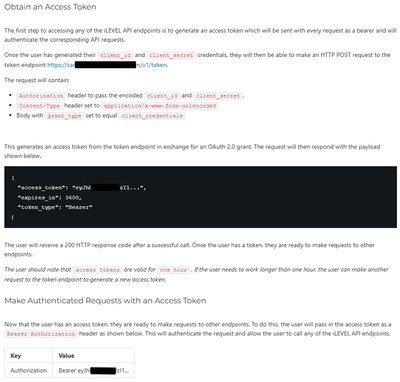
Hi, I need to ingest 3rd-party data, that uses an API, into my Azure SQL Server instance (ASSi) using Azure Data Factory (ADF). I'm a report developer so this area is unfamiliar to me, although I have previously integrated external, on-premise SQL Server data into our ASSi using ADF so I do have some exposure to the tool (just not API connections). The 3rd-party data belongs to a company named 'iLevel' (in case this is relevant). iLevel have provided some API documentation which is targeted for an experienced data engineer that understands API connections. This documentation has just a few sections before the connection focused details end. I'll list them below: 1) It mentions to download 'Postman Collection' and mentions no more than this. I've never heard of Postman Collection and I don't know why it's needed. Through limited exposure online, I don't understand its purpose, certainly not in my scenario. 2) It has the title 'Access to the API' and then lists four URLs which are the endpoints (I don't know which to use and will need to ask iLevel of this but, I guess, any will do for testing purposes). 3) Authentication and Authorization a) Generate a 'client id' and 'client secret' by logging into iLevel and generating these values with some clicks of a button. I've successfully generated both these values. b) Obtain an Access Token - it'll be easier to screenshot the instructions for this (I've blanked part of the URL for confidentiality). These are all the instructions on connection to the 3rd-party data. Unfortuntely for me, my lack of experience in this area means these instrcutions don't help me. I don't believe I'm any closer to connecting to the 3rd-party source data. Taking into consideration the above instructions but choosing to try and error in ADF, a tool I'm a little bit more familiar with, I've performed the following steps: 1) Created a Linked Service. I understand the iLevel solution is in the cloud and therefore the 'AutoResolveIntegrationRuntime' option has been selected as the 'Connect via integration runtime' value. For the 'Base URL' I've entered one of the four URL endpoints that were listed in the documentation (again, I will need to confirm which endpoint to use). The 'Test Connection' returns a successful result but I think it means nothing because if I were to placed 'xxx' at the end of the Base URL and test the connection, it stills returns successful when I know the URL with the 'xxx' post-fix isn't legit. 2) Create an ADF Pipeline containing 'Web activity' and 'Set variable' objects. The only configuration under the Web activity is the 'Settings' pane which has: The 'Body' property has (the client id and client secret taken from the iLevel solution are included in the body but blanked out): If the Web activity is successful then the Pipeline's next object (the Set variable) should assign the access token to a variable - as I understand this is what the Web activity is doing: The 'Value' property has: This is as far as I've got into my efforts of this integration task because the Web activity object fails when executed. The error message does state it is to do with an invalid 'client id' or 'client secret' - see below: You may direct to focus on the incorrect client id or client secret, however I don't have any confidence that I understand how to configure ADF to obtain an access token, and I'm maybe missing something if I see no need for Postman Collection use. What is Postman Collection and do I need it for what I'm trying to achieve? If yes, can anyone provide training material that suits my need? Have I configured ADF correctly and it is indeed an issue with the client id or client server, or is the error message received just a by-product of an incorrect ADF configuration? Your help will be most appreciated. Many thanks.266Views0likes1Comment
Backup and restore the Azure Database for MySQL flexible server
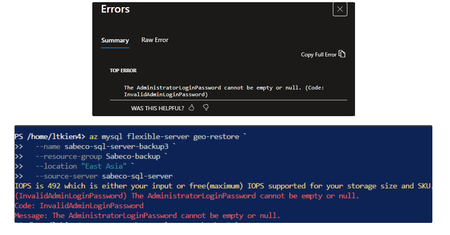
Hi everyone, I’m running into an issue while performing a geo-restore for an Azure MySQL Flexible Server using Azure CLI and Portal. When executing the az mysql flexible-server geo-restore command, the restore process fails with the error “InvalidAdminLoginPassword: The AdministratorLoginPassword cannot be empty or null”. I don’t see any administrator password configuration option in the Azure Portal, and there is also no auto-populated argument in the CLI. According to the official documentation, geo-restore uses the source server as the restore point, so the administrator login configuration is expected to be derived from the source server. Are there any recommended best practices for handling admin credentials securely during geo-restore? Thanks in advance for your insights. I used this official doc as a reference, https://learn.microsoft.com/en-us/azure/mysql/flexible-server/how-to-restore-server-portal321Views0likes1CommentADF unable to ingest partitioned Delta data from Azure Synapse Link (Dataverse/FnO)
We are ingesting Dynamics 365 Finance & Operations (FnO) data into ADLS Gen2 using Azure Synapse Link for Dataverse, and then attempting to load that data into Azure SQL Database using Azure Data Factory (ADF). This is part of a migration effort as Export to Data Lake is being deprecated. Source Details Source: ADLS Gen2 Data generated by: Azure Synapse Link for Dataverse (FnO) Format on lake: Delta / Parquet Partitioned folder structure (e.g. PartitionId=xxxx) Destination: Azure SQL Database Issue Observed in ADF When configuring ADF pipelines: Using ADLS Gen2 dataset with: Delta / Parquet Recursive folder traversal Wildcard paths We encounter: No data returned in Data Preview Or runtime error such as: “No partitions information found in metadata file” Despite this: The data is present in ADLS The same data can be successfully queried using Synapse serverless SQL Key Question for ADF / Synapse Engineers What is the recommended and supported ADF ingestion pattern for: Partitioned Delta/Parquet data produced by Azure Synapse Link for Dataverse Specifically: Should ADF: Read Delta tables directly, or Use Synapse serverless SQL external tables/views as an intermediate layer? Is there a reference architecture for: Synapse Link → ADLS → ADF → Azure SQL Are there ADF limitations when consuming Synapse Link–generated Delta tables? Many customers are now forced to migrate due to Export to Data Lake deprecation, but current ADF documentation does not clearly explain how to replace existing ingestion pipelines when using Synapse Link for FnO. Any guidance, patterns, or official documentation would be greatly appreciated.222Views0likes1CommentSwitch Azure SQL Provisioned to Serverless and back to Provisioned
Hi Can we switch Azure SQL from "Provisioned" to "Serverless" and back to "Provisioned" without any interruptions? Wanted to observe how serverless works for a week. Data should never be lost while switching the mode (NOT a transactional data). Its more of nightly refresh and nothing much happening during day time. Its a retail dataWH. Currently im connecting to the below Azure SQL which is a provisioned instance. We are scaling up or down per our needs / work load and paying $X. sql-xxxx-xxx-xxx-dev.database.windows.net Nightly process runs at higher cores and then scales back to the lowest 2 core. When someone queries tables, joins during day time, it takes 10-30 mins or so depending on the table size. I'm wondering if i switch to serverless i would save money even if billed by seconds since nightly process runs 1hr and not much of querying every day during day time. i would like to test that.414Views1like3Comments




Events
Recent Blogs
- 4 MIN READA key benefit of Azure HorizonDB comes from its smart storage layer, which works seamlessly with Postgres and takes over durability and high availability work typically done by Postgres itself. Thi...Sep 04, 2026137Views0likes0Comments
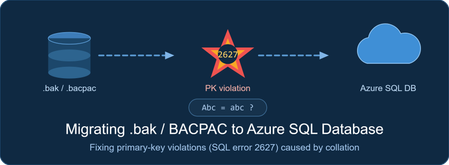
- Problem Statement Customer trying to mograte SQL Server database to Azure SQL Database by restoring a .bak file to a jump server, exporting it to a .bacpac, and importing that .bacpac to Azure SQL ...Sep 04, 2026101Views0likes0Comments