azure data factory
380 Topics
OData Connector for Dynamics Business Central
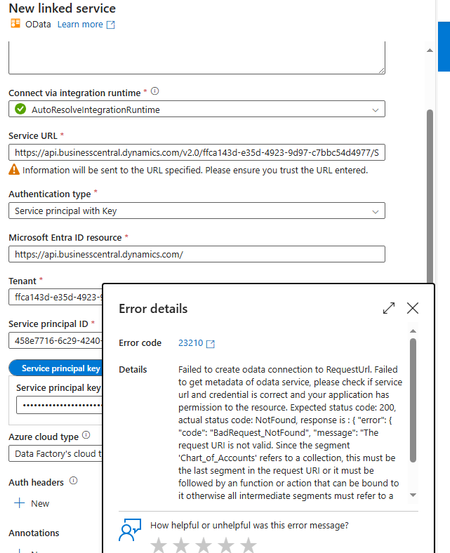
Hey Guys, I'm trying to connect Dynamics Business Central OData API in ADF but I'm not sure what I'm doing wrong here because the same Endpoint is returning data on Postman but returning an error in ADF LinkedService. https://api.businesscentral.dynamics.com/v2.0/{tenant-id}/Sandbox-UAT/ODataV4/Company('company-name')/Chart_of_Accounts806Views1like2Comments
Microsoft Integration Runtime Download 5.68.9705.1
There is a new Runtime version, 5.68.9705, released today, however it looks like the release notes are protected and can not be opened once downloaded: https://www.microsoft.com/en-gb/download/details.aspx?id=39717&msockid=3edfc848eac467411552dd76ebf56680503Views0likes4Comments
ADF - REST API Copy Data Activity - Best Practices
Hey everyone, I'm relatively new to Azure and am using Azure Data Factory (ADF) to extract data from Vonigo via their API. Everything is working, but I'm looking for ways to improve efficiency. Right now it takes 30+ minutes to pull all franchise data for a given report. The challenge is that Vonigo only allows reports to be run for one franchise at a time, and switching franchises requires a separate API call. My current process is: Select a franchise from a list Run all required reports for that franchise Save the results to Blob Storage Move to the next franchise and repeat (We'll eventually ingest the files into our silver layer for transformation.) Speed Issue One thing that significantly slows the pipeline down is that many activities are running sequentially. If I disable sequential execution, I've seen cases where data gets written to the wrong destination or associated with the wrong franchise. Has anyone successfully parallelized a similar process while maintaining data integrity? Are there specific points in the workflow where parallel execution would be safe? Pagination / Loop Issue Originally, I used a Lookup activity to inspect the most recently created file. An If activity would then determine whether the file contained any records: If records existed, increment the page number and continue. If no records existed, end the loop. This worked, but the Lookup activity added noticeable overhead. To improve performance, I changed the logic to use the Copy Activity output instead. Specifically, I'm checking the amount of data read from the last API call. Pages with no records appear to consistently return the same data-read value, so I use that to determine when to stop paging. This approach is much faster, but it feels more fragile since it's relying on an indirect indicator rather than the actual record count. Would you trust the Copy Activity output in this scenario, stick with the Lookup approach, or recommend a different pattern altogether? Thanks for any suggestions.653Views0likes6Comments
Migrating ~100 SSIS Packages to Azure: Acceleration Strategies & ADF vs. Fabric Guidance
Hi everyone, Our team is currently planning to migrate approximately 100 SSIS packages (including several large and highly complex workflows) to Azure. We are evaluating two primary paths: a lift-and-shift using Azure Data Factory (ADF) SSIS Integration Runtime (SSIS-IR) vs. a full rewrite. Current Architecture / Tech Stack: Azure, VMs, Azure SQL Managed Instance (SQL MI) We would appreciate insights on the following: Accelerated Rewrite Options: If we decide to rewrite, are there automation tools, frameworks, or best practices to expedite the transition rather than manually rebuilding every activity in ADF? ADF vs. Microsoft Fabric: Given Microsoft’s strategic push toward Fabric, is ADF still the ideal migration target, or should we consider targeting Fabric Data Pipelines directly? Thank you in advance for any inputs, advice, or shared experiences!379Views0likes1Comment
Azure Data Factory ForEach Loop Fails Despite Inner Activity Error Handling - Seeking Best Practices
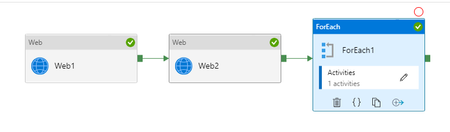
Hello Azure Data Factory Community, I'm encountering a persistent issue with my ADF pipeline where a ForEach loop is failing, even though I've implemented error handling for the inner activities. I'm looking for insights and best practices on how to prevent internal activity failures from propagating up and causing the entire ForEach loop (and subsequently the pipeline) to fail, while still logging all outcomes. My Setup: My pipeline processes records using a ForEach loop. Inside the loop, I have a Web activity (Sample_put_record) that calls an external API. This API call can either succeed or fail for individual records. My current error handling within the ForEach iteration is structured as follows: 1.Sample_put_record (Web Activity): Makes the API call. 2.Conditional Logic: I've tried two main approaches: •Approach A (Direct Success/Failure Paths): The Sample_put_record activity has a green arrow (on success) leading to a Log Success Items (Script activity) and a red arrow (on failure) leading to a Log Failed Items (Script activity). Both logging activities are followed by Wait activities (Dummy Wait For Success/Failure). •Approach B (If Condition Wrapper): I've wrapped the Sample_put_record activity and its success/failure logging within an If Condition activity. The If Condition's expression is @equals(activity('Sample_put_record').status, 'Succeeded'). The True branch contains the success logging, and the False branch contains the failure logging. The intention here was for the If Condition to always report success, regardless of the Sample_put_record outcome, to prevent the ForEach from failing. The Problem: Despite these error handling attempts, the ForEach loop (and thus the overall pipeline) still fails when an Sample_put_record activity fails. The error message I typically see for the ForEach activity is "Activity failed because an inner activity failed." When using the If Condition wrapper, the If Condition itself sometimes fails with the same error, indicating that an activity within its True or False branch is still causing a hard failure. For example, a common failure for Sample_put_record is: "valid":false,"message":"WARNING: There was no xxxxxxxxxxxxxxxxxxxxxxxxx scheduled..." (a user configuration/data issue). Even when my Log Failed Items script attempts to capture this, the ForEach still breaks. What I've Ensured/Considered: •Wait Activity Configuration: Wait activities are configured with reasonable durations and do not appear to be the direct cause of failure. •No Unhandled Exceptions: I'm trying to ensure no unhandled exceptions are propagating from my error handling activities. •Pipeline Status Goal: My ultimate goal is for the overall pipeline status to be Succeeded as long as the pipeline completes its execution, even if some Sample_put_record calls fail and are logged. I need to rely on the logs to identify actual failures, not the pipeline status. My Questions to the Community: 1.What is the definitive best practice in Azure Data Factory to ensure a ForEach loop never fails due to an inner activity failure, assuming the inner activity's failure is properly logged and handled within that iteration? 2.Are there specific nuances or common pitfalls with If Condition activities or Script activities within ForEach loops that could still cause failure propagation, even with try-catch and success exits? 3.How do you typically structure your ADF pipelines to achieve this level of resilience where internal failures are logged but don't impact the overall pipeline success status? 4.Are there any specific configurations on the ForEach activity itself (e.g., Continue on error setting, if it exists for ForEach?) or other activities that I might be overlooking? Any detailed examples, architectural patterns, or debugging tips would be greatly appreciated. Thank you in advance for your help!703Views0likes1Comment
Copy Data Activity Failed with Unreasonable Cause
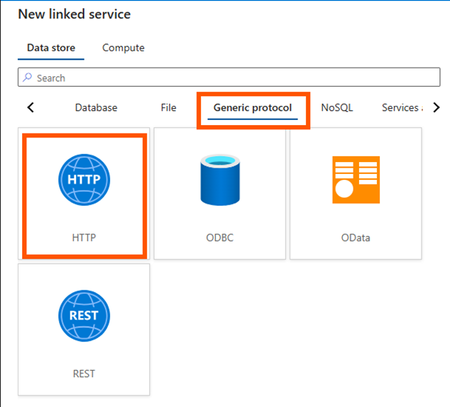
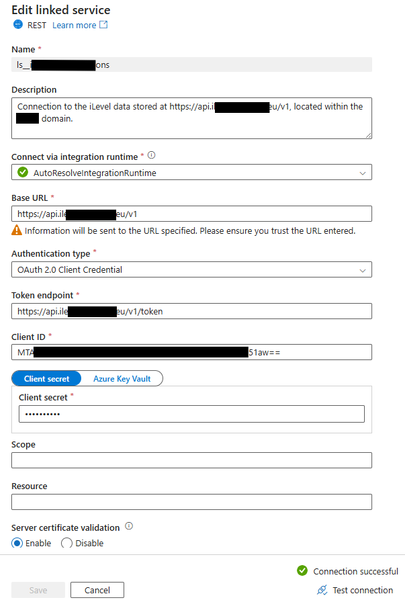
It is a simple set up but it has baffled me a lot. I'd like to copy data to a data lake via API. Here are the steps I've taken: Created a HTTP linked service as below: Created a dataset with a HTTP Binary data format as below: Created a pipeline with a Copy Data activity only as shown below: Made sure linked service and dataset all working fine as below: Created a Sink dataset with 3 parameters as shown below: Passed parameters from pipeline to Sink dataset as below: That's all. Simple, right? But the pipeline failed with a clear message "usually this is caused by invalid credentials." as below: Summary: No need to worry about the Sink side of parameters etc. which I have used same thing for years on other pipelines and all succeeded. This time the API failed to reach a data lake from source side as said "invalid credentials". In Step 4 above one could see the linked service and dataset connections were succeeded, ie. credentials have been checked and passed already. How come it failed in data copy activity complaining an invalid credentials? Pretty weird. Any advice and suggestions will be welcomed.438Views0likes1Comment
User Properties of Activities in ADF: How to add dynamic content in it?
On ADF, I am using a for each loop in which I am using an Execute Pipeline Activity which is getting executed for different iterations as per the values of the items provided to the For-Each Loop. I am stuck on a scenario which requires me to add the Dynamic Content Expression in the User Properties of individual activities of ADF. Specific to my case, I want to add the Dynamic Content Expression in the User Properties of Execute Pipeline Activity so that I get to individual runs of these activities on Azure Monitor with a specific label attached to it through its User Properties. The necessity to add the Dynamic Content Expression in the User Properties is due to the reason that each execution in respective iterations of these activities corresponds to a particular Step from a set of Steps configured for the Data Load Job as a whole, which has been orchestrated through ADF. To identify the association with the respective Job-Step, I require to add Dynamic Content Expression in its User Properties. Any sort of response regarding this is highly appreciated. Thank You!550Views1like1Comment
ADF unable to ingest partitioned Delta data from Azure Synapse Link (Dataverse/FnO)
We are ingesting Dynamics 365 Finance & Operations (FnO) data into ADLS Gen2 using Azure Synapse Link for Dataverse, and then attempting to load that data into Azure SQL Database using Azure Data Factory (ADF). This is part of a migration effort as Export to Data Lake is being deprecated. Source Details Source: ADLS Gen2 Data generated by: Azure Synapse Link for Dataverse (FnO) Format on lake: Delta / Parquet Partitioned folder structure (e.g. PartitionId=xxxx) Destination: Azure SQL Database Issue Observed in ADF When configuring ADF pipelines: Using ADLS Gen2 dataset with: Delta / Parquet Recursive folder traversal Wildcard paths We encounter: No data returned in Data Preview Or runtime error such as: “No partitions information found in metadata file” Despite this: The data is present in ADLS The same data can be successfully queried using Synapse serverless SQL Key Question for ADF / Synapse Engineers What is the recommended and supported ADF ingestion pattern for: Partitioned Delta/Parquet data produced by Azure Synapse Link for Dataverse Specifically: Should ADF: Read Delta tables directly, or Use Synapse serverless SQL external tables/views as an intermediate layer? Is there a reference architecture for: Synapse Link → ADLS → ADF → Azure SQL Are there ADF limitations when consuming Synapse Link–generated Delta tables? Many customers are now forced to migrate due to Export to Data Lake deprecation, but current ADF documentation does not clearly explain how to replace existing ingestion pipelines when using Synapse Link for FnO. Any guidance, patterns, or official documentation would be greatly appreciated.385Views0likes1CommentWeb activity failure due to Invoking endpoint failed with HttpStatusCode - 403 -- help?
Hi, I have an Azure Data Factory (ADF) instance that I am using to create a Pipeline to ingest external (cloud based) 3rd party data into my Azure SQL Server database. I am a novice with ADF and have only used it to ingest some external SQL data into my SQL database - it did work. The external source I'm attempting to extract from uses an OAuth 2.0 API and an API is something I've not used before. Using Postman (never used this software before this attempt), I have passed the external source's base_url, client_id, and client_secret, and in return successfully received an access token. This tells me that the base_url, client_id, and client_secret values I passed are correct and accepted by the target source/application. Feeling encourage to implement the same values into ADF, I first created a Linked Service which with a successful test connection returned - see below. This Linked Service uses the same values as the Postman entry which granted an access token. I then created a Pipeline with a Web activity object within it. The General and User Properties don't have any configuration, only the Settings tab does which shown below. Again, the URL, Client ID and Client Secret configured here are the same as those used in Postman (and the Linked Service). I execute the Web object and it returns with a failure - see below. The error states the endpoint refused the request (for an access token). Is this accurate as I was able to receive an access token via Postman when using the same credentials? I don't understand why via Postman I can received an access token but via ADF it errors. I'm wondering if I've completed the ADF parts incorrectly, or if there is more needed just to received an access token, or if it's something else? Are you able to advise what's taking place here? Thanks.460Views0likes1Comment
SharePoint Online Multiple Files (Folder) Copy with Http Connector
This blog shows how to copy multiple files from a folder from SharePoint Online using ADF. Go through this public documentation on how to copy a single file - Copy data from SharePoint Online List by using Azure Data Factory - Azure Data Factory | Microsoft Docs35KViews9likes37Comments