
Forum Widgets
Latest Discussions

Help wanted: Refresh articles in Azure Architecture Center (AAC)
I’m the Project Manager for architecture review boards (ARBs) in the Azure Architecture Center (AAC). We’re looking for subject matter experts to help us improve the freshness of the AAC, Cloud Adoption Framework (CAF), and Well-Architected Framework (WAF) repos. This opportunity is currently limited to Microsoft employees only. As an ARB member, your main focus is to review, update, and maintain content to meet quarterly freshness targets. Your involvement directly impacts the quality, relevance, and direction of Azure Patterns & Practices content across AAC, CAF, and WAF. The content in these repos reaches almost 900,000 unique readers per month, so your time investment has a big, global impact. The expected commitment is 4-6 hours per month, including attendance at weekly or bi-weekly sync meetings. Become an ARB member to gain: Increased visibility and credibility as a subject‑matter expert by contributing to Microsoft‑authored guidance used by customers and partners worldwide. Broader internal reach and networking without changing roles or teams. Attribution on Microsoft Learn articles that you own. Opportunity to take on expanded roles over time (for example, owning a set of articles, mentoring contributors, or helping shape ARB direction). We’re recruiting new members across several ARBs. Our highest needs are in the Web ARB, Containers ARB, and Data & Analytics ARB: The Web ARB focuses on modern web application architecture on Azure—App Service and PaaS web apps, APIs and API Management, ingress and networking (Application Gateway, Front Door, DNS), security and identity, and designing for reliability, scalability, and disaster recovery. The Containers ARB focuses on containerized and Kubernetes‑based architectures—AKS design and operations, networking and ingress, security and identity, scalability, and reliability for production container platforms. The Data & Analytics ARB focuses on data platform and analytics architectures—data ingestion and integration, analytics and reporting, streaming and real‑time scenarios, data security and governance, and designing scalable, reliable data solutions on Azure. We’re also looking for people to take ownership of other articles across AAC, CAF, and WAF. These articles span many areas, including application and solution architectures, containers and compute, networking and security, governance and observability, data and integration, and reliability and operational best practices. You don’t need to know everything—deep expertise in one or two areas and an interest in keeping Azure architecture guidance accurate and current is what matters most. Please reply to this post if you’re interested in becoming an ARB member, and I’ll follow up with next steps. If you prefer, you can email me at v-jodimartis@microsoft.com. Thanks! 🙂80Views0likes0Comments
Integrate Agents with Skills in Github Copilot
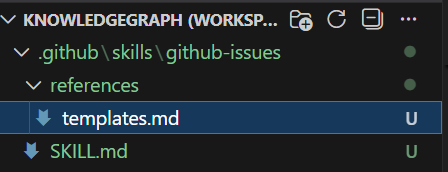
The past year saw the rise of Agentic workflows. Agents have a task or goal to accomplish and build context, take actions using tools. Tools while affective in surfacing the requisite sources and actions can easily increase in numbers causing context bloat, high token consumption. Agent Skills was proposed in a recent Anthropic paper to address the above challenges. Agent Skills are now supported in Visual Studio Code (Experimental) and can be used with Github Copilot. It works across Copilot coding agent, Copilot CLI, and agent mode in Visual Studio Code Insiders. Copilot coding agent is available with the GitHub Copilot Pro, GitHub Copilot Pro+, GitHub Copilot Business and GitHub Copilot Enterprise plans. The agent is available in all repositories stored on GitHub, except repositories owned by managed user accounts and where it has been explicitly disabled. An Agent Skill is created to teach Copilot on performing specialized tasks with detailed instructions while also being repeatable. At its core, Agent Skills are folders which contain instructions, scripts, and resources that the Copilot automatically loads when relevant to the query. On receiving a prompt, Copilot determines if a skill is relevant to your task and it then loads the instructions. The skills instructions are executed along with any resources included in the directory structure relevant to the specific skill. One guideline would be to encapsulate into a skill anything which is being done repeatedly. In the example below, we have a skill for creating a github issue for a feature request using a specific template (the template will be referenced by the skill based on the type of issue to be created). The SKILL.md file is very detailed in all the instructions required for supporting multiple github issues related actions. The description is key to understanding the Skill and when the Agent requires a specific Skill, the appropriate instructions are loaded. The loaded Skill is then executed in a secure code execution environment. A further option provided by Agent Skills is reusing the generated code by storing it in the filesystem to avoid repeated execution. In Visual Studio Code, enable the "chat.useAgentSkills" setting to use Agent Skills prior to the run. An Agent can have nested agents which is used to detail sub agents (Nested Agents is also enabled in settings as shown below) and thus decouple functionality. Any prompt in the chat will now have the option to pick from the Agent Skills in addition to the tools available. We can write our own skills, or use those which are shared by others - anthropics/skills repository or GitHub’s community created github/awesome-copilot collection. While skills are very powerful, using shared skills needs to be done with discretion and from a security perspective only use skills shared by trusted sources. Resources https://github.blog/changelog/2025-12-18-github-copilot-now-supports-agent-skills/ https://code.visualstudio.com/docs/copilot/customization/agent-skillsArunaChakkiralaFeb 03, 2026Microsoft1.9KViews1like0Comments
How about Websoft9 application hosting Platform
Websoft9 is One-click hosting for any website or application with 300+ customizable templates, including popular options like WordPress and Odoo. Do you have use it on https://marketplace.microsoft.com/en-us/product/virtual-machines/websoft9inc.websoft9gowingoOct 28, 2025Copper Contributor50Views0likes0CommentsHow to use the newly launched MCP Registry
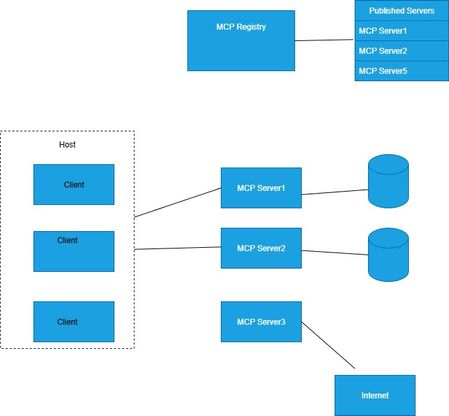
The newly launched Model Context Protocol (MCP) Registry in preview is as an open catalog for publicly available MCP servers. This is key in providing discoverability of MCP servers and standardization of this process. The Registry serves as a source of truth for MCP Servers and has also published a process for adding MCP servers. The MCP Registry also allows to register public and private sub-registries. This is an interesting addition and bears some semblance to DNS in its design. The public sub-registry can be likened to a MCP marketplace for servers while a private sub-registry would be suitable for enterprises with stricter privacy and security requirements. Accessing Data The Registry data can be accessed through the API provided. No authentication is required for read only access. The base URL is https://registry.modelcontextprotocol.io GET /v0/servers - List all servers with pagination GET /v0/servers/{id} - Get full server details including packages and configuration For instance, the following curl query can be used to get the list of servers curl --request GET \ --url https://registry.modelcontextprotocol.io/v0/servers \ --header 'Accept: application/json, application/problem+json' The details on usage is in the github link here Publishing Servers This requires authentication and the client package to be installed After installing the mcp-publisher client, the server.json file has be populated with the MCP server details to be added. Authentication can be done using github or DNS verification. The last step is to publish the server. The github link here has the complete set of steps for adding servers. More details can be found in the link here.ArunaChakkiralaSep 10, 2025Microsoft1.1KViews0likes0CommentsImplementing Zero-Trust Network Security for Azure Web Apps Using Private Endpoints
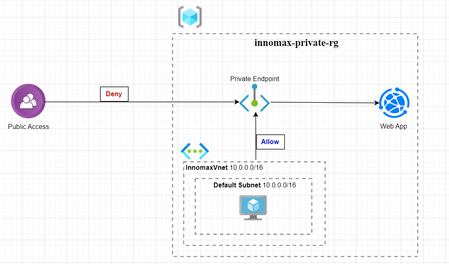
Author: Sai Min Thu Date: 7.9.2025 Lab Objective: To demonstrate how to completely remove public internet access from an Azure App Service Web App and secure it within a private virtual network using Private Endpoints, adhering to a zero-trust network model. In today's threat landscape, the principle of "never trust, always verify" is paramount. While Azure Web Apps are publicly accessible by default, many enterprise scenarios require workloads to be isolated from the public internet to meet strict compliance and security requirements. This guide provides a step-by-step walkthrough of configuring an Azure Web App to be accessible only through a private network connection via an Azure Private Endpoint. We will: Establish a foundational resource group and virtual network. Deploy a basic web application. Implement core security controls by creating a Private Endpoint and integrating with Private DNS. Enforce network isolation by applying access restrictions. Validate the security configuration. Documents Details: https://docs.google.com/document/d/1ci17PsPCILbP8JVZMMLkjAolHK3pomgT-RE76InEkqA/edit?usp=sharingSaiMinThuSep 07, 2025Copper Contributor76Views0likes0CommentsAzure Durable Functions Performance Optimization Techniques
This blog is co-authored by Dr. Magesh Kasthuri, Distinguished Member of Technical Staff (Wipro) and Sanjeev Radhakishin Assudani, Azure COE Principal Architect (Wipro). Performance is a very important aspect in any application. A slow performing application can result in high run costs in cloud. In this blog, we explain performance optimization steps with an example. It is very important to review Durable function configuration for language runtime configurations. Durable function configurations are defined in the host.json file. There are some important configurations like maxConcurrentActivityFunctions, maxConcurrentOrchestratorFunctions that define the number of activity function and orchestrator instances that can run on a host. Depending on your application workloads, you will have to configure them. Durable functions also use storage account for their internal working like state management, task execution etc. It is recommended to have a dedicated V1 storage account for cost optimizations. Step 1: Optimize Function Code Use Async/Await Appropriately Asynchronous programming is key to non-blocking operations. Ensure that you are using async and await keywords appropriately. Avoid blocking calls and prefer async methods where possible to keep the event loop free. Screenshot: Example of async/await usage in Visual Studio. Minimize Function Execution Time Break down large tasks into smaller sub-tasks that can be processed independently. This not only speeds up execution time but also improves reliability and error handling. Screenshot: Workflow diagram showing task breakdown. Step 2: Optimize Durable Task Management Reduce Orchestrator Function Overhead Ensure that the orchestrator functions are lightweight and primarily responsible for orchestrating activities rather than doing the heavy lifting. Offload complex processing to activity functions. Screenshot: Example orchestrator function code. Parallelize Tasks Where possible, run tasks in parallel to decrease overall execution time. Durable Functions support parallel task execution patterns, allowing multiple activities to be executed simultaneously. Screenshot: Parallel task execution example. Step 3: Optimize Resource Allocation Scale-Out Strategies Configure your Azure Functions to scale out efficiently. Use the Azure Functions Premium Plan or Dedicated (App Service) Plan for better scaling options and resource allocation. Screenshot: Scaling settings in Azure portal. Use Appropriate Pricing Plans Choose a pricing plan that aligns best with your workload. For instance, the Premium plan offers features such as better scaling, VNET integration, and always-on capabilities. Screenshot: Pricing plan options in Azure portal. Monitor and Allocate Resources Regularly monitor function performance using Azure Monitor and Application Insights. Adjust resource allocations based on the observed metrics to ensure optimal performance. Screenshot: Monitoring function performance in Azure Monitor. Durable Function Monitor Step 4: Optimize Storage and Data Handling Efficient State Management Durable Functions rely on Azure Storage for state management. Ensure efficient usage by minimizing the size and frequency of state updates. Batch state updates where possible to reduce storage operations. Screenshot: State management settings in Azure portal. Optimize Input/Output Operations Reduce the latency of I/O operations by optimizing data access patterns. Use faster storage solutions like Azure Cosmos DB or Redis for frequently accessed data. Screenshot: Data access optimization settings. Manage Concurrency Control the concurrency levels of your functions to prevent throttling and ensure fair usage of resources. Use the maxConcurrentActivityFunctions and maxConcurrentOrchestratorFunctions settings to manage concurrency effectively. Screenshot: Concurrency settings in Azure portal. Step 5: Enhance Error Handling and Retries Implement Robust Retries Configure retry policies for transient errors. Durable Functions support customizable retry policies, allowing you to define the interval and duration for retries, which can improve resilience and performance. Screenshot: Retry policy configuration. Graceful Error Handling Ensure that your functions handle errors gracefully. Use try-catch blocks and centralized error handling mechanisms to capture and log errors effectively. This will help in diagnosing performance issues and improving reliability. Screenshot: Error handling example in function code. Monitor and Analyze Failures Use Azure Monitor and Application Insights to track and analyze function failures. Understanding the root cause of failures can provide insights into performance bottlenecks and areas for improvement. Screenshot: Failure analysis in Application Insights. Step 6: Leverage Best Practices and Tools Implement Best Practices Follow Azure’s best practices for developing serverless applications. This includes keeping functions stateless, minimizing dependencies, and using managed identities for secure resource access. Screenshot: Best practices documentation in Azure portal. Use Application Insights Application Insights provides powerful telemetry and monitoring capabilities. Use it to gain insights into function performance, request rates, failure rates, and other critical metrics. Screenshot: Application Insights dashboard. Regularly Review and Refactor Periodically review and refactor your function code and orchestration logic. As workloads evolve, continuous optimization ensures that your functions remain performant and scalable. Screenshot: Code review session example. Results After implementing key performance optimization techniques for Azure Durable Functions, we observed significant increase the total number of transactions per minute processed. Transactions Per MinuteSireesha_MudapakaMar 21, 2025Microsoft1.2KViews3likes0Comments
[PowerPoint Add-in] The iframe disappears when printing the slide.
Hi everyone. My add-in embeds an iframe to display a website in the slide. I can view and interact with the iframe normally in both edit mode and presentation mode. However, when I print the slide, the iframes do not display. Does anyone know why this is happening? Thank you very much.Quang_Nguyen_DSSMay 21, 2024Copper Contributor293Views0likes0Comments
Issue with Azure AD B2C: Limited Customization of Sign-Up/Sign-In Flow with Custom Policies
We are experiencing a significant limitation with Azure AD B2C custom policies regarding the customization of the sign-up and sign-in flow. While Azure AD B2C offers some flexibility through custom policies, the extent of this customization is restricted. Specifically, we are unable to introduce entirely new custom form fields and are confined to the predefined flow provided by Azure AD B2C. Detailed Explanation: Predefined Form Fields: Azure AD B2C provides a set of predefined form fields for the sign-up and sign-in processes. These fields include typical information such as email, password, and basic user details. While we can choose which fields to display or hide and modify their order, adding new custom fields that are not supported by Azure AD B2C is not possible. UI Customization: Azure AD B2C allows for customization of the user interface through HTML, CSS, and JavaScript. However, this customization is limited to styling and layout changes. We cannot alter the underlying structure or logic of the form fields provided by Azure AD B2C. Custom Policies Limitations: Custom policies allow for modifying the user journey to some extent, such as integrating external systems, adding conditional logic, and performing claims transformations. Despite these capabilities, the core flow structure of the sign-up and sign-in processes remains fixed. Critical functionalities such as adding entirely new steps in the authentication process or significantly altering existing ones are restricted. Impact on Our Implementation: The inability to fully customize the sign-up and sign-in flow impacts our project in the following ways: User Experience: We are unable to provide a seamless user experience tailored to our specific requirements. Business Logic: Implementing custom business logic directly within the sign-up and sign-in process is challenging. Integration: Integrating additional verification steps or custom fields that are crucial for our application’s workflow is not feasible. Request for Enhancement: We request the following enhancements to Azure AD B2C custom policies: Custom Form Fields: Allow the addition of entirely new custom form fields that can be defined and managed within the custom policies. Flexible Flow Customization: Provide greater flexibility in altering the core flow structure of the sign-up and sign-in processes. Enhanced UI Control: Allow for more comprehensive control over the UI elements, enabling the introduction of new fields and steps within the user journey. These enhancements would significantly improve our ability to tailor Azure AD B2C to our specific needs and provide a better user experience. Conclusion: Azure AD B2C is a powerful identity management solution, but the current limitations on customizing the sign-up and sign-in flows restrict its potential. Addressing these issues would greatly benefit developers and businesses looking to create more customized and user-centric authentication experiences. Thank you for considering our request. We look forward to potential updates and enhancements that will help us leverage Azure AD B2C more effectively.JainamKMay 20, 2024Copper Contributor407Views0likes0CommentsBest Practices for API Error Handling: A Comprehensive Guide
APIs (Application Programming Interfaces) play a critical role in modern software development, allowing different systems to communicate and interact with each other. However, working with APIs comes with its challenges, one of the most crucial being error handling. When an API encounters an issue, it's essential to handle errors gracefully to maintain system reliability and ensure a good user experience. In this article, we'll discuss best practices for API error handling that can help developers manage errors effectively. Why is API Error Handling Important? API error handling is crucial for several reasons: Maintaining System Reliability: Errors are inevitable in any system. Proper error handling ensures that when errors occur, they are handled in a way that prevents them from cascading and causing further issues. Enhancing User Experience: Clear, informative error messages can help users understand what went wrong and how to resolve the issue, improving overall user satisfaction. Security: Proper error handling helps prevent sensitive information from being exposed in error messages, reducing the risk of security breaches. Debugging and Monitoring: Effective error handling makes it easier to identify and debug issues, leading to quicker resolutions and improved system performance. Best Practices for API Error Handling 1. Use Standard HTTP Status Codes HTTP status codes provide a standard way to communicate the outcome of an API request. Use status codes such as 200 (OK), 400 (Bad Request), 404 (Not Found), and 500 (Internal Server Error) to indicate the result of the request. Choosing the right status code helps clients understand the nature of the error without parsing the response body. 2. Provide Descriptive Error Messages Along with HTTP status codes, include descriptive error messages in your API responses. Error messages should be clear, concise, and provide actionable information to help users understand the problem and how to fix it. Avoid technical jargon and use language that is understandable to your target audience. 3. Use Consistent Error Response Formats Maintain a consistent format for your error responses across all endpoints. This makes it easier for clients to parse and handle errors consistently. A typical error response may include fields like status, error, message, code, and details, providing a structured way to convey error information. 4. Avoid Exposing Sensitive Information Ensure that error messages do not expose sensitive information such as database details, API keys, or user credentials. Use generic error messages that do not reveal internal system details to potential attackers. 5. Implement Retry Logic for Transient Errors For errors that are likely to be transient, such as network timeouts or service disruptions, consider implementing retry logic on the client side. However, retries should be implemented judiciously to avoid overwhelming the server with repeated requests. 6. Document Common Errors Provide comprehensive documentation that includes common error codes, messages, and their meanings. This helps developers quickly identify and troubleshoot common issues without needing to contact support. 7. Use Logging and Monitoring Implement logging and monitoring to track API errors and performance metrics. Logging helps you understand the root cause of errors, while monitoring allows you to proactively identify and address issues before they impact users. 8. Handle Rate Limiting and Throttling Implement rate limiting and throttling to protect your API from abuse and ensure fair usage. Return appropriate error codes (e.g., 429 - Too Many Requests) when rate limits are exceeded, and provide guidance on how users can adjust their requests to comply with rate limits. 9. Provide Support for Localization If your API serves a global audience, consider providing support for localization in your error messages. This allows users to receive error messages in their preferred language, improving the user experience for non-English speakers. 10. Test Error Handling Finally, thoroughly test your API's error handling capabilities to ensure they work as expected. Test various scenarios, including valid requests, invalid requests, and edge cases, to identify and address potential issues. Conclusion Effective error handling is essential for building reliable and user-friendly APIs. By following these best practices, you can ensure that your API handles errors gracefully, provides meaningful feedback to users, and maintains high availability and security. Implementing robust error handling practices will not only improve the reliability of your API but also enhance the overall user experience.SenthilMar 17, 2024Tin Contributor9.8KViews0likes0CommentsMICROSOFT FABRIC & CONTENT SAFETY: ANALYTICS ON METADATA
Content Moderation with Azure Content Safety and Blob Metadata for Analysis and Insights with Microsoft Fabric We as IT Professionals are facing a lot of challenges in everyday life, and problem solving is quite often a required skill spanning across various situations and Technologies. Some of these challenges are very special and i am talking about Content and moderation. Internet is everywhere and digital content is taking over, opening a Pandora’s box especially now where anyone from a Computer can create and spread false or “unwanted” text and images and video, to say the least. But we are fortunate enough to utilize countermeasures and moderate that content making the experience a little more safer and filtered, with the help of various tools one of them being Azure Content Safety. In addition we can use metadata for example on photos to perform analysis on the results. Enter Microsoft Fabric! Intro Microsoft Fabric is an end-to-end analytics solution with full-service capabilities including data movement, data lakes, data engineering, data integration, data science, real-time analytics, and business intelligence—all backed by a shared platform providing robust data security, governance, and compliance. Your organization no longer needs to stitch together individual analytics services from multiple vendors. Instead, use a streamlined solution that’s easy to connect, onboard, and operate. Azure AI Content Safety is an AI service that lets you handle content that is potentially offensive, risky, or otherwise undesirable. It includes the AI-powered content moderation service which scans text, image, and videos and applies content flags automatically. So we are going to build a React Application where users upload Photos and select some categories about them, Content Safety performs moderation flagging , and Microsoft Fabric brings to life Analysis on the process and the results. Build For this workshop we need : Azure Subscription VSCode with Node.Js Content Safety Resource from Azure AI Services Azure Functions Azure Container Registry Azure Web APP Azure Logic Apps Azure Storage Accounts Microsoft Fabric ( Trial is fine) Let’s start with our Front-end Web Application , React. React it is easy to understand and very flexible and powerful. Our Web App is a UI where users will Upload Photos, select Categorization for the Photos and submit. The process will take the Photos to a Storage Account and a Storage Trigger fires our Azure Function. Let’s have a look on our required details. We have 2 Blobs ‘uploads’ & ‘content’ with Container Access level, and we need to create a SAS token for the React App . Once we have this let’s add it into our .env file in React. The App.js is like this : /*App.js*/ // App.js import React, { useState } from 'react'; import { BlobServiceClient } from '@azure/storage-blob'; import logoIcon from './logo-icon.png'; import './App.css'; function App() { const [selectedCategories, setSelectedCategories] = useState({}); const [file, setFile] = useState(null); const [message, setMessage] = useState(''); const [isCategorySelected, setIsCategorySelected] = useState(false); const handleCheckboxChange = (event) => { const { value, checked } = event.target; setSelectedCategories(prev => { const updatedCategories = { ...prev, [value]: checked }; setIsCategorySelected(Object.values(updatedCategories).some(v => v)); // Check if at least one category is selected return updatedCategories; }); }; const handleFileChange = (event) => { setFile(event.target.files[0]); /*setFile(event.target.Files);*/ setMessage(`File "${event.target.file} selected !`); }; const handleSubmit = async (event) => { event.preventDefault(); if (!file) { setMessage('Please select a file to upload.'); return; } if (!isCategorySelected) { setMessage('Please select at least one category.'); return; } const sasToken = process.env.REACT_APP_SAS_TOKEN; const storageAccountName = process.env.REACT_APP_STORAGE_ACCOUNT; const containerName = 'uploads'; const blobServiceClient = new BlobServiceClient( `https://${storageAccountName}.blob.core.windows.net?${sasToken}` ); // Concatenate the selected categories into a comma-separated string const categoriesMetadataValue = Object.entries(selectedCategories) .filter(([_, value]) => value) .map(([key]) => key) .join(','); const metadata = { 'Category': categoriesMetadataValue }; try { const containerClient = blobServiceClient.getContainerClient(containerName); const blobClient = containerClient.getBlockBlobClient(file.name); await blobClient.uploadData(file, { metadata }); setMessage(`Success! File "${file.name}" has been uploaded with categories: ${categoriesMetadataValue}.`); } catch (error) { setMessage(`Failure: An error occurred while uploading the file. ${error.message}`); } }; return ( <div className="App"> <div className="info-text"> <h1>Welcome to the Image Moderator App!</h1> JPEG, PNG, BMP, TIFF, GIF or WEBP; max size: 4MB; max resolution: 2048x2048 pixels </div> <form className="main-content" onSubmit={handleSubmit}> <div className="upload-box"> <label htmlFor="photo-upload" className="upload-label"> Upload Photo <input type="file" id="photo-upload" accept="image/jpeg, image/png, image/bmp, image/tiff, image/gif, image/webp" onChange={handleFileChange} /> </label> </div> <div className="logo-box"> <img src={logoIcon} alt="Logo Icon" className="logo-icon" /> <div className="submit-box"> <button type="submit" disabled={!isCategorySelected} className="submit-button">Submit</button> </div> </div> <div className="categories-box"> {['people', 'inside', 'outside', 'art', 'society', 'nature'].map(category => ( <label key={category}> <span>{category}</span> <input type="checkbox" name="categories" value={category} onChange={handleCheckboxChange} checked={!!selectedCategories[category]} /> </label> ))} </div> </form> {message && <div className="feedback-message">{message}</div>} {/* Display feedback messages */} <div className="moderator-box"> {/* Data returned from Moderator will be placed here */} </div> </div> ); } export default App; There is an accompanying App.css file that is all about style, i am going to post that also to GitHub. We can test our App with npm start and if we are happy time to deploy to Web App Service! So we have our Azure Container Registry and we need to login, tag and push our app ! Don;t forge we need Docker running and a Docker file as simple as this: # Build stage FROM node:18 AS build # Set the working directory WORKDIR /app # Copy the frontend directory contents into the container at /app COPY . /app # Copy the environment file COPY .env /app/.env # Install dependencies and build the app RUN npm install RUN npm run build # Serve stage FROM nginx:alpine # Copy the custom Nginx config into the image # COPY custom_nginx.conf /etc/nginx/conf.d/default.conf # Copy the build files from the build stage to the Nginx web root directory COPY --from=build /app/build /usr/share/nginx/html # Expose port 80 for the app EXPOSE 80 # Start Nginx CMD ["nginx", "-g", "daemon off;"] And let’s deploy : az acr login --name $(az acr list -g rgname --query "[].{name: name}" -o tsv) az acr list -g rg-webvideo --query "[].{name: name}" -o tsv docker build -t myoapp . docker tag myapp ACRNAME.azurecr.io/myapp:v1 docker push ACRNAME.azurecr.io/myapp:v1 Once our App is pushed go to your Container Registry, from Registries select our image and deploy to a Web App: Some additional setting are needed on our Storage Account, beside the Container Level Anonymous read Access The settings are about CORS and we must add “*” in allowed Origins with GET, PUT and LIST for the allowed methods. Once we are ready, we can open our URL and Upload a sample file to verify everything is working as expected. Now we have a Function App to build. Create a new Function App with an APP Service plan of B2, and .NET 6.0 since we are going to deploy a C# code for a new trigger. Also we need to add into the Function App configuration the CONTENT_SAFETY_ENDPOINT, and CONTENT_SAFETY_KEY, for our Azure AI Content Safety resource. From VSCode add a new Function, set it to Blob Trigger and here is the code for our Function to call the Safety API and get the Image moderation status. We can see that we can set our Safety levels depending on the case : using System; using System.IO; using System.Threading.Tasks; using Azure; using Azure.AI.ContentSafety; using Azure.Storage.Blobs; using Microsoft.Azure.WebJobs; using Microsoft.Extensions.Logging; using System.Collections.Generic; using System.Linq; namespace Company.Function { public static class BlobTriggerCSharp1 { [FunctionName("BlobTriggerCSharp1")] public static async Task Run( [BlobTrigger("uploads/{name}.{extension}", Connection = "AzureWebJobsStorage_saizhv01")] Stream myBlob, string name, string extension, ILogger log) { log.LogInformation($"Processing blob: {name}.{extension}"); string connectionString = Environment.GetEnvironmentVariable("AzureWebJobsStorage_saizhv01"); BlobServiceClient blobServiceClient = new BlobServiceClient(connectionString); BlobClient blobClient = blobServiceClient.GetBlobContainerClient("uploads").GetBlobClient($"{name}.{extension}"); string endpoint = Environment.GetEnvironmentVariable("CONTENT_SAFETY_ENDPOINT"); string key = Environment.GetEnvironmentVariable("CONTENT_SAFETY_KEY"); ContentSafetyClient contentSafetyClient = new ContentSafetyClient(new Uri(endpoint), new AzureKeyCredential(key)); ContentSafetyImageData image = new ContentSafetyImageData(BinaryData.FromStream(myBlob)); AnalyzeImageOptions request = new AnalyzeImageOptions(image); try { Response<AnalyzeImageResult> response = await contentSafetyClient.AnalyzeImageAsync(request); var existingMetadata = (await blobClient.GetPropertiesAsync()).Value.Metadata; var categoriesAnalysis = response.Value.CategoriesAnalysis; bool isRejected = categoriesAnalysis.Any(a => a.Severity > 0); // Strict threshold string jsonResponse = System.Text.Json.JsonSerializer.Serialize(response.Value); log.LogInformation($"Content Safety API Response: {jsonResponse}"); var metadataUpdates = new Dictionary<string, string> { {"moderation_status", isRejected ? "BLOCKED" : "APPROVED"} }; // Add metadata for each category with detected severity foreach (var category in categoriesAnalysis) { if (category.Severity > 0) { metadataUpdates.Add($"{category.Category.ToString().ToLower()}_severity", category.Severity.ToString()); } } foreach (var item in metadataUpdates) { existingMetadata[item.Key] = item.Value; } await blobClient.SetMetadataAsync(existingMetadata); log.LogInformation($"Blob {name}.{extension} metadata updated successfully."); } catch (RequestFailedException ex) { log.LogError($"Analyze image failed. Status code: {ex.Status}, Error code: {ex.ErrorCode}, Error message: {ex.Message}"); throw; } } } } The Filtering Settings are configured within our code and we can be as strict as we need. The corresponding setting is Azure Ai Studio We have our Custom Metadata inserted on our Image Blob Files. Now we need a way to extract these into a CSV or JSON file, so later Microsoft Fabric would provide Analysis. Enter Logic Apps! With a simple Trigger either on a Schedule or whenever a Blob changes we will execute our workflow! The following is the whole code: { "definition": { "$schema": "https://schema.management.azure.com/providers/Microsoft.Logic/schemas/2016-06-01/workflowdefinition.json#", "contentVersion": "1.0.0.0", "triggers": { "Recurrence": { "type": "Recurrence", "recurrence": { "interval": 1, "frequency": "Week", "timeZone": "GTB Standard Time", "schedule": { "weekDays": [ "Monday" ] } } } }, "actions": { "Initialize_variable": { "type": "InitializeVariable", "inputs": { "variables": [ { "name": "Meta", "type": "array" } ] }, "runAfter": {} }, "Lists_blobs_(V2)": { "type": "ApiConnection", "inputs": { "host": { "connection": { "name": "@parameters('$connections')['azureblob']['connectionId']" } }, "method": "get", "path": "/v2/datasets/@{encodeURIComponent(encodeURIComponent('xxxxxxx'))}/foldersV2/@{encodeURIComponent(encodeURIComponent('JTJmdXBsb2Fkcw=='))}", "queries": { "nextPageMarker": "", "useFlatListing": true } }, "runAfter": { "Initialize_variable": [ "Succeeded" ] }, "metadata": { "JTJmdXBsb2Fkcw==": "/uploads" } }, "For_each": { "type": "Foreach", "foreach": "@body('Lists_blobs_(V2)')?['value']", "actions": { "HTTP": { "type": "Http", "inputs": { "uri": "https://strxxx.blob.core.windows.net/uploads/@{items('For_each')?['Name']}?comp=metadata&sv=2022-11-02&ss=bfqt&srt=sco&sp=rwdlacupiytfx&se=2023-11-30T21:56:52Z&st=2023-11-19T13:56:52Z&spr=https&sig=S4PlM4MJc9SI9e0iD5HlhJPZL3DWkwdEi%2BBIzbpLyX4%3D", "method": "GET", "headers": { "x-ms-version": "2020-06-12", "x-ms-date": "@{utcNow()}" } } }, "Category": { "type": "Compose", "inputs": "@outputs('HTTP')['headers']['x-ms-meta-Category']", "runAfter": { "HTTP": [ "Succeeded" ] } }, "Moderation": { "type": "Compose", "inputs": "@outputs('HTTP')['Headers']['x-ms-meta-moderation_status']", "runAfter": { "Category": [ "Succeeded" ] } }, "ArrayString": { "type": "AppendToArrayVariable", "inputs": { "name": "Meta", "value": { "Category": "@{outputs('Category')}", "Moderation": "@{outputs('Moderation')}" } }, "runAfter": { "Moderation": [ "Succeeded" ] } } }, "runAfter": { "Lists_blobs_(V2)": [ "Succeeded" ] } }, "Compose": { "type": "Compose", "inputs": "@variables('Meta')", "runAfter": { "For_each": [ "Succeeded" ] } }, "Update_blob_(V2)": { "type": "ApiConnection", "inputs": { "host": { "connection": { "name": "@parameters('$connections')['azureblob']['connectionId']" } }, "method": "put", "body": "@body('Create_CSV_table')", "headers": { "ReadFileMetadataFromServer": true }, "path": "/v2/datasets/@{encodeURIComponent(encodeURIComponent('strxxxx'))}/files/@{encodeURIComponent(encodeURIComponent('/content/csvdata.csv'))}" }, "runAfter": { "Create_CSV_table": [ "Succeeded" ] }, "metadata": { "JTJmY29udGVudCUyZmNzdmRhdGEuY3N2": "/content/csvdata.csv" } }, "Create_blob_(V2)": { "type": "ApiConnection", "inputs": { "host": { "connection": { "name": "@parameters('$connections')['azureblob']['connectionId']" } }, "method": "post", "body": "@body('Create_CSV_table')", "headers": { "ReadFileMetadataFromServer": true }, "path": "/v2/datasets/@{encodeURIComponent(encodeURIComponent('strxxxx'))}/files", "queries": { "folderPath": "/content", "name": "csvdata.csv", "queryParametersSingleEncoded": true } }, "runAfter": { "Update_blob_(V2)": [ "Failed" ] } }, "Create_CSV_table": { "type": "Table", "inputs": { "from": "@variables('csvData')", "format": "CSV" }, "runAfter": { "csvData": [ "Succeeded" ] } }, "csvData": { "type": "InitializeVariable", "inputs": { "variables": [ { "name": "csvData", "type": "array", "value": "@outputs('Compose')" } ] }, "runAfter": { "Compose": [ "Succeeded" ] } } }, "outputs": {}, "parameters": { "$connections": { "type": "Object", "defaultValue": {} } } }, "parameters": { "$connections": { "value": { "azureblob": { "id": "/subscriptions/xxxx/providers/Microsoft.Web/locations/westeurope/managedApis/azureblob", "connectionId": "/subscriptions/xxxxxxxxxxx/resourceGroups/rg-modapp/providers/Microsoft.Web/connections/azureblob", "connectionName": "azureblob", "connectionProperties": { "authentication": { "type": "ManagedServiceIdentity" } } } } } } } It is quite challenging to get Custom Metadata from your Blobs as it needs a crafted API call with specific Headers. For example if you look into the Code : "uri": "https://strxxx.blob.core.windows.net/uploads/@{items('For_each')?['Name']}?comp=metadata&sv=2022-11-02&ss=bfqt&srt=sco&sp=rwdlacupiytfx&se=2023-11-30T21:56:52Z&st=2023-11-19T13:56:52Z&spr=https&sig=S4PlM4MJc9SI9e0iD5HlhJPZL3DWkwdEi%2BBIzbpLyX4%3D", "method": "GET", "headers": { "x-ms-version": "2020-06-12", "x-ms-date": "@{utcNow()}" } } }, "Category": { "type": "Compose", "inputs": "@outputs('HTTP')['headers']['x-ms-meta-Category']", "runAfter": { "HTTP": [ "Succeeded" ] } And here is the Flow, again we can notice it is quite complex to get Custom Metadata from Azure Blob, we need an HTTP Call with specific headers and specific output for the metadata in the format of x-ms-meta: {Custom Key} Finally our CSV is stored into a new Container in our Storage Account ! Head over to Microsoft Fabric and create a new Workspace, and a new Copy Task: We are moving with this Task our Data directly into the Managed Lakehouse of Fabric Workspace, which we ca run on a schedule or with a Trigger. Next we will create a Semantic Model but first let’s create a Table from our CSV. Find your File into the Lakehouse selection. Remember you need to create a new Lakehouse in the Workspace ! Now select the file we inserted with the Pipeline and from the elipsis menu select Load to Tables : Go to the Tables Folder and create a new Semantic Model for the Table: On the semantic model editing experience, you are able to define relationships between multiple tables, and also apply data types normalization and DAX transformations to the data if desired. Select New report on the ribbon. Use the report builder experience to design a Power BI report. And there you have it ! A complete Application where we utilized Azure Content Safety, and Microsoft Fabric to moderate and perform analysis on images that our users upload ! Conclusion In this exploration, we’ve journeyed through the intricate and powerful capabilities of Azure Content Safety and its seamless integration with custom metadata, culminating in robust analysis using Fabric. Our journey demonstrates not only the technical proficiency of Azure’s tools in moderating and analyzing content but also underscores the immense potential of cloud computing in enhancing content safety and insights. By harnessing the power of Azure’s content moderation features and the analytical prowess of Fabric, we’ve unlocked new frontiers in data management and analysis. This synergy empowers us to make informed decisions, ensuring a safer and more compliant digital environment. GitHub Repo : Content Safety with Custom Metadata Architecture:KonstantinosPassadisMar 03, 2024Learn Expert2.7KViews0likes0Comments





Tags
- web apps83 Topics
- AMA48 Topics
- azure functions43 Topics
- desktop apps12 Topics
- mobile apps9 Topics
- azure kubernetes service4 Topics
- community2 Topics
- azure1 Topic
- Azure Data Explorer AMA1 Topic
- Azure SignalR Service1 Topic