
Forum Widgets
Latest Discussions

P2P Server app in Azure Portal
HI Everyone, Does any one has any idea about P2P Server app in azure portal? I just noticed this app in App registration. Should i delete it as it looks supecious. look at scopes of this app? How can i analyze this app what this app has been doing ? should i delete it?adminKKJul 24, 2021Copper Contributor68KViews1like3CommentsApp Service timeout in 230 sec
Hello Team, We have couple of App Service which takes more than 230 Sec. We can not use Durable function or Webjobs. how can we increase the request time, as we have a task running which takes about 10 mins. Thanks, BiplabBiplab SahJul 16, 2020Tin Contributor52KViews0likes2Comments
Trying to down just specific file in Azure repo to Windows and Linux.
I am new to Azure and created a text file to test with in my Azure repo. I have the command "git" on Windows to download from the Windows server and "wget" or "curl" on Linux. Could somebody give me the syntax to download my test flat file? I am having no luck. On Windows, I can clone my my repo via the following command: >git clone https://GregSmith0896@dev.azure.com/GregSmith0896/WebSphere/_git/WebSphere On Linux, again I can download the repo with : >wget clone https://GregSmith0896@dev.azure.com/GregSmith0896/WebSphere/_git/WebSphere I would like to just download a specific file in the repo which exists in the branch "scripts" and the file name is "test.txt" Please let me know. Thank you.Solvedgrsm001Jul 02, 2020Tin Contributor19KViews0likes3Comments
Windows vs Linux App Services for dotnet apps
Hi 🙂 I expect that this question is highly subjective. I've hosted dotnet framework stuff on Windows VMs for years. When dotnet core came out I started hosting new apps on Linux VMs because they were lighter / cheaper. I'm deploying my first project as an Azure app service. It's dotnet core / blazor. The person who set it up before me set up Windows app services. I'm inclined to switch it to Linux moving forward but am questioning my motifvations. Are there any practical reasons? Does the argument about lowere resource usage (and hopefully better performance) hold true in the app service domain as it (I assume) it does in the VM world? Thanks very muchdamiensawyerOct 08, 2022Copper Contributor16KViews1like3Comments
Execute Azure Function using ADF activity and AAD Login
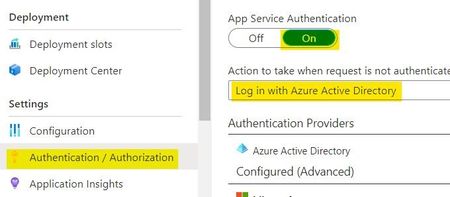
We are trying to execute an Azure Function (HTTP type) using Azure Data Factory (ADF). The Function App has the App Service Authentication set as "On" and the action to take when request is not authenticated is set as "Log in with Azure Active Directory". If we have this configuration in the Function App, is it possible to execute the Azure Function from ADF? We configured the Azure Function and Active Directory App by following this documentation: https://urldefense.proofpoint.com/v2/url?u=https-3A__nam06.safelinks.protection.outlook.com_-3Furl-3Dhttps-253A-252F-252Fdocs.microsoft.com-252Fen-2Dus-252Fazure-252Fapp-2Dservice-252Fconfigure-2Dauthentication-2Dprovider-2Daad-26data-3D04-257C01-257CFelipe.Rocha-2540microsoft.com-257C3e259ade08c043f75b0908d87b8bce47-257C72f988bf86f141af91ab2d7cd011db47-257C1-257C0-257C637395187680813277-257CUnknown-257CTWFpbGZsb3d8eyJWIjoiMC4wLjAwMDAiLCJQIjoiV2luMzIiLCJBTiI6Ik1haWwiLCJXVCI6Mn0-253D-257C1000-26sdata-3DaLtqA0RLT-252BnOQgzRvpO3-252FBHymas6xDVnCjtNg-252BLTPn8-253D-26reserved-3D0&d=DwMFAw&c=eIGjsITfXP_y-DLLX0uEHXJvU8nOHrUK8IrwNKOtkVU&r=6PBUmFEROSKfIVB29NY06e8Dp-dqEFIr6V8Pn_TTogM&m=2xNcTOHFliLYWEEUfrAbIYlhonao8kIgcQ1S3dP6kyI&s=87sJjlggshqh-zIdTp1NjIVjCOkX3R0es972xbuL3A8&e= We aren’t using a web app and maybe that’s the confusing part when trying to follow the steps from the documentation. ADF is the one that needs to authenticate when trying to access/execute the function. Do you know anything about this type of configuration?mariellecespedesOct 29, 2020Copper Contributor11KViews1like12CommentsHow do I grant user access to the Azure OpenAI Studio - GPT Playground
Hi there, I am trying to grant user or contributor access to the GPT playground to some users of my system, but it looks like there are no specific permissions to grant users access to the GPT playground on Azure OpenAI Studio. Any hints on how to do this? Thanks.adafienoMar 15, 2023Microsoft10KViews0likes5CommentsBest Practices for API Error Handling: A Comprehensive Guide
APIs (Application Programming Interfaces) play a critical role in modern software development, allowing different systems to communicate and interact with each other. However, working with APIs comes with its challenges, one of the most crucial being error handling. When an API encounters an issue, it's essential to handle errors gracefully to maintain system reliability and ensure a good user experience. In this article, we'll discuss best practices for API error handling that can help developers manage errors effectively. Why is API Error Handling Important? API error handling is crucial for several reasons: Maintaining System Reliability: Errors are inevitable in any system. Proper error handling ensures that when errors occur, they are handled in a way that prevents them from cascading and causing further issues. Enhancing User Experience: Clear, informative error messages can help users understand what went wrong and how to resolve the issue, improving overall user satisfaction. Security: Proper error handling helps prevent sensitive information from being exposed in error messages, reducing the risk of security breaches. Debugging and Monitoring: Effective error handling makes it easier to identify and debug issues, leading to quicker resolutions and improved system performance. Best Practices for API Error Handling 1. Use Standard HTTP Status Codes HTTP status codes provide a standard way to communicate the outcome of an API request. Use status codes such as 200 (OK), 400 (Bad Request), 404 (Not Found), and 500 (Internal Server Error) to indicate the result of the request. Choosing the right status code helps clients understand the nature of the error without parsing the response body. 2. Provide Descriptive Error Messages Along with HTTP status codes, include descriptive error messages in your API responses. Error messages should be clear, concise, and provide actionable information to help users understand the problem and how to fix it. Avoid technical jargon and use language that is understandable to your target audience. 3. Use Consistent Error Response Formats Maintain a consistent format for your error responses across all endpoints. This makes it easier for clients to parse and handle errors consistently. A typical error response may include fields like status, error, message, code, and details, providing a structured way to convey error information. 4. Avoid Exposing Sensitive Information Ensure that error messages do not expose sensitive information such as database details, API keys, or user credentials. Use generic error messages that do not reveal internal system details to potential attackers. 5. Implement Retry Logic for Transient Errors For errors that are likely to be transient, such as network timeouts or service disruptions, consider implementing retry logic on the client side. However, retries should be implemented judiciously to avoid overwhelming the server with repeated requests. 6. Document Common Errors Provide comprehensive documentation that includes common error codes, messages, and their meanings. This helps developers quickly identify and troubleshoot common issues without needing to contact support. 7. Use Logging and Monitoring Implement logging and monitoring to track API errors and performance metrics. Logging helps you understand the root cause of errors, while monitoring allows you to proactively identify and address issues before they impact users. 8. Handle Rate Limiting and Throttling Implement rate limiting and throttling to protect your API from abuse and ensure fair usage. Return appropriate error codes (e.g., 429 - Too Many Requests) when rate limits are exceeded, and provide guidance on how users can adjust their requests to comply with rate limits. 9. Provide Support for Localization If your API serves a global audience, consider providing support for localization in your error messages. This allows users to receive error messages in their preferred language, improving the user experience for non-English speakers. 10. Test Error Handling Finally, thoroughly test your API's error handling capabilities to ensure they work as expected. Test various scenarios, including valid requests, invalid requests, and edge cases, to identify and address potential issues. Conclusion Effective error handling is essential for building reliable and user-friendly APIs. By following these best practices, you can ensure that your API handles errors gracefully, provides meaningful feedback to users, and maintains high availability and security. Implementing robust error handling practices will not only improve the reliability of your API but also enhance the overall user experience.SenthilMar 17, 2024Tin Contributor9.7KViews0likes0CommentsAADSTS50011: The reply URL specified in the request doesn't match registered the reply URLs
Is this a common occurrence; does anyone know how to get around this issue? "AADSTS50011: The reply URL specified in the request does not match the reply URLs configured for the application: 'my application client id'. " I've followed the directions explicitly in these two documents, and reviewed others to see if I was missing anything. Reviewing responses to others' issues with the same problem did not resolve the failed auth issue. https://docs.microsoft.com/en-us/azure/app-service/configure-authentication-provider-aad https://docs.microsoft.com/en-us/azure/active-directory/develop/quickstart-configure-app-access-web-apis#add-redirect-uris-to-your-application I have an Azure Web App that has been registered. I can go to Azure Portal Home >> App registrations >> My App >> Endpoints, add all of the OAuth endpoints under the Redirect URIs and still cannot get fully logged in. I tried the <app-url>/.auth/login/aad/callback redirect format from one of the above articles with no success. I've tried https://myapplicationname.azurewebsites.net/.auth/login/aad/callback, https://login.microsoftonline.com/mytenent/oauth2/v2.0/authorize (as well as the three other endpoints with this format), https://login.microsoftonline.com/common/oauth2/v2.0/authorize (same with other three endpoints), etc. When I run in debug on my localhost:44321/ the web app launches, prompts for authentication, and is successful each time, however, always fails with the same subject error any time I deploy the build to Azure. My localhost addresses are listed in the Redirect URIs, so that makes sense the local deployment is successful but I cannot figure out why the deployed web app always fails when it goes live. I've tried everything that I could possibly think of with different combinations, but no luck getting past the auth error so any insights would be greatly appreciated.sffc-snsAug 25, 2020Copper Contributor9.6KViews0likes3CommentsHow to host moodle on azure
Hello everyone, I am here for help, I am an IT specialist my employer asked me to host a Moodle LMS on azure to be accessible for our program, I have no idea how to do it because I don't have experience on hosting websites and Azure as well. I am willing to learn about azure and how to use to make Moodle available to our benfieries. could you please give me a detailed guideline about that? I am having a free azure subscription right now but I will purchase other packages later once I got a clear idea how to use it. I am looking for your kind answers. Thanks, BarzanBarzan90Nov 25, 2020Copper Contributor9.4KViews0likes2Comments



Tags
- web apps83 Topics
- AMA48 Topics
- azure functions43 Topics
- desktop apps12 Topics
- mobile apps9 Topics
- azure kubernetes service4 Topics
- community2 Topics
- azure1 Topic
- Azure Data Explorer AMA1 Topic
- Azure SignalR Service1 Topic